Hi,
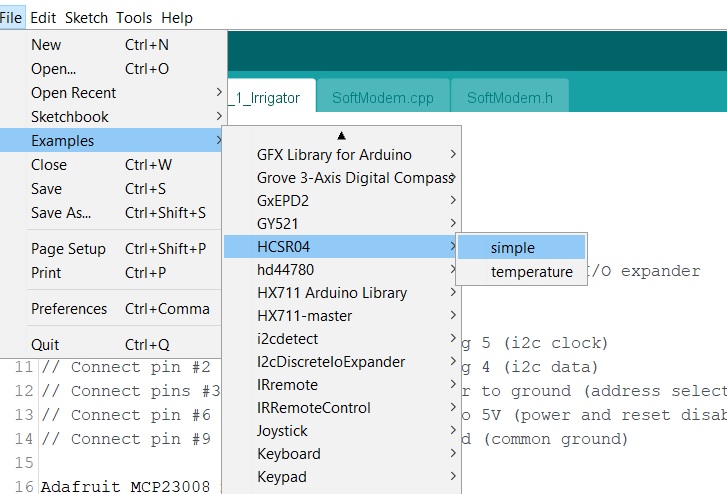
I've tried using the UltrasonicDistanceSensor but it said that HCSR04 doesn't contain it.I replaced it with HCSR0.dist but it mesured the distance so I switched it with HCSR04.speed The problem is that the error says that HCSR04 class has no member named speed!What should I do?
#include<HCSR04.h>

const int trigPin = 5;
const int echoPin = 6;
const int  buzzer = 3;
const int led = 2;

long duration;
int FirstDistance;
int SecondDistance;
double speed;
int distance;
float Time = 1.0;
float delayedtime = 1000 * Time;


HCSR04 sensor(5,6);


void setup() {
  // put your setup code here, to run once:
  Serial.begin(9600);
  pinMode(trigPin, OUTPUT);
  pinMode(echoPin, INPUT);
pinMode(buzzer,OUTPUT);
pinMode(led,OUTPUT);
}

void loop() {
  // put your main code here, to run repeatedly:
 float GetSpeed();
 Serial.println(sensor.speed(GetSpeed()) );
 delay(60);
 if( speed > 3){
  digitalWrite(led,HIGH);
  tone(buzzer,3000);
  delay(2000);
  digitalWrite(led,LOW);
  noTone(buzzer);

 }
}
float GetDistance(){

  digitalWrite(trigPin, LOW);
  delayMicroseconds(2);

  digitalWrite(trigPin, HIGH);
  delayMicroseconds(10);
  digitalWrite(trigPin, LOW);

  duration = pulseIn(echoPin, HIGH);

  distance = duration * 0.034 / 2;

  Serial.print("the distance is");
  Serial.println(distance);

  return distance;
}

  void GetSpeed() {

    FirstDistance = GetDistance();
    delay(delayedtime);

    SecondDistance = GetDistance();

    speed = (FirstDistance - SecondDistance) / Time;

    Serial.print("the speed (cm/s) is :");
    Serial.println(speed);
    return speed;
  }
There might be more of them but since I dont know anything about calculating speed with an HCSR04 I need help.What should I do?
My code;
#include<HCSR04.h>
#define trigPin 4
#define echoPin 6

HCSR04 hc(trigPin,echoPin);


long duration;
int distance1=0;
int distance2=0;
double Speed=0;
int distance=0;


void setup() {
  // put your setup code here, to run once:

}

void loop() {
  // put your main code here, to run repeatedly:
distance1 = hcRead();
delay(60);
distance2 = hcRead();

speed = (distance1 - distance2)/1.0;

Serial.print("speed is");
Serial.println(speed);
if (distance >0 && distance <5)
{
    digitalWrite( 2 , HIGH);
    delay(50);                  // waits for a second
}

if (distance > 5 && distance <10 )
{
    digitalWrite( 2 , HIGH);
    delay(50);                  // waits for a second
    digitalWrite( 2 , LOW);    // sets the LED off
    delay(50);


}
}
I have merged your posts due to them having too much overlap on the same subject matter @katkara.
In the future, please only create one topic for each distinct subject matter and be careful not to cause them to converge into parallel discussions. Instead of creating new topics on the same subject, simply post an update on your progress, along with responses to any questions the helpers have asked you, to the existing topic.
The reason is that generating multiple threads on the same subject matter can waste the time of the people trying to help. Someone might spend a lot of time investigating and writing a detailed answer on one topic, without knowing that someone else already did the same in the other topic.
You're printing the value of a constant float called "speed". The value you gave that constant is zero.
It's not surprising then that you see zero printed.
After you finally get this working, it would be interesting to hear your reflections on what you have learned about the code-writing and debugging processes that will help you do those things by yourself in the future.
Oops - I was looking at reply 28.
I don't really know why getDistance gets called in the loop function
I think too many variables have global scope when they don't need it.
Your setup function looks a little bare so that may explain why your ranger module doesn't trigger, and you never use the "hc" thingy, so you may as well simplify that away.
Best to work with the least clutter
BUT you can save yourself some effort by using the HCSR04 library properly.
You do not need to do all that pulsIn stuff.
The library does it all for you.
This is the library's example.
#include <HCSR04.h>

UltraSonicDistanceSensor distanceSensor(13, 12);  // Initialize sensor that uses digital pins 13 and 12.

void setup () {
    Serial.begin(9600);  // We initialize serial connection so that we could print values from sensor.
}

void loop () {
    // Every 500 miliseconds, do a measurement using the sensor and print the distance in centimeters.
    Serial.println(distanceSensor.measureDistanceCm());
    delay(500);
}
See how easy it is to get distance?
PLEASE TRY MY EDIT.
Tom..
PS. It seems you are not reading anyone's posts COMPLETELY.