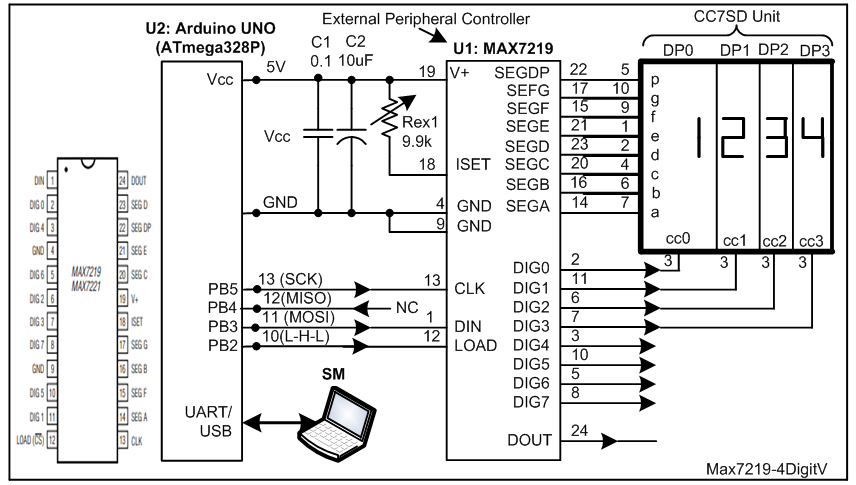
Hi guys, I am making a timer for my project. The project requires that the LEDs on the timer display must have 3 brightness levels. The brightness level will be selected by a potentiometer or switch. I am using a 4 digit seven-segment display as my LEDs. How does one potentiometer adjust the 3 level brightness of the 4 digit 7-segment display? I tried the code below. There is only one pin of the digit showing up.
const int potPin = A0; // Connect the potentiometer to analog input A0
const int segmentPins[] = {7, 6, 5, 11, 10, 8, 9}; // Connect the 7-segment display pins to digital pins 2-8
const int numSegments = 7; // Number of segments in the display
int brightness = 0; // Store the brightness value
int a=7;
int b=6;
int c=5;
int d=11;
int e=10;
int f=8;
int g=9;
int dp=4;

void setup() {

  for (int i = 0; i < numSegments; i++) {
    pinMode(segmentPins[i], OUTPUT);
    digitalWrite(segmentPins[i], LOW);

  }
}

void loop() {
  int potValue = analogRead(potPin); // Read the value of the potentiometer
  brightness = map(potValue, 0, 1023, 0, 255); // Map the potentiometer value to the brightness range
  for (int i = 0; i < numSegments; i++) {
  analogWrite(segmentPins[0], brightness); // Set the brightness of the first segment
  delay(2); // Wait a short amount of time
  digitalWrite(segmentPins[i], LOW); // Turn off the current segment
  }
}
Could anyone help with this? Is it possible to use one potentiometer to adjust 3 levels of the brightness of the 4 digit 7-segment display?
I guess this is a 12 pin display ( 4 digit pins and 8 segment pins including the decimal point). Presumably you are going to be multiplexing that display at some stage in the development of this project.
Another approach to dimming the display is then to regularly display a blank digit instead of the actual digit.
I think the solution is to turn on each digit for an adjustable amount of time:
const byte potPin = A0;                                // Connect the potentiometer to analog input A0
const byte segmentPins[] = { 7, 6, 5, 11, 10, 8, 9 };  // Connect the 7-segment display pins to digital pins 2-8
const int numSegments = 7;                             // Number of segments in the display
const unsigned long MinBrightness = 50;
const unsigned long MaxBrightness = 3000;


void setup()
{
  for (int i = 0; i < numSegments; i++)
  {
    pinMode(segmentPins[i], OUTPUT);
    digitalWrite(segmentPins[i], LOW);
  }
}

void loop()
{
  int potValue = analogRead(potPin);                                                // Read the value of the potentiometer
  unsigned long brightness = map(potValue, 0, 1023, MinBrightness, MaxBrightness);  // Map the potentiometer value to the brightness range

  // Turn on all segments
  // In actual use, the segments for the current digit would be turned on
  for (int i = 0; i < numSegments; i++)
  {
    digitalWrite(segmentPins[i], HIGH);
  }

  // The longer the segments are on, the brighter, but too long and the display flickers
  delayMicroseconds(brightness);  // Wait a short amount of time

  // Turn off all segments before selecting the next digit or you will get ghosting.
  for (int i = 0; i < numSegments; i++)
  {
    digitalWrite(segmentPins[i], LOW);  // Turn off the current segment
  }
}
Multiplexing can be a little difficult for a newbie to understand and multiplexing with brightness control even worse. Besides it consumes a lot of processor time. You would be better off buying an I2C display that does all that for you.
I've used the DFRobot DFR0645-G (also comes in RED). It's the cheapest
SparkFun 7-Segment Serial Display but it's much more expensive.
Adafruit has quite a few, all different colors.
Multiplexing may be non-trivial but the constraints listed in the first post are consistent with a school type project where the OP does not have the flexibility to use ready made driver chip solutions.
Yes, this is the one I am using, which is a 4-pin 4-dight 7-segment display.
Is there any information you can give to adjust the brightness of it using a potentiometer?
Thank you.