Interesting problem. You need to look at the left widget and see if it is on. Really we would like to help you but a large part of your problem appears to be your computer. What computer are you using and with what operating system?
Another thing that will help you get a good answer is to post an annotated schematic of your board. Also post links to technical data on each of the hardware items.
On your computer Open "Device Manager" and go down to "COM Ports"
You'll likely see the Com Port Available and Resolved with a Driver.
Now do that for the other boards...
Do the drivers resolve in Device Manager ?
If NOT, You have a driver issue and the Ports are not going to show up in the IDE
Until this driver issue is fixed
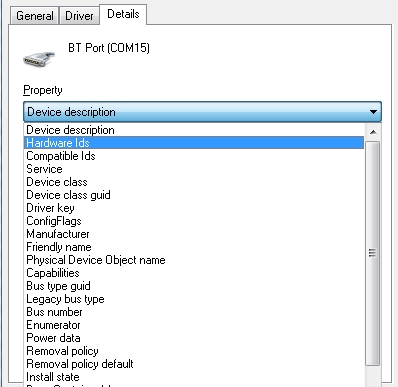
You can Also Right click on the Unresolved Driver
and Select PROPERTIES
The Select the DETAILS Tab
Now Select the PROPERTY Drop down list
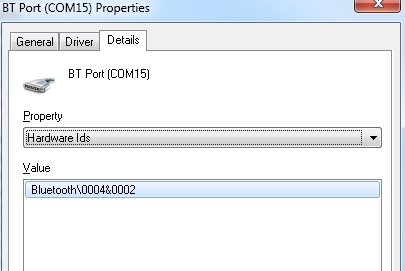
Go to HARDWARE ID's
Here you can find Useful information relating to your Device
and finally...
This next one is a bit of a long shot, but if you have system issues
you can open cmd.exe
Type in sfc/scannow
Press ENTER
in most cases System File checker can fix file and integrity issues with your computer.
I don't actually think this is your root issue, but it doesn't hurt to check.