I am using an Arduino Uno and an Arduino ethernet shield 2 as a web server that hosts an HTML page. Also, the Arduino is getting data from a different Arduino (using XBee).
I want to be able to change a header element on the page when the Arduino receives certain data.
In other words, I am trying to manipulate the DOM of the page from the Arduino itself (or maybe somehow implement javascript from the Arduino?)
I'm using an SD card that contains the HTML
I have to use an Arduino for the project
Does anyone know how I can do this?
Thanks!
EDIT: Thanks for all the help, I ended up using AJAX as some people suggested and it worked perfectly! I learned AJAX with some youtube videos and then followed these tutorials up until part seven: Arduino Ethernet Shield Web Server Tutorial
my code (before finding solution):
#include <SPI.h>
#include <Ethernet.h>
#include <SD.h>
// MAC address printed on a sticker on the Arduino Shield 2
// The IP address is dependent on the local network:
byte mac[] = { 0x90, 0xA2, 0xDA, 0x10, 0x04, 0xE1 };

EthernetServer server(80);

File webPage;

void setup() {
//  // ignore sd card
//  pinMode(4, OUTPUT);
//  digitalWrite(4, HIGH);

  Serial.begin(9600);
  while(!Serial){
  };// wait for serial port to connect.

  // initialize the Ethernet shield using DHCP:
  Serial.println("Obtaining an IP address using DHCP");
  if (Ethernet.begin(mac) == 0)
  {
    Serial.println("Failed to obtaining an IP address");

    // check for Ethernet hardware present
    if (Ethernet.hardwareStatus() == EthernetNoHardware)
      Serial.println("Ethernet shield was not found");

    // check for Ethernet cable
    if (Ethernet.linkStatus() == LinkOFF)
      Serial.println("Ethernet cable is not connected.");

    while (true);// stall program forever because arduino is not connected to ethernet
  }
  ////////////////////////////////////////////////////////////////////
  // print out Arduino's IP address, subnet mask, gateway's IP address, and DNS server's IP address
  Serial.print("- Arduino's IP address   : ");
  Serial.println(Ethernet.localIP());

  Serial.print("- Gateway's IP address   : ");
  Serial.println(Ethernet.gatewayIP());

  Serial.print("- Network's subnet mask  : ");
  Serial.println(Ethernet.subnetMask());

  Serial.print("- DNS server's IP address: ");
  Serial.println(Ethernet.dnsServerIP());

  // TODO: initialize something depending on your application
  ////////////////////////////////////////////////////////////////////

  // start the server
  server.begin();
  Serial.print("server is at ");
  Serial.println(Ethernet.localIP());

  Serial.println("Initializing SD card.... ");
  if(!SD.begin(4)){
    Serial.println("ERROR - SD card initialization failed");
    return;
  }
  Serial.println("SUCCES - SD card initialized");
  if(!SD.exists("index.htm")){
    Serial.println("ERROR - can't find index.htm file");
  }
  Serial.println("SUCCES - Found index.htm file.");
}

void loop() {
// listen for incoming clients
  EthernetClient client = server.available();
  if (client) {// if client connected:
    Serial.println("new client");
    // an http request ends with a blank line
    boolean currentLineIsBlank = true;
    while (client.connected()) {// read all bytes from client
      if (client.available()) {
        char c = client.read();
        Serial.write(c);
        // if you've gotten to the end of the line (received a newline
        // character) and the line is blank, the http request has ended,
        // so you can send a reply
        if (c == '\n' && currentLineIsBlank) {
          // send a standard http response header
          client.println("HTTP/1.1 200 OK");
          client.println("Content-Type: text/html");
          client.println("Connection: close");  // the connection will be closed after completion of the response
//          client.println("Refresh: 5");  // refresh the page automatically every 5 sec
          client.println();

          webPage = SD.open("index.htm");
          if (webPage){
            while (webPage.available()){
              client.write(webPage.read());
            }
            webPage.close();
          }
          break;
        }
        if (c == '\n') {
          // you're starting a new line
          currentLineIsBlank = true;
        } else if (c != '\r') {
          // you've gotten a character on the current line
          currentLineIsBlank = false;
        }
      }
    }
    // give the web browser time to receive the data
    delay(1);
    // close the connection:
    client.stop();
    Serial.println("client disconnected");
  }
}
it's usually the browser requesting data and your arduino is responding by pushing the HTML
what's the code you use to send that HTML?
if you are pushing byte after byte, you could have key markers in the HTML that you spot during the reading of the HTML file and replace them on the fly by the right content
alternatively you can possibly use AJAX requests that would send back the updated value and you have a Javascript code in the browser modify locally the DOM based on the received data
Does it matter what element I'm trying to modify? I guess it could also be a paragraph so it doesn't have to be a header...
what's the code you use to send that HTML?
if you are pushing byte after byte, you could have key markers in the HTML that you spot during the reading of the HTML file and replace them on the fly by the right content
I mostly just copied the code from a tutorial so I'm not entirely sure how it works. I think it is pushing byte after byte but maybe you can tell from the code?
alternatively you can possibly use AJAX requests that would send back the updated value and you have a Javascript code in the browser modify locally the DOM based on the received data
Never used AJAX request before so I will I have to learn about it... does it work with Arduino? can I make an AJAX request from the Arduino ide?
As suggested by @J-M-L, use placeholders in your HTML. They need to be something that you don't use in your HTML, e.g. <%somename%>. When you encounter <%, you remove it, replace somename by the value that you want to send and delete the %>.
that makes parsing complicated because you need to detect multiple characters in the stream.
A crude way to handle this could be to embed a non alphanumeric character in the HTML like ESCape "\x1B" and followed by an index in binary as well for the content that would be in an array at that index. Something like "\x1B\x00"
that gives you 255 entries to play with and keeps the parser to minimum (read a byte in the file, if it's not escape send it to the output, if it's escape then read the next byte and send the matching entry)
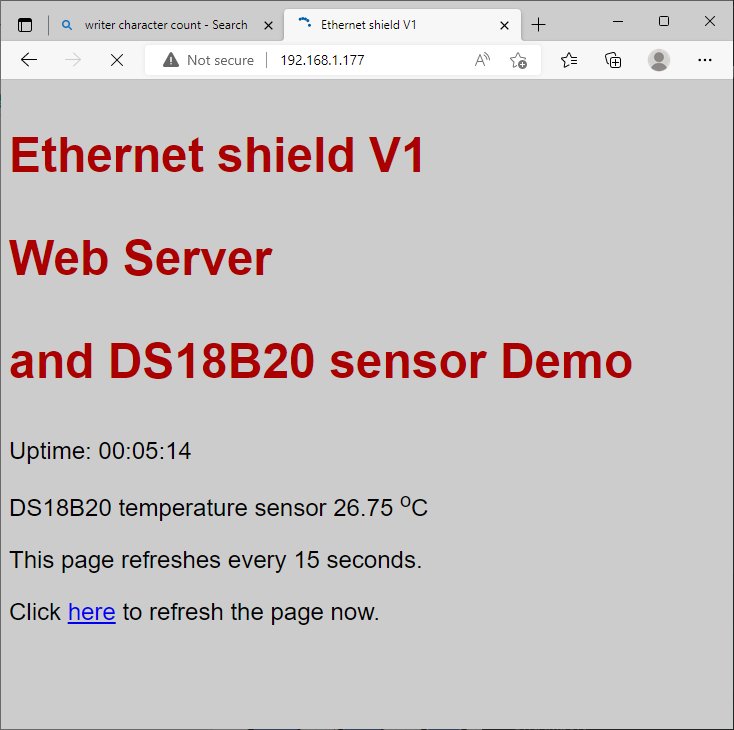
have a look at this Ethernet webserver example which updates the DS18B20 temperature sensor value on a web page refreshed every 15 seconds
// Ethernet shield V1 - webserver displaying DS18B20 temperature sensor value
//   ideas from https://42bots.com/

/*
 Web Server
 Circuit: Ethernet shield attached to pins 10, 11, 12, 13

 created 18 Dec 2009
 by David A. Mellis
 modified 9 Apr 2012
 by Tom Igoe
 modified 02 Sept 2015
 by Arturo Guadalupi

 */

#include <SPI.h>
#include <Ethernet.h>
#include <OneWire.h>
#include <DallasTemperature.h>
/********************************************************************/
// Data wire is plugged into pin 2 on the Arduino
#define ONE_WIRE_BUS 2
// Setup a oneWire instance to communicate with any OneWire devices
OneWire oneWire(ONE_WIRE_BUS);
// Pass our oneWire reference to Dallas Temperature.
DallasTemperature sensors(&oneWire);

// Enter a MAC address and IP address for your controller below.
// The IP address will be dependent on your local network:
byte mac[] = {
  0xDE, 0xAD, 0xBE, 0xEF, 0xFE, 0xED
};
IPAddress ip(192, 168, 1, 177);

// Initialize the Ethernet server library
// with the IP address and port you want to use
// (port 80 is default for HTTP):
EthernetServer server(80);

void setup() {
  // You can use Ethernet.init(pin) to configure the CS pin
  //Ethernet.init(10);  // Most Arduino shields
  //Ethernet.init(5);   // MKR ETH shield
  //Ethernet.init(0);   // Teensy 2.0
  //Ethernet.init(20);  // Teensy++ 2.0
  //Ethernet.init(15);  // ESP8266 with Adafruit Featherwing Ethernet
  //Ethernet.init(33);  // ESP32 with Adafruit Featherwing Ethernet

  // Open serial communications and wait for port to open:
  Serial.begin(115200);
  while (!Serial) {
    ; // wait for serial port to connect. Needed for native USB port only
  }
  Serial.println("Ethernet WebServer Example");
 Serial.println("attempting DHCP connection");
  // start the Ethernet connection:
  if (Ethernet.begin(mac) == 0) {
    Serial.println("Failed to configure Ethernet using DHCP");
    // no point in carrying on, so do nothing forevermore:
    while(true);
  }
  // start the Ethernet connection and the server:
  // Ethernet.begin(mac, ip);
  // start the server
  server.begin();
  Serial.print("server is at ");
  Serial.println(Ethernet.localIP());
  Serial.println("Dallas Temperature IC Control Library Demo");
  sensors.begin();
}

void loop() {
  // listen for incoming clients
  EthernetClient client = server.available();
  if (client) {
    Serial.println("new client");
    // an http request ends with a blank line
    boolean currentLineIsBlank = true;
    while (client.connected()) {
      if (client.available()) {
        char c = client.read();
        Serial.write(c);
        // if you've gotten to the end of the line (received a newline
        // character) and the line is blank, the http request has ended,
        // so you can send a reply
        if (c == '\n' && currentLineIsBlank) {
          send_HTML(client);  // transmit HTML page
          break;
        }
        if (c == '\n') {
          // you're starting a new line
          currentLineIsBlank = true;
        } else if (c != '\r') {
          // you've gotten a character on the current line
          currentLineIsBlank = false;
        }
      }
    }
    // give the web browser time to receive the data
    delay(1);
    // close the connection:
    client.stop();
    Serial.println("client disconnected");
  }
}

// HTML web page template - details filled in using snprintf()
char HTML[]=
"HTTP/1.1 200 OK\n\
Content-Type: text/html\n\
Connection: close\n\
\n\
<!DOCTYPE HTML>\n\
<html>\n\
 <head>\
    <meta http-equiv='refresh' content='15'/>\
    <title>Ethernet shield V1</title>\
    <style>\
      body { background-color: #cccccc; font-family: Arial, Helvetica, Sans-Serif; font-size: 1.5em; Color: #000000; }\
      h1 { Color: #AA0000; }\
    </style>\
  </head>\
  <body>\
    <h1><p>Ethernet shield V1<p>\
    <p> Web Server<p>\
    <p>and DS18B20 sensor  Demo<p></h1>\
    <p>Uptime: %02d:%02d:%02d</p>\
    <p>DS18B20 temperature sensor %s <sup>o</sup>C<p>\
    <p>This page refreshes every 15 seconds.<p>\
    <p>Click <a href=\"javascript:window.location.reload();\">here</a> to refresh the page now.</p>\
  </body>\
</html>";

// build HTML and transmit it
char html[1000]={0};
void send_HTML(EthernetClient client) {
  sensors.requestTemperatures(); // Send the command to get temperature readings
  Serial.print("Temperature is: ");
  float temp=sensors.getTempCByIndex(0);
  Serial.print(temp);
  char tempText[50];
  dtostrf(temp, 4, 2, tempText);  // convert temperature to string
  int sec = millis() / 1000;
  int min = sec / 60;
  int hr = min / 60;
  // Build an HTML page to display on the web-server root address
  int n=snprintf ( html, 2000, HTML, hr, min % 60, sec % 60, tempText  );
  Serial.print("****  snprintf() returned ");
  Serial.println(n);
  //delay(1000);
  // Serial.println(html);
   client.println(html);
 delay(1000);
}
run on an Arduino Mega serial monitor displays
Ethernet WebServer Example
attempting DHCP connection
server is at 192.168.1.177
Dallas Temperature IC Control Library Demo
new client
GET / HTTP/1.1
Host: 192.168.1.177
etc etc
Ok so I learned a little about AJAX and it seems to be the solution for my problem.
I tried following this tutorial: Arduino AJAX Web Server for Reading a Switch Manually
the code is supposed to update the state of a switch once I click a button on the web page using AJAX, however, when I click the button it just outputs all the page elements again leaving me with two of every element, and when I continue to press the button nothing else happens (I can see the request being made but there are no changes to the page).
Could you check the code and maybe see what's wrong? or maybe point me to better material? I modified the code a little in the setup:
void setup()
{
// ignore sd card
  pinMode(4, OUTPUT);
  digitalWrite(4, HIGH);

  Serial.begin(9600);
  while(!Serial){
  };// wait for serial port to connect.

  // initialize the Ethernet shield using DHCP:
  Serial.println("Obtaining an IP address using DHCP");
  if (Ethernet.begin(mac) == 0)
  {
    Serial.println("Failed to obtainin an IP address");

    // check for Ethernet hardware present
    if (Ethernet.hardwareStatus() == EthernetNoHardware)
      Serial.println("Ethernet shield was not found");

    // check for Ethernet cable
    if (Ethernet.linkStatus() == LinkOFF)
      Serial.println("Ethernet cable is not connected.");

    while (true);// stall program forever because arduino is not connected to ethernet
  }
  ////////////////////////////////////////////////////////////////////
  // print out Arduino's IP address, subnet mask, gateway's IP address, and DNS server's IP address
  Serial.print("- Arduino's IP address   : ");
  Serial.println(Ethernet.localIP());

  Serial.print("- Gateway's IP address   : ");
  Serial.println(Ethernet.gatewayIP());

  Serial.print("- Network's subnet mask  : ");
  Serial.println(Ethernet.subnetMask());

  Serial.print("- DNS server's IP address: ");
  Serial.println(Ethernet.dnsServerIP());

  // TODO: initialize something depending on your application
  ////////////////////////////////////////////////////////////////////

  // start the server
  server.begin();
  Serial.print("server is at ");
  Serial.println(Ethernet.localIP());
}
You could also try Server Sent Events, which are...
"...useful to send updated sensor readings to a browser. Whenever a new reading is available, the ESP32 sends it to the client and the web page can be updated automatically without the need to make additional requests."
I've used that approach with ESP8266/ESP32 "arduino" boards; presumably the Ethernet add-on can do the same.