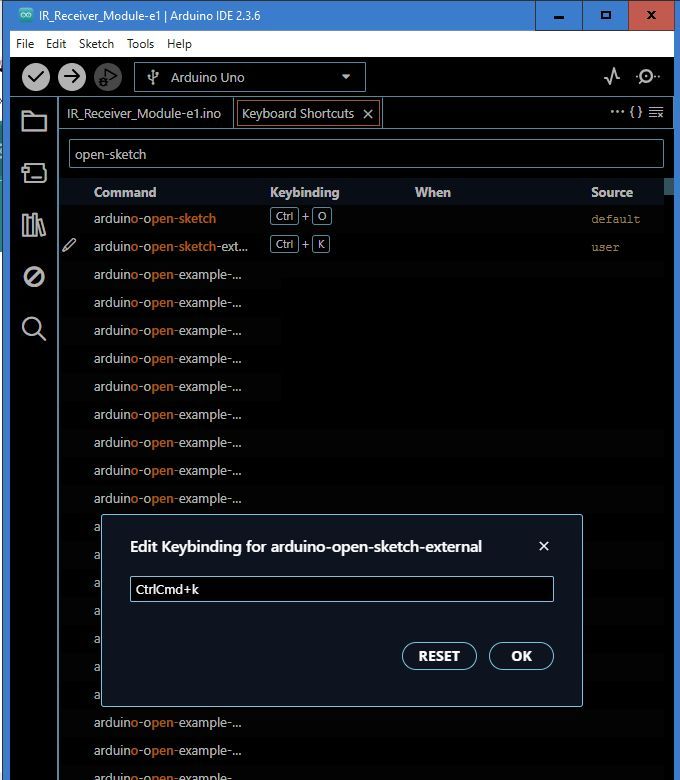
The shortcut for opening the sketch folder has changed from <Ctrl + K> in IDE1.8.19 to <Alt + Ctrl + K> in IDE 2.3.6. That conlicts with another global hotkey I use on this Win 10 PC. So I want to change it. But strangely if I use File > Advanced > Keyboard Shortcuts to display the full list, then search for 'open sketch folder', nothing is found. Nor can I find it manually by scrolling.
The name of the command in the "Keyboard Shortcuts" view is "arduino-open-sketch-external". If you type that in the search query field you will find it.
Thanks but
Q1: Is there documentation on how to edit 'keybinding value'? For example, I'd like to change it to <Ctrl+Alt+NumPad+>? Scrolling the list I'm guessing NumPad is not supported?
Q2: An alternative would be <Ctrl+K>, same as IDE 1.8.19. How do I find that in the list? (I see it in combinations, but so far not solo.)
Q3: Not an immediate problem for me, but the majority of entries are not identifiable because their names are not displayed at sufficient length. For example scores (hundreds?) beginning 'arduino-open-example—...'
BTW, isn't the prefix 'arduino-' redundant? The search tool apparently needs the full string, like 'arduino-open-sketch-external', so obvious searches like 'open sketch', 'sketch open' or 'sketch folder' all failed.
Select File > Advanced > Keyboard Shortcuts (or Arduino IDE > Advanced > Keyboard Shortcuts for macOS users) from the Arduino IDE menus.
The "Keyboard Shortcuts" tab will open in the Arduino IDE window.
Type arduino-open-sketch-external in the "Search keybindings" field of the "Keyboard Shortcuts" tab.
Hover the mouse pointer over the "arduino-open-sketch-external" row in the search results.
A pencil icon ("Edit Keybinding") will appear at the left side of the row.
Click the pencil icon.
The "Edit Keybinding for arduino-open-sketch-external" dialog will open.
The input field in the dialog contains a text representation of the keyboard shortcut. Adjust this according to your preferences. ⓘ Notes about the syntax:
For most keys you can simply use the name of the key (i.e., a, 3, /, f2).
ctrlcmd is a special key name that configures the shortcut to use the Ctrl key on Linux/Windows, Command key on macOS.
Use the + separator for key combinations (e.g., ctrl+s).
Use a space separator for key sequences (AKA "chords") (e.g., ctrl+k ctrl+i).
Click the "OK" button in the dialog.
The dialog will close.
Click the X icon on the "Keyboard Shortcuts" tab.
It seems it is not.
The Arduino IDE developers are tracking the poor experience here:
If you have a GitHub account, you can subscribe to that thread to get notifications of any new developments related to this subject:
Please only comment on the GitHub issue thread if you have new technical information that will assist with the resolution. General discussion and support requests are always welcome here on the Arduino Forum.
Bespoke commands implemented by the Arduino IDE developers in the Arduino IDE codebase.
I suspect the command names we see are actually machine identifiers. In that context, the prefix makes sense, in order to create a "namespace" for the commands contributed by the Arduino IDE codebase. But the developers should have made the effort to also define human friendly names to be exposed in the user interface.
Not the full string, but for some reason the hyphen is mandatory. So you will find it with a search for open-sketch, but not for open sketch.
This is ironic because the search is excessively "fuzzy" in other ways:
Thanks, appreciate that detailed reply. I half expected my change to <Ctrl + k> to fail - but happily it works.
My pessimism was because I still don't know what IDE 2 does with that, if anything? But if it does nothing, why was this frequently used shortcut changed from its long established IDE 1 setting?
Type ctrl+k in the search field of the "Keyboard Shortcuts" view and you will see what it is used for.
The Ctrl+K shortcut by itself is associated with the "Terminal: Clear" command. However, that is not a significant collision because it is only active when you are using the Terminal view (something Arduino IDE inherits from the Eclipse Theia Platform IDE framework upon which it is built), which is not considered a core feature of Arduino IDE.
However, you will also notice quite a few other shortcuts in the search results that start with Ctrl+K. For example, the shortcut for the "Toggle Fold" command is Ctrl+KCtrl+L. As I mentioned in my previous reply, this is a special type of shortcut called a "key sequences" (AKA "chord"). You trigger these shortcuts by pressing two separate combinations of keys in sequence:
Press and hold the Ctrl key.
Press and release the K key.
Press and release the L key.
If you define a global Ctrl+K shortcut, it makes it impossible to trigger any of those key sequences that start with Ctrl+K because pressing Ctrl+K will immediately trigger the "arduino-open-sketch-external" command.
I doubt the average user performs a "Show Sketch Folder" operation frequently. That I am aware, you are the first person to report this in the years since Arduino IDE 2.x was released. However, I do agree that any such inconsistencies between the user interfaces of the two versions is unfortunate.
But consider that if the developers had kept the Arduino IDE 1.x "Show Sketch Folder" shortcut, they would have needed to find new shortcuts for all those other commands.
Those shortcuts are not something invented out of thin air by the Arduino IDE developers. They are inherited from the VS Code editor (the world's most popular programming editor), on which the user interface of Eclipse Theia Platform and thus Arduino IDE is based. So someone who works with VS Code in addition to Arduino IDE will expect to be able to use the same general purpose shortcuts in both editors. There is also a good chance that the VS Code keyboard shortcuts are based on previously established conventions (for example, I would guess they were already established in Microsoft's similarly named but completely separate Visual Studio IDE).
Note that it is "Toggle Fold", not "Toggle Folder". The command collapses or expands a block of code in the sketch editor.
For example, if you place the cursor in this code:
void loop() {
  digitalWrite(LED_BUILTIN, HIGH);  // turn the LED on (HIGH is the voltage level)
  delay(1000);                      // wait for a second
  digitalWrite(LED_BUILTIN, LOW);   // turn the LED off by making the voltage LOW
  delay(1000);                      // wait for a second
}
and then perform a "Toggle Fold" operation, it will then appear like this in the editor:
void loop() {•••
}
You can easily accomplish the same thing by clicking the ˅ icon that appears in the left margin of the editor when you hover the mouse pointer over it, so you might not feel the need for a keyboard shortcut unless you are someone who prefers to avoid unnecessary use of the mouse while coding.


 Please only comment on the GitHub issue thread if you have new technical information that will assist with the resolution. General discussion and support requests are always welcome here on the Arduino Forum.