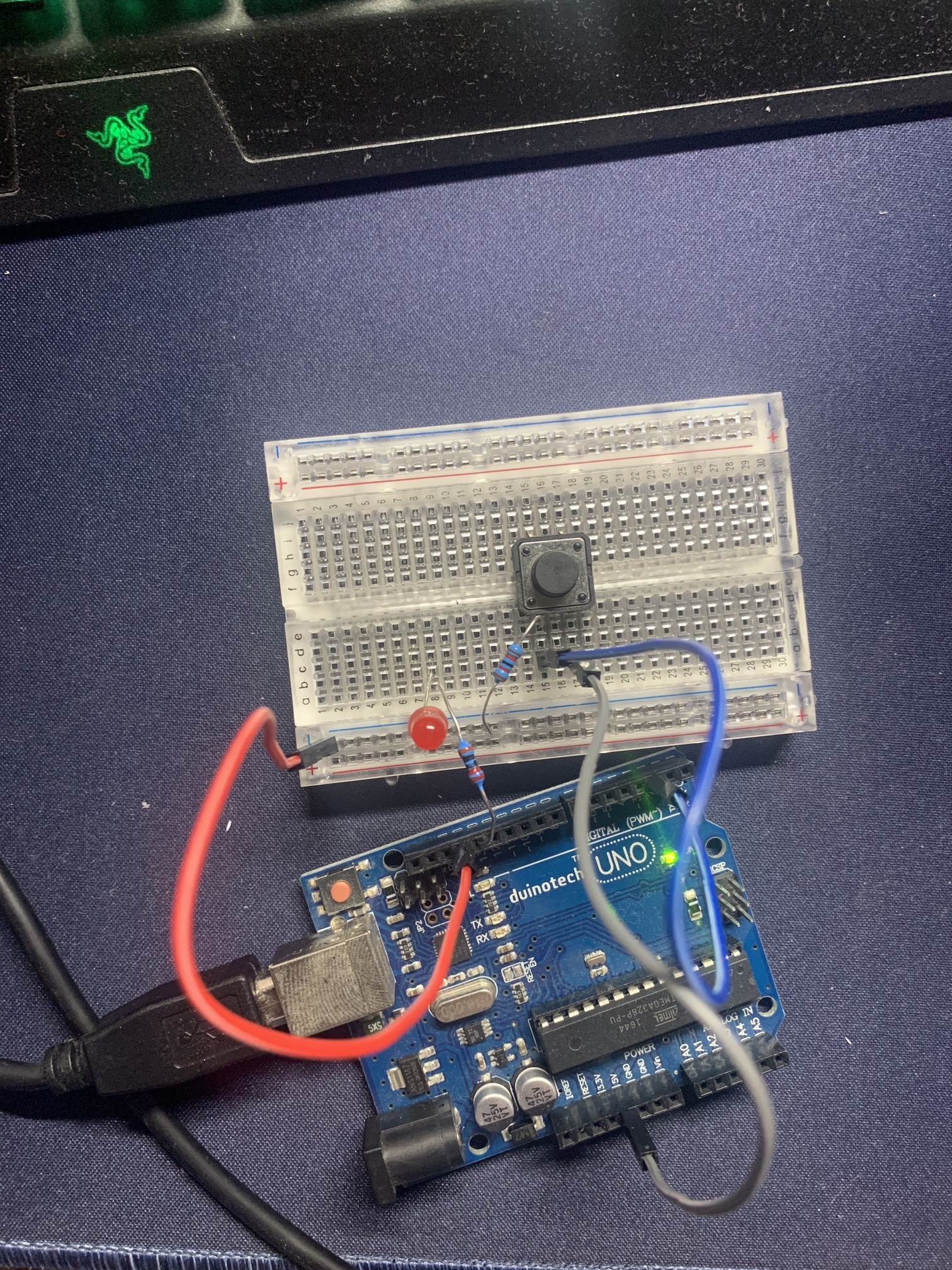
So I’m quite new to the arduino/circuit world still so please be gentle. I’ll try provide all the details I can.
I have a personal project that I’m working on that involves a small spaceship with lights in the engine that I want to turn on in a specific way (see code). I have the mockup with the uno board already done after a lot of mucking around and trial and error and it works exactly how I want. However, I am limited in space so I dont want big bulky boards or anything like that if I can avoid it. Correct me if I’m wrong but iI’ve heard its possible to create your own PCB boards that have only the components you need? If so, how would I go about doing something like that or is there a better solution to the problem?
I have attached a photo of the circuit in its working form. Note: the push switch is being used kind of as a toggle switch, I just hold down the button to mimic it in the on position and let go for the opposite.
Thanks very much for your help! Again, very new to this, just for a personal hobby but I plan on making this a few times.
void setup()
{
  pinMode(2, INPUT); // button
  pinMode(13, OUTPUT); // LED
  digitalWrite(13, LOW);
}

int pinState = LOW;
const int x = 500; // 500ms delay

void loop()
{
  int newState = digitalRead(2);
  if (newState != pinState) // button state differs from last recorded state?
  {
    pinState = newState;
    if (pinState == HIGH) // button newly pressed?
     delay(1000);
    digitalWrite(13, pinState);
    delay(50);
    digitalWrite(13, LOW);
    delay(50);
    digitalWrite(13, HIGH);
    delay(50);
    digitalWrite(13, LOW);
    delay(100);
    digitalWrite(13, HIGH);
    delay(100);
    digitalWrite(13, LOW);
    delay(300);
    digitalWrite(13, pinState);
    delay(500);
  }
}
I doubt that this is doing what you expect, your check for pinState==HIGH only affects the single line after it, which is a delay() call:
  if (newState != pinState) // button state differs from last recorded state?
  {
    pinState = newState;
    if (pinState == HIGH) // button newly pressed?
      delay(1000);
    digitalWrite(13, pinState);
...
I ran auto format in the IDE to highlight the fact with indentation.
Just not sure if you are aware of this, or not.
Also, you don't need any state change detection logic for a toggle switch. For that, all you need is:
Yeah so this code is based off some other code that I found so it has some extra pieces like the variable 'x' that are just kinda there and I forgot about. I fixed that up, as for the rest of the code, it works how I want it so I'm not too fussed otherwise, even if it can be made to look better. I do appreciate your input tho! I gave the code you provided a try and it does all the HIGH LOW states correctly but it just repeats it over and over. My intention was for it to 'power on' with a flashing animation and stay on while the switch is powered and then briefly flash off when released. I can attach a video if that would help?
Thanks! I've had a look at the Pro Mini, from what I can tell it looks like a solid option! I cant tell if it will work for sure as my knowledge is nowhere near that advanced aha so it may just take a practical test to confirm.
I'll have to look into getting the code onto the pro mini as well, my understanding is that I need something like a 5V Basic Breakout board to communicate with the pro mini and get it on that way?
Well, rather than trying to adapt someone else's non-fitting code for that, you should write it ground up from that specification. But you need to refine the on-off state definitions to put more meat on your skeleton description. Example "stay on" means what, stay flashing or pause with all lights on? Answer not only that. Please supply a complete blow by blow detailed description of what the lights should do.
Consider all "boundary cases" - e.g. what happens when the switch is in the "off" position at boot time?
That would be much more valuable than a video. Generally, when you have a good description, it can be coded blindfolded with your hands tied behind your back. The video won't achieve that step, either for you or for us.
Also not my job to sit through videos all day. But, thanks for putting some effort into your first post.
I fixed that up
Any time you have further needs, and you have made changes, please post the revised sketch in a new message.
Here is the exact function I want. By boot time, I assume that means when the circuit is connected to the power? If so, in the 'off' position I would want the led to not be powered at all. Once the switch has been moved to 'on', I want a small delay (1000ms) before the led flashes on (delay 50), off (delay 50), on (delay 50), off (delay 100), on (delay 100), off (delay 300), on and then remain on. When the switch is then moved back to 'off' , I want the led to flash again with no delay beforehand off (delay 100), on (delay 50), off and then remain off.
No, it's not enough. Please specify all the timing. Down to each individual on or off. And "a small delay" is not precise, it could be 10 milliseconds, or a few seconds... who knows?
You didn't specify the turn on behaviour with the switch in the "on" position.