Thank you so much Leo, I should receive the sensors on Tuesday and give your sketch a try.
I'm currently educating myself on the Arduino API reading through the Arduino webslte...
Cheers
Thank you so much Leo, I should receive the sensors on Tuesday and give your sketch a try.
I'm currently educating myself on the Arduino API reading through the Arduino webslte...
Cheers
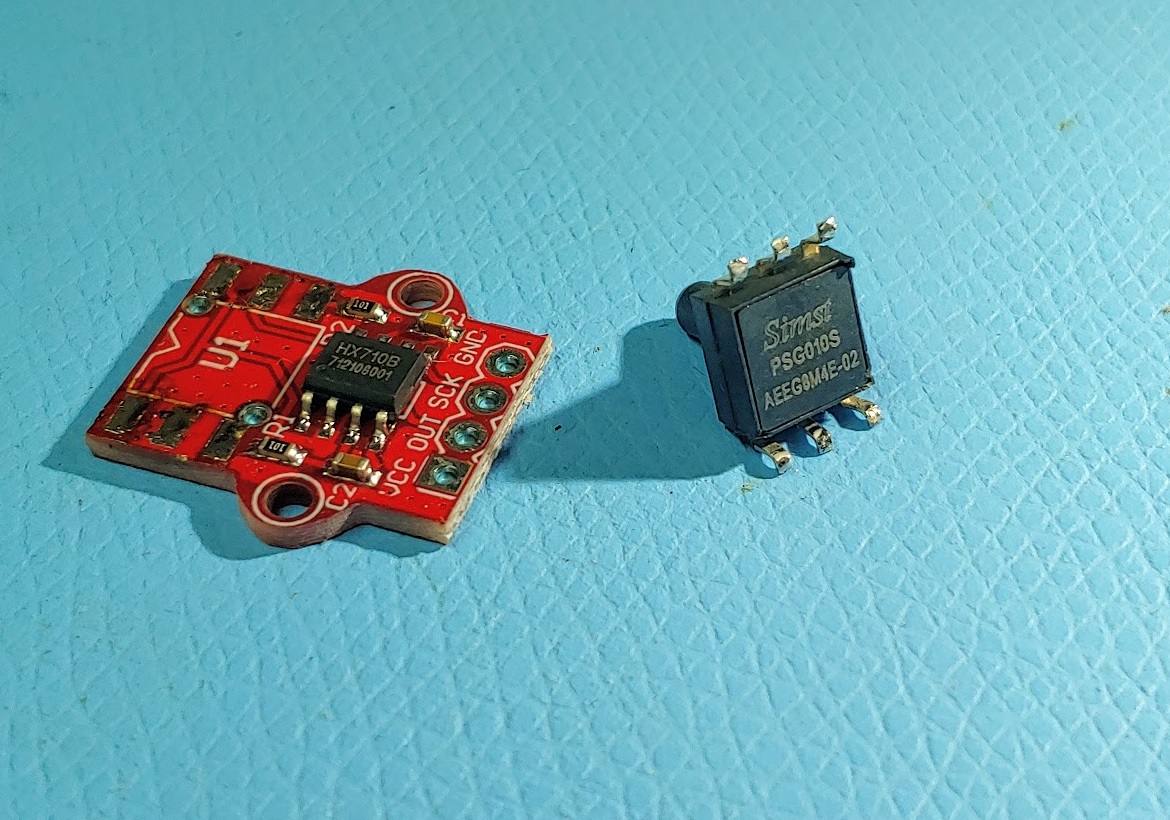
Received the sensor, and had some problems.
The nipple on the sensor is tiny, and I didn't have a rubber (fuel) hose for that size (~2.5mm).
A piece of heat shrink did not fully seal, so air eventually leaked away. Took me a while to realise the drifting sensor was just an air leak.
The sensor (my one?) has quite a bit of offset, so "zero pressure" numbers are high.
Curious what your "zero pressure" numbers will be.
Ended up using the HX710 library (not the 710B). Seemed to work better.
Reduced resolution (noise), so I could use smaller calibration numbers.
Works ok with these mods, but I did not test the LED part yet. Maybe tomorrow.
Leo..
#include "HX710.h"
HX710 sensor;
#include <RunningMedian.h>
RunningMedian samples = RunningMedian(25);
#include "MultiMap.h"
int in[] = {950, 1000, 1050, 1100, 1150, 1200, 1250, 1300, 1350, 1400, 1450, 1500, 1550, 1600, 1650, 1700, 1750}; // calibrate
int out[] = {0, 1, 2, 3, 4, 5, 6, 7, 8, 9, 10, 11, 12, 13, 14, 15, 16}; // 17 steps
#include <Adafruit_NeoPixel.h>
#define PIN 6
#define Pixel_Number 16
Adafruit_NeoPixel strip = Adafruit_NeoPixel(Pixel_Number, PIN, NEO_GRB + NEO_KHZ800);
int rawValue, fuel, ledsToLight;
unsigned long prevMillis;

void updateStrip(int ledsToLight, uint32_t colorOn, uint32_t colorOff) {
  for (int x = 0; x < Pixel_Number; x++) {
    if (x < ledsToLight) strip.setPixelColor(x, colorOn);
    else strip.setPixelColor(x, colorOff);
  }
  strip.show();
}

struct Level {
  int ledsToLight;
  uint32_t color;
};

#define max_colors 3
Level colors[max_colors] = {
  {3, strip.Color(255, 0, 0)},
  {5, strip.Color(255, 128, 0)},
  {16, strip.Color(0, 255, 0)},
};

uint32_t getColor(int ledsToLight) {
  uint32_t ret = strip.Color(0, 0, 255);
  for (int x = 0; x < max_colors; x++) {
    if (ledsToLight <= colors[x].ledsToLight) {
      ret = colors[x].color;
      break;
    }
  }
  return ret;
}

void setup() {
  Serial.begin(115200);
  sensor.initialize(3, 4); // SCK, SDI
  strip.begin();
  strip.show(); // clear
}

void loop() {
  if (millis() - prevMillis > 250 && sensor.isReady()) {
    prevMillis = millis();
    sensor.readAndSelectNextData(HX710_DIFFERENTIAL_INPUT_10HZ);
    rawValue = sensor.getLastDifferentialInput() >> 10; // snip
    samples.add(rawValue);
    fuel = samples.getMedian();
    ledsToLight = multiMap(fuel, in, out, 17);
    Serial.print("Median: ");
    Serial.print(fuel);
    Serial.print("\tLEDs: ");
    Serial.println(ledsToLight);
    if (ledsToLight == 0) doFlash();
    else {
      auto colorOff = strip.Color(0, 0, 0);
      auto colorOn = getColor(ledsToLight);
      updateStrip(ledsToLight, colorOn, colorOff);
    }
  }
}

void doFlash() {
  auto color = strip.Color(0, 0, 0);
  if ((millis() / 540) & 1 != 0) color = strip.Color(255, 0, 0);
  for (int x = 0; x < Pixel_Number; x++) strip.setPixelColor(x, color);
  strip.show();
}
Do you have an absolute or relative pressure sensor?
I think these sensors do relative pressure (one end open to admosphere).
Just tested the addition of your LED code to my sketch, which passed the test.
@papagino
Might want to change samples.getMedian(); to samples.getAverage;
Gives a more pleasant readout, more like an analogue gauge.
I also added strip.setBrightness(64); at the end of setup().
These LEDs are quite bright.
With the separation of the 'in' array, 140mm of water depth just lights all 16 LEDs.
Leo..
Thanks for all your help.
I should receive the sensors later today (February 20th) and will test everything.
I am planning to use a PTFE tubing because it is very resistant to gasoline and also glue a Quick Connect connector to the sensor's nipple to assure a proper seal.
Then I will seal the sensor + PCB and the bottom of the Quick Connect connector with UV Resin to make everything waterproof.
Other than the sensor's nipple, can the sensor be fully submerged under the resin, or there is a small hole for Atmospheric pressure inlet?
Thanks,
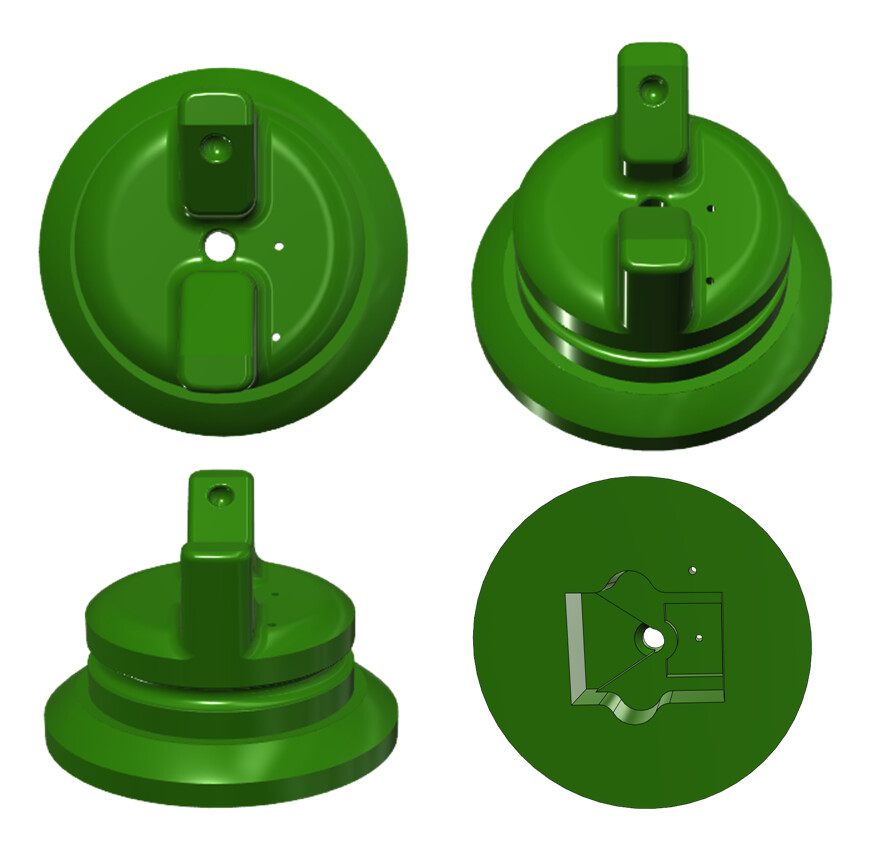
OK, I've received the Pressure Sensors, it looks like there are openings on both sides on the sensor, probably to allow the membrane inside the sensor to flex. I have redesigned the fuel cap insert to allow the bottom of the sensor to breathe via a small hole and chamber underneath the sensor. There is also another hole on the insert to allow for the gasoline fumes to escape the gas tank.
I should still be able to seal the sensor with UV epoxy because there are 2 VIA (holes) under the sensor that will allow it to breathe from under the PCB. Just need to prevent UV resin to block those openings...
The 3D part is printing now, should be completed in 3 hrs or so...
I expected the sensor to be mounted near the readout, with a long tube going to the fuel tank.
There is no need for the sensor to be near the fuel tank.
Leo..
This won't be possible, the Arduino is under the dash inside the cab.
This is about 6 or 7 feet from the gas tank taking under consideration the routing underneath the tractor. The tube/hose is way too rigid to be routed inside the cab.
This is why I have to install the Pressure Sensor inside the gas cap, then the 4-conductor cable is routed inside the cab to the Arduino. Temperature outside the cab can reach -20C.
The way I designed the Gas Cap insert will allow for outside air to be under the sensor, away from gas fumes. This way the sensor should not be exposed to gasoline fumes once everything is sealed with UV epoxy resin.
Cheers,
I found that the sensor is drifting quite a bit with temperature. Tested that yesterday with a bag of frozen peas. Could be one LED difference at -20C, so calibrate at a cold temp.
The library has temp measurement code, but only the HX710A chips have a build-in temp sensor.
Leo..
If ever variation in temperature is causing reading to change significantly, then I guess an external temperature sensor could be installed outside the cab then add some compensation in the codes.
But I doubt this will be an issue if I calibrate in cold temperature. + Or - one lit LED wouldn't be critical, nobody will die because of it... LOL
Thanks lots for your contribution to this project.
Cheers,
Replaced the LED code with a switch/case block. Maybe easier to understand.
Does the same, apart from some brightness corrections.
Leo..
#include "HX710.h"
HX710 sensor;
#include <RunningMedian.h>
RunningMedian samples = RunningMedian(25);
#include "MultiMap.h"
int in[] = {950, 1000, 1050, 1100, 1150, 1200, 1250, 1300, 1350, 1400, 1450, 1500, 1550, 1600, 1650, 1700, 1750}; // calibrate
int out[] = {0, 1, 2, 3, 4, 5, 6, 7, 8, 9, 10, 11, 12, 13, 14, 15, 16}; // 17 steps
#include <Adafruit_NeoPixel.h>
Adafruit_NeoPixel strip = Adafruit_NeoPixel(16, 6, NEO_GRB + NEO_KHZ800); // nb_LEDs, pin
int rawValue, level, ledsToLight;
unsigned long prevMillis, color;

void setup() {
  Serial.begin(115200);
  sensor.initialize(3, 4); // SCK, SDI
  strip.begin();
  strip.show(); // clear
  // strip.setBrightness(64);
}

void loop() {
  if (millis() - prevMillis > 250 && sensor.isReady()) {
    prevMillis = millis();
    sensor.readAndSelectNextData(HX710_DIFFERENTIAL_INPUT_10HZ);
    rawValue = sensor.getLastDifferentialInput() >> 10; // snip
    samples.add(rawValue);
    level = samples.getAverage();
    ledsToLight = multiMap(level, in, out, 17);
    Serial.print("Median: ");
    Serial.print(level);
    Serial.print("\tLEDs: ");
    Serial.println(ledsToLight);
  }
  switch (ledsToLight) {
    case 0: // flash
      color = strip.Color(0, 0, 0);
      if ((millis() / 500) & 1) color = strip.Color(63, 0, 0);
      break;
    case 1 ... 2: // red
      color = strip.Color(255, 0, 0);
      break;
    case 3 ... 5: // yellow
      color = strip.Color(170, 85, 0);
      break;
    case 6 ... 16: // green
      color = strip.Color(0, 255, 0);
      break;
  }
  strip.clear();
  strip.fill(color, 0, ledsToLight);
  strip.show();
}
Finally finished the gas cap with encapsulated sensor, working great so far.
Testing your last sketch now, seems to be working great.
The sensor is drifting very little, this is expected with cheap Made in China stuff.
I saw those MPS20N0040D sensors for $0.68 on Aliexpress, yet quality one with temperature compensation can be over $100 on Digikey.ca.
Will test and calibrate everything later this week.
Cheers
Dan
It's done...
Installed in tractor, calibrated at every 1 litre of gasoline (17L capacity), works wonderfully...
(The density of gasoline is 0.6 g/mL and the density of water is 1.0 g/mL).
Here is the final Sketch for anyone that may be interested...
#include "HX710.h"
HX710 sensor;
#include <RunningMedian.h>
RunningMedian samples = RunningMedian(10); // Higher the number, the more filtering it will have
#include "MultiMap.h"
int in[] = {920, 930, 950, 1000, 1020, 1040, 1060, 1090, 1130, 1148, 1185, 1200, 1250, 1280, 1335, 1400, 1460}; // Calibrated for John Deere 322 Gasoline Tank
int out[] = {0, 1, 2, 3, 4, 5, 6, 7, 8, 9, 10, 11, 12, 13, 14, 15, 16}; // 17 steps
#include <Adafruit_NeoPixel.h>
Adafruit_NeoPixel strip = Adafruit_NeoPixel(16, 6, NEO_GRB + NEO_KHZ800); // Number of NeoPixel Leds, Data pin
int rawValue, level, ledsToLight;
unsigned long prevMillis, color;

void setup() {
  Serial.begin(115200);
  sensor.initialize(3, 4); // SCK, SDI
  strip.begin();
  strip.show(); // clear
  strip.setBrightness(160); // To set NeoPixels Brightness (0 - 255)
}

void loop() {
  if (millis() - prevMillis > 250 && sensor.isReady()) {
    prevMillis = millis();
    sensor.readAndSelectNextData(HX710_DIFFERENTIAL_INPUT_10HZ);
    rawValue = sensor.getLastDifferentialInput() >> 10; // snip
    samples.add(rawValue);
    level = samples.getAverage();
    ledsToLight = multiMap(level, in, out, 17);
    Serial.print("Median: ");
    Serial.print(level);
    Serial.print("\tLEDs: ");
    Serial.println(ledsToLight);
  }
  switch (ledsToLight) {
    case 0: // flash
      color = strip.Color(0, 0, 0);
      if ((millis() / 500) & 1) color = strip.Color(63, 0, 0);
      break;
    case 1 ... 2: // red
      color = strip.Color(255, 0, 0);
      break;
    case 3 ... 5: // orange
      color = strip.Color(255, 128, 0);
      break;
    case 6 ... 16: // green
      color = strip.Color(0, 255, 0);
      break;
  }
  strip.clear();
  strip.fill(color, 0, ledsToLight);
  strip.show();
}
Thanks to everyone who help me with the coding, you are awesome...
Cheers
Dan