I am currently trying to get a DFPlayer Mini to work with my Arduino board. The DFPlayer does play audio files when connected to power and I momentarily ground one of the ADKEYs, however I cannot get it to work with my Arduino. I've tried both an Uno R3 and a Nano with no luck.
My SD Card is 32gb formatted to FAT32. All MP3 files are in the root named 0001.mp3, 0002.mp3, etc. I am powering the Arduino and DFPlayer with a power source that isn't the Arduino 5v power. I've tried doing the test code and wiring that DFRobot has on their site, but that doesn't work for me. This is the 2nd DFPlayer I've tried this with. I've tried multiple breadboards.
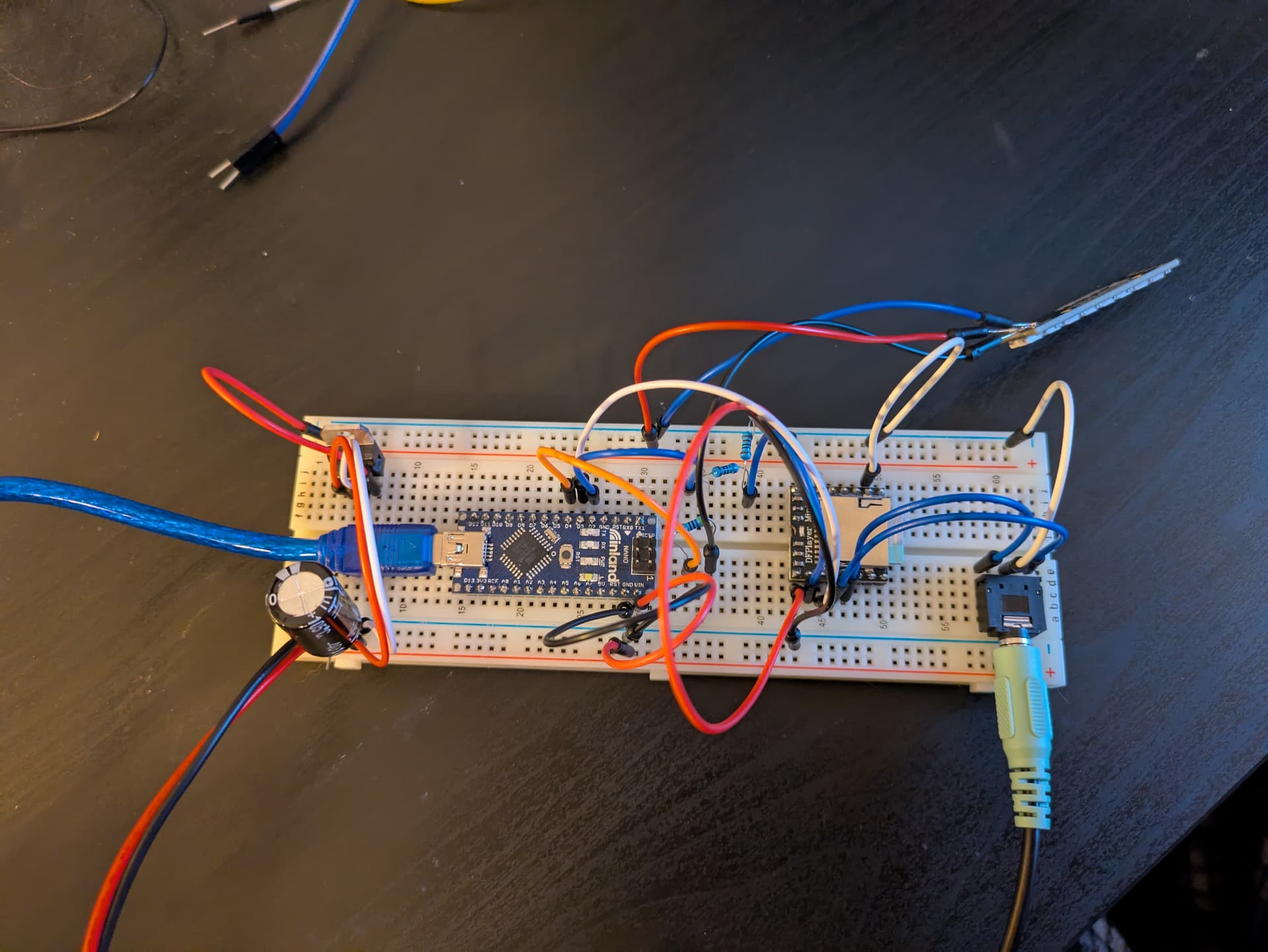
Here is a picture of my project:
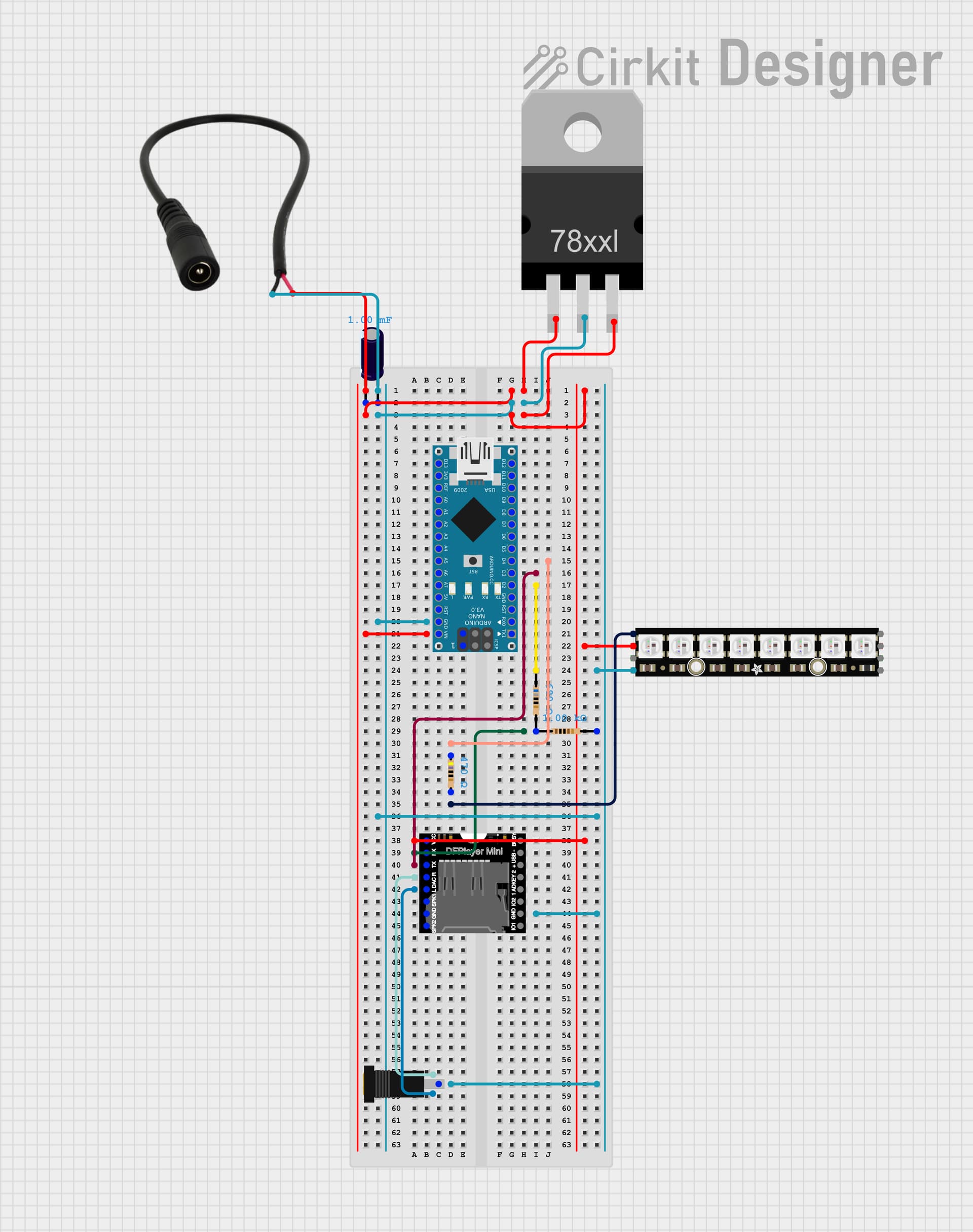
Here is a wiring diagram I made up:
Here is my code:
/*
  Nothing happens in a vacuum. Thanks to the following:

  Adafruit
  https://learn.adafruit.com/adafruit-neopixel-uberguide

  Indrek Luuk - Circuit Journal
  circuitjournal.com/how-to-use-the-dfplayer-mini-mp3-module-with-an-arduino

  One Guy, One Blog
  oneguyoneblog.com/2017/11/01/lightning-thunder-arduino-halloween-diy/

  "If I have seen further it is by standing on the shoulders of Giants."
  - Isaac Newton
*/

// these libraries must be installed prior to uploading
// includes
#include "SoftwareSerial.h"
#include "DFRobotDFPlayerMini.h"
#include <Adafruit_NeoPixel.h>

#ifdef __AVR__
#include <avr/power.h>
#endif

// set number of pixels in strip
int numPix = 8;
// set pin to control neopixels
int neoPin = 4;
// set initial brightness 0-255
int brightness = 255;

// create led object
Adafruit_NeoPixel ledStrip = Adafruit_NeoPixel(numPix, neoPin, NEO_GRBW + NEO_KHZ800);

// assign pins to TX and RX for player
static const uint8_t PIN_MP3_TX = 2;
static const uint8_t PIN_MP3_RX = 3;
SoftwareSerial softwareSerial(PIN_MP3_RX, PIN_MP3_TX);

// create the player object
DFRobotDFPlayerMini myDFPlayer;

void setup() {
  // initialize neopixels
  ledStrip.begin();
  ledStrip.setBrightness(brightness);
  ledStrip.show();

/*
  // initialize serial port for output
  Serial.begin(9600);
  // initialize player serial port
  softwareSerial.begin(9600);
*/
  softwareSerial.begin(9600);
  Serial.begin(115200);

/*
  // connect to player - print result
  if (myPlayer.begin(softwareSerial)) {
    Serial.println("Connection successful.");
    // set initial volume 0-30
    myPlayer.volume(30);
  } else {
    Serial.println("Connection failed.");
  }
*/
  if (!myDFPlayer.begin(softwareSerial, /*isACK = */false, /*doReset = */true)) {  //Use serial to communicate with mp3.
    Serial.println(F("Unable to begin:"));
    Serial.println(F("1.Please recheck the connection!"));
    Serial.println(F("2.Please insert the SD card!"));
    while(true){
      delay(0); // Code to compatible with ESP8266 watch dog.
    }
  }
  Serial.println(F("DFPlayer Mini online."));
  delay(2000);

  myDFPlayer.volume(30);
}

void loop() {
  // volume defines both the led brightness and delay after flash
  int volMin = 15;
  int volMax = 31;
  int randomVol = random(volMin, volMax);

  // upper value should be one more than total tracks
  int randomTrack = random(1, 9);

  // lightning variables
  // use rgbw neopixel adjust the following values to tweak lightning base color
  int r = random(40, 80);
  int g = random(10, 25);
  int b = random(0, 10);
  // return 32 bit color
  uint32_t color = ledStrip.Color(r, g, b, 50);
  // number of flashes
  int flashCount = random (5, 15);
  // flash white brightness range - 0-255
  int flashBrightnessMin =  10;
  int flashBrightnessMax =  255;
  // flash duration range - ms
  int flashDurationMin = 5;
  int flashDurationMax = 75;
  // flash off range - ms
  int flashOffsetMin = 0;
  int flashOffsetMax = 75;
  // time to next flash range - ms
  int nextFlashDelayMin = 1;
  int nextFlashDelayMax = 50;
  // map white value to volume - louder is brighter
  int flashBrightness = map(randomVol, volMin, volMax, flashBrightnessMin, flashBrightnessMax);

  // map flash to thunder delay - invert mapping
  int thunderDelay = map(randomVol,  volMin, volMax, 1000, 250);

  // randomize pause between strikes
  // longests track length - ms
  int longestTrack = 18000;
  // intensity - closer to longestTrack is more intense
  int stormIntensity = 30000;
  long strikeDelay = random(longestTrack, stormIntensity);

  if (myDFPlayer.available()) {
    printDetail(myDFPlayer.readType(), myDFPlayer.read()); //Print the detail message from DFPlayer to handle different errors and states.
  }
  Serial.println(myDFPlayer.readType());
  Serial.println(myDFPlayer.read());

  // debug serial print
  Serial.println("FLASH");
  Serial.print("Track: ");
  Serial.println(randomTrack);
  Serial.print("Volume: ");
  Serial.println(randomVol);
  Serial.print("Brightness: ");
  Serial.println(flashBrightness);
  Serial.print("Thunder delay: ");
  Serial.println(thunderDelay);
  Serial.print("Strike delay: ");
  Serial.println(strikeDelay);
  Serial.print("-");

  for (int flash = 0 ; flash <= flashCount; flash += 1) {
    // add variety to color
    int colorV = random(0, 50);
    if (colorV < 0) colorV = 0;
    // flash segments of neopixel strip
    color = ledStrip.Color(r + colorV, g + colorV, b + colorV, flashBrightness);
    ledStrip.fill(color, 0, 4);
    ledStrip.show();
    delay(random(flashOffsetMin, flashOffsetMax));
    ledStrip.fill(color, 8, 4);
    ledStrip.show();
    delay(random(flashOffsetMin, flashOffsetMax));
    ledStrip.fill(color, 4, 4);
    ledStrip.show();
    delay(random(flashOffsetMin, flashOffsetMax));
    ledStrip.fill(color, 9, 14);
    ledStrip.show();
    delay (random(flashDurationMin, flashDurationMax));
    ledStrip.clear();
    ledStrip.show();
    delay (random(nextFlashDelayMin, nextFlashDelayMax));
  }
  // pause between flash and thunder
  delay (thunderDelay);

  // trigger audio - randomize volume and track
  myDFPlayer.volume(randomVol);
  delay(2000);
  myDFPlayer.play(randomTrack);

  delay(strikeDelay);
}

void printDetail(uint8_t type, int value){
  switch (type) {
    case TimeOut:
      Serial.println(F("Time Out!"));
      break;
    case WrongStack:
      Serial.println(F("Stack Wrong!"));
      break;
    case DFPlayerCardInserted:
      Serial.println(F("Card Inserted!"));
      break;
    case DFPlayerCardRemoved:
      Serial.println(F("Card Removed!"));
      break;
    case DFPlayerCardOnline:
      Serial.println(F("Card Online!"));
      break;
    case DFPlayerUSBInserted:
      Serial.println("USB Inserted!");
      break;
    case DFPlayerUSBRemoved:
      Serial.println("USB Removed!");
      break;
    case DFPlayerPlayFinished:
      Serial.print(F("Number:"));
      Serial.print(value);
      Serial.println(F(" Play Finished!"));
      break;
    case DFPlayerError:
      Serial.print(F("DFPlayerError:"));
      switch (value) {
        case Busy:
          Serial.println(F("Card not found"));
          break;
        case Sleeping:
          Serial.println(F("Sleeping"));
          break;
        case SerialWrongStack:
          Serial.println(F("Get Wrong Stack"));
          break;
        case CheckSumNotMatch:
          Serial.println(F("Check Sum Not Match"));
          break;
        case FileIndexOut:
          Serial.println(F("File Index Out of Bound"));
          break;
        case FileMismatch:
          Serial.println(F("Cannot Find File"));
          break;
        case Advertise:
          Serial.println(F("In Advertise"));
          break;
        default:
          break;
      }
      break;
    default:
      break;
  }

}