I'm looking for a simple 5 input keypad, with 4 directional arrows and a select button in the middle. In a perfect world I would like it to be backlit and made of silicon, but given that I can't find anything even remotely close as of now, any material is fine. These things are everywhere on appliances and electronics, there's gotta be some place that sells them. Anyone have any input?
Google may help
HERE
scavenge the part form these 'electronics' you see..
or make your own?
or go for a 5-position button??
Thanks Larry! I really appreciate the condescension. Oh, and a bunch of pictures of keypads completely different from what I described is extremely helpful! You can have my permission to be a jackass once you find what I'm looking for. If you had actually read my post and done a little googling yourself for the right thing instead of assuming I hadn't done mine then you'd realize that it's not so simple to find.
xl97, I would scavenge but I don't have anything like that just laying around, and it'd be too expensive to buy something just for the keypad. I've thought about making my own as well but I can't even find individual buttons like I want. I can give up silicon, even backlit, I just want some buttons either with arrows on them or shaped like triangles, something to indicate a direction. When I looked for triangle buttons all I found were huge arcade ones. I feel like this shouldn't be this hard. I'm not advocating you guys to google in my stead, but if you've used or seen anything like this it would be a huge help to me.
really appreciate the condescension.
Click on one of the images that is close to what you need.
This takes you to a web site where you you can see if they have something that might better fit your needs.
I often make what I need as I cannot really find something that fits.
Use small push button switches that can be found at sites like Sparkfun.
Make up the matrix up on a PCB and place an overlay over the switches.
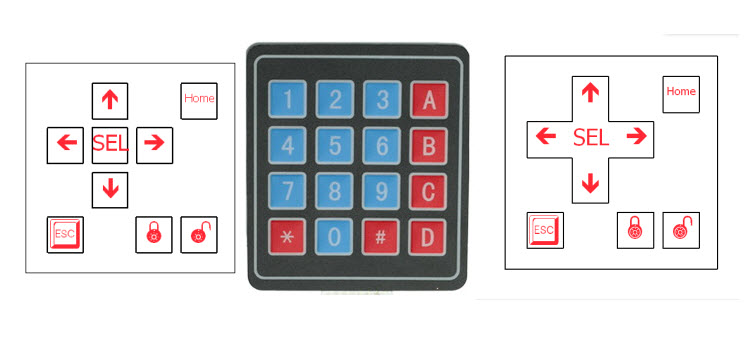
See the attached image on the right hand side of a sample that I made.
I wasn't being condescending in any way.
You might do this in your communications.
I don't.
Edit:
You can have my permission to be a jackass once you find what I'm looking for.
This is really helpful.

Sorry for misunderstanding you then. But yeah, I understand the process of making a matrix keypad. Is that what that picture is displaying? Forgive my ignorance, I'm not entirely sure what I'm looking at. I don't know if this would be considered a matrix since I wouldn't have two wires running to each button, but I was thinking I could reduce it to 3 inputs with some OR gates, giving me a max of 7 push buttons (binary 001 - 111). But that really isn't the problem. I just need a source for a keypad like I described or a button that gives some kind of directional indication to a person who isn't familiar with the device.
Sorry for misunderstanding you then.
OK
I have also used:
HERE.
You can either use them in a matrix or wire them to inputs directly.
The attached image is also a good choice.
HERE
They are high enough that surface mount LEDs can be placed by the side of the switches which might give you the back-light that you were talking about.
The LEDs will shine through the laminated overlay.
Then you can make a laminated overlay to cover the switches like I did here in the 2nd image.


Your example?

Yes, exactly like that. How do the buttons feel quality wise? And where do you have your laminated overlays printed? I'm assuming you use some type of service to have that done.
The switches have tactile feedback.
IMO they are good quality.
I use SketchUp for designing the overlay but any graphics program would do.
You can go to Staples and they will do laminating for you for a few dollars.
I suggest you use their thinner lamination as their thicker one is quite stiff.
I use this machine for laminating but it is expensive.
http://www.staples.ca/en/3M-LS950-Cool-Laminator/product_41407_2-CA_1_20001
I have also taken an existing keypad and just relabeled the keys to my liking using the same overlay method (you can also print the overlay on colored paper if you don’t want white as the background). Used double stick carpet tape to adhere the overlay to the keypad.
This might be the way you want to go, however there is no room to add back-lights.
You can either ignore the other buttons in your code or use them as function keys
SEE HERE
OR
HERE
Myself... I would look at some slim-line remotes for dvd players.. or kids toys... (usually a gold mine of junk there to salvage)
IMHO though... the 'top side' is NOT the crucial portion of this..
is the underlying 'buttons' and connection that count. the top can be re-done user a laser or even a vinyl cutter..etc..
get some extremely small/flat buttons/switches... and work out the connectivity..
or see if you find an old key fob/remote that has the button layout you want. you can erase the 'markings' and re-do them yourself in any fashion you choose...
the care remote/fob idea might be the best approach as your getting a 'case' too... and I would think there is anough room inside to 'transplant' what you want..
is this a wired keypad? (if so that makes it easier)..
even if the remote/toy you have has extra stuff.. you can cut the top layer off and keep the direction key portion and laminate it over/onto your final 'case'.
what size are you looking for this to be?
Given that I have that exact keypad in your picture larry, that sounds like a great idea if I decide I don't need backlighting. Thanks again.
xl97, I can't believe I never thought of remotes! I've probably got one laying around somewhere, if not they're cheap enough. You say I can erase the markings and redo them. How would one go about doing that aside from the lamination method mentioned by Larry? I've never heard of using a laser to etch a design into silicone. Although I might actually have access to an engraver. But yes, this is a wired keypad, and I want it to be maximum about 2.5 x 2.5 inches.