A comment in the PrimoDeepSleep example states that the board will reset when coming out of deep sleep. This doesn't appear to be the case when I am using it. Is that only for specific boards or specific wake up events? I am just going LowPower.deepSleep(10000), and it just continues to loop after it wakes back up.
Welcome to the forum.
I you mention something, please give a link as reference, so we can read what it is about. Which "LowPower" library do you mean ? There are a number of "LowPower" libraries.
The Arduino Primo board in combination with "LowPower" is mentioned here and here on Github.
How can those two Issues on Github be relevant for you ?
Which Arduino board do you have ? A Arduino MKR Zero or a Arduino Primo ?
The Arduino Primo is no longer in the Arduino store, it is a retired product.
The Arduino Primo has a nRF52832 processor with a ESP8266 for WiFi : https://docs.arduino.cc/retired/boards/arduino-primo/. Putting the processor in deep sleep while the ESP8266 is still running does not seem very useful.
When I checked the repo, I see it says they removed support for the Primo. I will be honest, when it saw "PrimoLowPower" in the examples list, I was not aware there was a board called "Primo", and just assumed they meant it was a primo low power state, like the lowest power state you can get to. So, it was only the Primo that reset then. Apparently the version of Arduino Low Power that gets installed in the IDE is not up to date with the repository, because it still includes the PrimoLowPower example.
How is this relevant for you ?
If you use a battery for a Arduino board with WiFi, then there are better solutions.
If you mention a "Low Power" that gets installed, then you have to mention which one, there are so many. There are a number of "LowPower" and "Low Power" libraries.
I think that you mention this one:
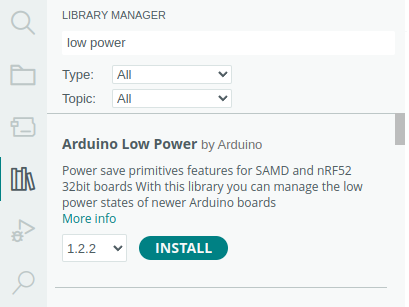
If you click on "More info", and then on "Go to repository", then look at how many stars it has and then see if the "Issues" are fixed.
It has 72 stars (good), but also 20 bugs (not good), and if you read this, then the library is only for one nRF52 board, the Primo board.
Arduino is open source. Some bugs takes years to fix. Everyone can write a library (good or bad).
The best way for an Arduino project is to tell us what your project is for (give a broad view of your project). Use common hardware and common software that everyone uses and stay away from boards that have two processors (double the trouble for the price of one).
This topic was automatically closed 180 days after the last reply. New replies are no longer allowed.