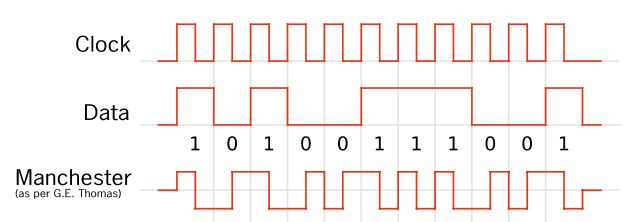
Please, I want to add encoding Manchester in my program,I searched a lot for a topic similar to my problem to benefit, but I did not find a solution that would help so I decided to present my problem.
my ldr senor give me values, and I want to convert it to a binary with the Manchester coding.
And now I want to program it so that
if it receives the light for a delay of 200 seconds and then does not receive anything for a delay of 200 seconds it gives me 1 bit,
esle if when it does not receives a light for a delay of 200 seconds and it receives a light of 200 seconds it gives me zero the attached program is approximate I want to correct it
gives me bit 0
this is approximate program I want to correct.
#define SOLARPIN A0
int ambientReading = 0;

void setup() {
  Serial.begin(9600);
  pinMode(SOLARPIN, INPUT);
  int ambientReading = analogRead(SOLARPIN);
  Serial.print("ambientReading ");
  Serial.println(ambientReading);
}
void loop() {

  int reading = analogRead(SOLARPIN);
  int bits[10];
  for (int i = 0; i < 10; i++) {
    if (reading > ambientReading )  delay(200)  &&   (reading = ambientReading ) delay(200) {

      bits[i] = 1;
    }
    else        (reading = ambientReading )  delay(200)  &&   (reading > ambientReading ) delay(200) {
      bits[i] = 0;
    }
  }
}
An example of Manchester encoding showing in image attacher
The problem with Manchester encoding and your setup is you do not know if the first bit is a zero or a one. Hopefully you have a fixed first bit.
However to recover a Manchester encoded signal you should look at measuring the time between edges using millis() and not try and use delay(). When you use delay you are relying on having a synchronised clock at both ends, which entirely negates to whole point of a self clocking protocol such as Manchester encoding.
Study the state change examples in the IDE for how to detect edges, and also the blink without delay for timing the duration of pulses with millis(). Then you can compare the elapsed time in a range to discover if you have a bit that lasted 1 or 2 cycles.
aarg:
Right. Well what is the problem? Do you not understand Manchester coding, or something else? Why have you chosen Manchester encoding?
thanks Mr, so i need to make ardouino indrestand this order
for (int i = 0; i < 10; i++) {
if (reading > ambientReading ) delay(200) && (reading = ambientReading ) delay(200) {
FYI the 4 USART of Arduino DUE (USART0/1/2/3) have a biphase Manchester II format feature. Therefore the 4 USART have a Manchester encoder and a Manchester decoder.
For more information, see pages 782 to 788 of Sam3x datasheet.
An example sketch to test Manchester encoding/decoding with a single DUE board:
/********************************************************************************/
/*        Biphase Manchester II format example with USART0 and USART1           */
/*   Hoock a jumper between RX1 and TX2 and onotrher one between TX1 and RX2    */
/********************************************************************************/

#define US_MAN_ONE (0x1u << 29) /**< \brief (US_MAN) Transmitter Manchester Polarity */
char c = 0;
void setup() {

  Serial.begin(250000);

  Serial1.begin(500000); // Serial1 is for USART0
  Serial2.begin(500000); // Serial2 is for USART1

  USART0->US_MR |= US_MR_MAN;

  USART0->US_MAN = US_MAN_ONE |
                   US_MAN_DRIFT;

  USART1->US_MR |= US_MR_MAN;

  USART1->US_MAN = US_MAN_ONE |
                   US_MAN_DRIFT;

  Serial2.print("Hello");
}


void loop() {
  String s;
  s = "";

  while (Serial1.available() > 0) {
    c = Serial1.read();
    s += c;

  }
  if (s.length() > 0) {
    Serial.println(s);
    Serial2.print(s);
  }
  delay(1000);
}
It looks like you are trying to read a ten-bit Manchester Encoded signal and decode it to binary. Why are you using an analog input to read a digital signal? The first thing to do is to reduce your analog signal to binary. You seem to be attempting to do that by taking one sample and using that as the threshold between 0 and 1. That won't work well because that one 'ambient' reading will be very close to the 0 level. Any noise above 0 will be counted as 1, even if it is very close to 0. You want the threshold to be half way between 0 and 1.
You can read every 400 milliseconds but you have to start 100 milliseconds after the first transition from 0 to 1.
const byte SOLARPIN = A0;
const unsigned BitTime = 400;  // Milliseconds per bit


int MaxLevel;
int MinLevel;
int Threshold = 0;


void setup()
{
  Serial.begin(9600);


  // Initialize the two levels to whatever the current input is.
  // As more samples arrive the threshold between 0 and 1 will be corrected to be
  // half way between the lowest level and highest level.
  MaxLevel = MinLevel = analogRead(SOLARPIN);
}


// Detect 0 and 1 inputs.  Adjusting the threshold based on new levels.
boolean GetReading()
{
  int reading = analogRead(SOLARPIN);
  if (reading > MaxLevel)
  {
    MaxLevel = reading;
    Serial.print("New MaxLevel: ");
    Serial.println(MaxLevel);
    Threshold = (MaxLevel + MinLevel) / 2;
    Serial.print("New Threshold: ");
    Serial.println(Threshold);
  }


  if (reading < MinLevel)
  {
    MinLevel = reading;
    Serial.print("New MinLevel: ");
    Serial.println(MinLevel);
    Threshold = (MaxLevel + MinLevel) / 2;
    Serial.print("New Threshold: ");
    Serial.println(Threshold);
  }


  return reading > Threshold;
}


void loop()
{
  unsigned int receivedValue = 0;


  // Wait for the start bit which must be a 1 bit.  If it is a 0 bit the timing will be wrong.
  while (GetReading() == 0)
  {
    // Do Nothing
  }


  delay(BitTime / 4); // Wait until 1/4 of a bit has passed


  // Now sample each bit at the 1/4 mark:
  for (int bit = 0; bit < 10; bit++)
  {
    receivedValue *= 2;  // Move the bits left one bit
    receivedValue += GetReading(); // Add the new bit at the bottom
    delay(BitTime);
  }


  // 'receivedValue' now contains the received 10-bit value.
  Serial.print("Received value (decimal)= ");
  Serial.println(receivedValue, DEC);  // Display as binary
  Serial.print("Received value (binary)= ");
  Serial.println(receivedValue, BIN);  // Display as binary
}