ESP32 S3 crashing on BLE connect to server

I'm using an ESP32-S3-WROOM dev board and trying to read data from a PowerTech bluetooth battery monitor. I'm certain that it is a BLE device because I have a bunch of scanner apps that report it as such.

The problem is that the ESP32 is resetting itself every time it connects to the BLE device.

The dev is being done in Arduino IDE 2.0. The selected board is ESP32S3 Dev Module.

I'm using Sensorslot's heart rate watch monitor sketch from GitHub - SensorsIot/Bluetooth-BLE-on-Arduino-IDE: Scketches which are used in my YouTube video. Pretty much all I have changed is the serviceUUID and charUUID. I was able to determine these from via the Android app, BLE Scanner. The Powertech batter monitor app reports the device's address, which I was able to identify in BLE Scanner. From there I was able to drill in and find the service id and characteristic id, which I entered into the code, below.

The code finds the device, creates a client and connects to the server. It finds the service and characteristic and seems to register for notification events... and then the ESP32 crashes and resets. A sample of the output is below. This is just an extract, it goes around and around in circles:

Starting Arduino BLE Client application...
BLE Advertised Device found: Name: , Address: 09:41:df:90:69:52, manufacturer data: 06000109200292439ae769adefa039d2d82ad7ed3fea807c906a535706
BLE Advertised Device found: Name: , Address: 69:92:63:52:85:fb, manufacturer data: 4c001005531c44517e, txPower: 12
BLE Advertised Device found: Name: , Address: 5f:5f:5f:e3:97:7e, manufacturer data: e000041dca912c18, serviceUUID: 0000fe9f-0000-1000-8000-00805f9b34fb
BLE Advertised Device found: Name: , Address: cb:c3:44:23:ac:33, manufacturer data: fc330305
BLE Advertised Device found: Name: LE_WH-1000XM4, Address: c7:e4:db:dd:85:80, serviceUUID: 0000fe03-0000-1000-8000-00805f9b34fb
BLE Advertised Device found: Name: , Address: 3c:9c:c3:90:f4:97, manufacturer data: 06000109200297dea6c6ad1343f03fedd07e51a1449cca4c394cf34143
BLE Advertised Device found: Name: , Address: 59:71:c5:cd:28:1c, manufacturer data: e0000426ca3695c2, serviceUUID: 0000fe9f-0000-1000-8000-00805f9b34fb
BLE Advertised Device found: Name: , Address: 54:7e:27:34:80:e6, manufacturer data: 4c0010053f18e91453, txPower: 8
BLE Advertised Device found: Name: , Address: 56:96:96:cd:77:46, manufacturer data: e0000422ca3c27d3, serviceUUID: 0000fe9f-0000-1000-8000-00805f9b34fb
BLE Advertised Device found: Name: , Address: 76:1f:cb:b2:93:99, manufacturer data: e0000421ca7d5fda, serviceUUID: 0000fe9f-0000-1000-8000-00805f9b34fb
BLE Advertised Device found: Name: Battery Monitor, Address: e0:62:34:e2:55:3d, serviceUUID: 0000fff0-0000-1000-8000-00805f9b34fb, txPower: 0
Found our device!  address: Forming a connection to e0:62:34:e2:55:3d
 - Created client
 - Connecting 1
 - Connected to server
 - Services: 0
 - Found our service
 - Created client
 - Connecting 1
 - Connected to server
 - Services: 0
 - Found our service
 - Found our characteristic
The characteristic value was: 
registerForNotify: start
registerForNotify: end
Guru Meditation Error: Core  1 panic'ed (LoadProhibited). Exception was unhandled.

Core  1 register dump:
PC      : 0x42006736  PS      : 0x00060830  A0      : 0x820032c5  A1      : 0x3fce2d60  
A2      : 0x00000000  A3      : 0x3fce2dce  A4      : 0x00000002  A5      : 0x00000001  
A6      : 0x3fcf7e74  A7      : 0x00010000  A8      : 0x3fc97e60  A9      : 0x3fce2d30  
A10     : 0x3fce2d7c  A11     : 0x3fcf7e78  A12     : 0x00000020  A13     : 0x40b98bf6  
A14     : 0x3fcf7e74  A15     : 0x3f012db0  SAR     : 0x00000013  EXCCAUSE: 0x0000001c  
EXCVADDR: 0x00000030  LBEG    : 0x40056fc5  LEND    : 0x40056fe7  LCOUNT  : 0x00000000  


Backtrace:0x42006733:0x3fce2d600x420032c2:0x3fce2db0 0x42003351:0x3fce2e20 0x42009475:0x3fce2e60 

BLE Advertised Device found: Name: , Address: 09:41:df:90:69:52, manufacturer data: 06000109200292439ae769adefa039d2d82ad7ed3fea807c906a535706
BLE Advertised Device found: Name: , Address: cb:c3:44:23:ac:33, manufacturer data: fc330305
BLE Advertised Device found: Name: , Address: c7:e4:db:dd:85:80, manufacturer data: 2d01040001310501c8e47ddf0440d5000000000000, txPower: -21
BLE Advertised Device found: Name: , Address: 54:7e:27:34:80:e6, manufacturer data: 4c0010053f18e91453, txPower: 8
BLE Advertised Device found: Name: , Address: 76:1f:cb:b2:93:99, manufacturer data: e0000421ca7d5fda, serviceUUID: 0000fe9f-0000-1000-8000-00805f9b34fb
BLE Advertised Device found: Name: , Address: 5f:5f:5f:e3:97:7e, manufacturer data: e000041dca912c18, serviceUUID: 0000fe9f-0000-1000-8000-00805f9b34fb
BLE Advertised Device found: Name: Battery Monitor, Address: e0:62:34:e2:55:3d, serviceUUID: 0000fff0-0000-1000-8000-00805f9b34fb, txPower: 0
Found our device!  address: Forming a connection to e0:62:34:e2:55:3d
 - Created client
 - Connecting 1
 - Connected to server
 - Services: 0
 - Found our service
 - Found our characteristic
The characteristic value was: 
registerForNotify: start
registerForNotify: end
Guru Meditation Error: Core  1 panic'ed (LoadProhibited). Exception was unhandled.

Core  1 register dump:
PC      : 0x42006736  PS      : 0x00060830  A0      : 0x820032c5  A1      : 0x3fce2d60  
A2      : 0x00000000  A3      : 0x3fce2dce  A4      : 0x00000002  A5      : 0x00000001  
A6      : 0x3fcf7e74  A7      : 0x00010000  A8      : 0x3fc97e60  A9      : 0x3fce2d30  
A10     : 0x3fce2d7c  A11     : 0x3fcf7e78  A12     : 0x00000020  A13     : 0x40b98bf6  
A14     : 0x3fcf7e74  A15     : 0x3f012db0  SAR     : 0x00000013  EXCCAUSE: 0x0000001c  
EXCVADDR: 0x00000030  LBEG    : 0x40056fc5  LEND    : 0x40056fe7  LCOUNT  : 0x00000000  


Backtrace:0x42006733:0x3fce2d600x420032c2:0x3fce2db0 0x42003351:0x3fce2e20 0x42009475:0x3fce2e60 


ELF file SHA256: 0000000000000000

The sketch is below:

/*
 * 
 * This sketch emulates a Heart rate watch and is able to receive BLE signals of a Polar H7 Heart Rate Sensor. 
 * It shows the received values in Serial and is also able to switch notificaton on the sensor on and off (using BLE2902)
 
   Copyright <2017> <Andreas Spiess>

  Permission is hereby granted, free of charge, to any person obtaining a copy of this software and associated documentation files (the "Software"),
  to deal in the Software without restriction, including without limitation the rights to use, copy, modify, merge, publish, distribute, sublicense,
  and/or sell copies of the Software, and to permit persons to whom the Software is furnished to do so, subject to the following conditions:

  The above copyright notice and this permission notice shall be included in all copies or substantial portions of the Software.

  THE SOFTWARE IS PROVIDED "AS IS", WITHOUT WARRANTY OF ANY KIND, EXPRESS OR IMPLIED, INCLUDING BUT NOT LIMITED TO THE WARRANTIES OF MERCHANTABILITY,
  FITNESS FOR A PARTICULAR PURPOSE AND NONINFRINGEMENT. IN NO EVENT SHALL THE AUTHORS OR COPYRIGHT HOLDERS BE LIABLE FOR ANY CLAIM, DAMAGES OR OTHER
  LIABILITY, WHETHER IN AN ACTION OF CONTRACT, TORT OR OTHERWISE, ARISING FROM, OUT OF OR IN CONNECTION WITH THE SOFTWARE OR THE USE OR OTHER
  DEALINGS IN THE SOFTWARE.
   
   Based on Neil Kolban's example file: https://github.com/nkolban/ESP32_BLE_Arduino
 */

#include "BLEDevice.h"
//#include "BLEScan.h"

// The remote service we wish to connect to.
static  BLEUUID serviceUUID(BLEUUID((uint16_t)0x1801));
// The characteristic of the remote service we are interested in.
static BLEUUID    charUUID(BLEUUID((uint16_t)0x2a05));

static BLEAddress *pServerAddress;
static boolean doConnect = false;
static boolean connected = false;
static BLERemoteCharacteristic* pRemoteCharacteristic;

BLEUUID powerPalUUID;

static void notifyCallback(
  BLERemoteCharacteristic* pBLERemoteCharacteristic,
  uint8_t* pData,
  size_t length,
  bool isNotify) {
  Serial.print("Notify callback for characteristic ");
  for (int i = 0; i < length; i++) {
    Serial.print(pData[i]);
    Serial.print(" ");
  }
  Serial.println();
}

bool connectToServer(BLEAddress pAddress) {
  Serial.print("Forming a connection to ");
  Serial.println(pAddress.toString().c_str());

  BLEClient*  pClient  = BLEDevice::createClient();
  Serial.println(" - Created client");

  // Connect to the remove BLE Server.
  Serial.print(" - Connecting "); Serial.println(pClient->connect(pAddress));
  Serial.println(" - Connected to server");

  Serial.print(" - Services: "); Serial.println(String(pClient->getConnId()));

  // Obtain a reference to the service we are after in the remote BLE server.
  BLERemoteService* pRemoteService = pClient->getService(serviceUUID);
  if (pRemoteService == nullptr) {
    Serial.print("Failed to find our service UUID: ");
    Serial.println(serviceUUID.toString().c_str());
    return false;
  }
  Serial.println(" - Found our service");


  // Obtain a reference to the characteristic in the service of the remote BLE server.
  pRemoteCharacteristic = pRemoteService->getCharacteristic(charUUID);
  if (pRemoteCharacteristic == nullptr) {
    Serial.print("Failed to find our characteristic UUID: ");
    Serial.println(charUUID.toString().c_str());
    return false;
  }
  Serial.println(" - Found our characteristic");

  // Read the value of the characteristic.
  std::string value = pRemoteCharacteristic->readValue();
  Serial.print("The characteristic value was: ");
  Serial.println(value.c_str());
  Serial.println("registerForNotify: start");
  pRemoteCharacteristic->registerForNotify(notifyCallback);
  Serial.println("registerForNotify: end");

  const uint8_t indicationOn[] = {0x2, 0x0};
  pRemoteCharacteristic->getDescriptor(BLEUUID((uint16_t)0x2902))->writeValue((uint8_t*)indicationOn, 2, true);
}
/**
   Scan for BLE servers and find the first one that advertises the service we are looking for.
*/
class MyAdvertisedDeviceCallbacks: public BLEAdvertisedDeviceCallbacks {
    /**
        Called for each advertising BLE server.
    */
    void onResult(BLEAdvertisedDevice advertisedDevice) {
      Serial.print("BLE Advertised Device found: ");
      Serial.println(advertisedDevice.toString().c_str());

      // We have found a device, let us now see if it contains the service we are looking for.
      if (advertisedDevice.haveServiceUUID() && advertisedDevice.getServiceUUID().equals(serviceUUID)) {

        //
        Serial.print("Found our device!  address: ");
        advertisedDevice.getScan()->stop();

        pServerAddress = new BLEAddress(advertisedDevice.getAddress());
        doConnect = true;

      } // Found our server
    } // onResult
}; // MyAdvertisedDeviceCallbacks


void setup() {
  Serial.begin(115200);
  Serial.println("Starting Arduino BLE Client application...");
  BLEDevice::init("");

  // Retrieve a Scanner and set the callback we want to use to be informed when we
  // have detected a new device.  Specify that we want active scanning and start the
  // scan to run for 30 seconds.
  BLEScan* pBLEScan = BLEDevice::getScan();
  pBLEScan->setAdvertisedDeviceCallbacks(new MyAdvertisedDeviceCallbacks());
  pBLEScan->setActiveScan(true);
  pBLEScan->start(30);
} // End of setup.


const uint8_t notificationOff[] = {0x0, 0x0};
const uint8_t notificationOn[] = {0x1, 0x0};
bool onoff = true;
void loop() {

  // If the flag "doConnect" is true then we have scanned for and found the desired
  // BLE Server with which we wish to connect.  Now we connect to it.  Once we are
  // connected we set the connected flag to be true.
  if (doConnect == true) {
    if (connectToServer(*pServerAddress)) {
      Serial.println("We are now connected to the BLE Server.");
      connected = true;
    } else {
      Serial.println("We have failed to connect to the server; there is nothin more we will do.");
    }
    doConnect = false;
  }

  // If we are connected to a peer BLE Server, update the characteristic each time we are reached
  // with the current time since boot.
  if (connected) {
    if (onoff) {
      Serial.println("Notifications turned on");
      pRemoteCharacteristic->getDescriptor(BLEUUID((uint16_t)0x2902))->writeValue((uint8_t*)notificationOn, 2, true);
    }
    else     {
      Serial.println("Notifications turned off");
      pRemoteCharacteristic->getDescriptor(BLEUUID((uint16_t)0x2902))->writeValue((uint8_t*)notificationOff, 2, true);
    }

    onoff = onoff ? 0 : 1;
  }

  delay(10000); // Delay a second between loops.
} // End of loop


This is the Powertech Battery Monitor app, showing the device address


This is the BLE Scanner app, identifying the device at the expected address
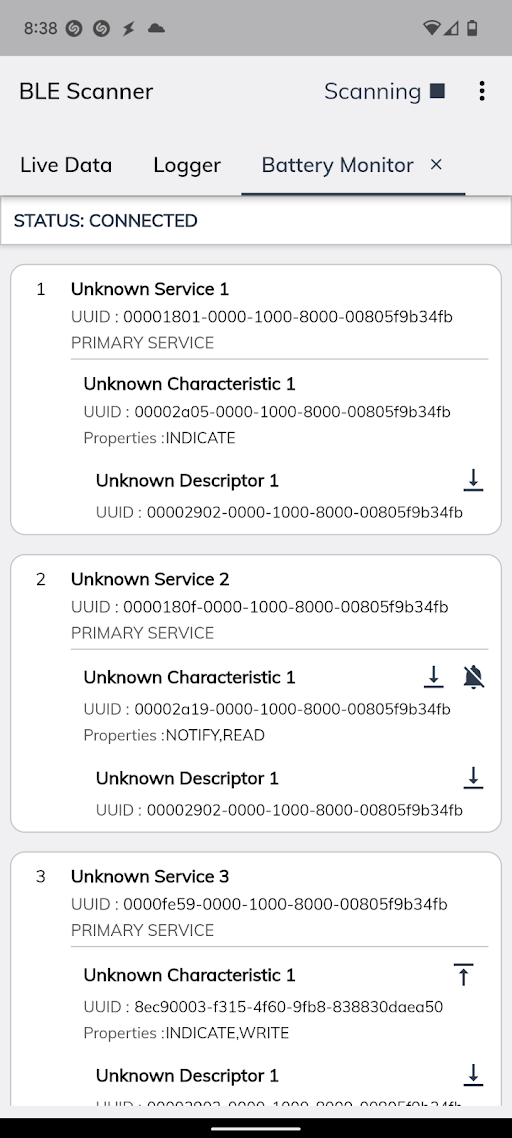

Service and characteristic id's in BLE Scanner

Any thought on why the device is repeatedly crashing would be greatly appreciated.

I would look into the following first.

This does not print anything according to your log.

// The remote service we wish to connect to.
static  BLEUUID serviceUUID(BLEUUID((uint16_t)0x1801));
// The characteristic of the remote service we are interested in.
static BLEUUID    charUUID(BLEUUID((uint16_t)0x2a05));

I think you are not using the correct service/characteristic.

The Battery Service UUID is 0x180F and the battery level characterisitc UUID is 0x2A19.

That is what is shown on the scanner for Service2.

UUID = 0x1801 is Generic Attribute Service

I'm getting an extended character here that I cannot paste into this post. It's not null. But I'm not sure what I should be expecting here. @jfjlaros

@cattledog The BLE Scanner actually shows 5 "Unknown Services", and they seem to swap order in the scanner. I've tried a couple of them, including 0x180f, but not all though. Sometimes the sketch finds them and I get the circular ESP32 resetting, sometimes it doesn't find them.

I would suggest that you use LightBlue as the app to look at your battery device.

You will see which service to connect with to see the actual data you want to read.

Thanks @cattledog, LightBlue looks really useful. When I subscribe to service fff0 and characteristic fff4 I've get a string of data once per second, which is how often the app updates. But the data is a hex string that changes wildly each time, and is unreadable as a string (extended characters). Any thoughts on what I could do with this kind of data?

Thanks for your input!

After changing the sketch to the following service and characteristic, as found in LightBlue:

// The remote service we wish to connect to.
static  BLEUUID serviceUUID(BLEUUID((uint16_t)0xfff0));
// The characteristic of the remote service we are interested in.
static BLEUUID    charUUID(BLEUUID((uint16_t)0xfff4));

...I'm now getting a steady stream of data in the serial monitor, e.g.:

Notify callback for characteristic 130 196 171 4 156 144 204 181 28 224 106 69 148 220 15 101 
Notify callback for characteristic 17 126 229 100 67 178 131 119 172 146 6 197 87 214 50 115 
Notify callback for characteristic 254 237 25 187 40 107 10 94 110 187 172 62 128 252 179 77 
Notify callback for characteristic 190 52 172 20 209 247 77 84 85 95 10 172 22 245 125 158 
Notify callback for characteristic 83 118 191 6 232 26 55 247 189 255 174 10 161 120 75 0 
Notify callback for characteristic 222 230 129 122 132 102 155 35 67 31 54 231 121 222 167 69 
Notify callback for characteristic 124 223 248 92 154 34 147 67 90 4 29 26 45 23 47 179 
Notify callback for characteristic 66 150 251 247 214 100 13 37 156 167 241 178 53 232 189 216 
Notify callback for characteristic 58 149 88 158 5 121 119 64 26 69 252 178 229 217 139 218 
Notify callback for characteristic 0 155 115 104 63 114 141 103 21 109 176 90 193 249 238 78 

I'm just not sure what to do with it. This is a battery monitor. The vendor app simply updates the display once per second with the battery charge %, which barely fluctuates when connected to a bench power supply, as I have it.

Any thoughts on how to handle this data?

In LightBlue use the Data Format pulldown to select a text or numerical format.

I am still concerned that you are not using Service 180F and Characteristic 2A19. What do see with those UUIDs in LightBlue?

I have tried the various data formats and it's seemingly illegible in all of them:

The thing is that I don't see that service at all in LightBlue. LightBlue shows fff0 and ffc0 services. I went back to BLE Scanner and it shows 1801, ffc0, 1800, fff0 and 180a. Weird right?

You can also try nrfConnect as your app. To me its not as friendly as Light Blue, but you should be able to see the services/characteristics.

It's Proprietary ?

This was good advice, thank you. Using this app I was not only able to see the 0x180f service and 0x2a19 characteristic, but also see legible, accurate battery-level data out of it.

Oddly though, I'm unable to connect to it in my sketch. For some reason the characteristic UID is never found. Here's the output during the scan:

load:0x3fcd0108,len:0x43c
load:0x403b6000,len:0xbd0
load:0x403ba000,len:0x29c8
entry 0x403b61d8
Starting Arduino BLE Client application...
BLE Advertised Device found: Name: Battery Monitor, Address: e0:62:34:e2:55:3d, manufacturer data: d81766f3ad5eef70072a24060543ed3d, serviceUUID: 0000fff0-0000-1000-8000-00805f9b34fb, txPower: 0
BLE Advertised Device found: Name: , Address: cb:c3:44:23:ac:33, manufacturer data: fc330305
BLE Advertised Device found: Name: , Address: 35:46:53:92:5a:5c, manufacturer data: 060001092002e9bafd767db74a2865d7c4c376c2f97d83c5f1bba36885
BLE Advertised Device found: Name: LE_WH-1000XM4, Address: cb:5e:3f:d4:c2:a4, serviceUUID: 0000fe03-0000-1000-8000-00805f9b34fb
BLE Advertised Device found: Name: , Address: c1:64:3b:e6:98:eb, manufacturer data: 4c001219002aa6cfe0ead5e9226eff9aedd08516b877cc47e5ee790000
BLE Advertised Device found: Name: , Address: 70:aa:27:57:60:93, manufacturer data: e0000421ca7d5fda, serviceUUID: 0000fe9f-0000-1000-8000-00805f9b34fb
BLE Advertised Device found: Name: , Address: 5b:9b:9b:9b:04:6a, manufacturer data: e000041dca912c18, serviceUUID: 0000fe9f-0000-1000-8000-00805f9b34fb
BLE Advertised Device found: Name: , Address: 46:03:17:7c:2c:53, manufacturer data: 4c00100506182b3b8a, txPower: 12
BLE Advertised Device found: Name: Powerpal 0002f8c7, Address: cf:f8:66:7d:08:6c, serviceUUID: 59daabcd-12f4-25a6-7d4f-55961dce4205
BLE Advertised Device found: Name: , Address: 46:c3:01:c7:9a:8a, manufacturer data: e0000426ca3695c2, serviceUUID: 0000fe9f-0000-1000-8000-00805f9b34fb
BLE Advertised Device found: Name: , Address: eb:21:90:f0:d6:64, manufacturer data: 4c0012020000
BLE Advertised Device found: Name: , Address: 4a:21:94:9d:a9:bb, manufacturer data: e0000424ca5d6470, serviceUUID: 0000fe9f-0000-1000-8000-00805f9b34fb

Note: it's the PowerPal device that has the service id 180f, as reported by various BLE scanner apps, not the Battery Monitor. But the PowerPal device doesn't seem to advertise the service id 180f in my sketch (per the output above)

Yes, absolutely. I've purchased the device, I'm just trying to redirect its output. The app nRF Connect seems to read it easily, I'm just trying to replicate that.

Now you get to be a cryptologist.

I am very confused by your environment and the proliferation of reported devices on the scan. Perhaps it relates to the ESP32 S3 and BLE5. Do nrfConnect and Light Blue report the same devices as the esp 32 scan?

If you just run the basic esp32 scan example sketch, what is reported? Is it the long list of devices?

If nrfConnect is finding the device, can connect to it, and report the data, then I would think that LightBlue and the ESP32 code could do the same.

The list changes slightly each time. Here's some of the output:

Scanning...
Advertised Device: Name: Battery Monitor, Address: e0:62:34:e2:55:3d, manufacturer data: 4c000215655f83caae16a10a702e31f30d58dd82f002000000, txPower: 0 
Advertised Device: Name: , Address: cb:c3:44:23:ac:33, manufacturer data: fc330305 
Advertised Device: Name: , Address: 4b:4b:4b:9f:15:1c, manufacturer data: e000041dca912c18, serviceUUID: 0000fe9f-0000-1000-8000-00805f9b34fb 
Advertised Device: Name: , Address: 21:85:d1:b3:f3:7d, manufacturer data: 06000109200234eb501fcdcdb690b3e6f8d3f93248ae75feeac5162452 
Advertised Device: Name: , Address: 74:bd:cf:29:c1:9a, manufacturer data: 4c0010050818af2384, txPower: 12 
Advertised Device: Name: , Address: 49:1d:f7:96:91:81, manufacturer data: e0000426ca3695c2, serviceUUID: 0000fe9f-0000-1000-8000-00805f9b34fb 
Advertised Device: Name: , Address: 76:1b:2d:a0:af:5e, manufacturer data: e0000424ca5d6470, serviceUUID: 0000fe9f-0000-1000-8000-00805f9b34fb 
Advertised Device: Name: , Address: 78:c4:ba:fd:44:4a, manufacturer data: e0000421ca7d5fda, serviceUUID: 0000fe9f-0000-1000-8000-00805f9b34fb 
Advertised Device: Name: , Address: 73:d2:34:73:8a:ea, manufacturer data: 4c0010050318c4c3d0, txPower: 7 
Advertised Device: Name: , Address: fc:3b:e2:c9:6e:f0, manufacturer data: 4c001219005f3f6e2c7ad323548c6149c0c926be406a3f6ecd33600200 
Advertised Device: Name: , Address: 53:66:e1:48:65:c8, manufacturer data: 7500021821a1692840fa1dd4c065b3f590d278ae 
Devices found: 11
Scan done!
Advertised Device: Name: Battery Monitor, Address: e0:62:34:e2:55:3d, manufacturer data: cb16209294cbf568022b2aa7b99bccb4, serviceUUID: 0000fff0-0000-1000-8000-00805f9b34fb, txPower: 0 
Advertised Device: Name: , Address: 4b:4b:4b:9f:15:1c, manufacturer data: e000041dca912c18, serviceUUID: 0000fe9f-0000-1000-8000-00805f9b34fb 
Advertised Device: Name: , Address: 21:85:d1:b3:f3:7d, manufacturer data: 06000109200234eb501fcdcdb690b3e6f8d3f93248ae75feeac5162452 
Advertised Device: Name: , Address: 78:c4:ba:fd:44:4a, manufacturer data: e0000421ca7d5fda, serviceUUID: 0000fe9f-0000-1000-8000-00805f9b34fb 
Advertised Device: Name: , Address: 49:1d:f7:96:91:81, manufacturer data: e0000426ca3695c2, serviceUUID: 0000fe9f-0000-1000-8000-00805f9b34fb 
Advertised Device: Name: , Address: cb:c3:44:23:ac:33, manufacturer data: fc330305 
Advertised Device: Name: , Address: 74:bd:cf:29:c1:9a, manufacturer data: 4c0010050818af2384, txPower: 12 
Advertised Device: Name: , Address: fc:3b:e2:c9:6e:f0, manufacturer data: 4c001219005f3f6e2c7ad323548c6149c0c926be406a3f6ecd33600200 
Advertised Device: Name: , Address: 76:1b:2d:a0:af:5e, manufacturer data: e0000424ca5d6470, serviceUUID: 0000fe9f-0000-1000-8000-00805f9b34fb 
Advertised Device: Name: Powerpal 0002f8c7, Address: cf:f8:66:7d:08:6c, serviceUUID: 59daabcd-12f4-25a6-7d4f-55961dce4205 
Advertised Device: Name: , Address: 73:d2:34:73:8a:ea, manufacturer data: 4c0010050318c4c3d0, txPower: 7 
Advertised Device: Name: , Address: 53:66:e1:48:65:c8, manufacturer data: 7500021821a1692840fa1dd4c065b3f590d278ae 
Devices found: 12
Scan done!
Advertised Device: Name: , Address: 21:85:d1:b3:f3:7d, manufacturer data: 06000109200234eb501fcdcdb690b3e6f8d3f93248ae75feeac5162452 

But nowhere in this list is the PowerPal service UUID 0x180f that shows up in the other scanners.

Not necessary, by the look of it. I believe I was looking at the wrong service/characteristic before. The PowerPal service 0x180f with and Characteristic 2A19 is displaying the correct data in scanner apps. Just need to figure out why I can't connect to it in a sketch

Just need to figure out why I can't connect to it in a sketch

Can you try to connect to the server by the known address.

Advertised Device: Name: Powerpal 0002f8c7, Address: cf:f8:66:7d:08:6c

If you forget about the specific service and characteristic, can you at least connect to the correct device?

Can you post what nrfConnect or LightBlue is showing for the PowerPal? Are the two apps consistent with each other for what they show?

Can you please post your latest sketch.

Thanks so much for your efforts, @cattledog. Your help is greatly appreciated.

I tried to connect directly, but the sketch hung on the call to connect. Here's what I tried:

static BLEAddress macAddress = BLEAddress("cf:f8:66:7d:08:6c");
...
void loop() {
    if (connectToServer(macAddress)) {
      Serial.println("We are now connected to the BLE Server.");
      connected = true;
    } else {
      Serial.println("We have failed to connect to the server; there is nothin more we will do.");
    }
}

The output shows that it creates the client and connects to the server, but it never returns from the call for the client to connect to the service 0x180f. Output after a couple of minutes is:

ESP-ROM:esp32s3-20210327
Build:Mar 27 2021
rst:0x1 (POWERON),boot:0x8 (SPI_FAST_FLASH_BOOT)
SPIWP:0xee
mode:DIO, clock div:1
load:0x3fcd0108,len:0x43c
load:0x403b6000,len:0xbd0
load:0x403ba000,len:0x29c8
entry 0x403b61d8
Starting Arduino BLE Client application...
Forming a connection to cf:f8:66:7d:08:6c
 - Created client
 - Connected to server

The current sketch is as follows:

/*
 * 
 * This sketch emulates a Heart rate watch and is able to receive BLE signals of a Polar H7 Heart Rate Sensor. 
 * It shows the received values in Serial and is also able to switch notificaton on the sensor on and off (using BLE2902)
 
   Copyright <2017> <Andreas Spiess>

  Permission is hereby granted, free of charge, to any person obtaining a copy of this software and associated documentation files (the "Software"),
  to deal in the Software without restriction, including without limitation the rights to use, copy, modify, merge, publish, distribute, sublicense,
  and/or sell copies of the Software, and to permit persons to whom the Software is furnished to do so, subject to the following conditions:

  The above copyright notice and this permission notice shall be included in all copies or substantial portions of the Software.

  THE SOFTWARE IS PROVIDED "AS IS", WITHOUT WARRANTY OF ANY KIND, EXPRESS OR IMPLIED, INCLUDING BUT NOT LIMITED TO THE WARRANTIES OF MERCHANTABILITY,
  FITNESS FOR A PARTICULAR PURPOSE AND NONINFRINGEMENT. IN NO EVENT SHALL THE AUTHORS OR COPYRIGHT HOLDERS BE LIABLE FOR ANY CLAIM, DAMAGES OR OTHER
  LIABILITY, WHETHER IN AN ACTION OF CONTRACT, TORT OR OTHERWISE, ARISING FROM, OUT OF OR IN CONNECTION WITH THE SOFTWARE OR THE USE OR OTHER
  DEALINGS IN THE SOFTWARE.
   
   Based on Neil Kolban's example file: https://github.com/nkolban/ESP32_BLE_Arduino
 */

#include "BLEDevice.h"
//#include "BLEScan.h"

// The remote service we wish to connect to.
static  BLEUUID serviceUUID(BLEUUID((uint16_t)0x180f));
// The characteristic of the remote service we are interested in.
static BLEUUID    charUUID(BLEUUID((uint16_t)0x2A19));

static BLEAddress *pServerAddress;
static boolean doConnect = false;
static boolean connected = false;
static BLERemoteCharacteristic* pRemoteCharacteristic;

static void notifyCallback(
  BLERemoteCharacteristic* pBLERemoteCharacteristic,
  uint8_t* pData,
  size_t length,
  bool isNotify) {
  Serial.print("Notify callback for characteristic ");
  for (int i = 0; i < length; i++) {
    Serial.print(pData[i]);
    Serial.print(" ");
  }
  Serial.println();
}

bool connectToServer(BLEAddress pAddress) {
  Serial.print("Forming a connection to ");
  Serial.println(pAddress.toString().c_str());

  BLEClient*  pClient  = BLEDevice::createClient();
  Serial.println(" - Created client");

  // Connect to the remove BLE Server.
  pClient->connect(pAddress);
  Serial.println(" - Connected to server");

  // Obtain a reference to the service we are after in the remote BLE server.
  BLERemoteService* pRemoteService = pClient->getService(serviceUUID);
  if (pRemoteService == nullptr) {
    Serial.print("Failed to find our service UUID: ");
    Serial.println(serviceUUID.toString().c_str());
    return false;
  }
  Serial.println(" - Found our service");


  // Obtain a reference to the characteristic in the service of the remote BLE server.
  pRemoteCharacteristic = pRemoteService->getCharacteristic(charUUID);
  if (pRemoteCharacteristic == nullptr) {
    Serial.print("Failed to find our characteristic UUID: ");
    Serial.println(charUUID.toString().c_str());
    return false;
  }
  Serial.println(" - Found our characteristic");

  // Read the value of the characteristic.
  std::string value = pRemoteCharacteristic->readValue();
  Serial.print("The characteristic value was: ");
  Serial.println(value.c_str());

  pRemoteCharacteristic->registerForNotify(notifyCallback);
}
/**
   Scan for BLE servers and find the first one that advertises the service we are looking for.
*/
class MyAdvertisedDeviceCallbacks: public BLEAdvertisedDeviceCallbacks {
    /**
        Called for each advertising BLE server.
    */
    void onResult(BLEAdvertisedDevice advertisedDevice) {
      Serial.print("BLE Advertised Device found: ");
      Serial.println(advertisedDevice.toString().c_str());

      // We have found a device, let us now see if it contains the service we are looking for.
      if (advertisedDevice.haveServiceUUID() && advertisedDevice.getServiceUUID().equals(serviceUUID)) {

        //
        Serial.print("Found our device!  address: ");
        advertisedDevice.getScan()->stop();

        pServerAddress = new BLEAddress(advertisedDevice.getAddress());
        doConnect = true;

      } // Found our server
    } // onResult
}; // MyAdvertisedDeviceCallbacks


void setup() {
  Serial.begin(115200);
  Serial.println("Starting Arduino BLE Client application...");
  BLEDevice::init("");

  // Retrieve a Scanner and set the callback we want to use to be informed when we
  // have detected a new device.  Specify that we want active scanning and start the
  // scan to run for 30 seconds.
  BLEScan* pBLEScan = BLEDevice::getScan();
  pBLEScan->setAdvertisedDeviceCallbacks(new MyAdvertisedDeviceCallbacks());
  pBLEScan->setActiveScan(true);
  pBLEScan->start(30);
} // End of setup.


const uint8_t notificationOff[] = {0x0, 0x0};
const uint8_t notificationOn[] = {0x1, 0x0};
bool onoff = true;
void loop() {

  // If the flag "doConnect" is true then we have scanned for and found the desired
  // BLE Server with which we wish to connect.  Now we connect to it.  Once we are
  // connected we set the connected flag to be true.
  if (doConnect == true) {
    if (connectToServer(*pServerAddress)) {
      Serial.println("We are now connected to the BLE Server.");
      connected = true;
    } else {
      Serial.println("We have failed to connect to the server; there is nothin more we will do.");
    }
    doConnect = false;
  }

  // If we are connected to a peer BLE Server, update the characteristic each time we are reached
  // with the current time since boot.
  if (connected) {
    if (onoff) {
      Serial.println("Notifications turned on");
      pRemoteCharacteristic->getDescriptor(BLEUUID((uint16_t)0x2902))->writeValue((uint8_t*)notificationOn, 2, true);
    }
    else     {
      Serial.println("Notifications turned off");
      pRemoteCharacteristic->getDescriptor(BLEUUID((uint16_t)0x2902))->writeValue((uint8_t*)notificationOff, 2, true);
    }

    onoff = onoff ? 0 : 1;
  }

  delay(10000); // Delay a second between loops.
} // End of loop

Here is what LightBlue sees:

And here's drilling into the Battery Level characteristic. The value (Hex 63) doesn't seem to change when I fiddle with the voltage and click Read Again, as it does in the proprietary app.

Here's what nRF Scanner sees:


The "Value" reading of 100% under 2A19 does change when I change the power supply input level, so I'm sure this is the data I want.