Feedback on circuit board for custom Flight Controller

Hi!

I am back in the game with trying to make a much better version of my completley made from scratch drone (no flight controllers, RC recivers and stuff).

I have experimented now for a couple of years making circuit boards with EasyEDA and ordering circuit boards from JLC PCB, but I am wondering if anyone would like to check my design and see if there are improvments to be made.

Also, everytime I order a circuit board, and I test it, I have misswired some stuff, so if someone has some time over and wants to help me with a check it would be amazing!

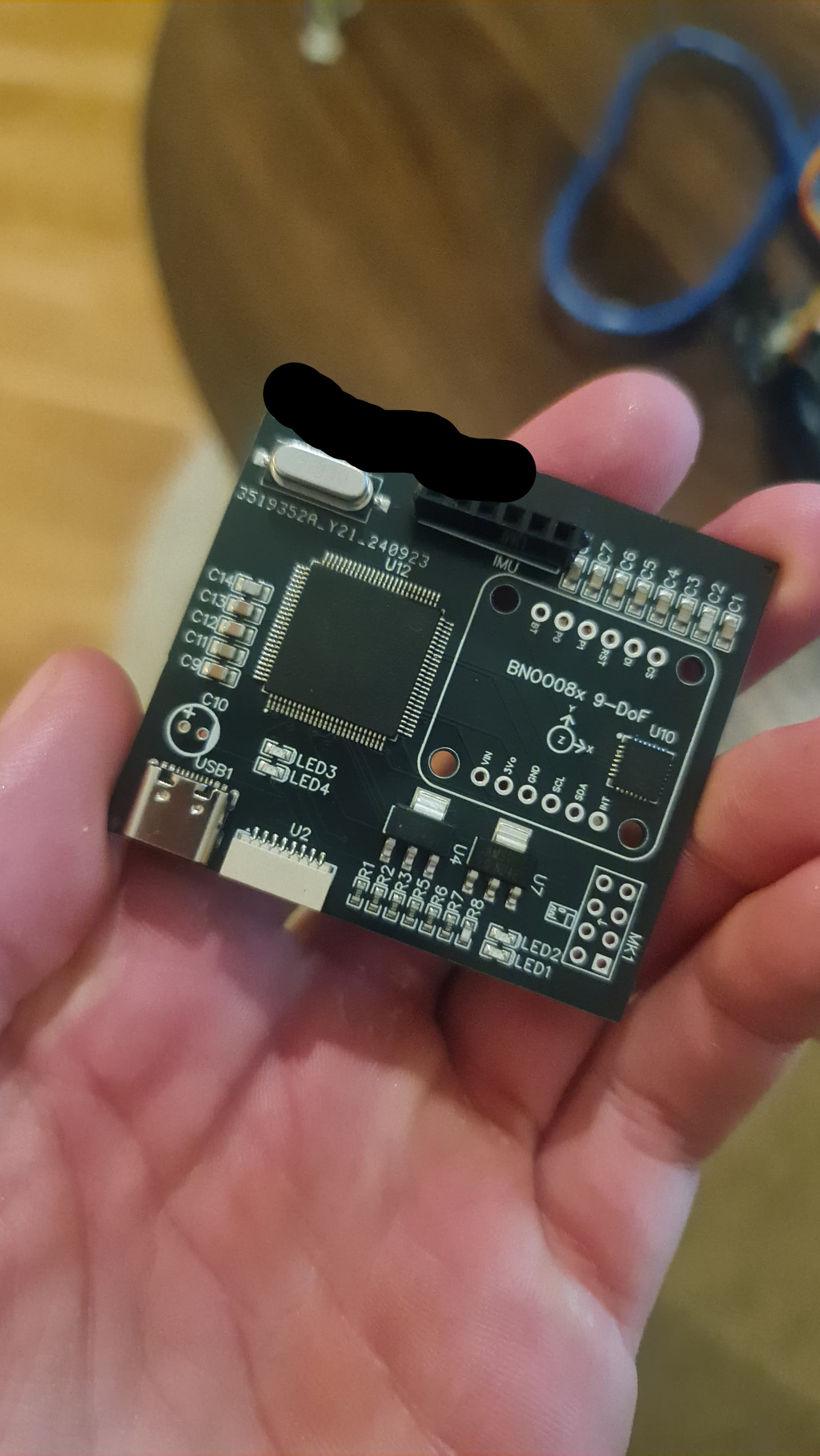
Here is my latest circuit board:

The components I use are:
BNO085
ATmega2560 (16Mhz)
NRF24L01+PA+LNA (I have never ever got the PA+LNA to work with my own 3.3v converters, so I use the "hat" I think it is called with an extra 40 something microfarad to make it work, therefore it is direcly wired to 5v on the ATmega)
ESC is some kind of BetaFlight, use the JT connector I believe it is called, motors wired to pins: 3,4,6,7 (pin 5 seems to be some kind of AIN[1], dont know what that means but skipped that pin)

My goal in the next version of this circuit board is to have the BNO085 chip direcly on the PCB instead of an extra layer of PCB on top of mine, this to make it easier to direcly order the PCB with SMB pre soldered :wink: And also the NRF oc course :slight_smile:

Thanks in advance!
Best regards Max

1 Like

DTR is not found anyware.
The LED3 and 4 are reversed.

Why not build it on a breadboard and test it first?

2 Likes

DTR is here?

image

Should it be wired to the ATmega to maybe? And not via the RST pin?
I wired it via this guide:

How can I test it on a breadboard with the ATmega2560 chip?

Thanks!
Br Max

Get a socket that adapts the circuit to breadboard friendly work. Often circuits are availanle in different packages. Use a package suitable for bredbord work.
Another option might be ordering a little circuit board giving You pads for soldering bredboard type pins.

1 Like

How will you program the bootloader on the 2560?
That USB connector looks a little strange.
I think you should study the datasheets of all the components you are using.

1 Like

Your LEDs are connected the wrong way round.

I'd put a Schottky diode on the Mega's RST to +5V with the anode to RST and cathode to 5V. This prevents the controller from accidentally entering HV programming mode and erasing the flash memory in the process; this is rare, but I've had it happen on some boards with Microchip/Atmel controllers.

I'd add pullups on the SCL and SDA. I assume your gyro module probably has 10k pullups, but these may be too marginal for reliable operation depending on your board layout. Use something like 3k3 or 4k7.

The pinout on your USB connector looks sketchy. I think you've used a USB-C part that only breaks out the power-related pins. This won't work for data transfer. You need to use a USB-C connector that also breaks out the DP and DN pins. The CC pins are for communicating/setting voltage & current. Read up on the USB-C PD (power distribution) spec to see how you want to wire these; off the top of my head you can leave them unconnected if you just want 5V from the USB host.

image
This bit is confusing; I assume you intend this not as a 3.3V supply (which appears to be below this bit), but as a regulator that will make 5V from an unspecified Vcc. Where is this Vcc coming from, what voltage is it, and how much current draw do you expect for the entire project? If it's just the Mega, a gyro and some LEDs, you should be OK with a linear regulator unless your input voltage is very high. You should be OK if Vcc happens to be 7 - 12V or so. Does it come from a LiIon battery pack or something?

image
Do you use a module that has an onboard regulator that makes 3.3V for the radio chip? The NRF24L01 itself is a 3.3V part. There's always some debate whether its logic pins are 5V tolerant (you're running the Mega on 3.3V after all). Look into this. Your Mega runs at 5V so you have a potential issue here. You may need logic level converters.

image
Decoupling caps are missing. You need 100nF on each of these pins.

image
Do you use a crystal or a ceramic oscillator? In case of the latter, this is OK but the part shown is wrong. If you're using a crystal as shown, you're missing the caps. You need something like 22pF on both XTAL pins.

Please read the documentation of the MEGA2560 and the relevant application notes; Microchip has good documentation that clearly explains everything I've said above about clock input, reset circuitry, power supply decoupling and many more things. It's clear you've not read any of this yet, so start studying.

I assume you've familiarized yourself with its datasheet and that you've tested it on a breadboard setup with a microcontroller and that you've confirmed in doing so that you're implementing it correctly on this board as well.

You might want to consider bringing out a couple of GPIO's to a connector for testing & expansion purposes. I'd also bring out I2C SCL/SDA , GND and +5V.

1 Like

Thank you for your amazing response! It is really appriciated!

I'd put a Schottky diode on the Mega's RST to +5V

Will look into it!

The USB seems a bit sketchy to me too, I used this guide for the setup of the Mega but I wanted to try a USB C, but I wasent 100% sure how to wire it but tried to make it a little bit like the tutorial:

This bit is confusing; I assume you intend this not as a 3.3V supply

Sorry! I see now that I forgot to change the label, and missing information about the VCC, the VCC currently takes in a 3s lipo battery (11.1v) with abount 4000mAh. It is mean to supply 5v, and then there is also a 3.3v converter onboard.

Do you use a module that has an onboard regulator that makes 3.3V for the radio chip? The NRF24L01 itself is a 3.3V part

The NRF I have worked with for a while, but the pins onboard seem to work with 5v logic via the SPI connection. I use this kind of hat with an extra 47 microfarad capacitor on the 5v input to make it work:
image

I have tred a couple of times to create my own 3.3v logic converter on board but I never succeed in powering the NRF24+PA+LNA properly..

Decoupling caps are missing. You need 100nF on each of these pins.

Where should the caps be? Between the VCC and the 5v+?

Do you use a crystal or a ceramic oscillator

I use the quartz crystal, I will look into capacitors!

I assume you've familiarized yourself with its datasheet and that you've tested it on a breadboard setup with a microcontroller and that you've confirmed in doing so that you're implementing it correctly on this board as well.

I have tested this, what I mean with "some kind of betaflight" is that this is some Amazon China version I belive, no documentation online, only a small paper that comes with it is avaiable as documentation, but I have goten it to work!

You might want to consider bringing out a couple of GPIO's to a connector for testing & expansion purposes. I'd also bring out I2C SCL/SDA , GND and +5V.

This sounds smart! Will do so!

Thank you for your amazing feedback and your time!
This is not something I will sell or anything, just a fun project Ive had for a couple of years and will try to step- up my game! It is really appriciated!

Br Max

Will dig more into the USB, I did some "guessing" with that and that is never good of course. Thank you!

What about ISP connections for programming the 2560?
Board is useless without it
See post #5

Yeah, that's a nice project. But since he doesn't have USB on the board, you'll have to figure out that part by yourself. Have a look at how Arduino does it on their boards. With USB-C it's critical to select a suitable connector since there are plenty out there that don't have actual pins for the data lines. I think you selected one of these and that won't work in the way you want it to.

OK, should work. Does that enter your board through the ESC connector? Just checking.
I'd place a 47uF buffer cap on the Vcc somewhere. Your board will/should work without it, but it's good practice to have some buffer capacity to prevent brownout conditions.

Yes, I suspected so. Note it not only has a cap, but more importantly a 3.3V regulator.

Powering and logic level converters are different things. Anyway, if you find the NRF24 works fine with 5V on its logic pints, let it be. I think I've run them that way on a Nano board as well with no problems, but only in a test setup. That did run for days/weeks though.

Yes, and physically close to each Vcc pin.

Good; do that. There is some math involved based on specs of the crystal you use, but you can skip that and just use 22pF, which will work in virtually all cases.

OK, that's what I wanted to check; good job!

You're welcome, I'm glad you found my ramblings useful! Have fun making that board; it's rewarding to do.

Keep in mind what @jim-p says above, too. If you get a virgin Mega2560 controller, you'll need to program it at least once with SPI.

Speaking of which - might as well break out TX, RX and DTR to the outside world, too, in case your CP2102 somehow doesn't work. If you include something like 1k in series with both TX and RX, you can connect an external UART ('FTDI cable') to the Mega without freaking out the CP2102.

Also, about that CP2102: you're missing some capacitors on that chip as well. See its datasheet, chapter 10. This outlines the various ways it can be powered. All schemes involve decoupling capacitors; you don't have these yet. Study some existing boards with this chip to see how others have solved this issue.

1 Like

I have now done a revised version with the help of your feedback!

I have selected a new USB C connector and rewired the CP2102, I found this guide on how to wire USB C to the CP2102: https://www.instructables.com/USB-TO-UART-CONVERTER-the-CP2102/

I have also placed a buffer cap of 47uF right before the 11.1-5v converter. And yes, it enters through the pin 7 of the SH connector from the ESC.

There is some math involved based on specs of the crystal you use, but you can skip that and just use 22pF, which will work in virtually all cases.

I placed a capacitor like this? Is that what you mean?
image

If you get a virgin Mega2560 controller, you'll need to program it at least once with SPI.

This I had no idea about! But my idea is that I can use the SPI connectors from the NRF connection before I connect the NRF, maybe it s even better to just break out a simple SPI connector to the outside world too.

Here is my latest version of the sketch:

Is there something I have missed? Thank you so much again for your time and knowledge!

Best regards Max
Why don't you read the 2560 datasheet. It explains about connecting Xtals and programming
See post #9

No, that's not right.
Please read this: https://qrohlf.com/images/blinky/atmel-2521-avr-hardware-design-considerations_applicationnote_avr042.pdf
See section 4.2:
image
Forget about the components above the dashed line; those are internal to the microcontroller. Cl1 and Cl2 should be around 22pF in your case.

Also read the rest of the document; it's very useful. E.g. around this pin on your Mega...:
image
...the app-note I linked to has some suggestions for that.

Yep, that should work. But you also need to break out RST otherwise you can't program the Mega.

image

image
Technically, you should have 5 caps because you have 5 Vcc pins (4x Vcc + 1x AVcc)

image
Missing filter cap(s). See datasheet of the CP2102, page 5.

Good improvements, but there's still the issue of paying heed to the datasheets. These should be the first point of reference; feel free to use other PCB's, blogs, YouTube videos etc. as additional information or examples, but never design anything that violates what the manufacturer outlines in the datasheet.

Like, you have said mutliple times "just read the datasheet", but it is not so easy to just jump into thousands of pages at once and just build a board, I am reading a lot of the documentation every day on every spare minute I have (has almost become addicting). But I still asked for some feedback on the board design if anyone has any spare time.

Its easy to say to someone who asks "how to get better at golf", just play for "1 000" hours and youll know how to play. Thank you for your time responding anyways!

Ah ok, is it this part you meant? The "option 2":

Because I have that 0.1uF cap, but maybe the second one is also needed.

No, that's not right.

I redesigned it like this now, found it in the ATmega2560 datasheet, also used the 22pF from your previous post :slight_smile:

Technically, you should have 5 caps because you have 5 Vcc pins (4x Vcc + 1x AVcc)

Added two more caps!

I will do some final polishes and then order a prototype and see how it works! Thank you for your amazing feedback once again! It is very appriciated!

No, these:
image
Note both caps circled in red & blue. Here's your implementation:
image
Note how you've only got the 'blue' one; the red one is missing. It's no biggie as the board will most likely work without it, but like many of these things, it's good practice to put it there and it'll be insurance against adverse conditions that you may not be foreseeing (very noisy environment etc.)

You're welcome! Good luck with the layout; that's always the fun part.

1 Like

Hard to believe as the mistakes you are making indicate otherwise.
Many other people come to the forum for help with circuits with the desire to learn how they work, you don't seem to be one of those people.
Without gaining any knowledge, you will be dependent on forum members to do everything for you.

Let's see how far you get with the PCB layout.

Most of those nrf units are clones and difficult to get more than a few metres and maybe up to 30m at best.

Hi again! I have now after a couple of months managed to get one board together that doesnt burn up! :smiley:

I have successfully uploaded the bootloader onto the ATmega I believe (or at least thats what it seems like in the verbose output on upload).

But when I try to upload a sketch I get this response from the programmer:

avrdude: stk500v2_ReceiveMessage(): timeout

The board I have is now completley pre assembled direcly from JLCPCB with all of the components onboard, so there "should" not be any miss- solderings.

Here is my latest schematic:

Here is the board design/layout:

Here is the actual board:

Is there something obvious that I have missed?

Thanks in advance!

The traces to the crystal for the microcontroller and the associated caps are waaaaaaayyyy too long. That whole section should be very compact and the total trace length limited to a few mm or so.

The USB D+ and D- form a differential pair, but you've routed them pretty much wherever. You may get away with it...or maybe not.

Just the first two things my eye falls on. You're pushing the limits with this PCB design - maybe a little too far. It looks very tidy, but I'm not sure whether I'd spend time on trying to get it to work.

PS: I also don't see any pull-up on RST on the uC, and in general I'd adhere to Microchip's recommendations to also include a diode between RST and VCC with the cathode to VCC. I'd ditch the resistors between CP2102 TX/RX and the uC's TX/RX at least for testing purposes.

1 Like

Thank you for such a quick response!

The circuit is pretty small, and if I comprate the distances to the crystal, they are about the same, Id say with a quick estimate that they are around 30mm.

The CP2102 tho has quite a route to the USB connection, maybe that can cause trouble, but I think the "stk500v2_ReceiveMessage" actually recieves a message from the programmer, does that mean that the connection between the USB and CP2102 is OK?

Ill try to remove the resistors and se if it works better. Ill also check the D+ and D- pair!

Thank you!