Hello,
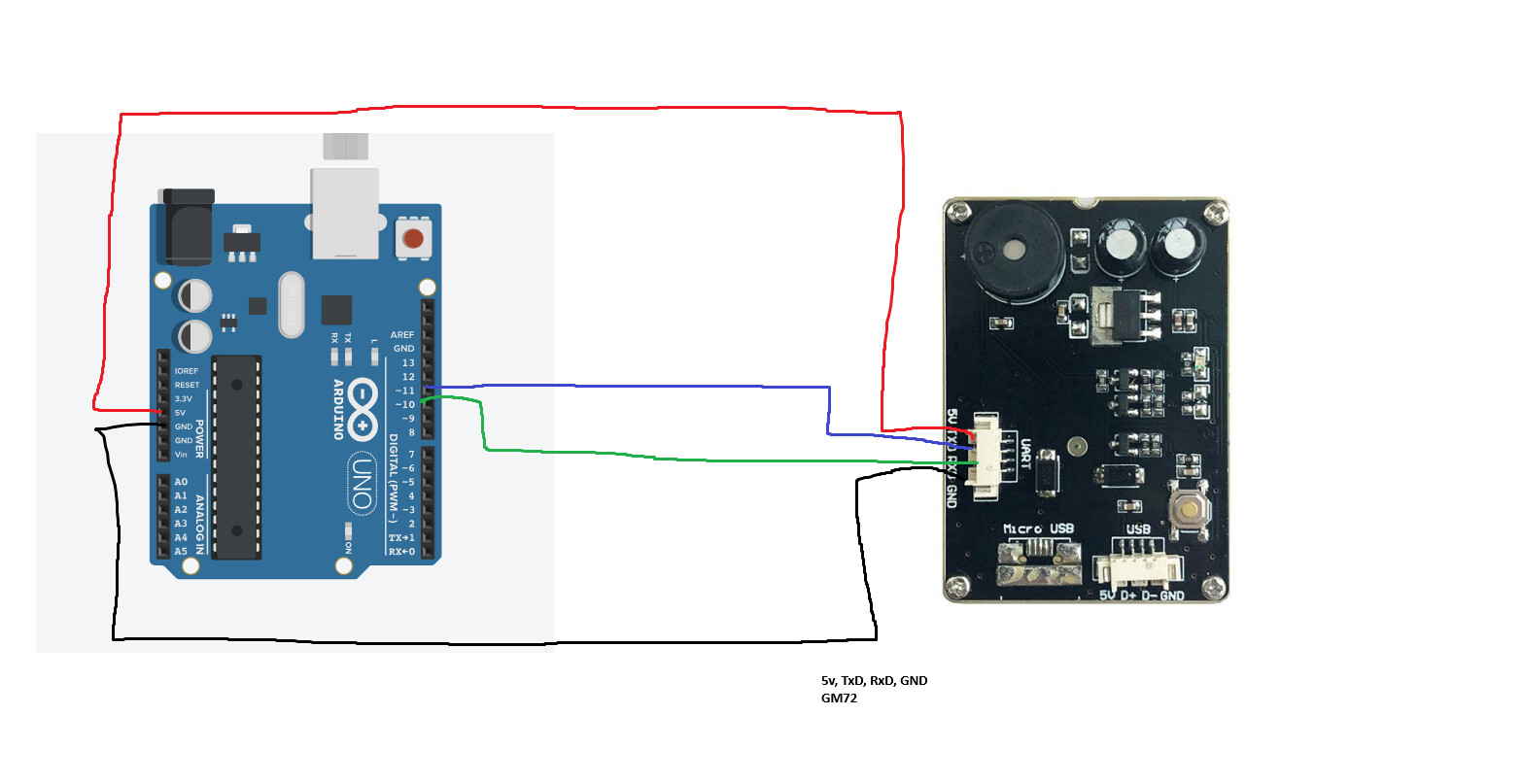
I have a GM72 scanner for my small project. The USB configuration/factory default can read inputs as it should be, however configuring the scanner to TTL 232 does not display/read any inputs on the serial monitor.
Manual Used: GROW GM72 Scanner Manual
Code for testing inputs:
//how2electronics.com sample qr input code
#include <SoftwareSerial.h>
SoftwareSerial mySerial(10, 11); // RX, TX

void setup()
{
  Serial.begin(9600);
  mySerial.begin(9600); // set the data rate for the SoftwareSerial port
}

void loop()
{
  if (mySerial.available()) // Check if there is Incoming Data in the Serial Buffer.
  {
    while (mySerial.available()) // Keep reading Byte by Byte from the Buffer till the Buffer is empty
    {
      char input = mySerial.read(); // Read 1 Byte of data and store it in a character variable
      Serial.print(input); // Print the Byte
      delay(5); // A small delay
    }
    Serial.println();
  }
}
}
I guess my real question is, does anyone have the same model of barcode/qr scanner (GM72), and how does one configure it for arduino ttl 232 connection? Thank you in advance!
Arduino set up (sorry for my haphazardness):