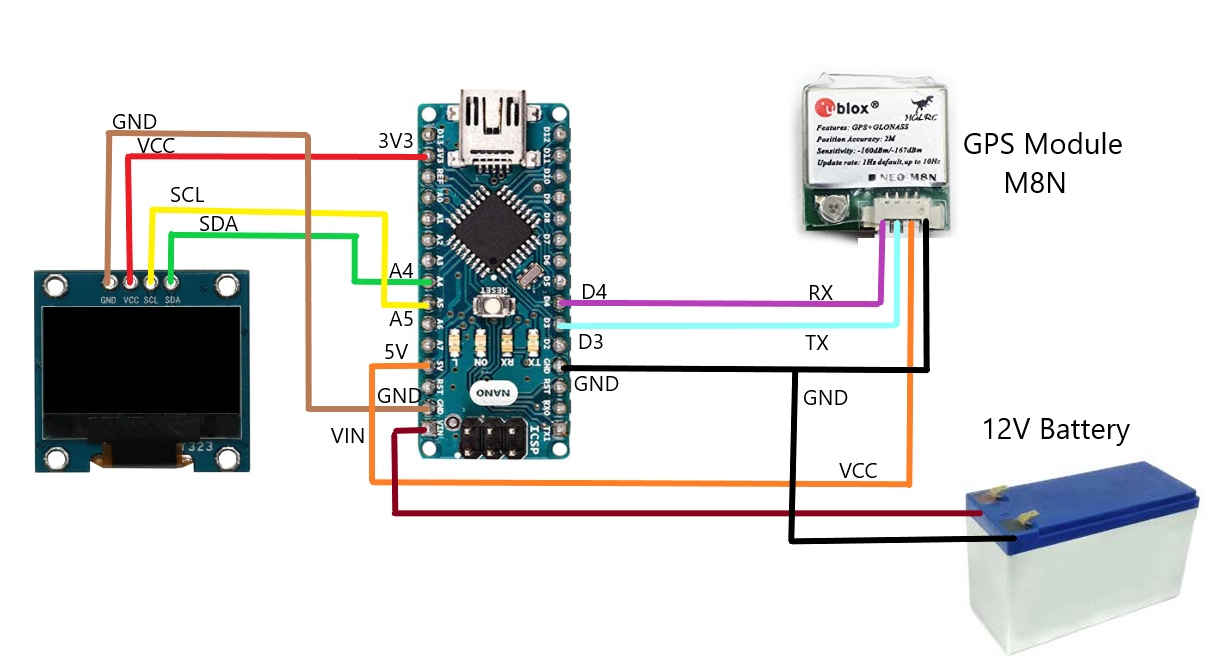
Hi, please everyone for advice. I built a GPS speedometer using an Arduino Nano board (clone), a GPS module with NEO-8M (Hglrc China), a 0.96" Oled display.
When I powered the board from USB port ,the display remains off. If I disconnect the GPS module power ( VCC or GND) the display turn on.
I also tried to supply power from external 5V with the same problem.
I changed the Arduino board, no effect.
I tested the GPS module with example code, I received properly the data.
Can you please help me with this issue?
Here are the connection:
OLED Display:
SCL- A5;
SDA - A4;
VCC - 3V3;
GND - GND.
GPS Module:
RX- D4;
TX - D3;
VCC- 5V;
GND- GND.
Here is the code :
#include <SoftwareSerial.h>
#include <Wire.h>
#include <Adafruit_SSD1306.h>
#include <TinyGPS++.h>

#define rxPin 3
#define txPin 4
SoftwareSerial mygps(rxPin, txPin);

#define SCREEN_WIDTH 128       // OLED display width, in pixels
#define SCREEN_HEIGHT 64       // OLED display height, in pixels
#define OLED_RESET -1          //Reset pin # (or -1 if sharing Arduino reset pin)
#define SCREEN_ADDRESS 0x3C    //See datasheet for Address
Adafruit_SSD1306 display(SCREEN_WIDTH, SCREEN_HEIGHT, &Wire, OLED_RESET);

TinyGPSPlus gps;


void setup()
{
  Serial.begin(115200);
  mygps.begin(9600);

  if (!display.begin(SSD1306_SWITCHCAPVCC, SCREEN_ADDRESS))
  {
    Serial.println(F("SSD1306 allocation failed"));
    for (;;); // Don't proceed, loop forever
  }
  display.clearDisplay();
  display.display();
  delay(2000);
}

void loop()
{
  boolean newData = false;
  for (unsigned long start = millis(); millis() - start < 1000;)
  {
    while (mygps.available())
    {
      if (gps.encode(mygps.read()))
      {
        newData = true;
      }
    }
  }

  //If newData is true
  if (newData == true)
  {
    newData = false;
    display.setTextColor(SSD1306_WHITE);

    if (gps.location.isValid() == 1)
    {
      //String gps_speed = String(gps.speed.kmph());
      display.setCursor(8,8);
      display.setTextSize(6);
      display.print(gps.speed.kmph(),1);


      display.display();
      delay(1500);
      display.clearDisplay();
    }
  }

  else
  {
    display.setTextColor(SSD1306_WHITE);
    display.setCursor(0, 20);
    display.setTextSize(3);
    display.print("No Data");
    display.display();
    delay(1500);
    display.clearDisplay();
  }
}