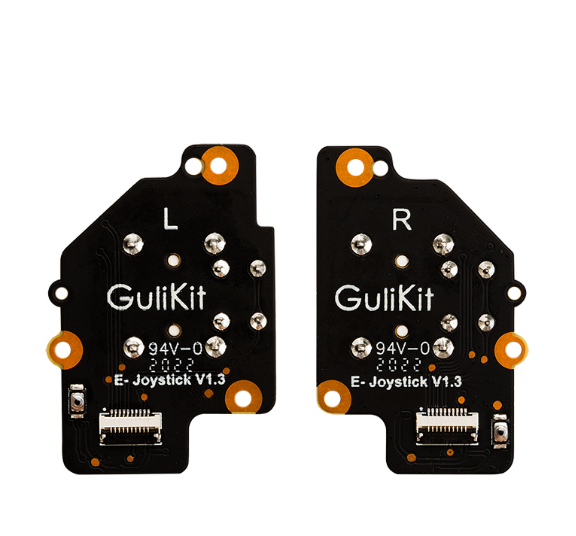
After being pretty disappointed with the "deadzone" in the commercial analog sticks I've purchased (the Adafruit one is awful and an XBox One replacement one is ok) I've started looking into something nicer. Basically the ones that I'm working with require you to move the a lot physically before it even registers a change, which is no good for subtle movements/controls.
The mechanical form factor looks very similar to the standard ones (which I imagine is intentional so it can interface with other commercial controllers), but the electronics are a different ballgame. The standard joysticks I've been using are two 10k pots, so getting info from them is straight forward.
I've also worked with hall sensors (quite a lot recently!), but it looks like there's an actual MCU on each controller:
Which is more than would be required for the direct electronic connections (3pins for each hall sensor, and 2 pins for the switch, and that's if they don't combine the shared ground/vcc).
In digging around this page I found a bit more info:
I guess there's some onboard signal conditioning to linearize the hall sensor output. That package is not the one on the circuit boards above however.
I've also written the email address on that page to find out about dev kits and such, but I wanted to see if anyone has come across these and/or used them in projects before?
Impressive investigation. Some joysticks looks like specially desgned for the application/environment.
Which application do You have in mind here? Using an ordinary pot deadzone, hystericies etc. can be software controlled.
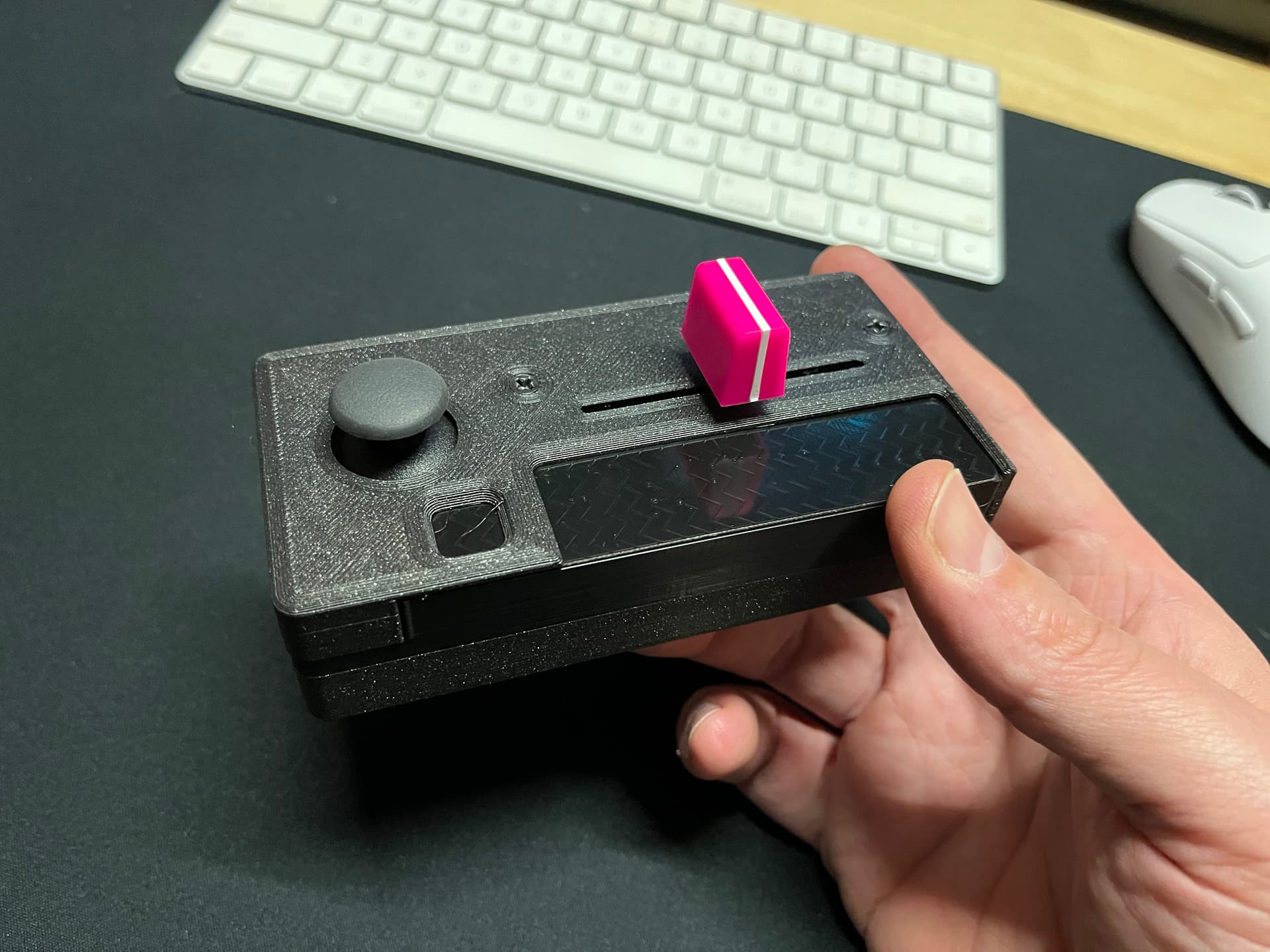
The intended use case is a MIDI controller-type thing as I've used xbox-style controllers with custom software for a few years now. I've basically made a little hybrid thing which has a contactless fader, a Bela Trill, and an analog joystick:
I do do some calibration/smoothing/tweaking of the readings I get from the joystick I currently have in there, but unless there's some voodoo I'm missing, I don't see how I can work around the deadzone since the Adafruit joystick has close to 1cm in the middle where you can wiggle it and no change in readings are registered on the ADC pin.
I guess I should clarify what I mean by "deadzone" as it can be desirable to have a spot in the middle where it reads as "0,0" or whatever, so you have to widen it up a bit. What I mean above is that there's a (large) area where no readings are registered at all, which makes it difficult to work with.
There's also a capacitive touch output, which I assume is the remaining non-ground pin (3rd from the left), but I've not been able to find one of the Steam Deck caps for purchase anywhere (they have a lead coming out from the bottom which you need to solder).
The push-button on the analog joysticks. Most consoles have a thing where you can press the stick to zoom in or whatever.
Yeah, got it working good on a Teensy in the end. Was really straightforward with the pinouts. Just had to tweak the ranges slightly for the scaling, but that was it.
I'm not doing anything special with it. I do use the analogResponsiveRead library to smooth input a bit and then split it into two 7-bit numbers to send as 14-bit MIDI, but that's quite use-case specific.
I guess I've not had it long enough to get any drift, but you can try manually resetting/calibrating them with that tiny button on the back of the circuitboard. When I powered mine up with the Teensy the first time I let it sit a few seconds then pushed that button and that's supposed to run its internal calibration routine.
I could've sworn I took a pic, but looking through my phone I don't have any. Sadly the way I've mounted it in an enclosure I'd have to completely gut the thing to get a pic of the bottom and it's all calibrated at the moment, so I don't want to mess with the rest of the controller.
I basically soldered very thin gauge wire to those points (except the 'key' one, which a multimeter told me had a much more accessible point further up on the board), then ran all the wires flat and up the board, where I taped everything down with kapton tape.
Impressive that you managed to snag at least a part of schematic from them.
Do you by any chance know what the MCU on these joysticks is? I intend to write a new firmware for them to fix an annoying quirk in their output signal plot.
There are some knockoffs that use a chinese one-time programmable MCU, but the ones used on GuliKit's appear to be something like STM32F03x.
No clue. I can try and take a look at one when I'm back with the parts (traveling at the moment).
Having a tweaked firmware would be nice. I guess the main thing it's doing is linearizing all the hall sensor stuff which can be a bit all over the place, and presumably some smoothing after that.
Yep, I'm not sure if the issue I'm experiencing can be fixed or it's a physical/magnetic design shortcoming.
There are actually two of them but they are probably related:
Output voltage on both axes reaches Vref before full deflection, it seems to be different on unit-by-unit basis, some people report no such effect, but many including me get max output at 70-80% deflection
When turning stick in circles output X/Y plot is not a circle but a square. Probably just a result of clamping we see in Issue no. 1
If it's calibration/linearization related - knowing the MCU model would be beneficial to reprogramming or replacing it.
There's also a chance that Hall sensors on these actually cap out at 70-80% deflection due to the configuration/properties of the magnets being used.
I hope it's not the latter though.
In my use case the output did seem a bit low but I just scale it up after the fact. The square-ificaition I find beneficial personally as it's otherwise impossible to get to the corner positions. So presuming an XY grid that goes from -1 to 1 on both the X and Y axis, with a pure circle it's impossible to get points [1, 1], [-1, -1] etc...
It could just be that their calibration is just very conservative in terms of fully normalizing the output and leaving (too much?) buffer there.
It could just be that their calibration is just very conservative in terms of fully normalizing the output and leaving (too much?) buffer there.
Probably yes, too bad we can't get down to their calibration without reverse-engineering the MCU and it's firmware.
I get benefit of square output to get the entire [-1,-1] to [1,1] plane, I would prefer them that way on my electronics projects as well, e.g. robots/multirotors.
Where this is a bit problematic is in their advertised usage scenario - as a steam deck joystick drop-in replacement. Losing 20-30% of stick travel sensitivity makes some games harder to control
I don't have a steamdeck but I would imagine the console-level calibration stage normalizes stuff to the full range. I know on the Nintendo switch you're meant to do full circles around the range of the controller for something like that.
Steam Deck probably does something to map circle onto a circumscribed square, but this part of steam deck programming is probably even harder to reach than MCU on these joysticks.
But from what I understand there's nothing to remap past 70% deflection because output value remains constant and this information is lost.