Hi, i am trying to create a setup with an Arduino, however, i don't know yet how to do the input side. I want to have an arduino in a box with a sound output chip and a speaker to play an mp3 that part i am very confident how to do it. However, the sound should only be played, when 5 or 6 buttons in the room are pressed within ~5 seconds of each other. Those buttons need to be several meters apart from each other, they need to be wireless connected to the Arduino and they need to be completely independent, so, no power plug or anything used, i basically need to be able to just hang them onto a wall. In theory, i know that i could connect a button with another arduino and connect that to a 433Mhz transmitter and have it all be fed by a powerbank, however, my weakest skillset in all of this is the actual electronical setup. So ideally, i would prefer to just buy a finished button with an attached transmitter from whatever online shop that is able to communicate with something that i have to connect to the arduino and then do the programming based on the set input it generates. I am able to code enough C/C++ that i should be able to figure out how to do the rest, but i am not finding any hardware that makes my life a bit easier. If it does not exist, cool, then i will have to buy stuff like written above, and try to build what i need myself. But i would prefer to pay a bit more and save me the deep dive if a convenience option exists.
Why not use an infared remote.
No point putting radio through your body for a few buttons. 
Sounds like an interesting idea, but i am not sure i can point the transmitter without any interference at the sensor. I would also need to find a way to mask the remote (and the sensor), they are not as inconspicuous as a small button on the wall. But it would be a super cheap way of doing it, really biggest fear would be that the geometry of the room, which i can't test in advance, will not allow for it to work very well.
But the ir receivers and remotes are so cheap, i might just try it as a backup solution. So, great input, thanks.
You seem to have too many "special wants" for a commercial system to fit the need. You can buy generic button key fob remotes with three buttons, "A, B,C". Does that help?
At those milliwatt power levels? Better put your tinfoil hat back on. 
Yes, if i can use several of them to talk to the same receiver. My biggest problem is, that i am not fluent in the technical terms, so i am scanning amazon for receivers and try to figure out whether they will work with an arduino or if they are not, and most of them do not advertise that
You can post links to candidate hardware, for comments.
I am looking at this thing right now, it has just one button, so i can build it into something and just have the button show and it seems to fit the bill off arduino compatible. The only thing that i don't know is how several of them connected to the same arduino will work, if i need to connect one receiver per transmitter to the board or if the receiver can be tought to work with several transmitters. I assume so, but as established, don't know this stuff.
The only thing that i don't know is how several of them connected to the same arduino will work,
Not easily or reliably. Try this one:
Look for a receiver that has relay output for each of the buttons. The relay contact can be a thought of as a push button for your Arduino. 4 relays, equal 4 push button switches.
Ideally it would be a keyfob with only one button, because i don't need them to press all buttons on the keyfob, but several keyfobs if this makes sense. And then i probably have to connect one receiver for each keyfob to the arduino. The input pins would not be a problem, it should be one for each button/keyfob, looking at that at least:

What i don't know is how the ground and the power in needs to be setup for this to work, but i guess i will have to figure that out. The best help you have already given me is to give me the right searchwords to find the keyfobs and instead what i was doing before, which only gave me stuff that worked without an interface to the mini cpu Now i have to try it out and fiddle with it.
No, you won't have to figure it out. There are hundreds if not thousands of similar projects in tutorials and blogs across the internet. Just have a look around.
Hello broetchenhler
Use your mobil telefon to control an Arduino via Bluetooth.
So, toys arrived and i am having a bit of a problem. I want to test the functionality with what i have, but i am not sure if the terrible quality of the cables is foiling me or the the receiver. I have an arduino uno connected to a breadboard to provide 5V and ground to a soundboard, which works fine, even though the connection is not good yet as i haven't soldered anything. I can play sounds as i want depending on if i send HIGH or LOW to the board. Then there is the receiver. It comes with really bad cables that are already short of breaking. I can with some problems connect the receiver to ground and 5V to power it and it is already trained on the transmitter keyfob.
It's this one:
So, the thing is i can't get the input pin on the arduino to get a stable connection, i found on the internet that with no connection the value of an input pin varies, so i connected the pin with + or - on the breadboard and now got stable values. Then, i tried to connect my input pin with the receiver and i can't get it to do anything, probably because i don't have a video to show me exactly how to do it, but also because i have no actual clue about electrical circuits and these cables are just bad. If i understand it correctly i would need to connect the arduino inputpin with Normally Open and Common with the breadboard on +?
Then you wouldn't understand much of what I could tell you. Sorry.
these cables are just bad
What cables? If they are bad, can't you replace them?
because i don't have a video to show me exactly how to do it
You very much overestimate the value of online videos. Most of them create more questions, than the number of things they answer.
Do you have any real and complete documentation of the devices that you can show us?
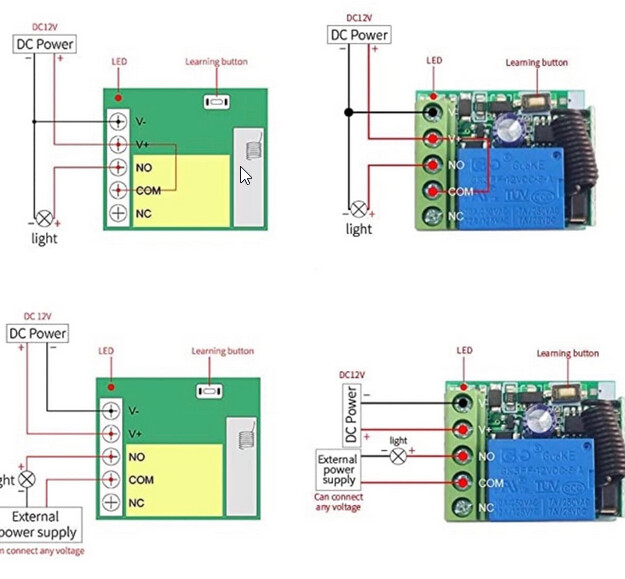
The receiver comes with cables and i had hoped that i would get away with no soldering, so i tried them first. There is a clamp for other contacs on the device, i will use them once i have a screwdriver fine enough to reach them The big problem with those super cheap circuit boards is that there is no documentation, and the ones that were linked above, which seem to do exactly what i am trying to achieve, are not available at amazon. The ones i find are all using V-, V+, NO,COM and NC and apparently i have to connect COM with ground and NO with the input pin. So i am going to try that, also need to activate pull/up on the input.
If it's just for an Arduino input, you don't need or want 12V on it, except for V+ and V-. Just one wire to Arduino ground from "common" and one wire to Arduino input pin from "NO", use the INPUT_PULLUP option when you set pinMode().
Similar to the lower right hand example of the four images you posted.
It's not even making a clicking noise?
Yaaay, it is now working (almost). First, i replaced the shoddy cables using the provided screw teminals and attaching better ones there. Then i was able to get stable connections from the receiver to the breadboard and with the tip to use the inbuilt pullup on the input pin, i get a stable connection with two receivers and one transmitter each. Now the limit to the seup is probably only the ampere the source of electricity is providing. There is one thing though, that might make it kinda problematic. The remote are cancelling each other out. Pressing one at a time, the right receiver is recognizing the learned connection and is sending low. When i press both, the receivers are not activated. Guess this is a hardware limitation i can't get around besindes buying different frequency receiver/transmitter pairs... But so far very happy, thanks for all the help.
Okay, i now wrote my sketch and it is actually working, pressing a button starts one mp3, if both buttons are pressed within 5 seconds from each other, the second sound is played. There is something strange happening thoughm that i do not understand. Right now, i am feeding the Arduino with USB from my pc, the two receivers get electricity from the breadboard + and - row fom the breadboard and are connectedto two sigital pins. The sound board is getting electricity over the micro usb interface from my laptop, i wasn't able to feed it from the breadboard. One, it needs 6v-35v, so it might just not have gotten enough juice, second, wenever i clicked a button and the receiver did send low to the input, the sound board would get no electricity anymore... So i thought getting indenpendent electricity would be the answer, but, then i tried to see if i connect the soundboard to a power bank and that one completely turned off when i pressed the button. So, i am pretty sure i am grounding somehow everything when i set my output to low, but i do not understand how and how to avoid it
This is the soundboard:

This is my setup: pin 7 and 8 are pulling the input pins 1 and 3 of the sound board low, pin 3 and 4 are input pins with pullup and go to the NOs of the receivers, the receivers COM go to GRND, so does their V_ and the V+ goes to 5V from the Arduino.
