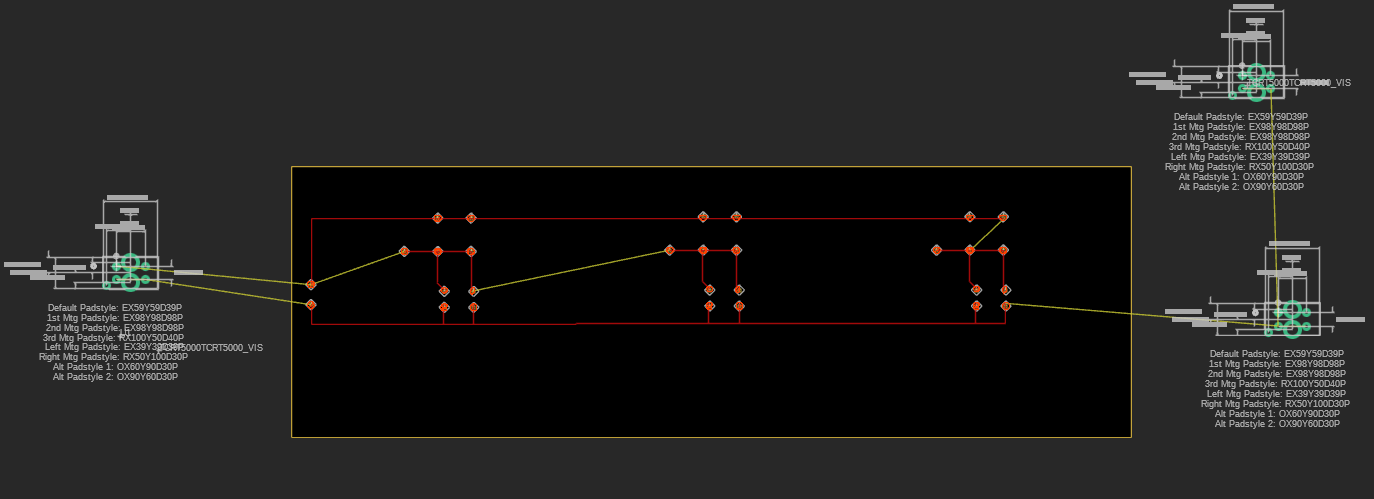
Been provided this code and I need to make it work for a robot that can ideally follow straight lines, bends and stop at junctions. Components used for line following are an array of 3 TCRT5000 IR sensors, and I am using a PCB that replaces the breadboard equivalent circuit used previously, screenshot of PCB design and IR sensor connections attached below.
(back view of PCB, with pins for analog pin connections to the Arduino and to its 5V and GND ports)
Problems: There is no change of the raw values of the IR sensors as stated in my code, they are all at 0, regardless if I bring them above a black line or white surface. "Set motor A PWM" and "Set motor B PWM" are 180 each, meaning that the robot is continuosly moving forwards, so the cases of 100, 110, 011 and others aren't being followed. The PCB has been tested for continuity, and I think it will work, but I am not sure why it isn't working. Any advice/help would be much appreciated.
For threshold, I understand it as the benchmark that tells me when the reflected light received is enough to consider the surface it was reflected from to be a black line, so I've just been mannually altering its value.
Dont have a multimeter on me right now, but I wrote the program like you said and there is no change at all in the values displayed on the Serial monitor after an analogread() for each sensor, as below.
int leftsensorpin = A5;
int middlesensorpin = A4;
int rightsensorpin = A3;

void setup() {
  // put your setup code here, to run once:
  Serial.begin(9600);
}

void loop() {
  // put your main code here, to run repeatedly:
analogRead(leftsensorpin);
Serial.print("Left:");
Serial.println(leftsensorpin);
analogRead(middlesensorpin);
Serial.print("Middle:");
Serial.println(middlesensorpin);
analogRead(rightsensorpin);
Serial.print("Right:");
Serial.println(rightsensorpin);
}
I get for left, middle and right sensor pins respectively: 19, 18, 17
Standard black tape for now, the readings don't change even when the sensors are brought to the white bit of the white table the black tape lies on.
Even without connection of the analog pins to the pins on the PCB, the same readings are displayed on the serial monitor.
No change to the readings when the sensors are rested on a black T-shirt.
they usually come with a breakout board that includes some necessary circuitry (probably handles the modulation of the infrared LED and a comparator / pot for triggering)
With the code I attached in the main post, I was able to see some time ago that when the ir sensors were covered and different combinations of covering was tested, the motor A and B pwm speeds were changing, according to the cases defined in voidUpdateDirection() of the code.
Not sure why it isn't working now though, i think the pcb may have something to do with it...
the phototransistor's output signal is likely weak and may require amplification to be useful for interfacing with a microcontroller.
Probably the breakout boards includes amplification circuitry (e.g., a comparator or operational amplifier) to clean up the signal and convert it into a more usable form, such as a clear digital high or low output.
But that doesn't explain an analog reading of 19 (on an Arduino Uno or the like), which corresponds to about 0.1V on the collector of the phototransistor, meaning it is completely saturated.
Remove the board from the project, swap the resistors if necessary, power the board with 5V. and test operation with your multimeter under different lighting conditions.
Edit: if the phototransistor was fried by excessive current, then it could appear to be an approximate short circuit to ground.
I see now, I've completely jumbled up the 4.7k and 100 ohm resistors, my mistake for not double checking their resistances and trusting a single google search for their colour.
So is the wrong input resistances the reason why all IR sensors seems to be unresponsive to being shown a black line and a white surface?
The sensors will not work correctly with the resistors reversed, and it is conceivable that the phototransistors have been damaged. The LED won't be, but won't give off significant light with a 4K7 series resistor.
Please read reply #11 carefully, where I point out that the mistake does not explain your observations.
Will do and I'll update here when I do, but regarding the code, does it look okay? Last time I tested it it could detect different cases like the left ir sensor on the black line so it decreased motor B's pwm so that it could make a right turn, etc. Do you think I need to include/make any more changes to it?