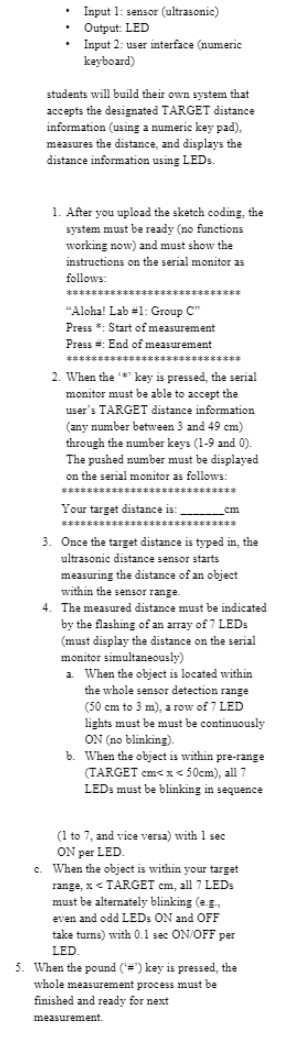
Hi!
Try this way:
#include <Keypad.h>

const uint8_t ROWS = 4;
const uint8_t COLS = 4;

char keys[ROWS][COLS] = {
  { '1', '2', '3', 'A' },
  { '4', '5', '6', 'B' },
  { '7', '8', '9', 'C' },
  { '*', '0', '#', 'D' }
};

uint8_t colPins[COLS] = { 5, 4, 3, 2 }; // Pins connected to C1, C2, C3, C4
uint8_t rowPins[ROWS] = { 9, 8, 7, 6 }; // Pins connected to R1, R2, R3, R4

// Create keypad object
Keypad keypad = Keypad(makeKeymap(keys), rowPins, colPins, ROWS, COLS);

bool distInput = false;
char dist[3] = "";
byte index = 0;
int targetDistance = 0;

void setup() {
  Serial.begin(9600);
}

void loop() {
  char key = keypad.getKey();

  switch (key)
  {
    case '0' ... '9':
      if (distInput == true)
      {
        Serial.print(key);
        if (index < 2)
        {
          dist[index] = key;
          dist[index + 1] = '\0';
          index++;
        }
        if (index == 2)
        {
          targetDistance = atoi(dist);

          if ((targetDistance < 50) && (targetDistance > 2))
          {
            index = 0;
            memset(dist, 0, 2); // Clear input
            distInput = false;
            Serial.print("\nYour target distance is:");
            Serial.print(targetDistance);
            Serial.println(" cm.");
            distInput = false;
          }
          else if (targetDistance < 3)
          {
            index = 0;
            memset(dist, 0, 2); // Clear input
            distInput = false;
            Serial.println("\nThe minimum distance is 03 cm.");
          }
          else
          {
            index = 0;
            memset(dist, 0, 2); // Clear input
            distInput = false;
            Serial.println("\nThe maximum distance is 49 cm.");
          }
        }
      }
      break;
    case '*':
      if (distInput == false)
      {
        Serial.println("\nPlease input Target value 03-49 cm (2 digits).");
        distInput = true;
      }
      break;
    case '#':
      if (distInput == false)
      {
        Serial.println("\nEnd of measurement.");     // for the case of pressing a '#'
      }
      break;
    default:
      break;
  }
}
Best regards.
➜ memory issue there when index is 1, you write the null at index 2 which does not exist
Yes, I forgot to remove this line.
I was thinking that the input could be bigger but in teacher instructions don't say to press any key to confirm the input. So I have limited the input to 2 digits even when the value is smaller than 10.
Thanks for your help.
in order to call atoi() you need the trailing null so
char dist[3] ;
would be good enough for 2 digits and the trailing null
Fixed, thanks!
Seems that the simulator doesn't crash by memory issue. 
BTW, if I'm not changing the value of dist[2] it could be null by default when declared in this way char dist[2] = "";?
the string literal "" would have a null char just at the first position so if it's a local variable you would not get 0 everywhere but just in the first position
you could use this initialization
char dist[2] = {0};
and you'll get 0 everywhere regardless of the size (whether it's 2 or 200)
if dist is a global variable then the compiler does that for you
Don't credit or blame the simulator. That code may well have functioned without trouble in real life.
As long as your luck held out or a change in circumstances didn't make the waiting problem turn up.
a7
I was referring to position 2 of the array dist.
In my mind when declared in this way char dist[2] = ""; after copy the key input (index 0 and 1) to dist it could be:
dist[0] = '4';
dist[1] = '9';
dist[2] = '\0';
So dist with size 2 could be enough to call atoi.
when you do so it's a definition of the variable dist, not just a declaration.
You tell the compiler 3 things:
- it's an array of type char
- reserve 2 slots of memory for that type (here 2 bytes)
- initialize the content of that variable with "", which is basically 1 byte holding the null value
if you wanted to put a null into index 2 then you do that outside the variable definition
char dist[3];   // reserve 3 slots for type char
dist[2] = '\0'; // assign the null char into the 3 slot
Thanks!