As your topic does not relate directly to the installation or operation of the IDE it has been moved to the Programming Questions category of the forum
Hi @newbieeee23241. I tried running your sketch on my UNO R4 WiFi board to see if I could identify the source of the crash, but unfortunately was not able to reproduce the crash so I didn't get anywhere with that.
So my recommendation is for you to try the suggestion that was provided with the stack trace:
Hopefully that will identify the specific code that is causing the crash.
I'll provide instructions you can follow to do that:
Right click the Windows "Start" button.
A context menu will open.
Select "Search" from the context menu.
The Windows "Start" menu will open with a search field selected.
Type windows powershell ise in the search field.
Select "Windows PowerShell ISE" from the search results.
A "Windows PowerShell ISE" window will open.
You should now see a list of file paths and line numbers in the sketch program's source code files correlating to each of the addresses in the stack trace produced by the crash.
Would tell me that the source code for address 0x0000410c in the stack trace is at line 42 in the file C:\Users\per\Documents\Arduino\Foo\Foo.ino.
You will typically see some strange paths not present on your computer in the later part of the tool's output. These are from addresses in the files of the board's core that were precompiled by the developers of the platform. It is unlikely the crash is caused by that code so you can simply ignore that part of the output.
If you check the code at the lines in the tool output, and the context of those lines, you might be able to identify the problem in the code that caused the crash.
If not, or if you do identify the problem but aren't sure about how to solve it, you can share the tool output here and the forum helpers will try to assist. I'll provide instructions you can follow to share the tool output:
Switch back to the PowerShell window.
Press the Ctrl+Shift+A keyboard shortcut.
This will select all the text in the PowerShell window.
Press the Ctrl+C keyboard shortcut.
This will copy the contents of the PowerShell window to the clipboard.
Open a forum reply here by clicking the "Reply" button.
Click the <CODE/> icon on the post composer toolbar.
This will add the forum's code block markup (```) to your reply to make sure the error messages are correctly formatted.
Press the Ctrl+V keyboard shortcut.
This will paste the output into the code block.
Move the cursor outside of the code block markup before you add any additional text to your reply.
function doPost(e) {
  // Check if e.postData is defined
  if (e && e.postData) {
    // Access the active sheet
    var sheet = SpreadsheetApp.getActiveSpreadsheet().getActiveSheet();

    // Parse the JSON data from the POST request
    var jsonData = JSON.parse(e.postData.contents);

    // Check if jsonData contains the expected properties
    if (jsonData && jsonData.timestamp && jsonData.value1 && jsonData.value2) {
      // Extract data from JSON
      var timestamp = jsonData.timestamp;
      var value1 = jsonData.value1;
      var value2 = jsonData.value2;

      // Append the data to the sheet
      sheet.appendRow([timestamp, value1, value2]);

      // Return a success message
      return ContentService.createTextOutput("Data received successfully");
    } else {
      // Return an error message if jsonData is incomplete
      return ContentService.createTextOutput("Error: Incomplete JSON data");
    }
  } else {
    // Return an error message if e.postData is undefined
    return ContentService.createTextOutput("Error: Missing POST data");
  }
}
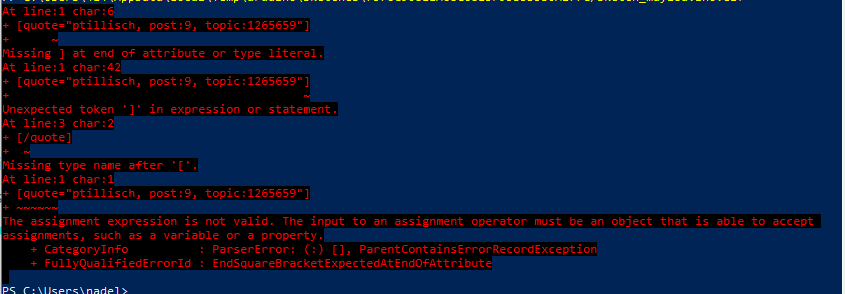
I notice that the username on your computer is nadel:
but the username shown in the .elf file path in the stack trace is 414:
The .elf file is generated when you compile the sketch program that is running on the UNO R4 WiFi board and generating the fault. So the .elf file is present on the computer and user account that was used to compile and upload the sketch, and thus you must also run the addr2line command on the computer and user account that was used to compile the sketch.
If you are using a different computer or user account now than you were when you uploaded the sketch to your board, you can simply generate a new .elf file by uploading the sketch to your board again:
Connect the UNO R4 WiFi board to your computer with a USB cable.
Open your Google Sheets sketch in Arduino IDE.
Select the UNO R4 WiFi board in Arduino IDE.
Select Sketch > Upload from the Arduino IDE menus.
Wait for the upload to finish successfully.
Open the Arduino IDE Serial Monitor.
Wait for the stack trace to be printed in Serial Monitor.
Repeat the instructions I provided in my previous reply, except this time replace the C:\Users\414\AppData\Local\Temp\arduino\sketches\7576C90811A68C6813F95B3D5B0A277C/sketch_may28a.ino.elf path in the command from step (5) of those instructions with the path that is shown in the new stack trace.
Hopefully this time the command will produce the expected output. If not, let us know and we'll try to figure out what is going wrong.
That doesn't answer anything, I don't know what guidelines chatGPT gives.
I was asking about setup in google sheets, not your arduino code.
You don't have valid script address from google.
This is a real bad choice. Especcially jumping between chatGPT and real humans.
The reason is that chatGPT will modify your code in a way that humans can't follow.
So you have to make a fundamental decision:
using 100% = always chatGPT
This was the output Sir. Please don't worry for this project anymore. I already found another solution which is to send data to the google firebase then to google sheets. I really appreciate your help and time for this one. Thanks and have a good day!
Sorry again sir I'm really a newbie in coding as I was also pressed on time I haven't tried to learn this and only used chatgpt as my guide. Thank you again and enjoy your day.
 You will typically see some strange paths not present on your computer in the later part of the tool's output. These are from addresses in the files of the board's core that were precompiled by the developers of the platform. It is unlikely the crash is caused by that code so you can simply ignore that part of the output.