So I have gotten myself in a bit over my head. I have never done anything like this but figured, hey I’ll give it a go. Anyways I am trying to run 4 strips of WS2812’s for a light show and figured Vixen would be the best way to get the results I want. So far I only have strip 1 and 2 hooked up. Strip one is 410 diodes setup sort of like a grid but in an “V” shape and strip 2 is 129 diodes. Strips 3 and 4 will likely be in the 80 range each.
I have two Arduino Mega’s because I figured strip one will take up all of one’s capabilities and I can run the other strips on Mega 2.
Using FastLed I have gotten both strips 1 and 2 to power up and play a show if they are both on the same data pin, but only via usb power. I have also gotten Strip 1 to communicate somewhat with Vixen but when I try to use a feature like chase it only lights up a few pixels here and there, so my first thought was power.
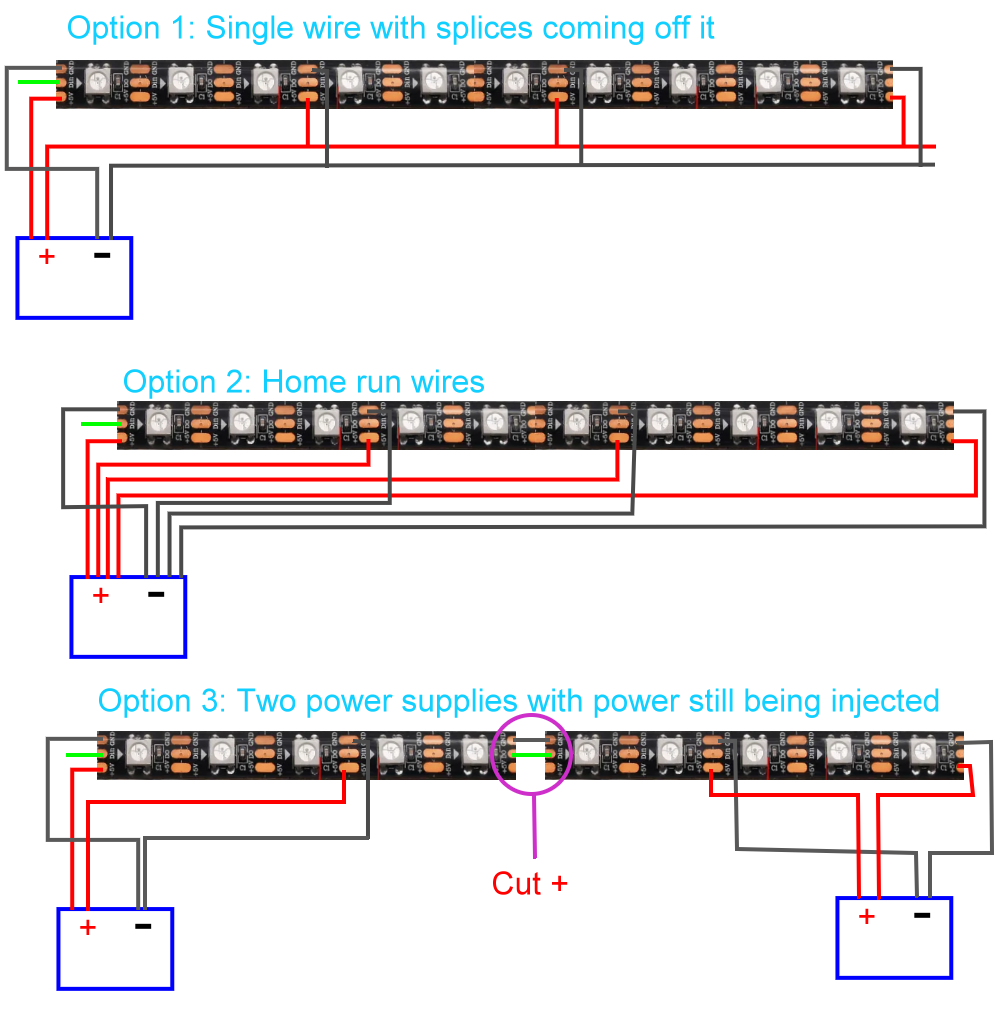
This may be silly, but I cannot for the life of me figure out how to hook up my power supplies to the lights but not power up the arduino with that power supply since it will need the USB hooked up. If I hook the LED’s straight into the power supply and keep the data pins hooked up the lights go crazy and just light up all random. So that’s question1. What I have is the VIN and GRD going to a breadboard power side. Data pin 10 going through a resistor to the serial cable of strip 1. Then the power and neutral of the LED strip being power from the breadboard through a capacitor. How do integrate the power supply into this without also powering the arduino?
The next issue is now that I am controlling everything through Vixen I’m not getting great results.
I’m sure this has something to do with the power but also setup. In Vixen when setting up the controller I have the com port set right, baud to 115200 and header line >>410<< and number of output to 3 x 410 so 1230. Patch over the led strip works. The problem is when I use a function like chase it just doesn’t work, dissolve works okay, and the right color is lighting up when I select it. I’m not sure what’s going wrong here.
I’m sure there will be more questions along the way and I’m trying to figure them out myself but I feel like I am missing one silly little thing and it will change my whole output. Once I get into using multiple Arduinos and such I will have a lot of problems but for now I am just trying to get strip 1 to do what I want it to.
Also final question which is essentially a yes/no. Do you always have the have a PC hooked up to run the light show? And is there a way to make the show switchable via button?
Ok so, i never used Vixen, have downloaded it once and had a look, but discarded it in favor of DMX controlled system, so i can get someone else (any VJ) to do the work during the night, so i am no specialist on Vixen.
All the strip and the Arduino need to share is GND & data. They can be powered from different sources as long as they share common ground. Basically just do not connect Vin of the Arduino to the PSU.
Thank you! Power problems solved I would say, I’ll test tonight. Next question, is there a way to have one Arduino able to send data out of two digital pins? So I can send data for one strip through one pin and data for another strip through another pin? Like in the base code in the sketch I set data pin 10 for strip 1 but I’d like to be able to Control Strip 2 from data pin 13.
I’m not sure, I’d have to look. I guess more of the question is in the sketch how do I say to output pin 10 and pin 13 for different programs? Or maybe I don’t? I guess that’s more of a Vixen prompt and less of a base code thing.
well for that we should have a look at the sketch which you haven't shared as yet. FastLED allows for setting the output pin, and for switching between pins, as do any of the other popular libraries for controlling LED's
how you process the input (from vixen) to output is what is the thing here.
/*

Vixen Lights 3.x - Arduino Generic Serial for Addressable Pixels

Using this code is pretty straight forward, simply hookup your one wire (WS2811 or WS2812) data line to pin 6 of your Arduino
and upload this code.  Make sure you have properly installed the FastLED library from http://fastled.io Once you are done, simply
power your Pixel strips from an external power supply.  Next configure a Generic Serial Controller inside of Vixen Lights 3.x and
add 3 x pixels for the number of channels.  Configure the Generic Serial Controller to use 115200, 8, none, and 1.  Then create
your element and add "Multiple Items (1 x number of pixels).  Finally select your pixel elements and set them as RGB pixels before
patching them to the controler outputs.  You should now be ready to begin testing.

For a complete tutorial check out blog.huntgang.com

Created   November 8th, 2014
By        Richard Sloan - www.themindfactory.com
And       David Hunt - blog.huntgang.com
Version   1.4

*/


// You must download and install the library from http://fastled.io/
#include <FastLED.h>

// Sets the maximum number of LEDs that this code will handle to avoid running out of memory
#define NUM_LEDS 500

// Sets the pin which is used to connect to the LED pixel strip
#define DATA_PIN 10

CRGB leds[NUM_LEDS];


void setup() {
  // Define the speed of the serial port
  Serial.begin(115200);
}

void loop() {
  // Set some counter / temporary storage variables
  int cnt;
  unsigned int num_leds;
  unsigned int d1, d2, d3;

  // Begin an endless loop to receive and process serial data
  for(;;) {
    // Set a counter to 0.  This couter keeps track of the pixel colors received.
    cnt = 0;
    //Begin waiting for the header to be received on the serial bus
    //1st character
    while(!Serial.available());
      if(Serial.read() != '>') {
        continue;
        }
    //second character
    while(!Serial.available());
      if(Serial.read() != '>') {
        continue;
        }
    //get the first digit from the serial bus for the number of pixels to be used
    while(!Serial.available());
      d1 = Serial.read();
    //get the second digit from the serial bus for the number of pixels to be used
    while(!Serial.available());
      d2 = Serial.read();
    //get the third digit from the serial bus for the number of pixels to be used
    while(!Serial.available());
      d3 = Serial.read();
    //get the end of the header
    while(!Serial.available());
      if(Serial.read() != '<') {
        continue;
        }
    while(!Serial.available());
      if(Serial.read() != '<') {
        continue;
        }
    // calculate the number of pixels based on the characters provided in the header digits
    num_leds = (d1-'0')*100+(d2-'0')*10+(d3-'0');
    // ensure the number of pixels does not exceed the number allowed
    if(num_leds > NUM_LEDS) {
      continue;
      }
    // Let the FastLED library know how many pixels we will be addressing
    FastLED.addLeds<WS2812B, DATA_PIN, GRB>(leds, num_leds);
    // Loop through each of the pixels and read the values for each color
    do {
      while(!Serial.available());
        leds[cnt].r = Serial.read();
      while(!Serial.available());
        leds[cnt].g = Serial.read();
      while(!Serial.available());
        leds[cnt++].b = Serial.read();
      }
    while(--num_leds);
    // Tell the FastLED Library it is time to update the strip of pixels
    FastLED.show();
    // WOO HOO... We are all done and are ready to start over again!
    }
}
Here's the sketch I am using. Currently setup for Pin 10 which is Strip 1, which has 410 diodes on it. Not sure if I should do strips 2,3,4 from another Arduino or can a single Arduino handle this much? Currently I have strip 2 on pin 13 but have yet to try and power it as well.
well with the current setup, i don't see much of an issue, other than the obvious situation that while the FastLED.show() is being executed, interrupts are turned off, which will also mean that there is no transfer from the FIFO to the Serial buffer. With the current method you can use the same buffer for receiving more data and send that also in a single chunk. Memory wise it's fine, and if you can control the framerate that vixen is using, that will help. A Mega is not the fastest processor and there is no option of creating the output signal in the background, it is bit-banged, that is your main limitation. For the time of the transfer, 3 * the total amount of LEDs * 8 bits at 800kbps, the processor will be fully in use, while it's waiting for data during the reception stage.
I have everything somewhat working but now I am limited on my coding knowledge. In Vixen I have the Arduino setup but I can only figure out how to run it on a single pin. In total I have 4 separate strands I wanting to control, therefore I have 4 data wires that need to be hooked up. How do I tell vixen to tell the arduino which pin to use for its corresponding strand of lights?
First of all you could consider just daisy chaining the strands, this would be the easiest solution. How many leds in total are we talking about ? 700 ? what kind of arduino are you using ? Memory is a big limitation, for every LED it will need 3 bytes in the output buffer, and the ATmega 328P has only 2 KB of RAM, so 700 LED's in one go is going to be a serious issue.
Other option would be to send it all in one go anyway, and just separate the data on reception. problem here is that reception should continue although transmission is in progress already, and this is going to be an issue with a bit-banged output signal, or a temporary storage of the whole buffer needs to be done, again the memory issue comes up, 700 LEDs is just a lot of data, 410 LEDs should still be ok though.
The best would be if Vixen would send the chunks in a more easily manageable size, but then it would have to include which chunk it is sending, and i don't know if Vixen can do that, or how, and i am not going to go through the manual to find out.
In short, either use a board that has enough memory and choose an approach, or use 2 boards and choose an approach.