Hello All,
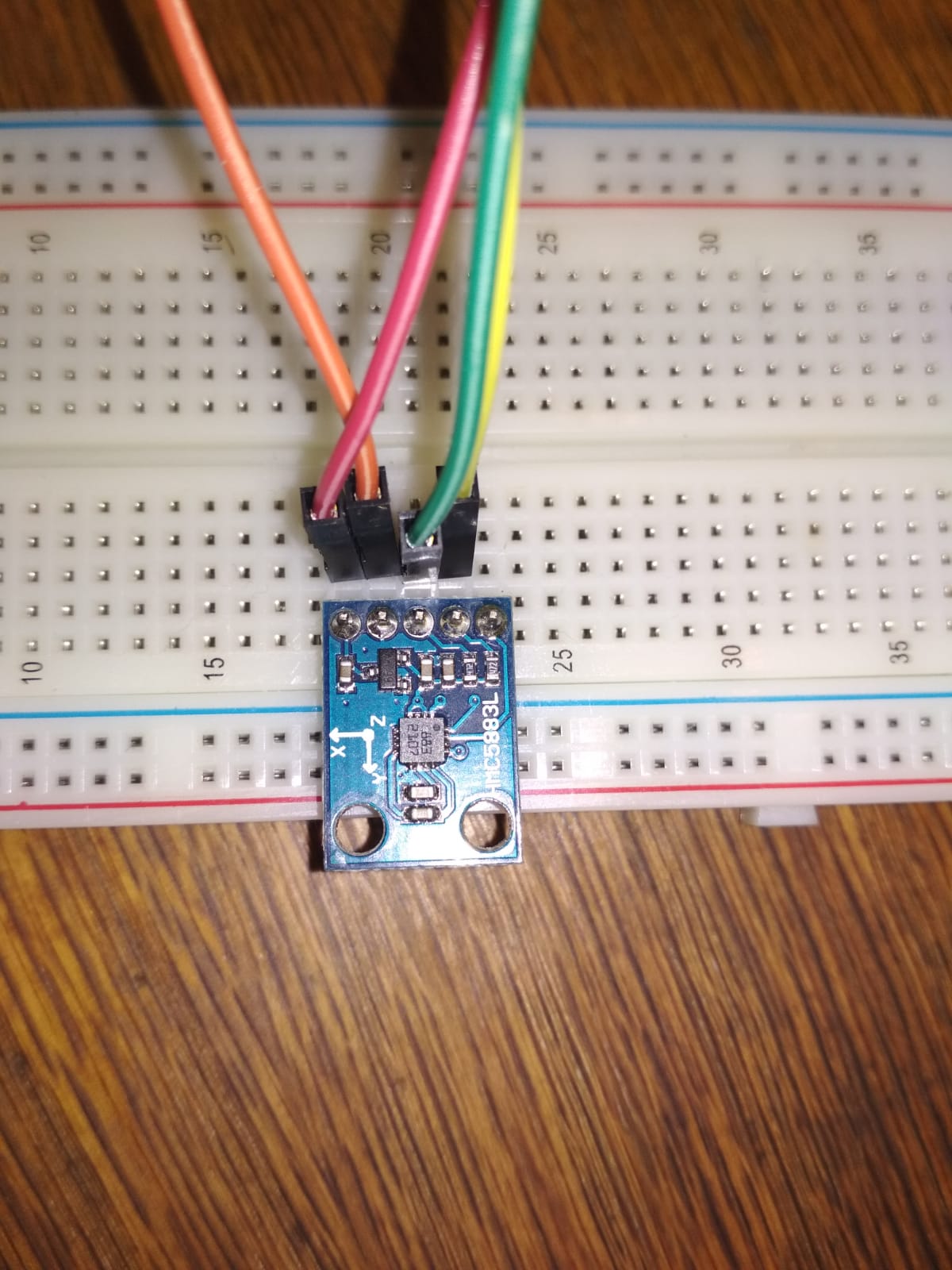
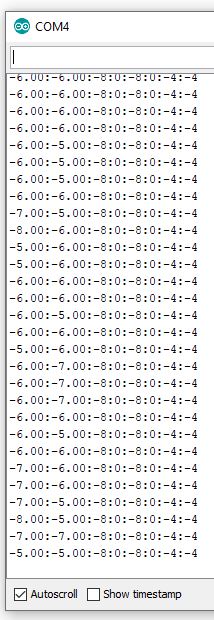
i have attached the picture of the chip. There is also a screen of COM4 for the values. The values are all the same if i rotate the chip.
What can i do in the situation ? Is the chip broken ? I got a connection to the chip over I2C 0X1E.
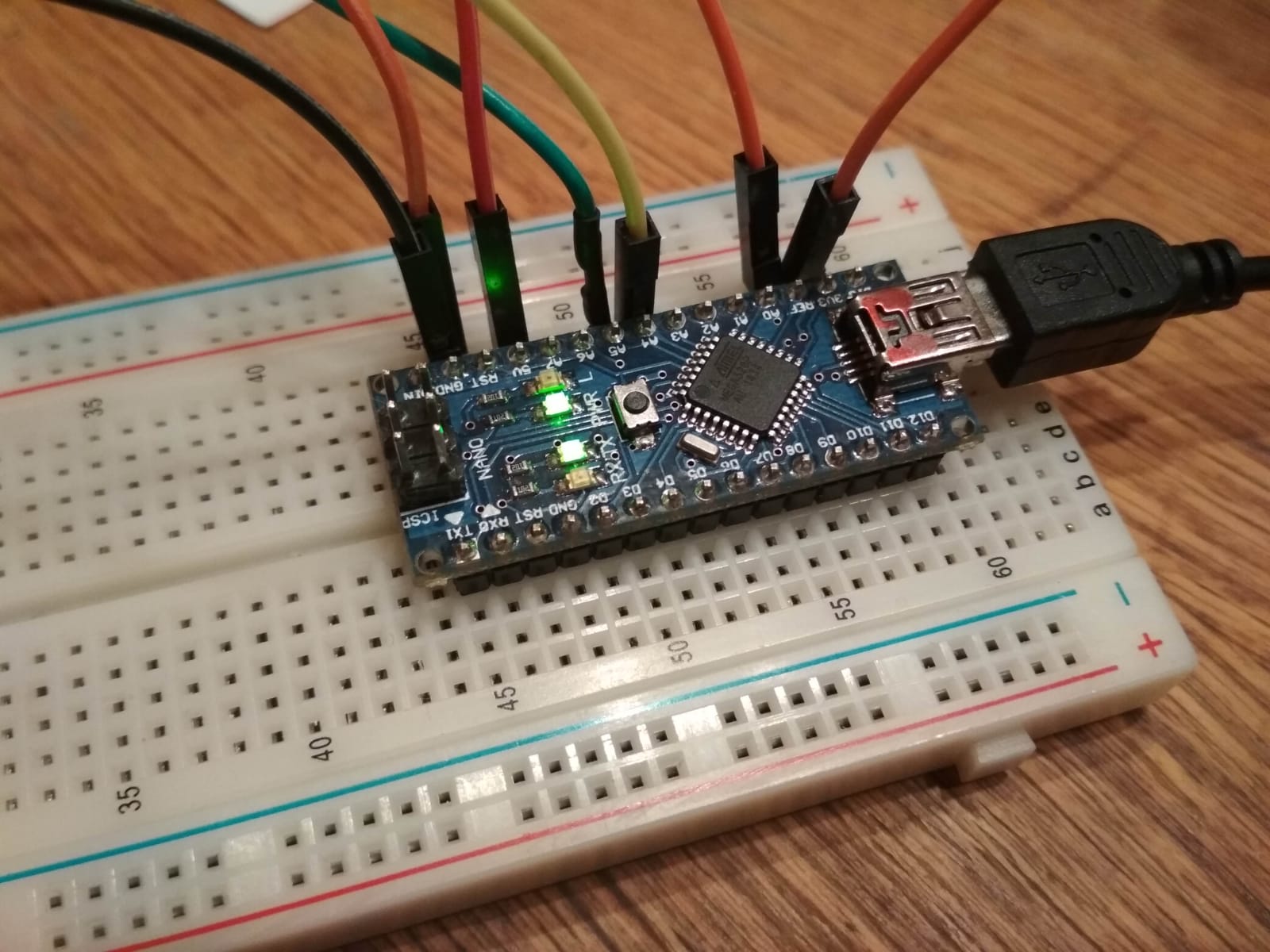
The device is also blinking ( blinking device.jpg ).
BR
Mathias
/*
HMC5883L_Example.pde - Example sketch for integration with an HMC5883L triple axis magnetomerwe.
Copyright (C) 2011 Love Electronics (loveelectronics.co.uk)

This program is free software: you can redistribute it and/or modify
it under the terms of the version 3 GNU General Public License as
published by the Free Software Foundation.

This program is distributed in the hope that it will be useful,
but WITHOUT ANY WARRANTY; without even the implied warranty of
MERCHANTABILITY or FITNESS FOR A PARTICULAR PURPOSE.  See the
GNU General Public License for more details.

You should have received a copy of the GNU General Public License
along with this program.  If not, see <http://www.gnu.org/licenses/>.

*/

// Reference the I2C Library
#include <Wire.h>
// Reference the HMC5883L Compass Library
#include <HMC5883L.h>

// Store our compass as a variable.
HMC5883L compass;
// Record any errors that may occur in the compass.
int error = 0;

// Out setup routine, here we will configure the microcontroller and compass.
void setup()
{
  // Initialize the serial port.
  Serial.begin(9600);

  Serial.println("Starting the I2C interface.");
  Wire.begin(); // Start the I2C interface.

  Serial.println("Constructing new HMC5883L");
  compass = HMC5883L(); // Construct a new HMC5883 compass.

  Serial.println("Setting scale to +/- 1.3 Ga");
  error = compass.SetScale(1.3); // Set the scale of the compass.
  if(error != 0) // If there is an error, print it out.
    Serial.println(compass.GetErrorText(error));

  Serial.println("Setting measurement mode to continous.");
  error = compass.SetMeasurementMode(Measurement_Continuous); // Set the measurement mode to Continuous
  if(error != 0) // If there is an error, print it out.
    Serial.println(compass.GetErrorText(error));
}

// Our main program loop.
void loop()
{
  // Retrive the raw values from the compass (not scaled).
  MagnetometerRaw raw = compass.ReadRawAxis();
  // Retrived the scaled values from the compass (scaled to the configured scale).
  MagnetometerScaled scaled = compass.ReadScaledAxis();

  // Values are accessed like so:
  int MilliGauss_OnThe_XAxis = scaled.XAxis;// (or YAxis, or ZAxis)

  // Calculate heading when the magnetometer is level, then correct for signs of axis.
  float heading = atan2(scaled.YAxis, scaled.XAxis);

  // Once you have your heading, you must then add your 'Declination Angle', which is the 'Error' of the magnetic field in your location.
  // Find yours here: http://www.magnetic-declination.com/
  // Mine is: 2� 37' W, which is 2.617 Degrees, or (which we need) 0.0456752665 radians, I will use 0.0457
  // If you cannot find your Declination, comment out these two lines, your compass will be slightly off.
  float declinationAngle = 0.0457;
  heading += declinationAngle;

  // Correct for when signs are reversed.
  if(heading < 0)
    heading += 2*PI;

  // Check for wrap due to addition of declination.
  if(heading > 2*PI)
    heading -= 2*PI;

  // Convert radians to degrees for readability.
  float headingDegrees = heading * 180/M_PI;

  // Output the data via the serial port.
  Output(raw, scaled, heading, headingDegrees);

  // Normally we would delay the application by 66ms to allow the loop
  // to run at 15Hz (default bandwidth for the HMC5883L).
  // However since we have a long serial out (104ms at 9600) we will let
  // it run at its natural speed.
  // delay(66);
}

// Output the data down the serial port.
void Output(MagnetometerRaw raw, MagnetometerScaled scaled, float heading, float headingDegrees)
{
   Serial.print("Raw:\t");
   Serial.print(raw.XAxis);
   Serial.print("   ");
   Serial.print(raw.YAxis);
   Serial.print("   ");
   Serial.print(raw.ZAxis);
   Serial.print("   \tScaled:\t");

   Serial.print(scaled.XAxis);
   Serial.print("   ");
   Serial.print(scaled.YAxis);
   Serial.print("   ");
   Serial.print(scaled.ZAxis);

   Serial.print("   \tHeading:\t");
   Serial.print(heading);
   Serial.print(" Radians   \t");
   Serial.print(headingDegrees);
   Serial.println(" Degrees   \t");
}
sure it is the HMC? .. or QMC?
The blinking LED is the serial TX LED. It will blink whenever a Serial print is executed.
It looks to be a genuine HMC5883 as shown on this page.
Please provide a link to the library that you used. There seem to be several with the same name.
Hello All,
i have used library from this side
BR
Mathias
ensure the sensor responds.. run the I2C-scanner program..
I2C scanner says, device is available on adress 0x1E.
BR
Mathiad
The serial monitor output you posted as a .jpg image was not produced by the program you posted.
Please post the text output from the posted program, using code tags.
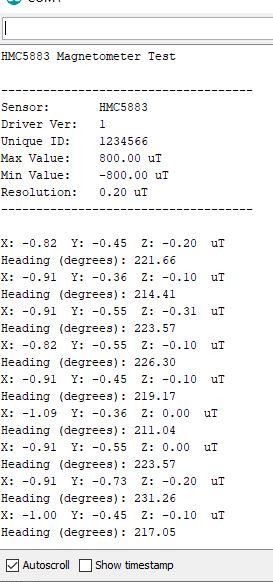
Hello jremington,
i have used now the code from the link bellow.
/***************************************************************************
  This is a library example for the HMC5883 magnentometer/compass

  Designed specifically to work with the Adafruit HMC5883 Breakout
  http://www.adafruit.com/products/1746

  *** You will also need to install the Adafruit_Sensor library! ***

  These displays use I2C to communicate, 2 pins are required to interface.

  Adafruit invests time and resources providing this open source code,
  please support Adafruit andopen-source hardware by purchasing products
  from Adafruit!

  Written by Kevin Townsend for Adafruit Industries with some heading example from
  Love Electronics (loveelectronics.co.uk)

 This program is free software: you can redistribute it and/or modify
 it under the terms of the version 3 GNU General Public License as
 published by the Free Software Foundation.

 This program is distributed in the hope that it will be useful,
 but WITHOUT ANY WARRANTY; without even the implied warranty of
 MERCHANTABILITY or FITNESS FOR A PARTICULAR PURPOSE.  See the
 GNU General Public License for more details.

 You should have received a copy of the GNU General Public License
 along with this program.  If not, see <http://www.gnu.org/licenses/>.

 ***************************************************************************/

#include <Wire.h>
#include <Adafruit_Sensor.h>
#include <Adafruit_HMC5883_U.h>

/* Assign a unique ID to this sensor at the same time */
Adafruit_HMC5883_Unified mag = Adafruit_HMC5883_Unified(123456);

void displaySensorDetails(void)
{
  sensor_t sensor;
  mag.getSensor(&sensor);
  Serial.println("------------------------------------");
  Serial.print  ("Sensor:       "); Serial.println(sensor.name);
  Serial.print  ("Driver Ver:   "); Serial.println(sensor.version);
  Serial.print  ("Unique ID:    "); Serial.println(sensor.sensor_id);
  Serial.print  ("Max Value:    "); Serial.print(sensor.max_value); Serial.println(" uT");
  Serial.print  ("Min Value:    "); Serial.print(sensor.min_value); Serial.println(" uT");
  Serial.print  ("Resolution:   "); Serial.print(sensor.resolution); Serial.println(" uT");
  Serial.println("------------------------------------");
  Serial.println("");
  delay(500);
}

void setup(void)
{
  Serial.begin(9600);
  Serial.println("HMC5883 Magnetometer Test"); Serial.println("");

  /* Initialise the sensor */
  if(!mag.begin())
  {
    /* There was a problem detecting the HMC5883 ... check your connections */
    Serial.println("Ooops, no HMC5883 detected ... Check your wiring!");
    while(1);
  }

  /* Display some basic information on this sensor */
  displaySensorDetails();
}

void loop(void)
{
  /* Get a new sensor event */
  sensors_event_t event;
  mag.getEvent(&event);

  /* Display the results (magnetic vector values are in micro-Tesla (uT)) */
  Serial.print("X: "); Serial.print(event.magnetic.x); Serial.print("  ");
  Serial.print("Y: "); Serial.print(event.magnetic.y); Serial.print("  ");
  Serial.print("Z: "); Serial.print(event.magnetic.z); Serial.print("  ");Serial.println("uT");

  // Hold the module so that Z is pointing 'up' and you can measure the heading with x&y
  // Calculate heading when the magnetometer is level, then correct for signs of axis.
  float heading = atan2(event.magnetic.y, event.magnetic.x);

  // Once you have your heading, you must then add your 'Declination Angle', which is the 'Error' of the magnetic field in your location.
  // Find yours here: http://www.magnetic-declination.com/
  // Mine is: -13* 2' W, which is ~13 Degrees, or (which we need) 0.22 radians
  // If you cannot find your Declination, comment out these two lines, your compass will be slightly off.
  float declinationAngle = 0.22;
  heading += declinationAngle;

  // Correct for when signs are reversed.
  if(heading < 0)
    heading += 2*PI;

  // Check for wrap due to addition of declination.
  if(heading > 2*PI)
    heading -= 2*PI;

  // Convert radians to degrees for readability.
  float headingDegrees = heading * 180/M_PI;

  Serial.print("Heading (degrees): "); Serial.println(headingDegrees);

  delay(500);
}
What happens when you run the HMC5883L_calibrate example from that library?
I have started it
/*
  Calibrate HMC5883L. Output for HMC5883L_calibrate_processing.pde
  Read more: http://www.jarzebski.pl/arduino/czujniki-i-sensory/3-osiowy-magnetometr-hmc5883l.html
  GIT: https://github.com/jarzebski/Arduino-HMC5883L
  Web: http://www.jarzebski.pl
  (c) 2014 by Korneliusz Jarzebski
*/

#include <Wire.h>
#include <HMC5883L.h>

HMC5883L compass;

int minX = 0;
int maxX = 0;
int minY = 0;
int maxY = 0;
int offX = 0;
int offY = 0;

void setup()
{
  Serial.begin(9600);

  // Initialize Initialize HMC5883L
  while (!compass.begin())
  {
    delay(500);
  }

  // Set measurement range
  compass.setRange(HMC5883L_RANGE_1_3GA);

  // Set measurement mode
  compass.setMeasurementMode(HMC5883L_CONTINOUS);

  // Set data rate
  compass.setDataRate(HMC5883L_DATARATE_30HZ);

  // Set number of samples averaged
  compass.setSamples(HMC5883L_SAMPLES_8);
}

void loop()
{
  Vector mag = compass.readRaw();

  // Determine Min / Max values
  if (mag.XAxis < minX) minX = mag.XAxis;
  if (mag.XAxis > maxX) maxX = mag.XAxis;
  if (mag.YAxis < minY) minY = mag.YAxis;
  if (mag.YAxis > maxY) maxY = mag.YAxis;

  // Calculate offsets
  offX = (maxX + minX)/2;
  offY = (maxY + minY)/2;

  Serial.print(mag.XAxis);
  Serial.print(":");
  Serial.print(mag.YAxis);
  Serial.print(":");
  Serial.print(minX);
  Serial.print(":");
  Serial.print(maxX);
  Serial.print(":");
  Serial.print(minY);
  Serial.print(":");
  Serial.print(maxY);
  Serial.print(":");
  Serial.print(offX);
  Serial.print(":");
  Serial.print(offY);
  Serial.print("\n");
}
The result is following in the pic.
-6.00:-6.00:-8:0:-8:0:-4:-4
-6.00:-6.00:-8:0:-8:0:-4:-4
-6.00:-6.00:-8:0:-8:0:-4:-4
-6.00:-6.00:-8:0:-8:0:-4:-4
-6.00:-5.00:-8:0:-8:0:-4:-4
-6.00:-5.00:-8:0:-8:0:-4:-4
-6.00:-5.00:-8:0:-8:0:-4:-4
-6.00:-6.00:-8:0:-8:0:-4:-4
-7.00:-5.00:-8:0:-8:0:-4:-4
-8.00:-6.00:-8:0:-8:0:-4:-4
-5.00:-6.00:-8:0:-8:0:-4:-4
-5.00:-6.00:-8:0:-8:0:-4:-4
-6.00:-6.00:-8:0:-8:0:-4:-4
-6.00:-6.00:-8:0:-8:0:-4:-4
-6.00:-5.00:-8:0:-8:0:-4:-4
-6.00:-6.00:-8:0:-8:0:-4:-4
-5.00:-6.00:-8:0:-8:0:-4:-4
-6.00:-7.00:-8:0:-8:0:-4:-4
-6.00:-7.00:-8:0:-8:0:-4:-4
-6.00:-7.00:-8:0:-8:0:-4:-4
-6.00:-6.00:-8:0:-8:0:-4:-4
-6.00:-5.00:-8:0:-8:0:-4:-4
-6.00:-6.00:-8:0:-8:0:-4:-4
-7.00:-6.00:-8:0:-8:0:-4:-4
-7.00:-6.00:-8:0:-8:0:-4:-4
-7.00:-5.00:-8:0:-8:0:-4:-4
-8.00:-5.00:-8:0:-8:0:-4:-4
-7.00:-7.00:-8:0:-8:0:-4:-4
-5.00:-5.00:-8:0:-8:0:-4:-4
It could be that the module is defective.
The HMC5883L is no longer being produced, so I suggest that you buy a newer and better magnetometer from a reliable supplier like Pololu. They fully support their well engineered products.