How do I interface Arduino UNO with Logitech 3D Pro Extreme Joystick?

Items:

  1. Arduino UNO
  2. Arduino USB Host Shield
  3. Logitech 3D Pro Extreme Joystick with USB cable.

The Arduino UNO does not support an USB port for connection of a joystick, so rightfully I would need to get a Arduino USB Host Shield for the USB connection.

After that, I have installed the USB Host Shield Library 2.0. In the example library codes, I tried searching for the code that will read the Logitech 3D Pro Extreme Joystick.

But I do not know which to use....as there are quite a number of codes...Bluetooth, HID, PS3USB, PS4USB and many more. :confused:

Can anyone tell me which of the codes in the library can I use to control the Logitech 3D Pro Extreme Joystick with the Arduino UNO Board?

What I want is to use the Logitech 3D Pro Extreme Joystick
Example of Arduino + Dongle Bluetooth + Servo Control PS3, if you guys don't get what i meant

Well, look at what this guy did. I was helping him, but the thread has been orphaned.
http://forum.arduino.cc/index.php?topic=327095.45

Hmmm yahh its you XD! I read your thread just now..
Somehow I was searching a solution, and came across your thread lols.

Yeah but anyways I am still figuring out as I will be using actuators instead of servo...will that make any difference in the coding?

I think it would be different...but i will try.. Truthfully speaking :|, I have no clue what the code is writing about but I tried my best to write this...pardon me if its wrong T-T...(Please do tell me where I am wrong)

I have to control 3 actuators relative to the motion of the joystick. But currently if the servo can work, I can then try on actuators? :open_mouth:

I was slightly confuse about the last few pages of the tread...

ceyhun: After including the <servo.h> and and creating the claw at 2nd page under the second void, it starts to work.

I tried doing that but I kept getting error in the Second page of the code, so i delete it.

============================First Code===============================

/* Simplified Logitech Extreme 3D Pro Joystick Report Parser */

#include <hid.h>
#include <hiduniversal.h>
#include <usbhub.h>
#include <Servo.h>

#include "le3dp_rptparser.h"

// Satisfy the IDE, which needs to see the include statment in the ino too.
#ifdef dobogusinclude
#include <spi4teensy3.h>
#include <SPI.h>

#endif

USB Usb;
USBHub Hub(&Usb);
HIDUniversal Hid(&Usb);
JoystickEvents JoyEvents;
JoystickReportParser Joy(&JoyEvents);

Servo Servo1;
int X;

Servo Servo2;
int Y;

Servo Servo3;
int T;

void setup()
{
Servo1.attach(9);
Servo2.attach(10);
Servo3.attach(11);

Serial.begin( 115200 );
#if !defined(MIPSEL)
while (!Serial); // Wait for serial port to connect - used on Leonardo, Teensy and other boards with built-in USB CDC serial connection
#endif
Serial.println("Start");

if (Usb.Init() == -1)
Serial.println("OSC did not start.");

delay( 200 );

if (!Hid.SetReportParser(0, &Joy))
ErrorMessage<uint8_t>(PSTR("SetReportParser"), 1 );
}

void loop()
{
Usb.Task();

int angle1 = map(X, 0, 1023, 0, 180);

Servo1.write(angle1);

Serial.print(angle1);

int angle2 = map(Y, 0, 1023, 0, 180);

Servo2.write(angle2);

Serial.print(angle2);

int angle3 = map(T, 0, 1023, 0, 180);

Servo3.write(angle3);

Serial.print(angle3);
}

=================================================================

=============================Second Code============================

#include "le3dp_rptparser.h"

JoystickReportParser::JoystickReportParser(JoystickEvents *evt) :
joyEvents(evt)
{}

void JoystickReportParser::Parse(HID *hid, bool is_rpt_id, uint8_t len, uint8_t *buf)
{
bool match = true;

// Checking if there are changes in report since the method was last called
for (uint8_t i=0; i<RPT_GAMEPAD_LEN; i++) {
if( buf != oldPad ) {
* match = false;*
* break;*
* }*
* }*
* // Calling Game Pad event handler*
* if (!match && joyEvents) {*
_ joyEvents->OnGamePadChanged((const GamePadEventData*)buf);
for (uint8_t i=0; i<RPT_GAMEPAD_LEN; i++) oldPad = buf*;*
* }
}
void JoystickEvents::OnGamePadChanged(const GamePadEventData *evt)
{*_

* uint16_t myX = evt->x;
_ Serial.println(myX);_
uint16_t myY = evt->y;
_ Serial.println(myY);_
uint16_t myT = evt->twist;
_ Serial.println(myT);
Serial.print("X: ");
Serial.print(evt->x);_

PrintHex<uint16_t>(evt->x, 0x80);
_ Serial.print(" Y: ");
Serial.print(evt->y);_

PrintHex<uint16_t>(evt->y, 0x80);*

* Serial.print(" Hat Switch: ");*
* Serial.print(evt->hat);*
* PrintHex<uint8_t>(evt->hat, 0x80);*

* Serial.print(" Twist: ");*
* Serial.print(evt->twist);*
* PrintHex<uint8_t>(evt->twist, 0x80);*

* Serial.print(" Slider: ");*
* Serial.print(evt->slider);*
* PrintHex<uint8_t>(evt->slider, 0x80);*

* Serial.print(" Buttons A: ");*
* Serial.print(evt->buttons_a);
PrintHex<uint8_t>(evt->buttons_a, 0x80);*

* Serial.print(" Buttons B: ");*
* Serial.print(evt->buttons_b);
PrintHex<uint8_t>(evt->buttons_b, 0x80);*

* Serial.println("");*
* int angle1 = map(myX, 0, 1023, 0, 180);*
* Serial.print(angle1);*
* int angle2 = map(myY, 0, 1023, 0, 180);*
* Serial.print(angle2);*
* int angle3 = map(myT, 0, 1023, 0, 180);*
* Serial.print(angle3);*

}
=================================================================
==============================Third Code============================
#if !defined(HIDJOYSTICKRPTPARSER_H)
#define HIDJOYSTICKRPTPARSER_H
#include <hid.h>
struct GamePadEventData
{
* union { //axes and hut switch*
* uint32_t axes;
_ struct {_
uint32_t x : 10;
uint32_t y : 10;
uint32_t hat : 4;
uint32_t twist : 8;
_ };
};_

uint8_t buttons_a;
uint8_t slider;
uint8_t buttons_b;
_};
class JoystickEvents
{
public:
virtual void OnGamePadChanged(const GamePadEventData evt);
};

#define RPT_GAMEPAD_LEN sizeof(GamePadEventData)/sizeof(uint8_t)
class JoystickReportParser : public HIDReportParser
{
JoystickEvents joyEvents;_
uint8_t oldPad[RPT_GAMEPAD_LEN];
public:
_ JoystickReportParser(JoystickEvents evt);
virtual void Parse(HID *hid, bool is_rpt_id, uint8_t len, uint8_t *buf);
};

#endif // HIDJOYSTICKRPTPARSER_H
=================================================================_

Do you have the libraries that are included in the first page? Like hid.h and hiduniversal.h?

I added the library files for USB Host Shield library 2.0 and just open:

Sketchbook > libraries > USB Host Shield library 2.0 > HID > le3dp

I mean if I open it that way...it should be there right :O?

OK. I see what you mean. Try something like
le3dp:

/* Simplified Logitech Extreme 3D Pro Joystick Report Parser */

#include <hid.h>
#include <hiduniversal.h>
#include <usbhub.h>

#include "le3dp_rptparser.h"

// Satisfy the IDE, which needs to see the include statment in the ino too.
#ifdef dobogusinclude
#include <spi4teensy3.h>
#include <SPI.h>
#endif

USB                                             Usb;
USBHub                                          Hub(&Usb);
HIDUniversal                                    Hid(&Usb);
JoystickEvents                                  JoyEvents;
JoystickReportParser                            Joy(&JoyEvents);

void setup()
{
  Serial.begin( 115200 );
#if !defined(__MIPSEL__)
  while (!Serial); // Wait for serial port to connect - used on Leonardo, Teensy and other boards with built-in USB CDC serial connection
#endif
  Serial.println("Start");

  if (Usb.Init() == -1)
      Serial.println("OSC did not start.");

  delay( 200 );

  if (!Hid.SetReportParser(0, &Joy))
      ErrorMessage<uint8_t>(PSTR("SetReportParser"), 1  );
}

void loop()
{
    Usb.Task();
}

le3dp_rptparser.cpp:

 #include "le3dp_rptparser.h"
byte xPin = 2;
JoystickReportParser::JoystickReportParser(JoystickEvents *evt) :
	joyEvents(evt)
{}

void JoystickReportParser::Parse(HID *hid, bool is_rpt_id, uint8_t len, uint8_t *buf)
{
	bool match = true;

	// Checking if there are changes in report since the method was last called
	for (uint8_t i=0; i<RPT_GAMEPAD_LEN; i++) {
		if( buf[i] != oldPad[i] ) {
			match = false;
			break;
		}
  }
  	// Calling Game Pad event handler
	if (!match && joyEvents) {
		joyEvents->OnGamePadChanged((const GamePadEventData*)buf);

		for (uint8_t i=0; i<RPT_GAMEPAD_LEN; i++) oldPad[i] = buf[i];
	}
}

void JoystickEvents::OnGamePadChanged(const GamePadEventData *evt)
{
  uint16_t myX = evt->x;

  uint16_t myY = evt->y;

  uint16_t myT = evt->twist;
  
	Serial.print("X: ");
	PrintHex<uint16_t>(evt->x, 0x80);
	Serial.print(" Y: ");
	PrintHex<uint16_t>(evt->y, 0x80);
	Serial.print(" Hat Switch: ");
	PrintHex<uint8_t>(evt->hat, 0x80);
	Serial.print(" Twist: ");
	PrintHex<uint8_t>(evt->twist, 0x80);
	Serial.print(" Slider: ");
	PrintHex<uint8_t>(evt->slider, 0x80);
  Serial.print(" Buttons A: ");
	PrintHex<uint8_t>(evt->buttons_a, 0x80);
	Serial.print(" Buttons B: ");
	PrintHex<uint8_t>(evt->buttons_b, 0x80);
	Serial.println("");
  
  if(myX > 512){//you can do whatever you want with the myX,myY,and myT. 
    digitalWrite(xPin,HIGH);//You can also use the buttons and the Z-axis.
  }
  else{
    digitalWrite(xPin,LOW);
  }
}

le3dp_rptparser.h:

#if !defined(__HIDJOYSTICKRPTPARSER_H__)
#define __HIDJOYSTICKRPTPARSER_H__

#include <hid.h>

struct GamePadEventData
{
  union { //axes and hut switch
    uint32_t axes;
    struct {
      uint32_t x : 10;
      uint32_t y : 10;
      uint32_t hat : 4;
      uint32_t twist : 8;      
    };
  };
  uint8_t buttons_a;
  uint8_t slider;
  uint8_t buttons_b;
};

class JoystickEvents
{
public:
	virtual void OnGamePadChanged(const GamePadEventData *evt);
};

#define RPT_GAMEPAD_LEN	sizeof(GamePadEventData)/sizeof(uint8_t)

class JoystickReportParser : public HIDReportParser
{
	JoystickEvents		*joyEvents;

  uint8_t oldPad[RPT_GAMEPAD_LEN];

public:
	JoystickReportParser(JoystickEvents *evt);

	virtual void Parse(HID *hid, bool is_rpt_id, uint8_t len, uint8_t *buf);
};

#endif // __HIDJOYSTICKRPTPARSER_H__

Change whatever you want at the end of JoystickEvents::OnGamePadChanged(const GamePadEventData *evt)

Hmm do you mean something like this...?
(Only Page 2 of codes are edited)

Anyway I was wondering if... I am supposed to write the codes in le3dp (Page 1) or le3dp_rptparser.cpp (Page 2)? Kinda confused... :\

Page 1 seems to look more familiar to me, as it it has a Void Setup() and void loop()
I mean I would rather write the codes in page 1...if its possible...hahas :open_mouth:

le3dp_rptparser.cpp:

#include "le3dp_rptparser.h"

byte xPin = 2;

byte yPin = 2;

byte tPin = 2;

JoystickReportParser::JoystickReportParser(JoystickEvents *evt) :
 joyEvents(evt)
{}

void JoystickReportParser::Parse(HID *hid, bool is_rpt_id, uint8_t len, uint8_t *buf)
{
 bool match = true;

 // Checking if there are changes in report since the method was last called
 for (uint8_t i=0; i<RPT_GAMEPAD_LEN; i++) {
 if( buf[i] != oldPad[i] ) {
 match = false;
 break;
 }
  }
   // Calling Game Pad event handler
 if (!match && joyEvents) {
 joyEvents->OnGamePadChanged((const GamePadEventData*)buf);

 for (uint8_t i=0; i<RPT_GAMEPAD_LEN; i++) oldPad[i] = buf[i];
 }
}

void JoystickEvents::OnGamePadChanged(const GamePadEventData *evt)
{
  
  uint16_t myX = evt->x;

  uint16_t myY = evt->y;

  uint16_t myT = evt->twist;

  
 Serial.print("X: ");
 PrintHex<uint16_t>(evt->x, 0x80);
 Serial.print(" Y: ");
 PrintHex<uint16_t>(evt->y, 0x80);
 Serial.print(" Hat Switch: ");
 PrintHex<uint8_t>(evt->hat, 0x80);
 Serial.print(" Twist: ");
 PrintHex<uint8_t>(evt->twist, 0x80);
 Serial.print(" Slider: ");
 PrintHex<uint8_t>(evt->slider, 0x80);
 Serial.print(" Buttons A: ");
 PrintHex<uint8_t>(evt->buttons_a, 0x80);
 Serial.print(" Buttons B: ");
 PrintHex<uint8_t>(evt->buttons_b, 0x80);
 Serial.println("");

  if(myX > 512)  //For myX
  {  
    digitalWrite(xPin,HIGH);  //Actuator movement for X-axis
  }
  
  else
  {
    digitalWrite(xPin,LOW); 
  }


  if(myY > 512)  //For myY
  {  
    digitalWrite(yPin,HIGH);  //Actuator movement for Y-axis
  }
  
  else
  {
    digitalWrite(yPin,LOW); 
  }


    if(myT > 512)  //For myT.
  {  
    digitalWrite(tPin,HIGH);  //Actuator movement for Z-axis
  }
  
  else
  {
    digitalWrite(tPin,LOW); 
  }
  
}

Can anyone help me check my work? :frowning: idk if its right or wrong...to write the codes in Le3dp (First Page) or must I write the codes in le3dp_rptparser.cpp (Second Page). I re-modify the codes as I need to have feedback for the actuators.

Le3dp:

/* Simplified Logitech Extreme 3D Pro Joystick Report Parser */

#include <hid.h>
#include <hiduniversal.h>
#include <usbhub.h>
#include <Servo.h>

#include "le3dp_rptparser.h"

// Satisfy the IDE, which needs to see the include statment in the ino too.
#ifdef dobogusinclude
#include <spi4teensy3.h>
#include <SPI.h>

#endif

USB                                             Usb;
USBHub                                          Hub(&Usb);
HIDUniversal                                    Hid(&Usb);
JoystickEvents                                  JoyEvents;
JoystickReportParser                            Joy(&JoyEvents);

//Defines 3 Linear Actuator Pins 9, 10, 11
#define LINEARACTUATORPIN 9   // Linear Actuator Digital Pin 9
#define LINEARACTUATORPIN 10  // Linear Actuator Digital Pin 10
#define LINEARACTUATORPIN 11  // Linear Actuator Digital Pin 11

//Defines 3 Joy Pins X, Y, T
#define JOY_PIN_X X           // Joystick Analog Pin X
#define JOY_PIN_Y Y           // Joystick Analog Pin Y
#define JOY_PIN_T T           // Joystick Analog Pin T


//generic deadband limits - not all joystics will center at 512, so these limits remove 'drift' from joysticks that are off-center.
#define DEADBANDLOW 482       //Decrease this value if drift occurs, increase it to increase sensitivity around the center position
#define DEADBANDHIGH 542      //Increase this value if drift occurs, decrease it to increase sensitivity around the center position

//max/min puse values in microseconds to send to the servo
#define POS_MIN      1050     //Fully retracted
#define POS_MAX      2000     //Fully extended


Servo linearActuator1;        // Create servo object to control the linear actuator 1
int X;                        // Variables to hold the last reading from the analog pins for the joystick. The value will be between 0 and 1023

Servo linearActuator2;        // Create servo object to control the linear actuator 2
int Y;                        // Variables to hold the last reading from the analog pins for the joystick. The value will be between 0 and 1023

Servo linearActuator3;        // Create servo object to control the linear actuator 3
int T;                        // Variables to hold the last reading from the analog pins for the joystick. The value will be between 0 and 1023


int ValueMapped1;             // The joystick values will be changed (or 'mapped') to new values to be sent to the linear actuator 1.

int ValueMapped2;             // The joystick values will be changed (or 'mapped') to new values to be sent to the linear actuator 2.

int ValueMapped3;             // The joystick values will be changed (or 'mapped') to new values to be sent to the linear actuator 3.


int LinearValue = 1500;       //Current positional value being sent to the linear actuator. Start at the 'centered' position

int speed = 1;                //Alter this value to change the speed of the system. Higher values mean higher speeds


void setup()
{
  linearActuator1.attach(9);
  linearActuator2.attach(10);
  linearActuator3.attach(11);
  
  Serial.begin( 115200 );
#if !defined(__MIPSEL__)
  while (!Serial);            // Wait for serial port to connect - used on Leonardo, Teensy and other boards with built-in USB CDC serial connection
#endif
  Serial.println("Start");
  
  if (Usb.Init() == -1)
      Serial.println("OSC did not start.");

  delay( 200 );

  if (!Hid.SetReportParser(0, &Joy))
      ErrorMessage<uint8_t>(PSTR("SetReportParser"), 1  );
}

void loop()
{
    Usb.Task();


    //Initialize servos
    linearActuator1.attach(LINEARACTUATORPIN, POS_MIN, POS_MAX);  // Attaches/activates the linear actuator on pin LINEARACTUATORPIN
    linearActuator2.attach(LINEARACTUATORPIN, POS_MIN, POS_MAX);  // Attaches/activates the linear actuator on pin LINEARACTUATORPIN
    linearActuator3.attach(LINEARACTUATORPIN, POS_MIN, POS_MAX);  // Attaches/activates the linear actuator on pin LINEARACTUATORPIN 


    //Use the write Microseconds to set the linear actuator to a default centered position
    linearActuator1.write(LinearValue); 
    linearActuator2.write(LinearValue); 
    linearActuator3.write(LinearValue); 


    /************** Actuator 1 Positions ******************************/
    //Read the values from the joystick
    int angle1 = analogRead(JOY_PIN_X);
 
    //Only update if the joystick is outside the deadzone (i.e. moved oustide the center position)
    if(angle1 > DEADBANDHIGH || angle1 < DEADBANDLOW)
    {
       ValueMapped1 = map(angle1, 0, 1023, speed, -speed);   //Map analog value from native joystick value (0 to 1023) to incremental change (speed to -speed).
       LinearValue = LinearValue + ValueMapped1;             //Add mapped joystick value to present Value
    }
      
    //Use the writeMicroseconds to set the servos to their new positions
    linearActuator1.write(LinearValue);
    
    Serial.print(angle1);

    delay(10); // Waits for the servo to get to they're position before continuing


    /************** Actuator 2 Positions ******************************/
    //Read the values from the joystick
    int angle2 = analogRead(JOY_PIN_Y);
 
    //Only update if the joystick is outside the deadzone (i.e. moved oustide the center position)
    if(angle2 > DEADBANDHIGH || angle2 < DEADBANDLOW)
    {
       ValueMapped2 = map(angle2, 0, 1023, speed, -speed);   //Map analog value from native joystick value (0 to 1023) to incremental change (speed to -speed).
       LinearValue = LinearValue + ValueMapped2;             //Add mapped joystick value to present Value
    }
      
    //Use the writeMicroseconds to set the servos to their new positions
    linearActuator2.write(LinearValue);

    Serial.print(angle2);
  
    delay(10); // Waits for the servo to get to they're position before continuing


    /************** Actuator 3 Positions ******************************/
    //Read the values from the joystick
    int angle3 = analogRead(JOY_PIN_T);
 
    //Only update if the joystick is outside the deadzone (i.e. moved oustide the center position)
    if(angle3 > DEADBANDHIGH || angle3 < DEADBANDLOW)
    {
       ValueMapped3 = map(angle3, 0, 1023, speed, -speed);   //Map analog value from native joystick value (0 to 1023) to incremental change (speed to -speed).
       LinearValue = LinearValue + ValueMapped3;             //Add mapped joystick value to present Value
    }
      
    //Use the writeMicroseconds to set the servos to their new positions
    linearActuator3.write(LinearValue);

    Serial.print(angle3);
  
    delay(10); // Waits for the servo to get to they're position before continuing

}

le3dp_rptparser.cpp:

#include "le3dp_rptparser.h"

JoystickReportParser::JoystickReportParser(JoystickEvents *evt) :
 joyEvents(evt)
{}

void JoystickReportParser::Parse(HID *hid, bool is_rpt_id, uint8_t len, uint8_t *buf)
{
 bool match = true;

 // Checking if there are changes in report since the method was last called
 for (uint8_t i=0; i<RPT_GAMEPAD_LEN; i++) {
 if( buf[i] != oldPad[i] ) {
 match = false;
 break;
 }
  }
   // Calling Game Pad event handler
 if (!match && joyEvents) {
 joyEvents->OnGamePadChanged((const GamePadEventData*)buf);

 for (uint8_t i=0; i<RPT_GAMEPAD_LEN; i++) oldPad[i] = buf[i];
 }
}

void JoystickEvents::OnGamePadChanged(const GamePadEventData *evt)
{

  uint16_t myX = evt->x;
  Serial.println(myX);

  uint16_t myY = evt->y;
  Serial.println(myY);

  uint16_t myT = evt->twist;
  Serial.println(myT);


 Serial.print("X: ");
 Serial.print(evt->x);
 PrintHex<uint16_t>(evt->x, 0x80);

 Serial.print(" Y: ");
  Serial.print(evt->y);
 PrintHex<uint16_t>(evt->y, 0x80);
 
 Serial.print(" Hat Switch: ");
  Serial.print(evt->hat);
 PrintHex<uint8_t>(evt->hat, 0x80);
  
 Serial.print(" Twist: ");
  Serial.print(evt->twist);
 PrintHex<uint8_t>(evt->twist, 0x80);
  
 Serial.print(" Slider: ");
  Serial.print(evt->slider);
 PrintHex<uint8_t>(evt->slider, 0x80);
 
  Serial.print(" Buttons A: ");
  Serial.print(evt->buttons_a);
 PrintHex<uint8_t>(evt->buttons_a, 0x80);
  
 Serial.print(" Buttons B: ");
  Serial.print(evt->buttons_b);
 PrintHex<uint8_t>(evt->buttons_b, 0x80);
  
 Serial.println("");

  int angle1 = map(myX, 0, 1023, 0, 180);
  Serial.print(angle1);

  int angle2 = map(myY, 0, 1023, 0, 180);
  Serial.print(angle2);

  int angle3 = map(myT, 0, 1023, 0, 180);
  Serial.print(angle3);
 
}

le3dp_rptparser.h:

#if !defined(__HIDJOYSTICKRPTPARSER_H__)
#define __HIDJOYSTICKRPTPARSER_H__

#include <hid.h>

struct GamePadEventData
{
  union { //axes and hut switch
    uint32_t axes;
    struct {
      uint32_t x : 10;
      uint32_t y : 10;
      uint32_t hat : 4;
      uint32_t twist : 8;      
    };
  };
  uint8_t buttons_a;
  uint8_t slider;
  uint8_t buttons_b;
};

class JoystickEvents
{
public:
 virtual void OnGamePadChanged(const GamePadEventData *evt);
};

#define RPT_GAMEPAD_LEN sizeof(GamePadEventData)/sizeof(uint8_t)

class JoystickReportParser : public HIDReportParser
{
 JoystickEvents *joyEvents;

  uint8_t oldPad[RPT_GAMEPAD_LEN];

public:
 JoystickReportParser(JoystickEvents *evt);

 virtual void Parse(HID *hid, bool is_rpt_id, uint8_t len, uint8_t *buf);
};

#endif // __HIDJOYSTICKRPTPARSER_H__

le3dp_rptparser.cpp (1.69 KB)

le3dp_rptparser.h (814 Bytes)

Logitech_Extreme_3D_Pro_Joystick___More_Likely_To_Work_.ino (6.93 KB)

  uint16_t myX = evt->x;
  Serial.println(myX);
  uint16_t myY = evt->y;
  Serial.println(myY);

  uint16_t myT = evt->twist;
  Serial.println(myT);

This takes the joystick values that are read by the USB Host Shield and turns them into variables that you can use. You declare myX like this:

  uint16_t myX = evt->x;

That sets it to the X value of the joystick. From then on, you can do whatever you want with it.
The X-value ranges from 0 to 1023. So do the Y and twist.
You can also use the buttons. You would declare something like this:

uint16_t myButtonB = evt->buttons_b;

And myButtonB would be either 1 or 0 controlled by button B.

====== Items ======

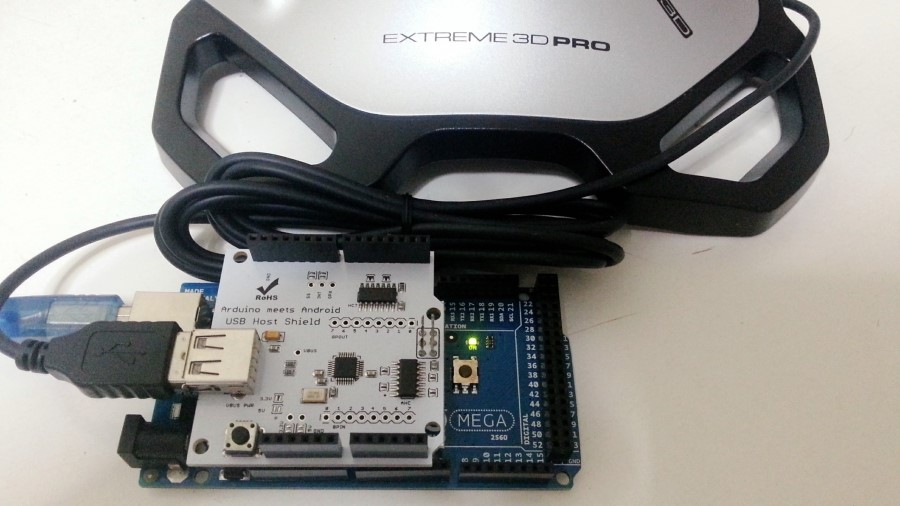
  1. Arduino MEGA 2560

  2. Arduino USB Host Shield 2.0
    Link: USB Host Shield Expansion Board Google Android Compatible for Arduino - Free shipping - DealExtreme

  3. Logitech 3D Pro Extreme Joystick with USB cable.
    Link: http://gaming.logitech.com/en-sg/product/extreme-3d-pro-joystick

Can anyone help me with this.......
I cant seem to make the Logitech 3D Pro Extreme Joystick work with the Arduino Mega 2560 T-T.

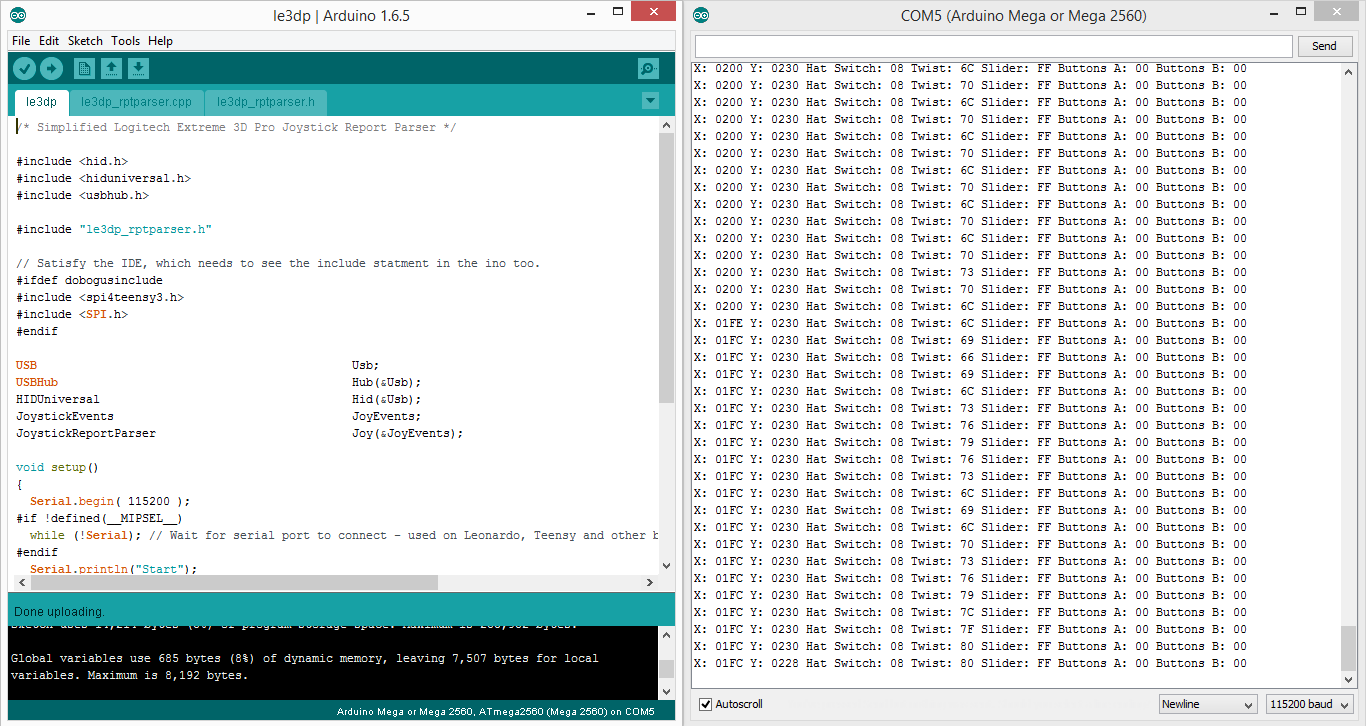
I connected the Logitech Joystick (USB) to the USB Host Shield, but was unable to make it work. When I click the upload button, the serial monitor displayed lots of weird symbols which I cant seem to understand.

====== I also have some doubts which I need to clarify ======

  1. Is the USB Host Shield that I am using compatible with the arduino mega?

  2. Does the Logitech Joystick requires any setup before I can connect it to the Arduino Mega?

  3. Do I need a external power supply? (I mean I am using USB Host Shield 2.0 Board)

Please refer to the attachments below. Thank you

  1. Yes, it says that it's compatible on that web page you linked.

  2. I don't expect it would. It didn't need any configuration before with the UNO, did it?

  3. Well, somebody has to provide power to the system.

Erm okay.... I did not tried it on the Arduino UNO as I brought the Mega, I don't think it will make any difference though :open_mouth: I mean the Mega just have additional ports..

But i still cant solve the problem about the weird symbols on the serial monitor, despite trying countless times since this morning T-T...

The USB Host Shield seems to be able to read...
When I move the joystick the symbols starts typing on the serial monitor.
And when I stop moving the joystick the symbols also stop appearing.

I am really confused...
It is able to run, when I uploaded the code from File > Examples > USB Host Shield Library 2.0 > HID > Le3dp but unable to read the output properly on the serial monitor. (Refer to the attachment above)

"Weird symbols" means the baud rate is incorrect. Check you have the same baud rate in Serial.begin() and in your serial monitor.

[Forgot attachment?]

OMG thanks so much XD...!!!

Stuck here for many days...yeah I dint know it was cause by the baud rate

(Must change it to 115200 baud cause i am using a the mega)

Hi. Sorry I didn't answer your PM. I have been on RCGroups.
Now that you have everything working, what are you going to do with this?

Hello! First of all i'd just like to say how helpful this has been for me and I thank you all.

I am extremely new to programming and Arduino in general. And am in need of some advice.

When i verify the code provided above. I am getting the following error-

Arduino: 1.8.0 (Windows 10), Board: "Arduino/Genuino Uno"

C:\Users\TravisLayne\Documents\Arduino\Logitech-Extreme3Dpro\Logitech-Extreme3Dpro.ino:7:29: fatal error: le3dp_rptparser.h: No such file or directory

#include "le3dp_rptparser.h"

^

compilation terminated.

exit status 1
Error compiling for board Arduino/Genuino Uno.

Thank you for any help! :slight_smile:

Hi Travis,

I'm very new to this as well. Bu let me try and see if I can be of any help at all.

Hmm...are you sure you have the USB host shield 2.0 library downloaded?
le3dp should be an example avaiable if you have the library downloaded

Yes, that should fix the error. Try here: GitHub - felis/USB_Host_Shield_2.0: Revision 2.0 of USB Host Library for Arduino.
Also take a look at this: GitHub - BenBrewerBowman/Arduino_Logitech_3D_Joystick: Arduino code for interfacing with the "Logitech Extreme 3D Pro Joystick". A more intuitive version of the "le3dp_rptparser".