Thank you very much for your suggestions. I am now reading up more intensively on the subject of serial communication. If you have any recommendations for sources, please let me know.
I understand what you mean. I could actually borrow an Arduino nano at the weekend. That should be enough for this purpose.
furthermore, get a nice Serial Program as the Serial Monitor is not sufficent for these low level tests.
For example CoolTerm is one I'm using - there are other well programs out there also.
on long term, get a microcontroller with at least two hardware serials.
For example an Arduino Mega or an Arduino Nano Every.
@reallynotonsteam
Your original project is to work with a UART gas sensor and UNO. Have you got your sensor? This is good that you are learning UART Protocol by exchanging data between two Arduino.
If you again planning to use a string, but now with HEX numbers - then this “improvement” makes no sense.
Better move on to transmitting binary information. Your temperature and humidity data easily fits into two bytes. For packet transmission, you need another byte to indicate the start of the data - and an end byte.
Unfortunately, the sensor has not yet arrived. It is being shipped from the USA to Europe and this is taking a while.
So i tried my best and reworked the code. The "transmitter" now writes the temperature and the humidity as bytes. Additionally, i added a start and an end byte. Here is my Code:
Transmitting UNO
#include <Adafruit_Sensor.h>
#include <DHT.h>
#include <DHT_U.h>

#define DHTPIN 2
#define DHTTYPE DHT11

DHT_Unified dht(DHTPIN, DHTTYPE);

byte temp, hum;
byte startByte = 0xFF; //Random
byte endByte = 0x00; //Random


void setup() {
  Serial.begin(9600);
  dht.begin();
  sensor_t sensor;
  dht.temperature().getSensor(&sensor);
  dht.humidity().getSensor(&sensor);
}

void loop() {
  // Get temperature event
  sensors_event_t event;
  dht.temperature().getEvent(&event);
  if (isnan(event.temperature)) {
    Serial.println("Error reading temperature!");
  } else {
    temp = event.temperature;
  }
  // Get humidity event
  dht.humidity().getEvent(&event);
  if (isnan(event.relative_humidity)) {
    Serial.println("Error reading humidity!");
  } else {
    hum = event.relative_humidity;
  }
  //The part where it's sent to the Receiver Arduino:

Serial.write(startByte);
Serial.write(temp);
Serial.write(hum);
Serial.write(endByte);

  delay(500);
}
This is how the Code is received: Receiver UNO
const byte numBytes = 32;
byte receivedBytes[numBytes];
byte numReceived = 0;

boolean newData = false;

void setup() {
  Serial.begin(9600);
}

void loop() {
  recvBytesWithStartEndMarkers();
  showNewData();
  delay(500);
}
void recvBytesWithStartEndMarkers() {
  static boolean recvInProgress = false;
  static byte ndx = 0;
  byte startByte = 0xFF;
  byte endByte = 0x00;
  byte rb;


  while (Serial.available() > 0 && newData == false) {
    rb = Serial.read();

    if (recvInProgress == true) {
      if (rb != endByte) {
        receivedBytes[ndx] = rb;
        ndx++;
        if (ndx >= numBytes) {
          ndx = numBytes - 1;
        }
      } else {
        receivedBytes[ndx] = '\0';  // terminate the string
        recvInProgress = false;
        numReceived = ndx;  // save the number for use when printing
        ndx = 0;
        newData = true;
      }
    }

    else if (rb == startByte) {
      recvInProgress = true;
    }
  }
}

void showNewData() {
  if (newData == true) {
    Serial.println("+++++++++++++++++++");
    Serial.print("Received Bytes: ");
    for (byte n = 0; n < numReceived; n++) {
      Serial.print(receivedBytes[n], HEX);
      Serial.print(' ');
    }
    Serial.println();
    Serial.print("Received Temp + Hum: ");
    for (byte m = 0; m < numReceived; m++) {
      if (m < (numReceived / 2)) { //First half of the byte represents temp
        Serial.print(receivedBytes[m]);
        Serial.print("°C");
        Serial.print(' ');
      } else { //second half of the byte represents hum
        Serial.print(receivedBytes[m]);
        Serial.print("%");
      }
    }
    Serial.println();
    newData = false;
  }
}
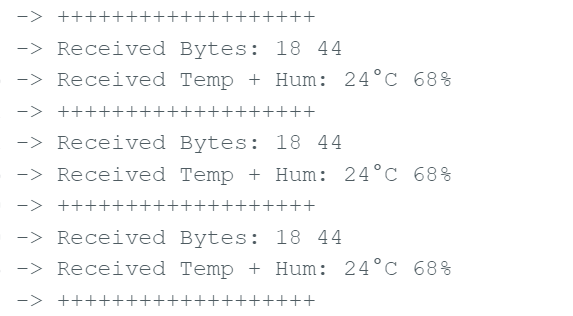
Am i really transmitting binary information? I'm so unsure if I'm doing it right. My serial monitor looks like this:
The Values seem to be plausible.
1. What sketch are you going to present if you are asked to send 0x23 reliably from Sender (UNO) to Receiver (NANO/UNO-2) using SUART (5, 6) Port (Software UART Port) ? The word "reliably' emphasizes that the message/data (here: 0x23) has a "Start Mark" and an "End Mark". How are you going choose the "Start Mark" byte and "End Mark" Byte?
2. Assume that the "Start Mark" byte is 0xFF, will the data byte 0xFF be received by the receiver? Data byte (in general) can be anything from 0x00 - 0xFF.
3. Assume that the "End Mark" byte is 0x00, will the data byte 0x00 be received by the receiver? Data byte (in general) can be anything from 0x00 - 0xFF.
It is important that the asynchronous Serial Protocol is understood correctly. There is something called ASCII coded transmission which makes a chaos (Step-2, 3) free transmission.
Why does it need to be SUART ?
I thought I would use the TX and RX pins to read the sensor
I chose 0xFF and 0x00 as an Example. The data sheet even specified 0xFF as the start marker. I then simply assumed that the data bits would not contain any 0xFF. The "End Mark" byte is unknown to me, as I can't find any reference to it in the datasheet. So i thougt i choose the complete "opposite" of 0xFF.
At first I thought it would work that way. But now I think it might be possible that the receiving Arduino starts reading the incoming information again when the start marker appears in the data bytes.
Same for the End Marker. I guess?
In my imagination, the stop and start markers did not appear in the data bits.
At this point, I also ask myself how I get to the stop bit. As it does not appear in the data sheet.
(Only Parity and/or checksum Bits)
How do i achieve a "logic high" for my stop bit?
Wow. It took me a while, but now I understand that the data type "byte" is already an unsigned datatype (and arduino exclusive?). So if my temperature could be negative, I had to choose another datatype.
The sensor is supposed to arrive tomorrow, although the tracking says that the parcel has not even left the USA. But I'm looking forward to trying it out soon
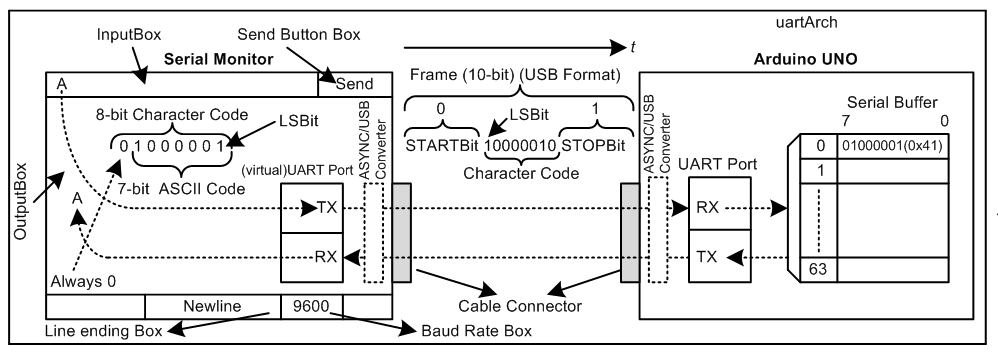
1. The following diagram (Fig-1) called asynchronous serial frame may be helpful:
Figure-1:
2. When this code: Serial.print('A') code is executed, the above frame of Step-1 is auomatically generated including Start Bit, Parity Bit, and Stop Bit. The character bits are also automatically inserted in the frame. The terms (referring to Fig-1) are:
Frame Length = 10
Character Length = 8
ASCII Code = 7
Start Bit = 1
Stop Bit = 1
Parity Bit = none
3. The following diagram (Fig-2) is a summary of transmission/reception of UART signal:
The Sensor arrived!
So i connected the Sensor to my Arduino UNO and i think it's working. At least the running lights are blinking. I connected the sensor like this:
And I tried the following code to see if I would get any response from the sensor:
#include <SoftwareSerial.h>
SoftwareSerial mySerial(5, 6);

void setup() {
  Serial.begin(9600);
  mySerial.begin(9600);
  Serial.println("<Arduino is ready>");
}

void loop() {
  mySerial.write(0xD7); //Command from Datasheet
  Serial.println(mySerial.available()); //see if there is any response
  delay(1000);
}
Unfortunately, i only get zeros (= no availability).
I guess I'm doing something wrong with my Code?
Your setup is wrong! Make it correct first (the codes are wrong as well!). Your sensor is a 3.3V device; you need a level shifter to connect its RX/TX pins with the Software UART (SUART) Port of 5V Arduino UNO device. You have ignored post #8. If you don't have level shifter similar to Fig-2 of post #4, you can use voltage divider circuit only on the STX (Fig-2 of post #4) line of UNO.