Hi, I am making a pressure gauge using arduino nano, a car sensor. The input is 0-5vdc on an analog pin. I have it all working with code from GPT because I cant code (GPT was hit or miss, but I finally managed to get it to spit out code that works). The issue is that the needle moves 5 degrees or so per step. I have a VDO style bipolar (4 pin) automotive cluster motor driven by an a4988 driver board which has no jumpers. I asked GPT to rewrite the code with microstepping but the result moved the needle very little. Here is the code that works. I can change the min/max voltages and everything does as it should. But the needle moves too much per step. Thank You
// Define the output pins for the stepper motor driver
const int stepperPins[] = {8, 9, 10, 11};

// Define the step sequence for a 4-wire stepper motor
const int stepSequence[4][4] = {
  {1, 0, 0, 1}, // Step 1
  {0, 1, 0, 1}, // Step 2
  {0, 1, 1, 0}, // Step 3
  {1, 0, 1, 0}  // Step 4
};

// Analog pin for voltage measurement
const int voltagePin = A0;

// Total steps for the motor
const int totalSteps = 45;

// Delay between steps (adjust for motor speed)
const int stepDelay = 10;

// Variable to track current position of the motor (0–45)
int currentPosition = 45;

// Voltage limits corresponding to step 0 and step 45
float minVoltage = 1.10;  // Minimum voltage (step 45)
float maxVoltage = 2.00;  // Maximum voltage (step 0)

void setup() {
  // Initialize the stepper motor pins as outputs
  for (int i = 0; i < 4; i++) {
    pinMode(stepperPins[i], OUTPUT);
  }

  // Initialize Serial Monitor for debugging
  Serial.begin(9600);

  // Reverse rotate the stepper motor to position 0 (counterclockwise)
  rotateStepper(totalSteps, false);
  currentPosition = 0;
}

void loop() {
  // Measure the voltage (0–1023 from analogRead)
  int analogValue = analogRead(voltagePin);

  // Convert the analog value (0-1023) to a voltage (0-5V)
  float voltage = (analogValue / 1023.0) * 5.0;

  // Output the measured voltage to the Serial Monitor
  Serial.print("Measured Voltage: ");
  Serial.print(voltage);
  Serial.println(" V");

  // Map the voltage to the motor steps (step 0 = 2.72V, step 45 = 1.23V)
  int targetPosition = mapVoltageToPosition(voltage);

  // Move the motor to the target position
  moveToPosition(targetPosition);

  // Small delay for stability
  delay(100);
}

// Function to rotate the stepper motor
// steps: Number of steps to rotate
// forward: Direction of rotation (true = forward, false = backward)
void rotateStepper(int steps, bool forward) {
  for (int step = 0; step < steps; step++) {
    // Iterate through the sequence in the desired direction
    for (int sequence = 0; sequence < 4; sequence++) {
      int index = forward ? sequence : 3 - sequence; // Adjust for direction

      // Activate the pins based on the step sequence
      for (int pin = 0; pin < 4; pin++) {
        digitalWrite(stepperPins[pin], stepSequence[index][pin]);
      }

      delay(stepDelay); // Adjust for motor speed
    }
  }
}

// Function to move the motor to a specific position
void moveToPosition(int targetPosition) {
  // Calculate the number of steps needed
  int stepsToMove = abs(targetPosition - currentPosition);
  bool forward = (targetPosition > currentPosition);

  // Rotate the motor the required number of steps
  rotateStepper(stepsToMove, forward);

  // Update the current position
  currentPosition = targetPosition;
}

// Function to map the voltage to a motor position (0 to 45)
int mapVoltageToPosition(float voltage) {
  // Ensure voltage is within the bounds of 1.23V to 2.72V
  voltage = constrain(voltage, minVoltage, maxVoltage);

  // Map the voltage range to step positions (step 0 corresponds to maxVoltage, step 45 corresponds to minVoltage)
  int position = map(voltage * 100, maxVoltage * 100, minVoltage * 100, 0, totalSteps);

  return position;
}
Your chatGPT-code example is very typical for chatGPT.
Your prompt was written too unprecise to receive exact matching code.
chatGPT made some guessings about what your foggy description exactly means and failed.
That is the reason why you got code where the software does not match the hardware.
An A4988 can do microstepping but your code does not match how to drive a A4988-driver in microstepping mode.
The common attitude here is:
either stay 100% with chatGPT
or
stay 100% human with zero percent chatGPT involved
chatGPT will throw over code that was modified by humans to something different.
And no user here will re-analyse and re-analyse and re-analyse again and again faulty chatGPT-code.
Even chatGPT can't look onto your table to see what exact hardware you are using.
Even chatGPT needs exact and detailed information
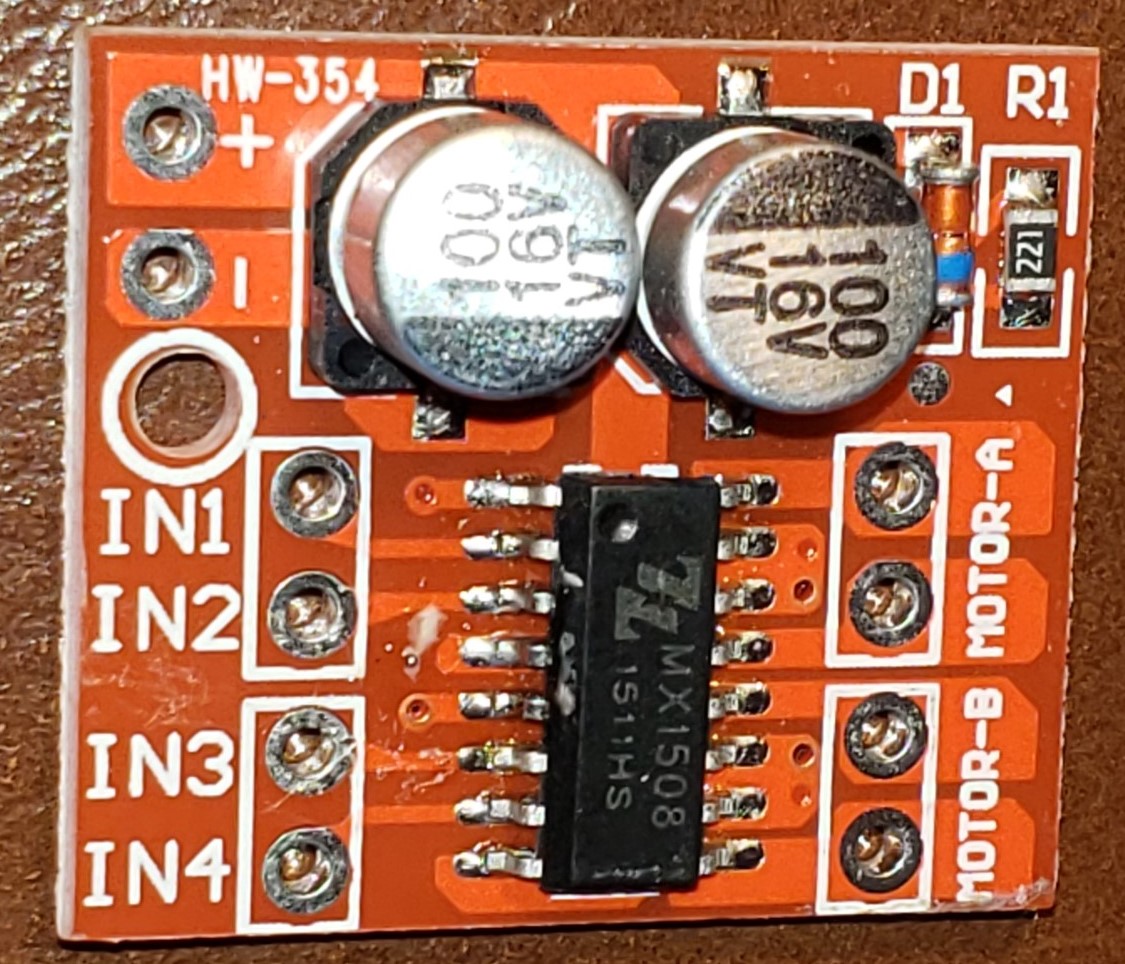
Thanks. Im new at this, so maybe the driver is not an a4988, or is a different implementation of that? Here's a pic. It only has 4 inputs, 4 outputs, and power pins... if u can recommend a driver board then I can get one...
Thanks! I just ordered 3 from adafruit. I had no idea they had driver/motor sets exactly for this. Question - what is difference between dc motor driver and stepper driver?
a DC motor driver uses an h-bridge to control the motor speed using pulse width modulation to control the average voltage and to reverse it's direction/polarity. It has two input, one LOW and the other driven HIGH using PWM.
a stepper motor drive can typically drive a stepper motor with either 4 or 2 coils with a step and direction inputs.
OK I screwed myself. I ordered 3 motors because adafruit makes it look like the driver was included. I didnt read the test fully I guess. So they show a TB6612 but that looks to not do microstepping, which at least these motors can do. Can someone point me to a driver board that will make this motor run smoothely and with fine resolution?
You should first ask "what is the difference between dc motor and stepper motor"?
If you know that, you will know that different drivers are needed.
A DC-motor runs from itself if a voltage is provided at the two terminals. The higher the voltage, the faster the motor rotates ( within its limits of course ). And the motor draws current as needed ( depening on the load a size of the motor ). The polarity defines the direction of rotating.
A stepper motor works very very different. It cannot turn from itself. There are usually two coils, and that coils must be engaged in the correct order to get the motor turning. Each change to the next order step creates one mechanical step of the motor. The speed does not depend on voltage or current, but how fast the changes in coil order engaging are. The current mainly depends on the voltage and the resistance ( and inductance ) of the coils. It's only little dependant on the load. A stepper draws current even it it does not turn ( as long as there is voltage applied to the coils ).
If you want to turn the stepper fast, you must switch the coils fast. And that's a problem because of the inductance of the coils. You need special drivers to circumvent this ( as far as possible )..
I asked GPT for a routine that steps once per scond and puts the count out the serial monitor. This stepper went almost all the way around with about 50 steps. Yet it is an automotive instrumemnt stepper (VDO IIRC). So the only way I can see it would work is with microstepping.
jermington said the adafruit stepper is much finer and I guess that means I can use this driver for it. If I run my steps counter routine it should take a LOT more steps to go around - if .5 deg per step that would be 720 steps to go around. They are coming tomorrow I think...
thanks for the link and the info yes I did notice that it was 600 steps through 315° which is more than adequate for what I'm trying to accomplish. My gauge is about a 270° sweep. Looks like I can use my existing stepper driver because the motor itself has more than enough resolution. I will post back after I get the motors tomorrow and try that.
I will also save the link you shared to me about these motors in case of any further questions I can try to answer them myself from that discussion.
hi, they came in today. I hooked it up and things didnt seem right on the step count. ran a step counter routine and sure enough, 160 steps stop to stop! Adafruit product page does indeed say 600 steps. before I get after adafruit on this, could there be anything I am missing? Thanks!
most of that is in this thread. my little one-step-at-a-time code isnt. it's a fact that the adafruit advertises 600 steps, but only goes 160 stop to stop which is the same as the identical ones I got off ebay last year. I already emailed them for return but wanted to ask if there is ANYTHING I could be missing (doubt it tho). I plan to post on adafruit forum as well, but since I started the project discussion here and since you recommended this stepper as a 600 step motor I wanted to advise anyone else who reads this topic and is considering this motor to double check. I can do my project with a 160 step motor though, but wanted to ask if anyone could imagine why it says 600 but actually is 160... the description says steps, (0.5 deg per step) not microsteps so its not that...