Hallo everybody. I´m new to Arduino. Spent the last days searching for a code that does what the thread-title tells, but result wasn´t satisfactory. If I could code, I could build the code out of the results I´ve already found, but I cannot code at all... At least, after a week, I can understand what stands in the code, at least, if it´s about stepper motors. But from then on, I can´t do it, and need a jumpstart-code, upon which then I could work.
Now to the problem: A voltage divider is gonna deliver 1-5V (strongly fluctuating between those two extremes, of course) to A0. Signal comes from a sensor.
A DVR8825-Driver/small-Stepper-combination should run CW if the input is 0-2V, and anti-CW if the input is 2-5V (run infinitively! not just 10 turns or anything similar).
That´s all !!! Of course, I know that I have to have a "dead-zone", in order to give the stepper a break, in case the input is constantly lashing around at 2V, but all that stuff comes later. I found some if/else-codes, also some </>-codes, but those were so special, that I could have never been able to change them, in a way that they remain functional, at my current knowledge-level.
So, I thank you á priori for any help. Please keep it as primitive as possible, I´ll refine it with time.
code, schematic, pictures, results
Please post a complete diagram of the hardware and the code using the <code./> tag.
Hello hiliagusta
Design a hysterese function by using the constrain() function with a following switch()/case to run the stepper motor correctly.
Have a nice day and enjoy coding in C++.
This is one of the codes that could fit, but doesn´t. I know little about the corresponding hardware, like, for example, that I surely don´t need relais, like refered to in the code:
const int sensepin = A0; // Analog input pin that the sensvoltage is attached to
const int relay = 6; // output pin that the relais 1 is attached to
const int relay2 = 5; // output pin that the relais 2 is attached to
int sensorValue = 0;
int outputValue = 0;
void setup() {
// initialize serial communications at 9600 bps:
Serial.begin(9600);
pinMode(6,OUTPUT);
pinMode(5,OUTPUT);
digitalWrite(6,HIGH);
digitalWrite(5,HIGH);
}
void loop() {
// read the analog in value:
sensorValue = analogRead(sensepin);
if (sensorValue > 20) {
digitalWrite(6,LOW);
delay(153);
digitalWrite(6,HIGH);
delay(300);
digitalWrite(5,LOW);
delay(150);
digitalWrite(5,HIGH);
delay(300);
} else {
digitalWrite(5,LOW);
delay(1000);
digitalWrite(5,HIGH);
delay(100);
digitalWrite(6,LOW);
delay(950);
digitalWrite(6,HIGH);
delay(100);
}
Another code would be that, which I found here, in the arduino forum: Stepper Motor and Pressure Sensor - #2 by nehalda
or, from a page, whose link I´m not allowed to add here (as a new user):
potVal = map(analogRead(A0),0,1024,0,500);
if (potVal>Pval)
stepper.step(10);
if (potVal<Pval)
stepper.step(-10);
Pval = potVal;
There is more examples, but they are too complicated for me, for trying to "skeletize/butcher" them down... Also, I´m not allowed to add them here, as a "new user".
The set-up is similar to this one here Stepper Motor with DRV8825 and Arduino Tutorial (4 Examples)
with an 28BYJ-48-stepper, and instead of the poti used in the example of this link, there is a voltage-divider (150k/10k), that senses the voltage of a capacitor. The capacitor is part of a Resistance-Capacitance-Oscllator, that´s gonna produce sparks for EDM (electrodischarge machining). The stepper is gonna close-in the spark-gap, till the gap-dielectricum turns conductive, and the spark springs over the gap, but is not going to allow a short, constantly maintaining the existence of the gap, and its ideal width. The charge-state of said capacitor is inversely analog to the spark-gap-current. So, to know the current and make decisions about the gap-width, it´s enough to know the momentary capacitor-charge-state, and simply decide which way to turn the stepper.
The first code-example in this posting descends from such an application, but doesn´t fit my hardware (a self-made-shield and solid-state-relais are used, and I know little about the circuitry that this person has built).
You are measuring a voltage. If the voltage is below your pre determined level do something and If your voltage level is above your predetermined level do something. Your driver board has a direction pin so I would use a DIO pin on your uC making it high or low based on an analog input. Less showing your existing code or a schematic this is as good as it gets.
Never mind. Starting typing this, had to feed and let dogs out, ate something came back and now see all the replies. 
Ron
As said, Ron Blain, most of the examples I found would fit, but they contain too much unneeded stuff, that would make those codes useless for me. The nearest to what I deed is the first example I posted, but the hardware is different. And instead of driving the dirPin and the stepPin, he drives two other digital-output-pins, that themselves drive some relais... But the main idea is the same.
I imagine something like that:
// Define stepper motor connections and steps per revolution:
#define sensepin A0
#define dirPin 2
#define stepPin 3
#define stepsPerRevolution 200

void setup() {
  // Declare pins as output:
  pinMode(stepPin, OUTPUT);
  pinMode(dirPin, OUTPUT);
}

void loop() {
  sensorValue = analogRead(sensepin)

if (sensorValue > 2) {

  // Set the spinning direction clockwise:
  digitalWrite(dirPin, HIGH);

    digitalWrite(stepPin, HIGH);
    delay(100);
    digitalWrite(stepPin, LOW);
    delay(100);
  }

  delay(100);


  } else {

  // Set the spinning direction counterclockwise:
  digitalWrite(dirPin, LOW);

    digitalWrite(stepPin, HIGH);
    delay(100);
    digitalWrite(stepPin, LOW);
    delay(100);
  }

  delay(100); ````
Sorry for not following the rule for code-presenting, I will try to learn what it´s all about: "use the Preformatted text toolbar button -, or the backtick-key" , which I both couldn´t find.
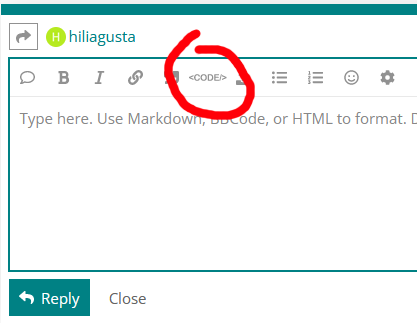
I see kolaha covered how to use a code tag.
OK using for example an Arduino UNO the analog to digital is normally about a 5.0 volt reference. Normally depends on how you power it. My own USB port is 4.8 volts. Anyway as to analog read 0 to 5.0 volts using the Arduino 10 bit A/D will give you for a 0 to 5.0 volt input will give you 0 to 1023 bits.
What you need to watch is if your voltage input swings back and forth you don't constantly want your stepper freaking out going CW and CCW so I would incorporate some what we call hysteresis in your code. A level of for example 2.0 volts would be an analog read of about 410 bits. So if I use greater than or equal to and less than or equal to and just insert 410 depending on your analog in your digital out for direction will just be bouncing around. Give this a read.
Ron
ONLY if the project has some inertial that is from whatever the stepper motor is directly connected to. Stepper motors are designed for continuous duty. Be sure to have air flow around them for cooling!
Is the voltage you are measuring AC or DC? What is the voltage before dividing?
To Ron Blain, from my first posting: "Of course, I know that I have to have a "dead-zone", in order to give the stepper a break, in case the input is constantly lashing around at 2V, but all that stuff comes later. "
To Paul: Surely, cooling won´t be a problem, also cause the load is relatively small...
To JCA34F: It´s DC. The voltage is 60V before the divider, and 1/12th is then maximaly sensed by the arduino.
The build is gonna have lots of trial-and-error, till the perfect threshold for direction-change is found (surely not 2V, but 2V is a good place to begin), but the build itself, as well as the code is maximaly simple, that´s why too little builders publicate it, and don´t even bother when I kindly ask them... They then say, it were too simple to bother, and add some advice about the code, but in normal language, instead of code-language, that is no help to me...
How about hysteresis? 2.1V to switch to forward, 1.9V to switch to reverse (adjust to suit).
See post #7.
[quote="hiliagusta, post:13, topic:1118716"]
To dlloyd, from my first posting: "Of course, I know that I have to have a "dead-zone", in order to give the stepper a break, in case the input is constantly lashing around at 2V, but all that stuff comes later. "
On the Wokwi-simulator this project was suggested to me, I simply had to swap the potentiometer (5V, GND, signal) with a sensor (solely GND, signal), does exactly what I wanted. The only difference to my plan, is that in this project, no driver (as DVR8825) was used, instead, digital pins 2 to 5 are directly connected to the stepper... The load of my stepper is supposedly small, still, I don´t think that it will work in the long term, without a driver.
// Stepper motor direction change at predefined analog input

#include <Stepper.h>

const int analogPin = A0;
const int stepsPerRevolution = 200;
// for your motor

// initialize the stepper library on pins 8 through 11:
Stepper myStepper(stepsPerRevolution, 2, 3, 4, 5);

void setup() {
  myStepper.setSpeed(60); // rpm
}

void loop()
{
  // Read new position
  int analogVal = analogRead(analogPin);

  if (analogVal > 430) { // 2.1V
    myStepper.step(stepsPerRevolution);
  } else if (analogVal <  390) { // 1.9V
    myStepper.step(-stepsPerRevolution);
  }
}
It is possible to use the Arduino Stepper.h library with a step/dir type driver like a DRV8825, but it is a little awkward. You use the 2-wire configuration, quaduple-step, and manage direction yourself:
ETA: in light of Change stepper dir according to predifined analog input value - #26 by DaveX you do not need to manage direction yourself -- Thq two-wire quadrature mode takes care of that if you use the other pin as the DIR pin, and the DIR pin is toggled in phase with the STEP pin, but lagging or leading by 90° depending on the direction.
Stepper.h works fine with a STEP/DIR driver, but needs 4x the steps to cycle through the signal transitions.
Oh, thanks a lot really ! OK, now finally, I´m a believer... One last thing: When I write "#include <Stepper.h>", Is the library included automatically since I´m connected to the internet, or do I have to do some additional steps? Don´t answer in detail, just show me the direction... Like, is "stepper.h" a link to the library, that I have to create myself, manually, or is automatically a link created, as soon as I write "stepper.h" ?
It is unclear how you are compiling your code In the IDE? On the Arduino online/cloud stuff, or in the Wokwi simulator. If it is in the IDE on your computer, if the library is installed, it finds it in your computer and uses it. On Wokwi, you have to tell the simulator to use the library in the Library Manager tab. On the other on-line things, I'm not sure how it works.
The Stepper.h library comes built-in with the IDE, so you don't have to install it. An externally supplied library, like the more capable library like AccelStepper.h, would require you to copy it from the internet and install it in the IDE. The process is described here:
Ok, now it´s clear... Thank you ...  Aside to that, I didn´t know that Stepper.h-library is the basic-arduino-stepper-library, instead, I thought, it is something exotic exactly like the just mentioned Accelstepper-library.