iam using a passive buzzer like this one
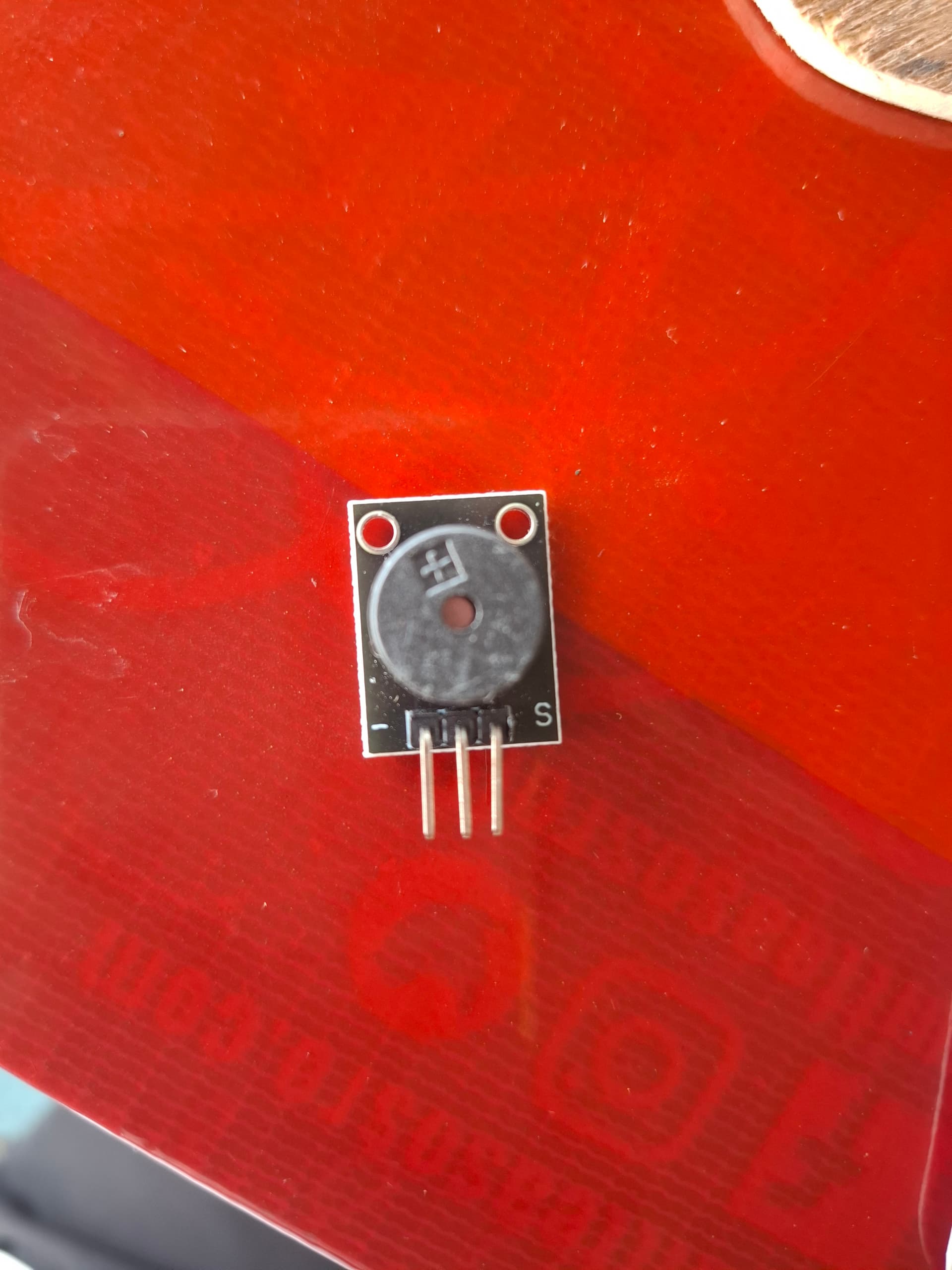
iam trying to make it sing the song happy birthday, yes it work but the volume is so small. is there a way to make it louder?
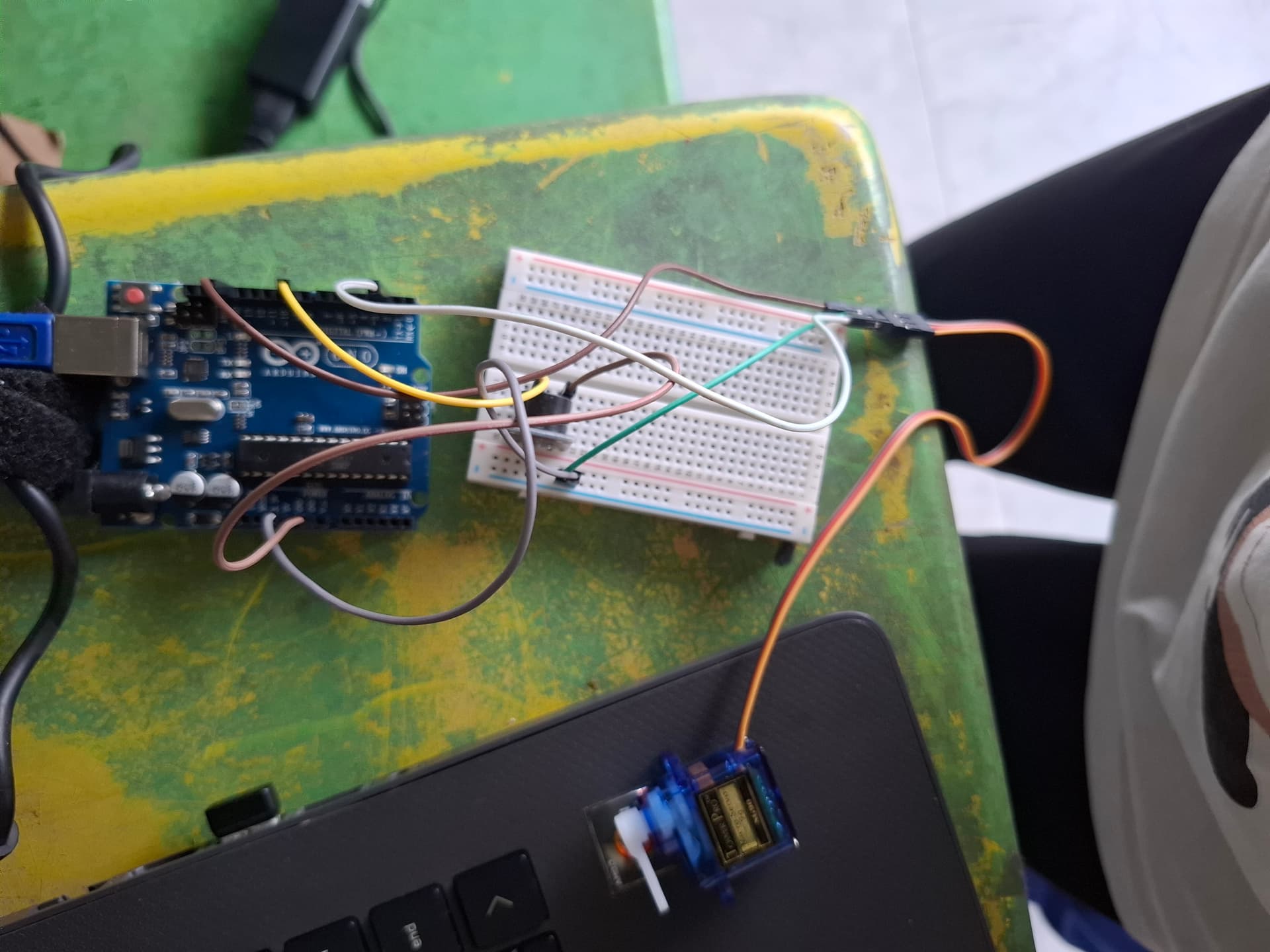
iam using a passive buzzer like this one
I've never seen a (presumably) piezo sounder on a small PCB like that before.
Piezo Sounders usually have only 2 pins but your board has 3. Do you know what the 3rd pin is for? Is there some other circuitry on the rear that we cannot see?
from what i search it is called esp32 buzzer. 1 if for gnd, 2 is for 5v, and 3 is for the digital pin
Looks like KY-006 . Middle pin is not connected.
You could use NPN transistor to drive it at higher voltage (and current).
From @krisi0506 's description, I think it is this:
In which case I don't think there is anything you can do to make it louder.
But this board is an active buzzer, which means it's frequency is fixed and you cannot play a tune.
I would consider one of those tiny amplifier boards and a regular 4 Ohm / 8 Ohm speaker to replace your buzzer.
EDIT: on closer inspection, the page I linked to above is full of contradictions and clearly unreliable.
For example it says
The VCC pin is used to supply power to the sensor, and it typically requires 3.3V or 5V (refer to the datasheet for specific voltage requirements). The GND pin is the ground connection and must be connected to the ground of your ESP32.
and immediately after that it says
Pin (-): Ground (GND).
Pin (middle): Not connected.
Pin (S): Signal input.
@krisi0506 : I would not recommend any further purchases from this seller, they appear to have no quality control.
Which Arduino are you using?
Where is the 5V pin connected to?
Do you have any transistors or MOSFETs?
 , man if i change it to a normal active buzzer will it still be able to sing happy birthday tune
Servo myServo;
int buzzer = 9;
int servoPin = 2;
int melody[] = {
264, 264, 297, 264, 352, 330, 0,
264, 264, 297, 264, 396, 352, 0,
264, 264, 528, 440, 352, 330, 297, 0,
466, 466, 440, 352, 396, 352
};
int noteDurations[] = {
300, 300, 600, 600, 600, 800, 400,
300, 300, 600, 600, 600, 800, 400,
300, 300, 600, 600, 600, 600, 800, 400,
300, 300, 600, 600, 600, 800
};
int currentNote = 0;
unsigned long previousMillis = 0;
void setup() {
myServo.attach(servoPin);
pinMode(buzzer, OUTPUT);
}
void loop() {
unsigned long currentMillis = millis();
// Play next note every X ms
if (currentNote < sizeof(melody) / sizeof(melody[0])) {
int duration = noteDurations[currentNote];
if (currentMillis - previousMillis >= duration + 60) {
  previousMillis = currentMillis;

  int freq = melody[currentNote];
  if (freq > 0) tone(buzzer, freq, duration);
  else noTone(buzzer);

  // Move servo alternately
  if (currentNote % 2 == 0) {
    myServo.write(0);
  } else {
    myServo.write(90);
  }

  currentNote++;
}
} else {
// Loop finished, start over (optional)
currentNote = 0;
}
}
i wanted to make like a funny repo looking robot that open its mouth and it will sing the birthday tune, yes it work but the volume is so damn small 
Assuming it actually is passive, try the toneAC library.
This library requires you to connect the buzzer to two pins.
It drives the buzzer in bridge mode for twice the voltage on the buzzer.
Test your buzzer:
A passive buzzer won't make any sound when connected straight to 5volt/GND.
Leo..
First you need to post your code correctly so that we can read and copy it.
In the IDE click on Edit, then click on Copy for Forum, that will copy your code for this forum. Then come back here and do a simple paste.
No.See post #8 and #12
If I have identified it correctly from your description, it is an active buzzer. But to play a tune you want a passive piezo sounder. These are round and have 2 pins. They can plug into your breadboard. You don't need one on a PCB.
The way you posted that is breaking forum rules. Please edit that post and fix it. The instructions are in the forum guide in the sticky post at the top of most forum categories.
If you mount the sounder so that it pokes through a hole in the card. Then the card acts as a baffle and it will sound louder.
Consider a DFR MP3 Player module?
To get higher volume (although nothing approaching that of the DFR Player) plus a more realistic sound, you really need several such passive buzzers. Such as in a project like this one:
If you’re already driving the buzzer at 5V and it still sounds weak, you might just be hitting the limit of what a passive buzzer can do. One small thing you can try is experimenting with different frequencies and duty cycles — sometimes the buzzer’s “sweet spot” is surprisingly narrow.
Also, if you’re testing tones or audio clips, I’ve found it handy to boost the file volume beforehand using an online tool like mp3louder.org (nothing fancy, just makes the test tones easier to hear). Not a fix for the hardware itself, but helps when you’re checking what sounds best.