Hi,
I have a problem converting a string into an integer or a float. It shows me that I find 0.00.
You can help me
I am attaching an image with the code and the serial monitor below!
Thank you very much!
is how I do it x_eData.RM0 = String(px_message.payload).toFloat(); and x_eData.RM1 = String(px_message.payload).toInt();
An attached image with code is useless. Posted code in code tags now that is something useful.
Did you happen to skip the reading of,
Please follow the advice given in the link below when posting code, in particular the section entitled 'Posting code and common code problems'
Use code tags (the </> icon above the compose window) to make it easier to read and copy for examination
If so it might be a good time to review the thing.
what is the source string content before you do all the parsing?
#include<SoftwareSerial.h>
SoftwareSerial SUART(0, 2);
int value;
void setup()
{
  Serial.begin(9600);
  SUART.begin(9600);
  Serial.println("Process start");

}

void loop()
{

  SUART.print('r');
  Serial.println( "Current sensor value reading!");
  delay(2000);

  while(SUART.available() > 0)
  {
     String s = SUART.readString();
     s.remove(s.length() - 1);
     s.remove(s.length() - 2);
     s.remove(0,2);
     s.replace(" ", "");
     Serial.println(s);
     value = s.toInt();
     float real_value = value*0.75;
     Serial.println(real_value);


     }
  delay(10*1000);
  }

This is my code.  The source of sting is a value of a sensor
What does the serial print show?
Really? A actual delay() that long? Your program comes to a stop at this point and does nothing else but delay, delay, delay.
multi things
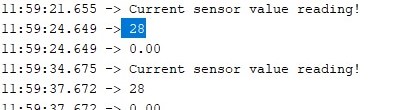
this is what serial print show
Yes, the sensor give value from 10 sec to 10 sec
28 looks like an int.
it a string. That i want to use toInt syntax.
And try the math like this
float real_value = (float)value*0.75;
ok. I will try
It is an integer after this point.
it shoud be, but the result of :
is 0.00.
i tried what you suggest:
but same result, 0.00.
Oh, I see.
receive the entire message before doing math on the message.
Did you try this
while(SUART.available() > 0)
  {
     String s = SUART.readString();
     s.remove(s.length() - 1);
     s.remove(s.length() - 2);
     s.remove(0,2);
     s.replace(" ", "");
     Serial.println(s);
     value = s.toInt();
     float real_value = value*0.75;
     Serial.println(real_value);


     }
s=100;
Serial.print( "s " );
Serial.print ( s );
real_value = float(s)*.075f;
Serial.print( " real_value " );
Serial.print (real_value,6 );
Serial.println(); <<<????? does it print a float? If so then you are receiving the serial incorrectly.
delay(10000);
}
yes, it's 7.500000.
What i can do in this case?
You could read how to send and receive serial info,
serial input basics
here is a function I use to receive serial, perhaps it will give a clue or not
void fReceiveSerial_LIDAR( void * parameters  )
{
  char OneChar;
  char *str;
  str = (char *)ps_calloc(300, sizeof(char) ); // put str buffer into PSRAM
  bool BeginSentence = false;
  sSerial.reserve ( StringBufferSize300 );
  for ( ;; )
  {
    EventBits_t xbit = xEventGroupWaitBits (eg, evtReceiveSerial_LIDAR, pdTRUE, pdTRUE, portMAX_DELAY);
    if ( LIDARSerial.available() >= 1 )
    {
      while ( LIDARSerial.available() )
      {
        OneChar = LIDARSerial.read();
        if ( BeginSentence )
        {
          if ( OneChar == ‘>’)
          {
            if ( xSemaphoreTake( sema_ParseLIDAR_ReceivedSerial, xSemaphoreTicksToWait10 ) == pdTRUE )
            {
              xQueueOverwrite( xQ_LIDAR_Display_INFO, ( void * ) &sSerial );
              xEventGroupSetBits( eg, evtParseLIDAR_ReceivedSerial );
              //
            }
            BeginSentence = false;
            break;
          }
          sSerial.concat ( OneChar );
        }
        else
        {
          if ( OneChar == ‘<’ )
          {
            sSerial = “”; // clear string buffer
            BeginSentence = true; // found begining of sentence
          }
        }
      } //  while ( LIDARSerial.available() )
    } //if ( LIDARSerial.available() >= 1 )
    xSemaphoreGive( sema_ReceiveSerial_LIDAR );
  }
  vTaskDelete( NULL );
} //void fReceiveSerial_LIDAR( void * parameters  )
The function checks if there is anything in the serial buffer. If there is then pop off the serial buffer and push it to a storage location. The functions checks for a sentence begin and a sentence end. When the sentence end comes it sends the completed received data off to have work done on the complete received data. The function follows the basics of receiving serial.
Could you add a line?
     Serial.println(s);
     value = s.toInt();
     Serial.println(value);  // See if the .toInt() is returning zero.
     float real_value = value*0.75;
it will be 0
run this code-version which does output everything after each processing-step
The processed string has a leading and trailing "#" to clearly show what is inside the string
#define dbg(myFixedText, variableName) \
  Serial.print( F(#myFixedText " "  #variableName"=") ); \
  Serial.println(variableName);

#define dbgi(myFixedText, variableName,timeInterval) \
  do { \
    static unsigned long intervalStartTime; \
    if ( millis() - intervalStartTime >= timeInterval ){ \
      intervalStartTime = millis(); \
      Serial.print( F(#myFixedText " "  #variableName"=") ); \
      Serial.println(variableName); \
    } \
  } while (false);

#include<SoftwareSerial.h>
SoftwareSerial SUART(0, 2);
int value;
void setup()
{
  Serial.begin(9600);
  SUART.begin(9600);
  Serial.println("Process start");

}

void loop()
{
  SUART.print('r');
  Serial.println( "Current sensor value reading!");
  delay(2000);

  while (SUART.available() > 0)
  {
    String s = SUART.readString();
    dbg("1:", s);

    s.remove(s.length() - 1);
    dbg("2:", s);

    s.remove(s.length() - 2);
    dbg("3:", s);

    s.remove(0, 2);
    dbg("4:", s);
    s.replace(" ", "");
    dbg("5:", s);

    Serial.print("#");
    Serial.print(s);
    Serial.println("#");

    value = s.toInt();
    dbg("6:", value);

    float real_value = value * 0.75;
    dbg("7:", real_value);
        //Serial.println(real_value);
  }
  delay(10 * 1000);
}
best regards Stefan
by the way using IO-pin 0 for the software-serial is a bad idea on Ardiuno Uno/Mega
IO-pins 0 and 1 are used for serial.
best regards Stefan
