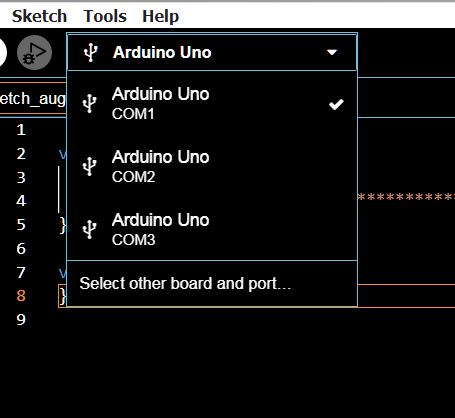
and when i trie to bootloader, this hapend:
avrdude: Error: Could not find USBtiny device (0x2a03/0x49)
Failed chip erase: uploading error: exit status 1
I need help!!
This isn't my table but - Does it show up in Device Manager?!?!
(As a COM port - or any way else.)
ALL that you do to program an UNO is plug in the USB cable, and click Upload in the IDE. If you are doing other things, you are on your own.
yes
i tried but dosen't work
Show ALL the verbose output in code tags
FQBN: arduino:avr:uno
Using board 'uno' from platform in folder: C:\Users\User\AppData\Local\Arduino15\packages\arduino\hardware\avr\1.8.6
Using core 'arduino' from platform in folder: C:\Users\User\AppData\Local\Arduino15\packages\arduino\hardware\avr\1.8.6
Detecting libraries used...
C:\Users\User\AppData\Local\Arduino15\packages\arduino\tools\avr-gcc\7.3.0-atmel3.6.1-arduino7/bin/avr-g++ -c -g -Os -w -std=gnu++11 -fpermissive -fno-exceptions -ffunction-sections -fdata-sections -fno-threadsafe-statics -Wno-error=narrowing -flto -w -x c++ -E -CC -mmcu=atmega328p -DF_CPU=16000000L -DARDUINO=10607 -DARDUINO_AVR_UNO -DARDUINO_ARCH_AVR -IC:\Users\User\AppData\Local\Arduino15\packages\arduino\hardware\avr\1.8.6\cores\arduino -IC:\Users\User\AppData\Local\Arduino15\packages\arduino\hardware\avr\1.8.6\variants\standard C:\Users\User\AppData\Local\Temp\arduino\sketches\7FB04199585D051EAA7CF7C5220237EB\sketch\Blink.ino.cpp -o nul
Generating function prototypes...
C:\Users\User\AppData\Local\Arduino15\packages\arduino\tools\avr-gcc\7.3.0-atmel3.6.1-arduino7/bin/avr-g++ -c -g -Os -w -std=gnu++11 -fpermissive -fno-exceptions -ffunction-sections -fdata-sections -fno-threadsafe-statics -Wno-error=narrowing -flto -w -x c++ -E -CC -mmcu=atmega328p -DF_CPU=16000000L -DARDUINO=10607 -DARDUINO_AVR_UNO -DARDUINO_ARCH_AVR -IC:\Users\User\AppData\Local\Arduino15\packages\arduino\hardware\avr\1.8.6\cores\arduino -IC:\Users\User\AppData\Local\Arduino15\packages\arduino\hardware\avr\1.8.6\variants\standard C:\Users\User\AppData\Local\Temp\arduino\sketches\7FB04199585D051EAA7CF7C5220237EB\sketch\Blink.ino.cpp -o C:\Users\User\AppData\Local\Temp\849628415\sketch_merged.cpp
C:\Users\User\AppData\Local\Arduino15\packages\builtin\tools\ctags\5.8-arduino11/ctags -u --language-force=c++ -f - --c++-kinds=svpf --fields=KSTtzns --line-directives C:\Users\User\AppData\Local\Temp\849628415\sketch_merged.cpp
Compiling sketch...
"C:\Users\User\AppData\Local\Arduino15\packages\arduino\tools\avr-gcc\7.3.0-atmel3.6.1-arduino7/bin/avr-g++" -c -g -Os -w -std=gnu++11 -fpermissive -fno-exceptions -ffunction-sections -fdata-sections -fno-threadsafe-statics -Wno-error=narrowing -MMD -flto -mmcu=atmega328p -DF_CPU=16000000L -DARDUINO=10607 -DARDUINO_AVR_UNO -DARDUINO_ARCH_AVR "-IC:\Users\User\AppData\Local\Arduino15\packages\arduino\hardware\avr\1.8.6\cores\arduino" "-IC:\Users\User\AppData\Local\Arduino15\packages\arduino\hardware\avr\1.8.6\variants\standard" "C:\Users\User\AppData\Local\Temp\arduino\sketches\7FB04199585D051EAA7CF7C5220237EB\sketch\Blink.ino.cpp" -o "C:\Users\User\AppData\Local\Temp\arduino\sketches\7FB04199585D051EAA7CF7C5220237EB\sketch\Blink.ino.cpp.o"
Compiling libraries...
Compiling core...
Using precompiled core: C:\Users\User\AppData\Local\Temp\arduino\cores\arduino_avr_uno_0d486cdc32cc0d14e1d96c3468fba038\core.a
Linking everything together...
"C:\Users\User\AppData\Local\Arduino15\packages\arduino\tools\avr-gcc\7.3.0-atmel3.6.1-arduino7/bin/avr-gcc" -w -Os -g -flto -fuse-linker-plugin -Wl,--gc-sections -mmcu=atmega328p -o "C:\Users\User\AppData\Local\Temp\arduino\sketches\7FB04199585D051EAA7CF7C5220237EB/Blink.ino.elf" "C:\Users\User\AppData\Local\Temp\arduino\sketches\7FB04199585D051EAA7CF7C5220237EB\sketch\Blink.ino.cpp.o" "C:\Users\User\AppData\Local\Temp\arduino\sketches\7FB04199585D051EAA7CF7C5220237EB/..\..\cores\arduino_avr_uno_0d486cdc32cc0d14e1d96c3468fba038\core.a" "-LC:\Users\User\AppData\Local\Temp\arduino\sketches\7FB04199585D051EAA7CF7C5220237EB" -lm
"C:\Users\User\AppData\Local\Arduino15\packages\arduino\tools\avr-gcc\7.3.0-atmel3.6.1-arduino7/bin/avr-objcopy" -O ihex -j .eeprom --set-section-flags=.eeprom=alloc,load --no-change-warnings --change-section-lma .eeprom=0 "C:\Users\User\AppData\Local\Temp\arduino\sketches\7FB04199585D051EAA7CF7C5220237EB/Blink.ino.elf" "C:\Users\User\AppData\Local\Temp\arduino\sketches\7FB04199585D051EAA7CF7C5220237EB/Blink.ino.eep"
"C:\Users\User\AppData\Local\Arduino15\packages\arduino\tools\avr-gcc\7.3.0-atmel3.6.1-arduino7/bin/avr-objcopy" -O ihex -R .eeprom "C:\Users\User\AppData\Local\Temp\arduino\sketches\7FB04199585D051EAA7CF7C5220237EB/Blink.ino.elf" "C:\Users\User\AppData\Local\Temp\arduino\sketches\7FB04199585D051EAA7CF7C5220237EB/Blink.ino.hex"
"C:\Users\User\AppData\Local\Arduino15\packages\arduino\tools\avr-gcc\7.3.0-atmel3.6.1-arduino7/bin/avr-size" -A "C:\Users\User\AppData\Local\Temp\arduino\sketches\7FB04199585D051EAA7CF7C5220237EB/Blink.ino.elf"
Sketch uses 924 bytes (2%) of program storage space. Maximum is 32256 bytes.
Global variables use 9 bytes (0%) of dynamic memory, leaving 2039 bytes for local variables. Maximum is 2048 bytes.
"C:\Users\User\AppData\Local\Arduino15\packages\arduino\tools\avrdude\6.3.0-arduino17/bin/avrdude" "-CC:\Users\User\AppData\Local\Arduino15\packages\arduino\tools\avrdude\6.3.0-arduino17/etc/avrdude.conf" -v -V -patmega328p -carduino "-PCOM2" -b115200 -D "-Uflash:w:C:\Users\User\AppData\Local\Temp\arduino\sketches\7FB04199585D051EAA7CF7C5220237EB/Blink.ino.hex:i"
avrdude: Version 6.3-20190619
Copyright (c) 2000-2005 Brian Dean, http://www.bdmicro.com/
Copyright (c) 2007-2014 Joerg Wunsch
     System wide configuration file is "C:\Users\User\AppData\Local\Arduino15\packages\arduino\tools\avrdude\6.3.0-arduino17/etc/avrdude.conf"

     Using Port                    : COM2
     Using Programmer              : arduino
     Overriding Baud Rate          : 115200
avrdude: stk500_recv(): programmer is not responding
avrdude: stk500_getsync() attempt 1 of 10: not in sync: resp=0x1b
avrdude: stk500_recv(): programmer is not responding
avrdude: stk500_getsync() attempt 2 of 10: not in sync: resp=0x1b
avrdude: stk500_recv(): programmer is not responding
avrdude: stk500_getsync() attempt 3 of 10: not in sync: resp=0x1b
avrdude: stk500_recv(): programmer is not responding
avrdude: stk500_getsync() attempt 4 of 10: not in sync: resp=0x1b
avrdude: stk500_recv(): programmer is not responding
avrdude: stk500_getsync() attempt 5 of 10: not in sync: resp=0x1b
avrdude: stk500_recv(): programmer is not responding
avrdude: stk500_getsync() attempt 6 of 10: not in sync: resp=0x1b
avrdude: stk500_recv(): programmer is not responding
avrdude: stk500_getsync() attempt 7 of 10: not in sync: resp=0x1b
avrdude: stk500_recv(): programmer is not responding
avrdude: stk500_getsync() attempt 8 of 10: not in sync: resp=0x1b
avrdude: stk500_recv(): programmer is not responding
avrdude: stk500_getsync() attempt 9 of 10: not in sync: resp=0x1b
avrdude: stk500_recv(): programmer is not responding
avrdude: stk500_getsync() attempt 10 of 10: not in sync: resp=0x1b
avrdude done. Thank you.
Failed uploading: uploading error: exit status 1
In post #11 it shows the Uno on COM3 not COM2
Are you sure you have the right port selected?
If you click on Tool->Get Board Info, does it say "Arduino Uno"?
Ok, everything looks normal. I drive a Mac so I don;t have to worry about drivers, but you will need to determine what USB to Serial chip you have (magnifying glass) then make sure correct driver is installed (Device Manager).
I sometimes get a similar thing, I will try about a dozen times, shut down the IDE if there is multiple copies open, shut down any open serial monitors, re-boot.
If it still doesn't work, maybe you had an ESD moment?
For an Uno?
I've moved your topic to a more suitable location on the forum.
It is on the right connection, but the plate information says it is unknown
How do you know it's the right connection if the board says unknown
So why every time I connect the Anthem, the plate appears for me but every time I ask for the plate information it doesn't recognize it
In this case he recognizes but doesn't know what
What the heck is 'Anthem' and 'plate'
We are now loosing information in the translation.
My IDE shows three Unos but there is really one connected to COM1.
If I select COM2 or COM3 and check board info it says unknown.
If I select COM1 it says ARDUINO Uno