I Spent 6 Hours on the problem of burning the bootloader in my Leonardo and I didn't fix
recently my Leonardo ATmega32u4 Board had a problem is detected
Board ---->Detected
port ---->Not Show
"I also checked the device manager no COMport is listed
so I want to burn the bootloader in Leonardo
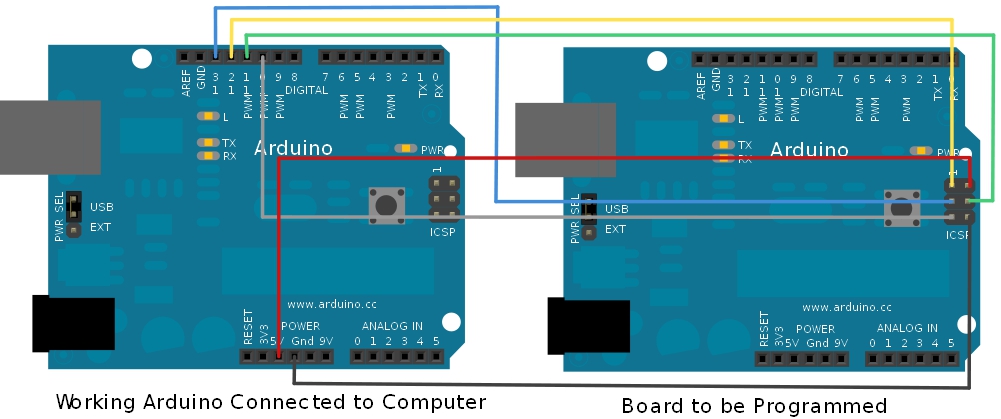
working Arduino UNO Connected to Computer as master & Leonardo as a Target like this connection diagram 523b53bb757b7f01268b456a.jpg (1001×419) (sparkfun.com)
but I got this error
avrdude: Expected signature for ATmega328P is 1E 95 0F
Double check chip, or use -F to override this check.
Failed chip erase: uploading error: exit status 1
Open the ArduinoISP firmware (in Examples) to your Arduino board.
Note for Arduino 1.0: you need to make one small change to the ArduinoISP code. Find the line in the heartbeat() function that says "delay(40);" and change it to "delay(20);".
Select the items in the Tools > Board and Serial Port menus that correspond to the board you are using as the programmer (not the board being programmed).
Upload the ArduinoISP sketch.
Wire your Arduino boards..
Select the item in the Tools > Board menu that corresponds to the board on which you want to burn the bootloader (not the board that you're using as the programmer). See the board descriptions on the environment page for details.
Select the Arduino as ISP in the Tools>Programmer menu.
The board that you selected was the Uno, not the Leonardo. You need to select the Leonardo as the board and the Uno port.
Before you continue
When you double-tap the reset of the Leonardo (not connected to the programmer), does the L-LED fade-in and fade-out for approximately 8 seconds? If so, there is probaly no need to burn the bootloader.