Hello All. I am trying to use the Arduino Nano RP2040 Connect Board. When i try to check the program I get the following error code.
In file included from c:\Users\joshu\Documents\Arduino\libraries\audio-tools\src/AudioI2S/I2SStream.h:14:0,from c:\Users\joshu\Documents\Arduino\libraries\audio-tools\src/AudioTools.h:73,from C:\Users\joshu\Documents\Arduino\FX-SaberOS-RP2040Connect-master\FX-SaberOS-RP2040Connect\FX-SaberOS-RP2040Connect.ino:46:c:\Users\joshu\Documents\Arduino\libraries\audio-tools\src/AudioI2S/I2SRP2040.h:5:10: fatal error: I2S.h: No such file or directory#include <I2S.h>^~~~~~~compilation terminated.Alternatives for I2S.h: []ResolveLibrary(I2S.h)-> candidates: []exit status 1
Compilation error: exit status 1
When i navigate to those locations i do find the I2S.h file, What is causing this and how can i fix it? (found in C:\Users\joshu\Documents\Arduino\libraries\audio-tools\src\AudioI2S)
Your problem is not an upload problem and hence your topic has been moved to a more suitable location on the forum.
Which library did you install? Link please.
The only audio-tools that I could find in the library manager is Gravitone by Matt Ruffner and that does not contain a directory AudioI2S .
I'm not familiar with the Nano RP2040 connect; does it support I2S?
Use quotes if your .h file is local header file:
#include "I2S.h"
Play with the relative path above, but keep quotes.
“<“ and “>“ tell compiler to look for a global I2S.h, while you have it in your directory.
For more information about this product see:-
Nano RP2040
You might want to look at this thread:-
Using rp2040
It appears @jedunlimited is using a version of the "arduino-tools" library from prior to the restructuring that occurred in the 1.0.0 release of that library:
However, the library did not contain a header file named I2S.h even at that version:
It instead is referencing the library bundled with the "Raspberry Pi Pico/RP2040/RP2350 " boards platform :
1 Like
A file named I2S.h is not present at the location you claimed to see it in the library from that source:
Please double check to make sure you really do see a file of that name there.
I also used this github when trying to find a I2S.h file
// Copyright 2015-2016 Espressif Systems (Shanghai) PTE LTD
//
// Licensed under the Apache License, Version 2.0 (the "License");
// you may not use this file except in compliance with the License.
// You may obtain a copy of the License at

//     http://www.apache.org/licenses/LICENSE-2.0
//
// Unless required by applicable law or agreed to in writing, software
// distributed under the License is distributed on an "AS IS" BASIS,
// WITHOUT WARRANTIES OR CONDITIONS OF ANY KIND, either express or implied.
// See the License for the specific language governing permissions and
// limitations under the License.

#ifndef _DRIVER_I2S_H_
#define _DRIVER_I2S_H_
#include "esp_err.h"
#include <esp_types.h>
#include "soc/gpio_reg.h"
#include "soc/soc.h"
show original
You need to use the following core: GitHub - earlephilhower/arduino-pico: Raspberry Pi Pico Arduino core, for all RP2040 and RP2350 boards . Installation instructions are in the link.
After that (and installing / copying a number of libraries) the example compiles. I did not look at the warnings.
Yes that is what is shown in the last link, of my Post #4 , as I write this, so far, no one has clicked on any of the links in that post. Especially @jedunlimited for whom my reply was written for. It is hard trying to answer a question when answers are ignored. It does not please me to say the least.
I uninstalled the original Saber Folder, Re-download it. Then went to the link you provided downloaded the codes and followed the instructions in the link. I still get the same error code. I dont know what I am doing wrong at this point.
Correction, slightly different error code
C:\Users\joshu\AppData\Local\Arduino15\packages\arduino\tools\arm-none-eabi-gcc\7-2017q4/bin/arm-none-eabi-g++ -c -w -g3 -nostdlib :\Users\joshu\AppData\Local\Arduino15\packages\arduino\hardware\mbed_nano\4.4.1\variants\NANO_RP2040_CONNECT/defines.txt :\Users\joshu\AppData\Local\Arduino15\packages\arduino\hardware\mbed_nano\4.4.1\variants\NANO_RP2040_CONNECT/cxxflags.txt -DARDUINO_ARCH_RP2040 -mcpu=cortex-m0plus -w -x c++ -E -CC -DARDUINO=10607 -DARDUINO_NANO_RP2040_CONNECT -DARDUINO_ARCH_MBED_NANO -DARDUINO_ARCH_MBED -DARDUINO_LIBRARY_DISCOVERY_PHASE=1 -IC:\Users\joshu\AppData\Local\Arduino15\packages\arduino\hardware\mbed_nano\4.4.1\cores\arduino -IC:\Users\joshu\AppData\Local\Arduino15\packages\arduino\hardware\mbed_nano\4.4.1\variants\NANO_RP2040_CONNECT -Ic:\Users\joshu\Documents\Arduino\libraries\I2Cdev -IC:\Users\joshu\AppData\Local\Arduino15\packages\arduino\hardware\mbed_nano\4.4.1\libraries\Wire -Ic:\Users\joshu\Documents\Arduino\libraries\OneButton\src -Ic:\Users\joshu\Documents\Arduino\libraries\Buttons -Ic:\Users\joshu\Documents\Arduino\libraries\Config_HW -Ic:\Users\joshu\Documents\Arduino\libraries\Adafruit_NeoPixel -Ic:\Users\joshu\Documents\Arduino\libraries\Light -Ic:\Users\joshu\Documents\Arduino\libraries\EEPROM\src -Ic:\Users\joshu\Documents\Arduino\libraries\Soundfont -Ic:\Users\joshu\Documents\Arduino\libraries\MPU6050\src -Ic:\Users\joshu\Documents\Arduino\libraries\Arduino_LSM6DSOX\src -IC:\Users\joshu\AppData\Local\Arduino15\packages\arduino\hardware\mbed_nano\4.4.1\libraries\SPI -Ic:\Users\joshu\Documents\Arduino\libraries\SD\src -IC:\Users\joshu\AppData\Local\Arduino15\packages\arduino\hardware\mbed_nano\4.4.1\cores\arduino/api/deprecated -IC:\Users\joshu\AppData\Local\Arduino15\packages\arduino\hardware\mbed_nano\4.4.1\cores\arduino/api/deprecated-avr-comp -iprefixC:\Users\joshu\AppData\Local\Arduino15\packages\arduino\hardware\mbed_nano\4.4.1\cores\arduino :\Users\joshu\AppData\Local\Arduino15\packages\arduino\hardware\mbed_nano\4.4.1\variants\NANO_RP2040_CONNECT/includes.txt C:\Users\joshu\AppData\Local\arduino\sketches\9CB63666212E4FF8229C573AAC46C0BC\sketch\FX-SaberOS-RP2040Connect.ino.cpp -o nulIn file included from C:\Users\joshu\Documents\Arduino\FX-SaberOS-RP2040Connect-master\FX-SaberOS-RP2040Connect\FX-SaberOS-RP2040Connect.ino:44:0:c:\Users\joshu\Documents\Arduino\libraries\SD\src/SD.h:23:10: fatal error: FS.h: No such file or directory#include <FS.h>^~~~~~compilation terminated.Alternatives for FS.h: []ResolveLibrary(FS.h)-> candidates: []exit status 1
Maybe some one should teach you about posting error messages.
I had to double click on that line and copy it. Then open up a text file in order to read it. Then paste it back as a blockquote.
This is what it really looks like:-
C:\Users\joshu\AppData\Local\Arduino15\packages\arduino\tools\arm-none-eabi-gcc\7-2017q4/bin/arm-none-eabi-g++ -c -w -g3 -nostdlib :\Users\joshu\AppData\Local\Arduino15\packages\arduino\hardware\mbed_nano\4.4.1\variants\NANO_RP2040_CONNECT/defines.txt :\Users\joshu\AppData\Local\Arduino15\packages\arduino\hardware\mbed_nano\4.4.1\variants\NANO_RP2040_CONNECT/cxxflags.txt -DARDUINO_ARCH_RP2040 -mcpu=cortex-m0plus -w -x c++ -E -CC -DARDUINO=10607 -DARDUINO_NANO_RP2040_CONNECT -DARDUINO_ARCH_MBED_NANO -DARDUINO_ARCH_MBED -DARDUINO_LIBRARY_DISCOVERY_PHASE=1 -IC:\Users\joshu\AppData\Local\Arduino15\packages\arduino\hardware\mbed_nano\4.4.1\cores\arduino -IC:\Users\joshu\AppData\Local\Arduino15\packages\arduino\hardware\mbed_nano\4.4.1\variants\NANO_RP2040_CONNECT -Ic:\Users\joshu\Documents\Arduino\libraries\I2Cdev -IC:\Users\joshu\AppData\Local\Arduino15\packages\arduino\hardware\mbed_nano\4.4.1\libraries\Wire -Ic:\Users\joshu\Documents\Arduino\libraries\OneButton\src -Ic:\Users\joshu\Documents\Arduino\libraries\Buttons -Ic:\Users\joshu\Documents\Arduino\libraries\Config_HW -Ic:\Users\joshu\Documents\Arduino\libraries\Adafruit_NeoPixel -Ic:\Users\joshu\Documents\Arduino\libraries\Light -Ic:\Users\joshu\Documents\Arduino\libraries\EEPROM\src -Ic:\Users\joshu\Documents\Arduino\libraries\Soundfont -Ic:\Users\joshu\Documents\Arduino\libraries\MPU6050\src -Ic:\Users\joshu\Documents\Arduino\libraries\Arduino_LSM6DSOX\src -IC:\Users\joshu\AppData\Local\Arduino15\packages\arduino\hardware\mbed_nano\4.4.1\libraries\SPI -Ic:\Users\joshu\Documents\Arduino\libraries\SD\src -IC:\Users\joshu\AppData\Local\Arduino15\packages\arduino\hardware\mbed_nano\4.4.1\cores\arduino/api/deprecated -IC:\Users\joshu\AppData\Local\Arduino15\packages\arduino\hardware\mbed_nano\4.4.1\cores\arduino/api/deprecated-avr-comp -iprefixC:\Users\joshu\AppData\Local\Arduino15\packages\arduino\hardware\mbed_nano\4.4.1\cores\arduino :\Users\joshu\AppData\Local\Arduino15\packages\arduino\hardware\mbed_nano\4.4.1\variants\NANO_RP2040_CONNECT/includes.txt C:\Users\joshu\AppData\Local\arduino\sketches\9CB63666212E4FF8229C573AAC46C0BC\sketch\FX-SaberOS-RP2040Connect.ino.cpp -o nulIn file included from C:\Users\joshu\Documents\Arduino\FX-SaberOS-RP2040Connect-master\FX-SaberOS-RP2040Connect\FX-SaberOS-RP2040Connect.ino:44:0:c:\Users\joshu\Documents\Arduino\libraries\SD\src/SD.h:23:10: fatal error: FS.h: No such file or directory#include <FS.h>^~~~~~compilation terminated.Alternatives for FS.h: []ResolveLibrary(FS.h)-> candidates: []exit status 1
That might be due to a bug in the forum software.
pert
August 19, 2025, 5:28am
16
9 posts were split to a new topic: Links don't show click counter
Also the Error message posted shows that the mbed libiary is being used and not the library .... RP2040 by Earle F. Philhower for audio I2S.
So I have no idea how you got that from my code.
You need to use the newly installed platform / core.
To test I cleaned out my libraries directory today with the exception of FastLED, Adafruit_Neopixel and List.
Next I compiled your code and for every library the compiler was complaining about I installed it
The directories for libraries that came with the library that you linked were copied to Arduino's libraries directory
I2Cdev
OneButton
MPU6050
audio-tools
Arduino_LSM6DSOX was installed using library manager.
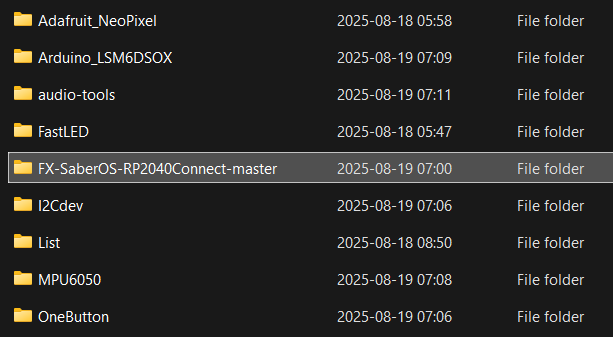
Arduino's libraries directory looked like below after that
Next the compile was successful with warnings.
FQBN: rp2040:rp2040:arduino_nano_connect
...
...
Sketch uses 163448 bytes (0%) of program storage space. Maximum is 16773120 bytes.
Global variables use 14592 bytes (5%) of dynamic memory, leaving 247552 bytes for local variables. Maximum is 262144 bytes.
As @Grumpy_Mike correctly identified you did not use the correct core; this can bee seen on the first line.
Ok I’ll give this a shot this afternoon
Unfortunately still couldnt get it to work. I guess I will just have to give up on this project. Guess its too advanced for me to complete. Sorry to inconvenience yall.