It'll work if I run your Visual Studio project and compile it myself.
Arinoth:
It'll work if I run your Visual Studio project and compile it myself.
Maybe a corrupt download then? Anyway, glad you made it work.
Hi,
I tried using your library as well but no luck. I am copying most of a post I put up on another forum so please excuse that.
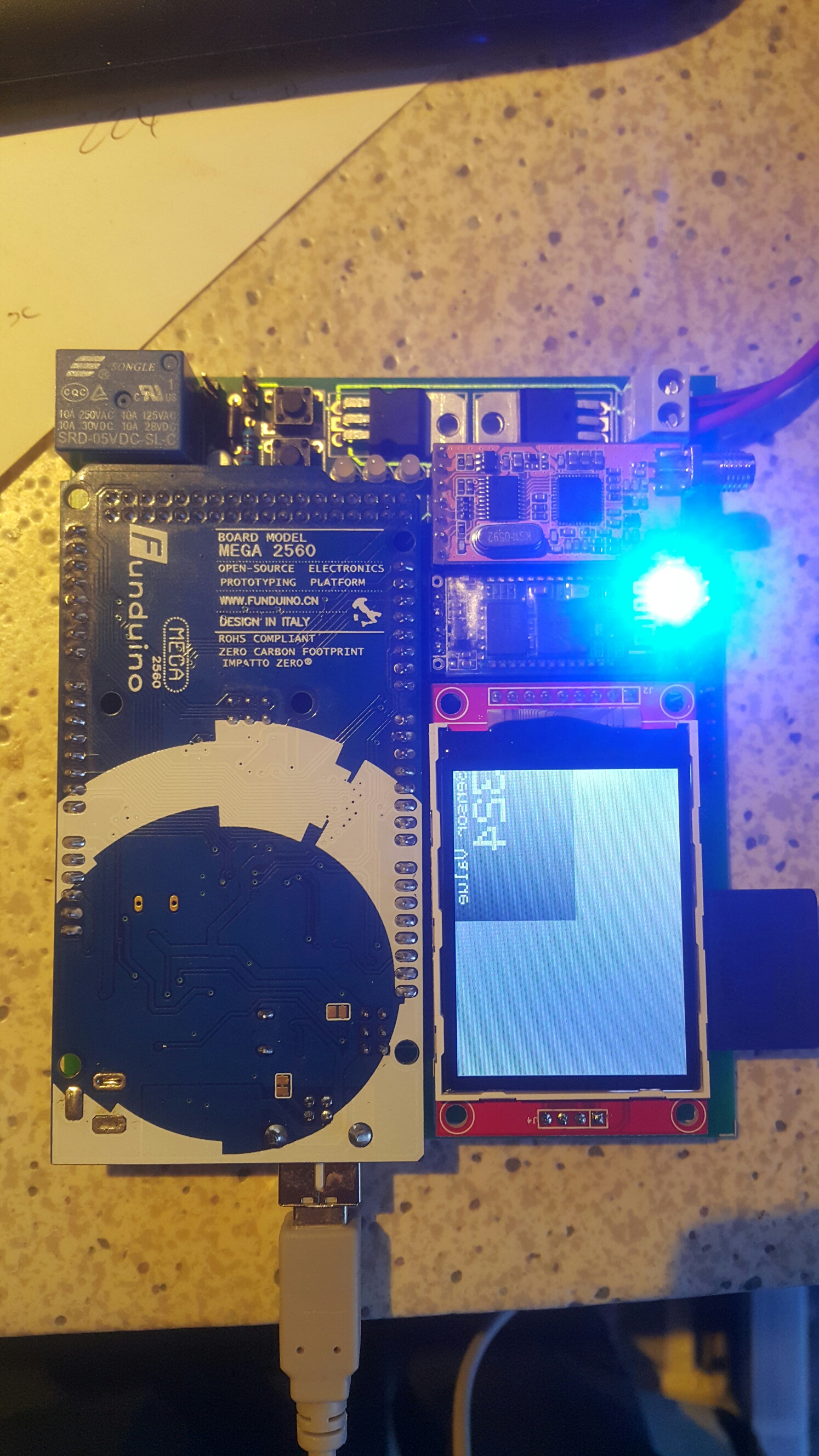
I have a 2.2 TFT. (2.2 inch 2.2" SPI TFT LCD Display module 240x320 ILI9341 51/AVR/STM32/ARM/PIC) as per picture attachment.
I have it connected up to a Mega 2560.
Wiring:
PIN MEGA CD4050 2.2TFT
SCK 52 YES SCK
MOSI 51 YES MOSI
MISO 50 NO MISO
D/C 4 YES D/C
RST 5 YES RST
CS 11 YES CS
So, I have a level converted between the Mega and the 2.2 TFT on all pins except the MISO pin.
I have tried more libraries than I care to count. Most notable being UTFT, TFT, TFTV2, ADAFRUIT_ILI9340, ADAFRUIT_ILI9341.
If I run the TFT example TFTDisplayText with only these changes:
#define cs 11
#define dc 4
#define rst 5
I have attached a picture of the display and my board running their display text sketch with the above pin changes. I get text coming up on my display, all be it reversed, the screen flickering white and only occupying 25% of the screen. I know this is because that library was developed for a different display so ... expect issues. The reason I mention it however is, I assume that based on the fact that it is working here, that my wiring is not wrong. I might be wrong on this assumption.
If I run your examples, I get the same thing but using these lines:
#define TFT_DC 4
#define TFT_CS 11
ALL the other libraries give me a white flickering screen with nothing else happening.
I desperately need assistance on this.
I must use SPI to access the display. I have not even started to engage the device on the SD card yet so this will be the next challenge.
Your assistance is appreciated.
DWaterford:
Hi,I tried using your library as well but no luck.
Ok, few things I would try:
- reduce SPI clock by increasing the clock divider in ILI9341_due.h to let's say #define ILI9341_SPI_CLKDIVIDER SPI_CLOCK_DIV8
- call the constructor with the reset pin defined: ILI9341_due myTFT(TFT_CS, TFT_DC, TFT_RST);
- I can't see the board but looks like you have another modules wired up. Have you tried to wire up just the board, CD4050 and TFT (e.g. on a breadboard without using that board)?
Hi MarekB,
Thanks for the reply.
Its difficult to unwire the board but if I have to, I will do so.
I will try the suggestions you have made.
Am I correct in assuming that because the TFT.H library works, my wiring is probably not wrong but that I am probably suffering from a coding/library issue? I took the tft.h sketch and changed each setting one by one. So, CD, D/C, RST and every change I made, killed my display. I therefore assume that those pins are working fine.
Am I correct in saying it should all work if, CS, D/C, RST are normal digital pins and then MOSI, MISO and SCK are the hardware pins (50,51 and 52)?
Is my logic right that because tft.h is giving me the display in the picture, my wiring is probably not wrong? Surely if it was, I would get nothing. In my mind, its hardware is probably right but the access to the hardware via MOSI etc through the software is wrong.
post your code
Awesome - I set
SPI_MODE_NORMAL
SPI_CLKDIVIDER SPI_CLOCK_DIV8
And ILI9341_due myTFT(TFT_CS, TFT_DC, TFT_RST);
Working perfectly.
Legendary guys - Thanks.
Next trick is finding where I can get a list of all the commands and operators. gTextAlighnTopLeft, etc ...
Is there a reference somewhere?
DWaterford:
Awesome - I set
SPI_MODE_NORMAL
SPI_CLKDIVIDER SPI_CLOCK_DIV8
And ILI9341_due myTFT(TFT_CS, TFT_DC, TFT_RST);Working perfectly.
Legendary guys - Thanks.
Next trick is finding where I can get a list of all the commands and operators. gTextAlighnTopLeft, etc ...
Is there a reference somewhere?
No deep documentation yet, I use Visual Studio so I get IntelliSense so if your IDE is not offering you something similar your best option is to scan through ILI9341_due.h and ILI9341_due_gText.h or look at the various example sketches. Btw. if you got that working you can try to decrease the ILI9341_SPI_CLKDIVIDER to SPI_CLOCK_DIV4 (or even put it back to SPI_CLOCK_DIV2) and see if it still works. The lower the divider the faster it renders.
If you want to use your own custom fonts then make sure you check out the github.io page (AVR Compatibility section).
OK - I have been through and looked at a number of the examples. Got a bit of an idea of how to get things working and I am making good progress.
I have found something weird though... Perhaps you can advise where to look (even though you don't know my circuit). A brief outline of my circuit:
Supply voltage comes in at 12+ Volts. Gets regulated down to 9v and connected to a backup battery. It then goes to another regulator to 5v. The 9v goes to my arduino input voltage and the 5v to my arduino 5v circuit. That way I supplement the 5v requirement on my circuit.
MY display powers up and everything works but only when my supply voltage is less than 9v. As soon as I lift the supply voltage over 9v, my TFT goes white. Tells me there is a supply voltage problem somewhere. If I leave the supply voltage off and just run the system off the usb port, everything works except, when I power up my GSM module and let it connect to the network, it requires too much current and the system resets.
Thoughts?
A bit off-topic for this thread but just from top of my head...I would try to measure voltage across TFT power pins (with 12V and 9V on input) and see if there's any difference. You can also try to put a 100nF decoupling capacitor across TFT power pins (as close as possible), maybe there's too much noise. Or try a separate 5V power for your arduino circuit. Btw. I use things like these or these to power some of my projects.
Hi MarekB,
Thanks for the reply. Apologies if this is not the forum for the discussion. Perhaps you can guide me as to where I should be posting. I assumed that due to it being the display that switches off that this would be a display related post.
I coupled my oscilloscope to my board today in an attempt to do some fault finding. I did this really to take a look at the amount of noise on my display supply as per your guidance. I found something else though.
On my 3.3V pin on the TFT display. I have a supplemental voltage supply on my board to boost the 5V capcity of my system. I dont however have anything on the 3.3V side because I assumed that the only devices using the 3.3V would be my TFT and the CD4050 HEX converter that interfaces to the TFT. When I measure the voltage on my 3.3V pin and I have the right supply voltages on the Arduino (IE - More than 7V on the VIN), my 3.3V pin is reading up at 3.6V The only things this pin is connected to is the VCC on my TFT and the VDD on my CD4050 converter. I am thinking that the CD4050 is leaking back into the Arduino board somehow because if I remove the board and check the 3.3V pin, its bang on 3.3V. I dont think the display is leaking back to the arduino because all pins on the display are operating at 3.3V and it has no higher supply. The CD4050 on the other hand, has the 5V pins coming from the arduino which are being converted down.
Has anyone had this before? Is there something more complicated I should be considering when putting the CD4050 and my 2.2" TFT in? Can they not share the 3.3V pin?
I am assuming this over voltage is the reason the 2.2" TFT is going completely white and that it is not the noise issue. I checked the noise and I am getting about 0.1V noise factor so will be capping that one too.
Thanks again for anyone's advice here.
You are in the right forum, just in the wrong thread. If you have questions regarding my ILI9341 library (like your very first post here) feel free to ask in this thread, otherwise either search the forum for a thread that deals with problem similar to yours and if you can't find anything then start your new thread. Looks like you have some problems with connecting TFT via CD4050 which does not directly relate to ILI9341_due library. You have a higher chance that some people that had issues with CD4050 will look at your problem if you post your question in CD4050 related thread.
And to your question, I am afraid I won't be much of a help here, I primarily use Arduino Due and Pro Mini 3.3V version so I do not have to deal with CD4050.
i have a ili9341 driver, but the display flex has the module hard wired for 3 wire spi [(d/c) bit included to make 9 bits in serial string.] the sam 3x spec states the SPI is "programable in data length between 8 and 16 bits" but i cant find any spi type routines that makes the data length set-able. would really love to get to dma speeds with 9 bit serial some how
SPI_Timing.pdf (87.5 KB)
MHedrick:
i have a ili9341 driver, but the display flex has the module hard wired for 3 wire spi [(d/c) bit included to make 9 bits in serial string.] the sam 3x spec states the SPI is "programable in data length between 8 and 16 bits" but i cant find any spi type routines that makes the data length set-able. would really love to get to dma speeds with 9 bit serial some how
I am not sure if you can make 9-bit transfers work with DMA. Somebody correct me if I am wrong but DMA seems to only be able to transfer 8, 16 or 32bit values (section 22.7.16 DMAC Channel x [x = 0..5] Control A Register, SRC_WIDTH and DST_WIDTH).
And you are right, there is no SPI function to change the data length, it is always set to 8-bit. The bit length is controlled by the SPI_CSR register - BITS part (32.8.9 SPI Chip Select Register) where you can set it between 8-16bits. So you would have to setup that register yourself for 9-bit transfers. At least that's what I have done in order to switch to 16-bit transfers.
With DMA not being able to do 9-bit transfers I guess your only option is to use SPI or Extended SPI for some speedup.
Again THX MarekB!.
TFT: 2.8" ILI9341 with touch screen
Board: arduino MEGA with house made shield (voltage dividers on CS, D/C, SCK, MOSI and RESET pin)


It´s alive!
MEGA 2.8" TFT ILI9341 graphics test 1
MEGA 2.8" TFT ILI9341 UTFT demo approach test 2
Best Regards.
Great that is works for ya TFTLCDCyg 8)
How large displays are supported by this library. Does anybody know any reasonable priced examples. I have a 240x320 display which is supported, but I would like to test a larger one.
the biggest i found was 3.2" 240x320 i dont think ili9341 are avaiable with larger units.
Hey guys, just updated the lib to v.1 version. Here is a list of changes (that I remember):
v1.00.000 - Breaking changes:
- functions renamed:
drawArc -> fillArc
selectFont -> setFont
defineArea -> setTextArea
setFontColor -> setTextColor
setCursor -> cursorToXY
setTextSize -> setTextScale
setFontLetterSpacing -> setTextLetterSpacing
getFontLetterSpacing -> getTextLetterSpacing
drawString -> print, printAt, printAligned
drawStringOffseted -> printAlignedOffseted
drawStringPivoted -> printAlignedPivoted
drawStringPivotedOffseted -> printAlignedPivotedOffseted - setTextArea (previously defineArea) is now set by x,y,width,height
(previously x1,y1,x2,y2) - images in .565 format must be generated again with the current BMP24toILI565
tool - removed glcdfont, use SystemFont5x7 instead
- New functions
- setAngleOffset (extracted from setArcParams)
- drawLineByAngle
- printAtOffseted
- clearArea
- drawImage
- setTextLineSpacing
- drawBitmap - well not a new function but now it actually works
- New additions
- SPI transactions support
- added support for String and FlashStringHelper*
- supporting '\n' in strings
- many more predefined colors like ILI9341_CHOCOLATE or ILI9341_SKYBLUE
- BMP24toILI9341Array - a tool to convert BMP image to an array
(so you can draw small images directly from memory, no need for an SD card) - a few new example sketches
- Other changes
- many speed improvements
- removed ILI9341_due_gText.h, ILI_SDSpi.h, ILI_SdFatConfig.h
- added ILI9341_due_config.h
- gText is now embedded directly in the ILI9341_due library so you do not
need to create ILI9341_due_gText objects anymore. Just call tft.print - updated github.io page, documented all functions with examples and
pictures! - ILIScreenshotViewer has embedded console and automatically loads
screenshots (no need to copy/paste strings)
Great !
Tested with the Adafruit touchscreen and a genuine Due, wired with 20cm (!) Dupont wires. Works fine with clock divider set to 2 (but generates glitches with text functions if divider == 1)
#include "..\Streaming\Streaming.h" is commented in the include file, but not in the source, generating an error if this lib is no present.
Commenting it in the source solves the problem, as this lib seems not to be needed.
I was just merging the two libs (gfx and text) and adding functions for a couple of days... Your update comes just in time ! (I was typing when you posted)