You seem to be including ILI9341_t3 library instead of ILI9341_due one? ILI9341_t3 is for Teensy 3.1 and it won't work on Due.
All the examples but the sdFatTftBitmap should not require any additional libraries. sdFatTftBitmap needs SdFat-beta library from Bill Greiman.
haxan:
First of all, Thanks MarekB. You have done an amazing job with the library.I just tested it on my DUE and its amazing. takes about 2771 ms to run the "graphicstestWithStats" example.
Had to make custom PCB though to test out the screen.
There is one little glitch when running the gTextBigFont. The remaining portion of the previous font stays on the screen. I have a 2.8 screen. However its not much issue. Might need to clear screen before showing the next font number.
Ok, should be fixed in the latest (v0.93.000).
MarekB:
You seem to be including ILI9341_t3 library instead of ILI9341_due one? ILI9341_t3 is for Teensy 3.1 and it won't work on Due.
All the examples but the sdFatTftBitmap should not require any additional libraries. sdFatTftBitmap needs SdFat-beta library from Bill Greiman.
Woops, my bad! Downloaded the correct libraries and it all compiles fine. Thanks 
Without trying to sound to greedy, I don't suppose there is a ST7735 library version for download? I saw some mention of it in the first post...
ILI9341_due Fractal demo
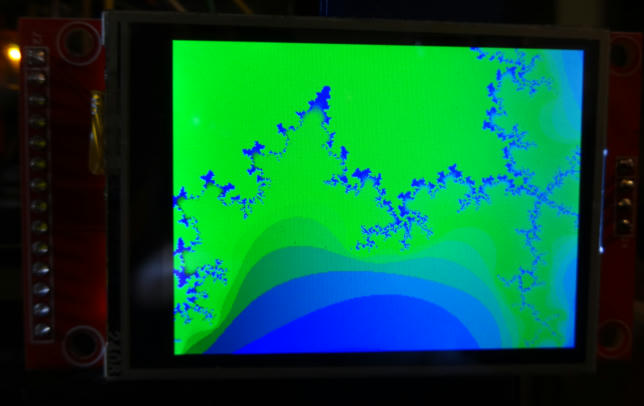
#include <complex>
using namespace std;

/*
New library ILI9341 for due by Marek Buriak
http://marekburiak.github.io/ILI9341_due/
https://github.com/marekburiak/ILI9341_due
THx
*/
#include <SPI.h>
#include <ILI9341_due_gText.h>
#include <ILI9341_due.h>
#include "fonts\Arial_bold_14.h"

#define LCD_CS 10	// Chip Select for LCD
#define LCD_DC 42	// Command/Data for LCD

ILI9341_due tft(LCD_CS, LCD_DC);
ILI9341_due_gText t1(&tft);
char textBuff[20];

// Color set
#define	BLACK           0x0000
#define	RED             0xF800
#define	GREEN           0x07E0
//#define	BLUE            0x001F
#define	BLUE            0x102E
#define CYAN            0x07FF
#define MAGENTA         0xF81F
#define YELLOW          0xFFE0
#define ORANGE          0xFD20
#define GREENYELLOW     0xAFE5
#define DARKGREEN       0x03E0
#define WHITE           0xFFFF

uint16_t  color;


const byte cmap[]={0b00000000,0b11100000,0b11100100,0b11101000,0b11101100,0b11110000,0b11110100,0b11111000,0b11111100,
                   0b11011100,0b10111100,0b10011100,0b01111100,0b01011100,0b00111100,0b00011100,0b00011101,0b00011110,
                   0b00011111,0b00011011,0b00010111,0b00010011,0b00001111,0b00001011,0b00000111,0b00000011,0b00100011,
                   0b01000011,0b01100011,0b10000011,0b10100011,0b11000011,0b11100011,0b11100010,0b11100001,0b11100000,0b00000000};

void setup()
{
  Serial.begin(9600);
  tft.begin();
  //tft.fillScreen(BLUE);
  tft.setRotation(3);
  GradienteVCc(0,0,320,240, 0, 0, 255);
	t1.defineArea(0, 0, 320, 240);
	t1.selectFont(Arial_bold_14);
	t1.setFontLetterSpacing(5);
	t1.setFontColor(ILI9341_WHITE, tft.color565(0,0,255));
	t1.drawString("Fractal", 0,5);
  delay(1000);

  fractal();
}

void loop(){
}

void fractal()
{
      for(int i=0;i<320;i++)
       {
        for(int j=0;j<240;j++)
          {
            complex<float> z(0,0),c((i+180.0)/1280.0,(j+640.0)/1280.0);
            int n;
            for(n=1;n<sizeof(cmap);n++)
               {
                 z=z*z+c;
                 if(norm(z)>4.0)break;
               }

            color = cmap[sizeof(cmap)-n];

            tft.drawPixel(i,j, tft.color565(0,255-color,color));
          }
       }
}


// Vertical gradient: up (0%) to down (100%)
void GradienteVcC(int X1, int Y1, int X2, int Y2, int Color1R, int Color1G, int Color1B)
{
  int Gradiente1;

  Color1R = Color1R*10;   Color1G = Color1G*10;    Color1B = Color1B*10;  //

  for (int i=0; i<=Y2-Y1; i++)
      {
          Gradiente1 = 1000 * i/(Y2 - Y1);
	  tft.drawFastHLine(X1, Y1+i, X2-X1, tft.color565(Color1R*Gradiente1/10000, Color1G*Gradiente1/10000, Color1B*Gradiente1/10000));
      }
}

// Vertical gradient: up (100%) to down (0%)
void GradienteVCc(int X1, int Y1, int X2, int Y2, int Color1R, int Color1G, int Color1B)
{
  int Gradiente1;
  Color1R = Color1R*10;   Color1G = Color1G*10;    Color1B = Color1B*10;  //
  for (int i=0; i<=Y2-Y1; i++)
      {
          Gradiente1 = 1000 * ((Y2 - Y1)-i)/(Y2 - Y1);
	  tft.drawFastHLine(X1, Y1+i, X2-X1, tft.color565(Color1R*Gradiente1/10000, Color1G*Gradiente1/10000, Color1B*Gradiente1/10000));
      }
}
Code source here:
Building an LCD TFT library for Arduino DUE - Arduino Due - Arduino Forum (THX Palliser)
And here:
VGA output - Arduino Due - Arduino Forum (THX stimmer)
PD:
MarekB:
...If you don't mind, I would like to include your converted demo in the lib's examples.
Thumbs-up MarekB 
nibbly:
Woops, my bad! Downloaded the correct libraries and it all compiles fine. ThanksWithout trying to sound to greedy, I don't suppose there is a ST7735 library version for download? I saw some mention of it in the first post...
Are you sure you were looking at the first post of the right thread?  I have not created any library for ST7735, there are some but not sure if any of them is utilizing DMA.
Sorry, my mind is all over the place. I got a whiff of the info from this post Highly optimized ILI9341 (320x240 TFT color display) library
It's mentioned in paragraph 2, but suspect it not DUE compatible.
TFTLCDCyg:
ILI9341_due Fractal demo#include <complex>
using namespace std;
/*
New library ILI9341 for due by Marek Buriak
THx
*/
#include <SPI.h>
#include <ILI9341_due_gText.h>
#include <ILI9341_due.h>
#include "fonts\Arial_bold_14.h"
#define LCD_CS 10 // Chip Select for LCD
#define LCD_DC 42 // Command/Data for LCD
ILI9341_due tft(LCD_CS, LCD_DC);
ILI9341_due_gText t1(&tft);
char textBuff[20];
// Color set
#define BLACK 0x0000
#define RED 0xF800
#define GREEN 0x07E0
//#define BLUE 0x001F
#define BLUE 0x102E
#define CYAN 0x07FF
#define MAGENTA 0xF81F
#define YELLOW 0xFFE0
#define ORANGE 0xFD20
#define GREENYELLOW 0xAFE5
#define DARKGREEN 0x03E0
#define WHITE 0xFFFF
uint16_t color;
const byte cmap[]={0b00000000,0b11100000,0b11100100,0b11101000,0b11101100,0b11110000,0b11110100,0b11111000,0b11111100,
0b11011100,0b10111100,0b10011100,0b01111100,0b01011100,0b00111100,0b00011100,0b00011101,0b00011110,
0b00011111,0b00011011,0b00010111,0b00010011,0b00001111,0b00001011,0b00000111,0b00000011,0b00100011,
0b01000011,0b01100011,0b10000011,0b10100011,0b11000011,0b11100011,0b11100010,0b11100001,0b11100000,0b00000000};
void setup()
{
Serial.begin(9600);
tft.begin();
//tft.fillScreen(BLUE);
tft.setRotation(3);
GradienteVCc(0,0,320,240, 0, 0, 255);
t1.defineArea(0, 0, 320, 240);
t1.selectFont(Arial_bold_14);
t1.setFontLetterSpacing(5);
t1.setFontColor(ILI9341_WHITE, tft.color565(0,0,255));
t1.drawString("Fractal", 0,5);
delay(1000);
fractal();
}
void loop(){
}
void fractal()
{
for(int i=0;i<320;i++)
{
for(int j=0;j<240;j++)
{
complex z(0,0),c((i+180.0)/1280.0,(j+640.0)/1280.0);
int n;
for(n=1;n<sizeof(cmap);n++)
{
z=z*z+c;
if(norm(z)>4.0)break;
}
color = cmap[sizeof(cmap)-n];
tft.drawPixel(i,j, tft.color565(0,255-color,color));
}
}
}
// Vertical gradient: up (0%) to down (100%)
void GradienteVcC(int X1, int Y1, int X2, int Y2, int Color1R, int Color1G, int Color1B)
{
int Gradiente1;
Color1R = Color1R10; Color1G = Color1G10; Color1B = Color1B*10; //
for (int i=0; i<=Y2-Y1; i++)
{
Gradiente1 = 1000 * i/(Y2 - Y1);
tft.drawFastHLine(X1, Y1+i, X2-X1, tft.color565(Color1RGradiente1/10000, Color1GGradiente1/10000, Color1B*Gradiente1/10000));
}
}
// Vertical gradient: up (100%) to down (0%)
void GradienteVCc(int X1, int Y1, int X2, int Y2, int Color1R, int Color1G, int Color1B)
{
int Gradiente1;
Color1R = Color1R10; Color1G = Color1G10; Color1B = Color1B10; //
for (int i=0; i<=Y2-Y1; i++)
{
Gradiente1 = 1000 * ((Y2 - Y1)-i)/(Y2 - Y1);
tft.drawFastHLine(X1, Y1+i, X2-X1, tft.color565(Color1RGradiente1/10000, Color1GGradiente1/10000, Color1BGradiente1/10000));
}
}
Code source here:
http://forum.arduino.cc/index.php?topic=229976.5 (THX Palliser)

And here:
http://forum.arduino.cc/index.php?topic=130742.0 (THX stimmer)


PD:

Thumbs-up MarekB :art:
Just a bit faster rendering
uint8_t color; // instead of uint16_t

void fractal()
{
	uint16_t scanline[320];
	tft.setAddrWindow(0,0,320,240);
	for(int j=0;j<240;j++)
	{
		for(int i=0;i<320;i++)
		{
			complex<float> z(0,0),c((i+180.0)/1280.0,(j+640.0)/1280.0);
			int n;
			for(n=1;n<sizeof(cmap);n++)
			{
				z=z*z+c;
				if(norm(z)>4.0)break;
			}

			color = cmap[sizeof(cmap)-n];
			scanline[i] = tft.color565(0,255-color,color);
		}
		tft.pushColors(scanline, 0, 320);
	}
}
Thx for the bit improbe.
Remember include RST pin
#define LCD_RST 41
ILI9341_due tft(LCD_CS, LCD_DC, LCD_RST);
or
#define TFT_RST 41
ILI9341_due tft(TFT_CS, TFT_DC, TFT_RST);
In order to get full stability and control on the wiring Due-TFT. Today without RST definition, the second ring Due-2.4" TFT only show randoms "turn off" and flickers many times. With RST pin definition the TFT remain stable.
Hi Guys,
I need a little bit of help...
I just downloaded the ILI9341_due library and ran it on my Arduino Due together with my new 2.8" TFT Capacitive touch LCD (https://www.adafruit.com/products/1947).
I tried the graphicstest and also the gTextBigFont examples and in each case nothing happened. I mean the screen was just white...
At first I thought maybe the screen is broken (although I had just bought it) so I tried plugging it into the Arduino Uno and ran the normal graphictest from Adafruit and it was fine - the screen worked and displayed the graphic test.
So I tried again to plug the screen to the Arduino Due and run the graphicstest from the ILI9341_due library code and again just a simple white screen. It just doesn't work. Compilation is fine and the upload of the code to the ARM chip is successful according to the IDE.
Does anybody have a suggestion as to what I am doing wrong or perhaps you think that the Due board isn't working properly?
Thanks a lot!
How did you connect it to Due? This shield is meant for a 5V Arduino Uno and alike and not for 3.3V Due. The shield might output 5V on some of its pins (like for that capacitive touch) which is fine for Uno but definitely not for Due. I personally would not connect it to Due without being definitely sure about the voltage. You might want to contact Adafruit and ask them if and how this shield can be connected to Due.
Btw. right from their description "The display uses digital pins 13-9". That won't work with ILI9341_due library as it only supports HW SPI which is available on Due's SPI header only. So at least you would have to do: "Solder closed three jumpers to use the ICSP header...". But as I say, the unknown voltage is the danger.
MarekB:
How did you connect it to Due? This shield is meant for a 5V Arduino Uno and alike and not for 3.3V Due. The shield might output 5V on some of its pins (like for that capacitive touch) which is fine for Uno but definitely not for Due. I personally would not connect it to Due without being definitely sure about the voltage. You might want to contact Adafruit and ask them if and how this shield can be connected to Due.
Btw. right from their description "The display uses digital pins 13-9". That won't work with ILI9341_due library as it only supports HW SPI which is available on Due's SPI header only. So at least you would have to do: "Solder closed three jumpers to use the ICSP header...". But as I say, the unknown voltage is the danger.
Hey Marek,
Thanks for the quick reply.
So first I'll begin by saying that I got everything working.
The shield is compatible also with the DUE since it also runs on 3.3V as written in the same link I previously wrote: "Onboard 3.3V @ 300mA LDO regulator".
You were right that I forgot to solder the three jumpers to use the ICSP header. Thanks for that.
I managed to use SPI_FULL_SPEED with this shield. At first I used 24bit BMP together with DMA mode and SPI Full Speed and got 419msec loading time per image. I then changed to 565 bitmap using the tool you provided and it shot down to 170msec per image. This is great and exactly what I was looking for.
Thanks a lot for all the code you wrote and for your support.
Next thing to do is check it together with the touch feature...
Lucent567: up some pictures or videos please 
TFTLCDCyg:
Lucent567: up some pictures or videos please
Here is a short move demonstrating what I've done.
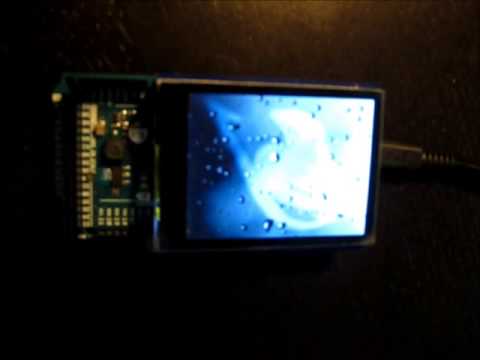
Thanks again to MarekB...
Glad that it worked out well for you
And yes, the display works at 3.3V. Since that shield is for Uno and alike it has things like that voltage regulator and logic level translator (CD4050) so your 5V signals are reduced to 3.3V level. I was just worried that the shield might also convert 3.3V back to 5V on some of its outputs. But since 3.3V is a logic HI even at 5V logic level then I guess they did not bother to step it back up to 5V.
Hello i buy this display:
http://it.aliexpress.com/item/A96-Free-Shipping-1-8-Serial-128X160-SPI-TFT-LCD-Module-Display-PCB-Adapter-Power-IC/1977166451.html
the display is : 1.8 TFT SPI 128*160
I want to say the datasheet of this display and the power consuming also.
For example if I want to use battery alimentation for it, what is the duration of the battery?
answer me please..
Thanks
Francesco Noto
Hi. I have a strange compile error with the sdFatTftBitmap example.
sdFatTftBitmap.ino: In function 'void setup()':
sdFatTftBitmap.ino:49:19: error: invalid conversion from 'int' to 'iliRotation' [-fpermissive]
In file included from C:\Users\nibrob\Google Drive\Code\Arduino\libraries\ILI9341_due-master/ILI9341_due_gText.h:36:0,
                 from sdFatTftBitmap.ino:23:
C:\Users\nibrob\Google Drive\Code\Arduino\libraries\ILI9341_due-master/ILI9341_due.h:204:7: error:   initializing argument 1 of 'void ILI9341_due::setRotation(iliRotation)' [-fpermissive]
  void setRotation(iliRotation r);
       ^
Error compiling.
I have not changes anything in the example except CS for the display and the sd card.
If I comment out the line "tft.setRotation(3); // landscape" It compiles fine but display stays blank/white and the uart debug says card initialised correctly and that images of card are loading..
edit:- ok, got it :-
v0.93.000 - Breaking changes:
                - setRotation now needs iliRotation enum as a parameter (instead of an int)
                - the meaning of some gText drawString parameters have changed
                  (event though the parameter type is the same)
So I changed the the following >> tft.setRotation(iliRotation270); // landscape
but I still get a blank/white display?
I also added a line in the main loop to display some text and it only works once when entering the loop then get blank display when printing bmp to display.
//#include <SPI.h>
#include <SdFat.h>
#include <SdFatUtil.h>
#include <ILI_SdSpi.h>
#include <ILI_SdFatConfig.h>
#include <ILI9341_due_gText.h>
#include <ILI9341_due.h>

#include "fonts\Arial_bold_14.h"

// CS and DC for the LCD
#define LCD_CS 11	// Chip Select for LCD
#define LCD_DC 9	// Command/Data for LCD

#define SD_CS 10		// Chip Select for SD card

#define BUFFPIXEL 320	// size of the buffer in pixels
#define SD_SPI_SPEED SPI_FULL_SPEED	// SD card SPI speed, try SPI_FULL_SPEED

SdFat sd; // set filesystem
SdFile bmpFile; // set filesystem
//ArduinoOutStream cout(Serial);

ILI9341_due tft(LCD_CS, LCD_DC);

// store error strings in flash to save RAM
#define error(s) sd.errorHalt_P(PSTR(s))

ILI9341_due_gText t1(&tft);


void setup()
{
	Serial.begin(9600);

	tft.begin();
	tft.setRotation(iliRotation270);	// landscape
	progmemPrint(PSTR("Initializing SD card..."));

	if(!sd.begin(SD_CS, SD_SPI_SPEED)){
		progmemPrintln(PSTR("failed!"));
		return;
	}

	progmemPrintln(PSTR("OK!"));
        t1.defineArea(100, 110, 220, 130);
	t1.selectFont(Arial_bold_14);
	t1.setFontLetterSpacing(5);
	t1.setFontColor(ILI9341_WHITE, ILI9341_BLUE);


}

void loop()
{
        t1.drawString("Display Working", gTextAlignMiddleCenter);
        delay(2000);
	bmpDraw("giraffe.565", 0, 0);
	delay(2000);
	bmpDraw("SOLDHO~1.565", 0, 0);
	delay(2000);
	bmpDraw("GLOOMY~1.565", 0, 0);
	delay(2000);
	bmpDraw("MOTIVA~1.565", 0, 0);
	delay(2000);
	bmpDraw("BLACKLAB.565", 0, 0);
	delay(2000);
	bmpDraw("LAMBO.565", 0, 0);
	delay(2000);
}
HAHA, schoolboy error on my behalf AGAIN.
Display power was 3.3v which worked for ALL the Graphics demos except loading a BMP (pixel count probably pushed power consumption over the edge)
Fed display with 5V and now BMPs load nicely.
Quick question. I'm using a samsung SD card and SPI speed is set to SPI_FULL_SPEED but the images load between 347mS and 455mS. Is this right?
Also, what governs the LCD SPI speed?
From Lucent567 (a few posts above):
I managed to use SPI_FULL_SPEED with this shield. At first I used 24bit BMP together with DMA mode and SPI Full Speed and got 419msec loading time per image. I then changed to 565 bitmap using the tool you provided and it shot down to 170msec per image.
So if you're loading BMPs then yours 347-455ms sounds about right. Use the 565 converter from the Tools folder to convert 24bit BMPs to 565 raw format and use that to speed up the loading and rendering.
Time to test: Mandelbrot fractal
#include <complex>
using namespace std;

/*
New library ILI9341 for due by Marek Buriak
http://marekburiak.github.io/ILI9341_due/
https://github.com/marekburiak/ILI9341_due
THx
*/
#include <SPI.h>
#include <ILI9341_due_gText.h>
#include <ILI9341_due.h>
#include "fonts\Arial_bold_14.h"

#define LCD_CS 10
#define LCD_DC 42
#define LCD_RST 43

ILI9341_due tft(LCD_CS, LCD_DC, LCD_RST);
ILI9341_due_gText t1(&tft);
char textBuff[20];

// Color set
#define	BLACK           0x0000
#define	RED             0xF800
#define	GREEN           0x07E0
//#define	BLUE            0x001F
#define	BLUE            0x102E
#define CYAN            0x07FF
#define MAGENTA         0xF81F
#define YELLOW          0xFFE0
#define ORANGE          0xFD20
#define GREENYELLOW     0xAFE5
#define DARKGREEN       0x03E0
#define WHITE           0xFFFF

//uint16_t  color;
uint8_t color; // instead of uint16_t

#define MAX_ITERATION 142
#define SCREEN_X_MAX 320
#define SCREEN_Y_MAX 240

  const float X0 = -2.5;
  const float Y0 = -1;
  const float X1 = 1;
  const float Y1 = 1;

//Color set
const byte cmap[]={0b00000000,0b11100000,0b11100100,0b11101000,0b11101100,0b11110000,0b11110100,0b11111000,0b11111100,
                   0b11011100,0b10111100,0b10011100,0b01111100,0b01011100,0b00111100,0b00011100,0b00011101,0b00011110,
                   0b00011111,0b00011011,0b00010111,0b00010011,0b00001111,0b00001011,0b00000111,0b00000011,0b00100011,
                   0b01000011,0b01100011,0b10000011,0b10100011,0b11000011,0b11100011,0b11100010,0b11100001,0b11100000,0b00000000};

void setup() {
Serial.begin(9600);
  tft.begin();
  //tft.fillScreen(BLUE);
  tft.setRotation(3);
  GradienteVCc(0,0,320,240, 0, 0, 255);
	t1.defineArea(0, 0, 320, 240);
	t1.selectFont(Arial_bold_14);
	t1.setFontLetterSpacing(5);
	t1.setFontColor(ILI9341_WHITE, tft.color565(0,0,255));
	t1.drawString("Fractal", 0,5);
  delay(1000);
  Serial.println("Mandelbrot generator");

  unsigned long stime = millis();

  drawmandelbrot(X0, Y0, X1, Y1);

  Serial.print("Drawing time : ");
  Serial.println(millis() - stime);
}

void loop() {

}

// Fractal code source: http://skyduino.wordpress.com/2012/08/25/arduinogenerique-generateur-de-fractale-de-mandelbrot/

void drawmandelbrot(const float x0, const float y0, const float x1, const float y1) {
  for(uint16_t x = 0; x < SCREEN_X_MAX; ++x) {
    float sx = x * (x1 - x0) / SCREEN_X_MAX + x0;

    for(uint16_t y = 0; y < SCREEN_Y_MAX; ++y) {
      float sy = y * (y1 - y0) / SCREEN_Y_MAX + y0;

      float z_r = 0, z_i = 0;
      uint16_t i = 0;

      do {
        float tmp = z_r * z_r - z_i * z_i + sx;
        z_i = 2 * z_r * z_i + sy;
        z_r = tmp;
        ++i;
      } while((z_r * z_r + z_i * z_i) < 4 && i < MAX_ITERATION);
        color = cmap[sizeof(cmap)-i];
        tft.drawPixel(x, y, (i == MAX_ITERATION) ? 0x0000 : tft.color565(255-color,0, 0)); //Red-Black-Black
    }
  }
}

// Vertical gradient: up (0%) to down (100%)
void GradienteVcC(int X1, int Y1, int X2, int Y2, int Color1R, int Color1G, int Color1B)
{
  int Gradiente1;

  Color1R = Color1R*10;   Color1G = Color1G*10;    Color1B = Color1B*10;  //

  for (int i=0; i<=Y2-Y1; i++)
      {
          Gradiente1 = 1000 * i/(Y2 - Y1);
	  tft.drawFastHLine(X1, Y1+i, X2-X1, tft.color565(Color1R*Gradiente1/10000, Color1G*Gradiente1/10000, Color1B*Gradiente1/10000));
      }
}

// Vertical gradient: up (100%) to down (0%)
void GradienteVCc(int X1, int Y1, int X2, int Y2, int Color1R, int Color1G, int Color1B)
{
  int Gradiente1;
  Color1R = Color1R*10;   Color1G = Color1G*10;    Color1B = Color1B*10;  //
  for (int i=0; i<=Y2-Y1; i++)
      {
          Gradiente1 = 1000 * ((Y2 - Y1)-i)/(Y2 - Y1);
	  tft.drawFastHLine(X1, Y1+i, X2-X1, tft.color565(Color1R*Gradiente1/10000, Color1G*Gradiente1/10000, Color1B*Gradiente1/10000));
      }
}
MarekB:
From Lucent567 (a few posts above):
So if you're loading BMPs then yours 347-455ms sounds about right. Use the 565 converter from the Tools folder to convert 24bit BMPs to 565 raw format and use that to speed up the loading and rendering.
Hi, I used the default images already in 565 format (giraffe etc.) and was getting 400-500mS at full SPI.
To use DMA SPI I comment out #include <SPI.h> correct?
One other thing, when installing the sdfat librarary, I could only get it to compile if I put it in "C:\Program Files (x86)\Arduino\libraries" The other 2 libraries we installed via the ide sketch>Import libraries