ILI9341(new)SPI library for Due supporting DMA transfer(Uno, Mega,.. compatible)

It seems to be a SKU:MAR2001

http://www.lcdwiki.com/2.0inch_Arduino_SPI_Module_ILI9225_SKU:MAR2001

And in fact besides ILI9225B and ILI9225G there is a ILI9225 (without a letter) out there, that does not have a register 66 and no combined SDI/SDA pin at all.

So with ILI9225 instead of ILI9225B or ILI9225G there is a big difference in operation: no read out , if you have no physical connection to both the SDI and the SDA pin.

But I am not sure, if mine is one of these, because i can not see the chip (look at the pictures in lcdwiki)!
And there they write:
8 SDA LCD SPI bus write data signal

Yes. Paragraph 7.2 Input Interfaces in the datasheet shows the interface types.

Your display is "similar" to mine i.e. has the same external header pin layout. Handy for bit-banging SPI when plugged into the Analog and Power headers of a Uno.

Mine has Q1 LED transistor
Mine has U1 LDO regulator
Mine has HC245 buffer.

Even if it has ILI9225-B you can't read SDA without removing the 245 buffer.

I have a 3.3V parallel ILI9225 display if you want to read GRAM. Are you in UK or Europe?
You can read/write with a 3.3V Due at full speed.

David.

My ILI9225 board also has U1 (LM6206-3.3 N3, 662K SMD Low Drop 3.3V regulator) on board.

LVC245A buffer, a 2R0 SMD resistor R1 and a SMD cap C1 an an open jumper J1 (do not know what it is for)

There is a SD-Slot with SD_CS, SD_MOSI, SD_SCK and SD_MISO but without soldered connectors.

And there is no connector for LED dimming and no Q1 transistor.

Are you in UK or Europe?

Funny question :wink: I always thought UK was Europe as well (even if part of the people want to leave EU).

But in fact i am not from the isle.

I think i will buy a board with two SPI data pins, if i find the time and complete the library for reading as well (perhaps it would work already. But i can not test it now - if someone wants to test it: just un- comment the reading functions and compile).

Hello,

Has there been any success making this library work with EastRising displays? I have this display + shield:

However, when I upload any of the example sketches, the display only renders solid white color.

Please, can someone help?

Thanks.

It should work fine with Marek's library.

Make sure that you use the correct pin numbers in the constructor for CS, DC, RST.

David,

It seems the shield was part of the problem. Everything works (including touch), after removing the shield. :wink: Thanks for your assistance!

Marek,

Your library is awesome! In terms of serial LCD drivers, I was beginning to think Arduino was stuck in the slow lane. Thanks!

Best Regards

I do not understand after loosing the shield

did you remove the shield? LOSE
or loosen the shield? LOOSE

The Due does not need level shifters. So you can wire directly from display to Due.
You MUST use the shield with Uno or Mega because they have 5V GPIO

The Adapter has several options. I suggest that you print the schematic. And make sure that you have all jumpers or solder-bridges correctly configured.

David.

David,

Yeah, I caught my mis-spell, a few seconds before your reply. I meant "losing". Perhaps "removing" is better.

I understand there are other ways to configure the shield. I don't intend to use it anyway, as it adds unnecessary bulk.

Best Regards,

@TFTLCDCyg
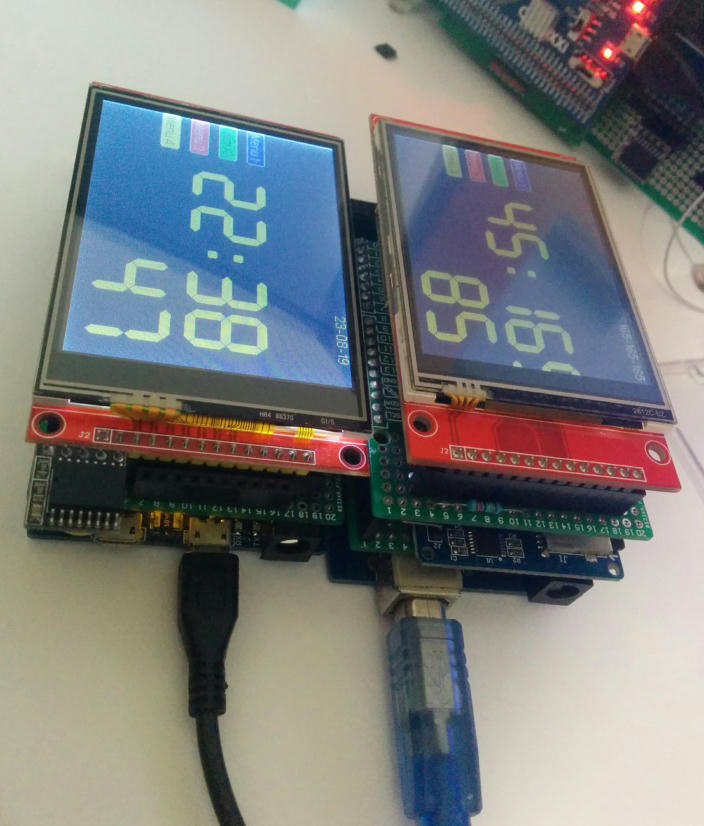
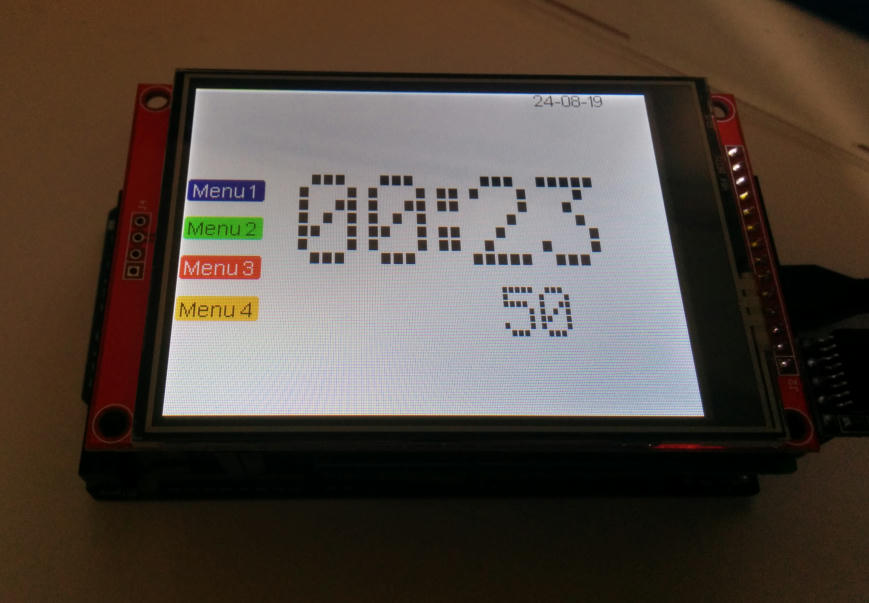
Greetings friend! I really appreciate these beautiful watches! (post #96). I own an ILI9341 3.2" TFT screen with Touch and an Arduino Mega Mini and I would like to make this beautiful watch with this beautiful Font (7Seg) using Marek's excellent library; so you could kindly share the your sketch here or by my email: (meuviolino@hotmail.com)?
My early thanks

Would anyone here on the forum have the sketch related to post #96, please?
Also some sketches of these watches with these beautiful fonts?
Thank you all

There is!

Setup:

MCU: Arduino due, RTC DS3231 (3.3V R-Pi version), MicroSD breakout
TFT: ILI9341 3.2"

ILI9341_due_MEGA_Menu_DS3231a.zip (10.2 KB)

@TFTLCDCyg
First, thank you for your kindness in attending me! I really appreciate these watches. I will go for items:

  1. It would be nice if you could use them on a larger screen like the one you mention in post #103, with a 4.3" or 5" RA8875, for example, although they are quite expensive.

  2. I also noticed that you collaborate a lot in this forum with your posts! Besides others, of course, like Marek, author of this excellent library!

  3. Sorry for my question but, this sketch you shared now with me, the picture shown is from a 3.2 SPI Breakout or Shield screen (with Arduino Mega)? I saw that it is embedded in a Mega or Due card! - If it is Breakout, should use Level Shifter or CD4050 on the logic pins is not it?

  4. My screen is a 3.2 SPI Breakout + Touch and I have an Arduino Mega Pro Mini (small card).

  5. I looked at this other page: problem with ili9341 - Displays - Arduino Forum, in post #6, in the second picture, you show a clock with a display (if I'm not mistaken) with the VFDa.h font but, in a large size; the third photo sketch: "Example: DS3231 + ILI9341 2.4 "+ Arduino MEGA", I was able to run it, but the VFDa.h font is small; do you also have this second photo sketch?
    Sorry if I wrote too much!
    Once again, thank you very much

For the MEGA you must use a CD4050BE. In the due you can connect directly.

These lines allow scaling of a font:

Header:

#define TEXT_SCALING_ENABLED

In the code:

  tft.setTextLetterSpacing(4);  
   tft.setTextScale(2);

For example:

void Time_Date()
{
  byte second, minute, hour, dayOfWeek, dayOfMonth, month, year;
  readDS3231time(&second, &minute, &hour, &dayOfWeek, &dayOfMonth, &month, &year);

 //   tft.setFont(Sev3);
 //   sprintf(TX, "%02d:%02d",hour, minute);
 //   tft.setTextScale(1);  
 //   tft.cursorToXY(75, 71);  tft.print(TX);
 //   sprintf(TX, "%02d",second);  tft.cursorToXY(206, 155);  tft.print(TX);

    tft.setTextLetterSpacing(4);  
    tft.setTextScale(2);  
    tft.setFont(VFDa);
    sprintf(TX, "%02d:%02d",hour, minute);
    tft.cursorToXY(75, 71);  tft.print(TX);
    
    tft.setTextScale(1);
    sprintf(TX, "%02d",second);  tft.cursorToXY(206, 155);  tft.print(TX);
    
    tft.setTextLetterSpacing(1);
    tft.setTextScale(1);
    tft.setFont(Arial14);
    sprintf(TX, "%02d-%02d-%02d",dayOfMonth, month, year);  tft.cursorToXY(240, 0);  tft.print(TX);
}

Thank you for the explanation!
I thought that to increase/decrease the font size it would only be time to build it, ie with GLCDFontCreator.
Does this mean that you can increase/decrease its size through 'tft.setTextScale'?

Another thing: I ran your sketch 'DS3231 + ILI9341 2.4" + Arduino MEGA' (problem with ili9341 - Displays - Arduino Forum), even though I had to make some changes due to the updates that Marek did it in his library, but an inconvenience is happening: every 9 seconds counted, he jumps 1 second, for example: starts at 25 to 33 and jumps to 35, 35 to 43 and jumps to 45 and so on. I am using the Arduino Pro Mini 3.3V 8Mhz (ATmega328P.) The modified sketch is attached for if you want to take a look.
Lastly, could you leave here how are the tft display connections to the Arduino Mega, including the Touch of this last sketch of yours?
Once again, thank you very much

DS3231_ILI9341_24_Arduino_Mega_Mod.ino (3.69 KB)

Sometimes the void loop is not necessary to use. That function limits the performance of screens such as ILI9341.

The void loop induces fictitious refresh rates in the graphic performance of the TFT. Some instructions must be executed only at the beginning of a screen cleaning, others must be executed continuously without resulting in annoying flickering or pixel overwriting.

The scheme we can use is as follows:

void funcion()
{
- Instructions that are executed once

while(1) o while(true)
{
- Repetitive or continuous cycle instructions
- To exit it, we can use the TFT touch screen
}
}

In a continuous cycle it is not necessary to use the delay () instruction. I leave you the version that integrates the previous concepts of the main program:

void setup()
{
  Serial.begin(115200);
  Wire.begin();
  
  bool result = tft.begin();
  
  Serial.print("TFT begin successful: ");
  Serial.println(result ? "YES" : "NO");

  tft.setRotation(iliRotation90);
  tft.fillScreen(ILI9341_BLACK);

  // defina a hora inicial aqui:
  // DS3231 segundos, minutos, horas, dia, data, mês, ano
  // setDS3231time(0,27,6,2,14,9,15); // dia 2 = Segunda-feira

  DS3231MP();
}
void loop(){}   //Nothing to do here!!!!

void DS3231MP()
{  
 tft.fillRect(0,0,320,240,ILI9341_WHITE);

 while (1)
 {
 byte second, minute, hour, dayOfWeek, dayOfMonth, month, year;
  // retrieve data from DS3231
  readDS3231time(&second, &minute, &hour, &dayOfWeek, &dayOfMonth, &month,
  &year);  
// Data
  //gTextArea t1={ 100, 110, 220, 50 };
  tft.setTextScale(1);  
  tft.setFont(Arial_bold_14);
  tft.setTextLetterSpacing(5);
  tft.setTextColor(ILI9341_BLUE, ILI9341_WHITE);
  sprintf(TX, "%02d / %02d / 20%02d", dayOfMonth, month, year);
  tft.printAt(TX, 88, 45);

// Hora
  //gTextArea t2={ 0, 0, 320, 240 };
  tft.setTextScale(2);  
  tft.setFont(VFDa);
  tft.setTextLetterSpacing(4);
  tft.setTextColor(ILI9341_BLACK, ILI9341_WHITE);
  sprintf(TX, "%02d:%02d:%02d", hour, minute,second);
  tft.printAt(TX, 5, 100);
  //delay(1000);
 }
}

I didn't see the jump in the seconds you noticed on your screen.

What version of DS3231 are you using in your setup?. Some link or picture?

Touch wiring:

touch panel (TCLK, TCS, TDIN, TDOUT, IRQ)
URTouch  myTouch(6,5,4,3,2);

"I didn't see the jump in the seconds you noticed on your screen."

In this attached sketch "DS3231_ILI9341_24_Arduino_Mega_Mod". With this short video on youtube: - YouTube Note well the Seconds counting!

And this attached sketch "DS3231_ILI9341_24_Arduino_ProMini." With this short video on youtube: DS3231 ILI9341 24 Arduino ProMini - YouTube
Also note the Seconds counting! (This is the last sketch you modified.)

The library is the DS3231 by Andrew Wickert, Eric Ayars, ........ LCC Version 1.0.0; It is not the DS3231 RTC. Do you think this could be the problem?

And here: URTouch myTouch (6,5,4,3,2); may be: URTouch myTouch (10,8,6,4,2); ? Thank you

PS. The RTClib library is also installed!

DS3231_ILI9341_24_Arduino_Mega_Mod.ino (3.76 KB)

DS3231_ILI9341_24_Arduino_ProMini.ino (3.9 KB)

In the second video:DS3231 ILI9341 24 Arduino ProMini - YouTube, you will notice that the Seconds count a bit ragged! Or is it my impression?

The best aproach to get info of the DS3231 RTC is this:

The RTC DS1307 is slightly different from the DS3231, when using such specific RTC libraries, errors such as the one you report usually appear. Remember that the DS3231 must use a rechargeable battery LIR2032, if you use a CR2032 you must modify the RTC circuit.

Let me made some test extra in order to try of reproduce your issue.

Yes, I have both libraries installed: DS3231 and RTClib and I am also using the LIR2032 rechargeable battery. So I included the RTClib in the sketch, looking like this appendix.

What about the URTouch myTouch (10,8,6,4,2); Can it be like this?

DS3231_ILI9341_24_Arduino_ProMini.ino (3.95 KB)

Why would anyone use URTouch when you have perfectly good SPI hardware?

I would enable Transactions in User_Setup.h

Then put TFT, SD, XPT2046 all on the same SPI bus.
I think that Bodmer even supports Touch in the TFT_eSPI library.

David.