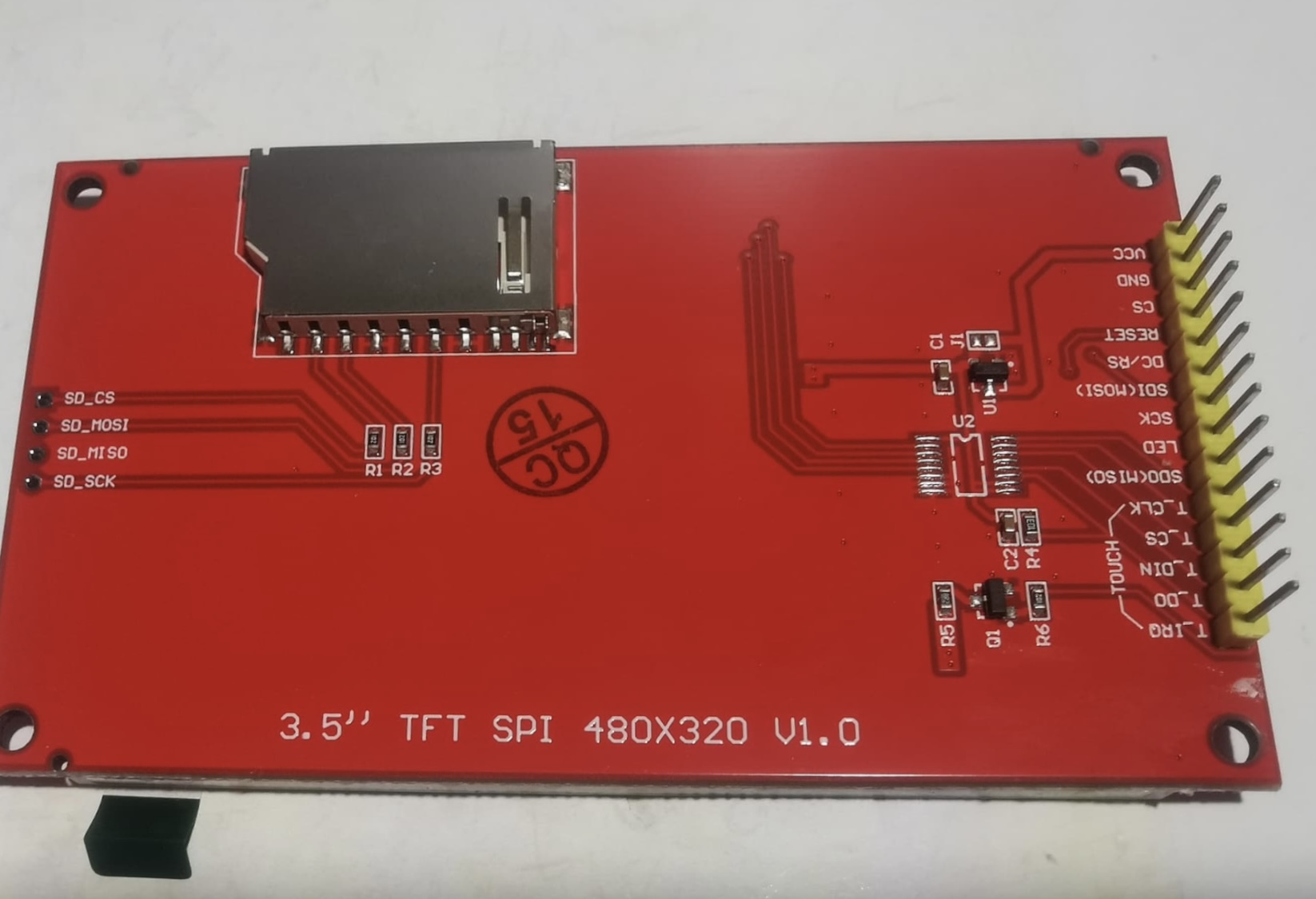
but I get nothing but a blank white screen. These worked on a Mega 2560 Rev3. I switched to the Due to get more speed in the display.
For my application I need the TFT plus the SD plus I have other peripherals (digipots, rotary controllers, buttons and relays, near the limit of pins on the Due. But now it seems that I have to choose to dump some necessary features from my device.
Does anyone have any idea what to do? Here is a Pinout of a nearly identical board to mine. Mine has pin headers for the SD card and is version 1.1 and is a 4.0” screen.
That should not be a problem, SPI does not have a limit on the number of devices. The actual limit is what the bus can drive. Without an annotated schematic I cannot be of much help.
Xfpd, I am not one of the “three accounts” you claim is me. There is another person to which I replied.
I explained everything above. I do not know why I appear with one account on my desktop and another on my phone. You seem to imply some sort of misconduct.
All I did was ask for help once for the new Due I got yesterday. One person has nicely responded and I am thankful. Again I apologize for offending you for failing to do whatever you assert I should do.
Sorry for my mistakes... why I connected the two accounts
User pedfasttech has the same avatar initials as user jt60541
User jt60541 (with the PF avatar) uses the initials on your avatar (jt)
Multiple avatar/same user happens here when users do not get answers within minutes because they need someone to write their final university project, assigned last semester, due tomorrow.
All circumstantial. Explaining my thoughts. Please, disregard (me).
OK All is cool. I will try to limit all future posts to JT60451 once I figure out how to get my phone to use the correct ID. As for university, my son graduated with his master's (Architecture) a year ago, that is as close as I have come to a university in recent times.
Sorry I am not going to spend the time to translate that to a schematic.
Sorry, I did not realize that you wanted a complete schematic. I could work this in KiCad, but instead what I did was work the issue. I moved the SCK, MISO and MOSI pins of the screen to the same pins on the SD, which are connected to the MOSI, MISO and SCK pins on the SPI pin header of the Due. This solved the screen issue.
I have an issue with the rotary controllers locking up the Due on pin interrupts, and that is a different issue to this one. The specific issue here is solved.
So thank you for pointing me in the right direction.