Hello
I expanded it to 16 or 32 button inputs with 74hc156. The incoming data comes as 0 1 thousand, I want to convert this data to decimal and send it on the LCD screen.
sample:
There are 8 buttons
11111111 open
00000 off
like 010101
How can I collect these data in order?

Hello aslan1983
Post your sketch, well formated, with comments and in so called code tags "</>" to see how we can help.
Have a nice day and enjoy coding in C++.
Дайте миру шанс!
#include <Wire.h>
#include <EEPROM.h>
#include <LiquidCrystal.h>
LiquidCrystal lcd(13, 12, 11, 10, 9, 8);


#define SO  2
#define SH_LD  3
#define CLK  4


// variables will change:
int i = 0;         // variable for reading 8-bit data
int PinState = 0;   //read the state of the SO pin
int Parallel_data = 0;//To store parallel data

void setup()
{
  Serial.begin(9600);
  pinMode(SH_LD, OUTPUT);
  pinMode(CLK, OUTPUT);

  pinMode(SO, INPUT);

  lcd.begin(20, 4);
  lcd.clear();

  lcd.setCursor(3,0);
  lcd.print("Test");
  lcd.setCursor(0,2);
  lcd.print("SOL :");
  lcd.print("255");
  lcd.setCursor(10,2);
  lcd.print("SAG :");
  lcd.print("255");
  lcd.setCursor(0,3);
  lcd.print("HEDEF : ");
  lcd.print("255");
  lcd.clear();

}

void loop()
{
  digitalWrite(CLK, LOW);
  digitalWrite(SH_LD, LOW);
  delay(5);
  digitalWrite(SH_LD, HIGH);
  Serial.print("Parallel Data:");
   for(i=0;i<32;i++) // 15 panel için 240 bit değeri girilecek
    {
        PinState = digitalRead(SO);// read the state of the SO:
        digitalWrite(CLK, LOW);
        delay(1);
        digitalWrite(CLK, HIGH);
        delay(1);
        Serial.print(PinState);
        Parallel_data = (Parallel_data<<1)|PinState;
    }

  lcd.setCursor(3,0);
  lcd.print("Test");
  lcd.setCursor(0,1);
  lcd.print("Data :" );
  lcd.print("0");
  lcd.setCursor(0,2);
  lcd.print("SOL :");
  lcd.print("255");
  lcd.setCursor(10,2);
  lcd.print("SAG :");
  lcd.print("255");
  lcd.setCursor(0,3);
  lcd.print("HEDEF : ");
  lcd.print("255");
 Serial.println();
 delay(1000);
}
I am assuming you are using an UNO. You are reading the data into Parallel_data which is declared as an int data type, which is only 16 bits. I would recommend an unsigned long data type for 32 bits, unless you are interested in the sign then use long type.
If you just want to display in decimal use:
lcd.print(Parallel_data);
i did shared code
"The incoming data comes as 0 1 thousand". I do not understand what this means.
What order? The order the buttons are pressed sequentially or simultaneously? The physical order the buttons are wired in?
It might be helpful to describe a scenario of what buttons you would press and the expected display.
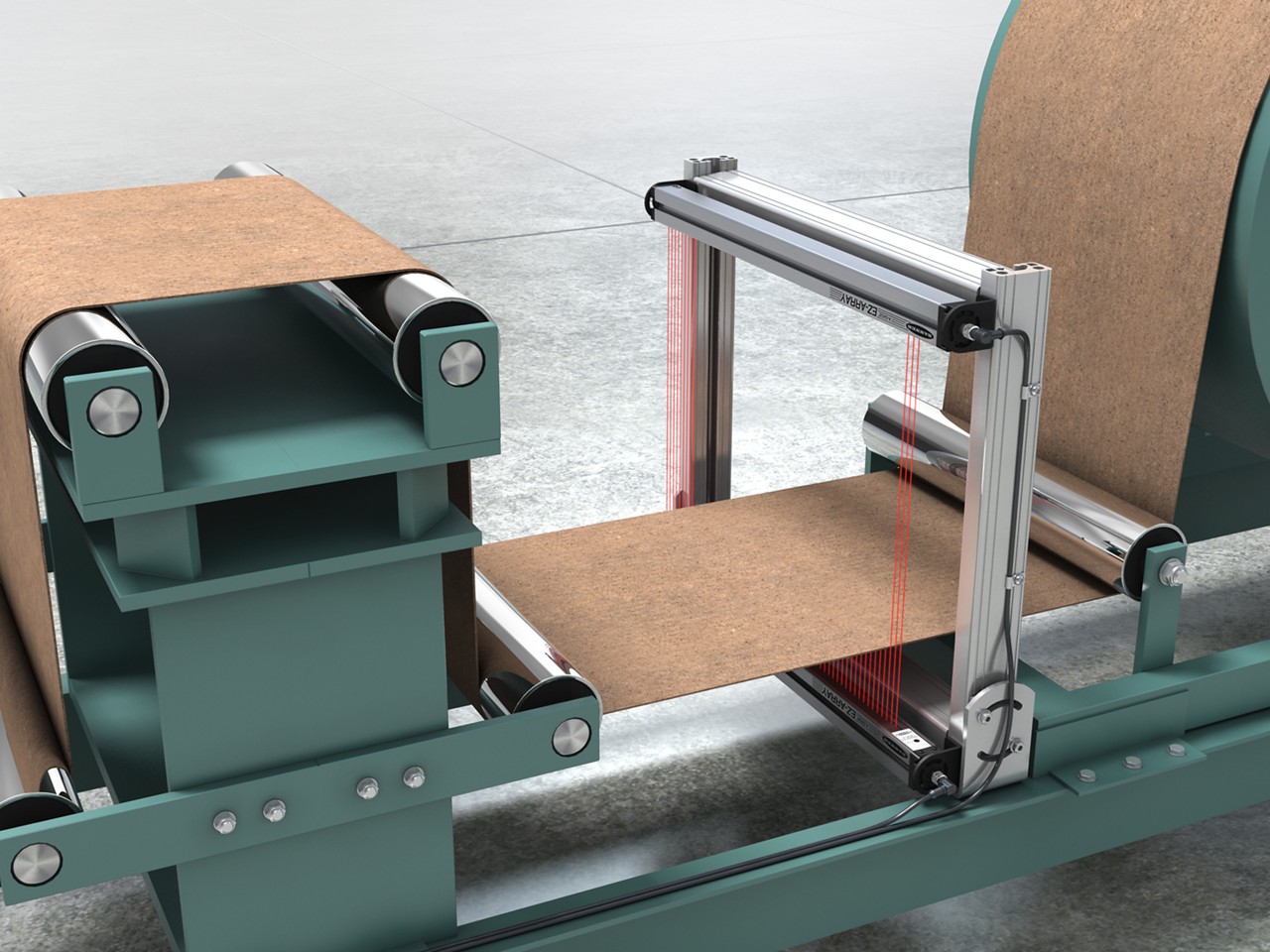
In short, I want to do something like this. I'm using 4 74hc165s that will follow the fabric and say the fabric is sliding left and right, it will write to the LCD which direction it is sliding. There are 32 inputs in total and each input has a receiver opposite an IR transmitter.
thanx
this may address you question. it shows how bits are shifted into a 32 bit variable and displayed as HEX, decimal and binary string
351A05B2
890897842
00110101000110100000010110110010
void
test (void)  {
    int  n;
    char s [40];
    unsigned long val = 0;

    for (n = 0; n < 32; n++)  {
        byte  bit = 50 < random(0,100) ? 1 : 0;
        val <<= 1;
        val  |= bit;

        s [n] = '0' + bit;
    }
    s [n] = '\0';

    Serial.println (val, HEX);
    Serial.println (val);
    Serial.println (s);
}

void setup () {
    Serial.begin (9600);

    test();
}

void loop() {
}
Hello to everyone
I'm using 6 pieces of 74hc165, what I want to do is, it doesn't matter which pin the data comes from, when 1 comes from any pin, int total=0; Increase one by one and decrease when 0 comes from any pin.
You have to explain that better.
The Wokwi simulator has a 74HC165: https://wokwi.com/projects/306024460940476993.
There will be 48 inputs, each can be 0 or 1.
Hi Koepel

I want it to be as in the picture, I want to print it to the LCD screen with bit shifting, the number increases as 1 comes from the pins, the number decreases as 0 comes
You mean you want to count the number of 1's - the number of 0's? In other words, you want to know how many more 1s there are than 0's, presuming 1's outnumber 0's? Or something else?
Sounds like you want to do some incrementing/decrementing a counter as you shift in the bits, or alternatively, shift the whole mess into memory, then deal with it afterwards.
Let us know.
C
Hi Camsyda
it's very true, I want to do this
It's useful when asking these things to outline your level of experience.
"I want..." tells us nothing about what level of programming knowledge, etc. you bring to the table, so we can provide you with suitable guidance. No, I won't write it for you.
C
There will be 32 or more mutual ir transceiver leds, if there is a drawing between the receiver and transmitter ir leds, the pins that detect this will send data, I can do this, but I get it as a binary like 0-2-4-8-16-64, I want that every time 1 comes int total=0; increase one by one, decrease when the data reaches 0.
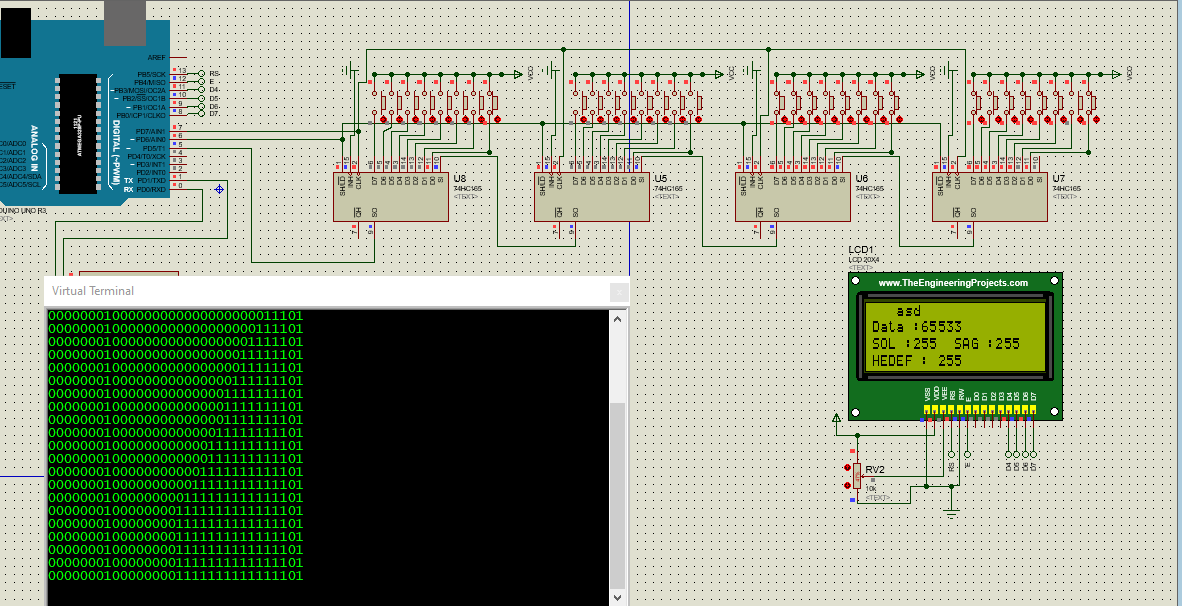
The Arduino Uno is only 8-bit, but the compiler supports up to uint64_t.
That is 64 bits in a single variable.
I don't know if the bitRead() and similar functions will work on it.
Hi Koepel
I tried up to 1024 and got data but it comes as binary 1 and 0, I want it, every time 1 comes int total=0; increment one by one, every time 0 comes int total=0; fall one by one
I still don't understand that.
Yükleniyor: Ekran Alıntısı2.PNG...
no matter which pin 1 comes from int total = 0; rise one by one, no matter which pin 0 comes from, let int total=0 decrease,
sample; 1 came from 1-2-3-4-5-6 pin, 6 will be written on the screen, pin order is not important, it will only collect incoming 1s

