My apologies if I did not find the correct category for this post. Please feel free to move it to another category.
I have read out a push on the Channel 9 button on my TCL TV remote controller.
IrRemote unfortunately doesn't know this protocol (see below). And I can't figure out what to do next with this readout nor do I know what the readout actually is.
My goal is to have my arduino simulate a channel 9 command. Can anyone point me to a direction of how to understand the readout and which command in IrRemote I can use to send this readout as a command?
Received noise or an unknown (or not yet enabled) protocol
rawData[208]:
-3276750
+3950,-3900
If I use another remote controller I have (LG TV) then this example ReceiveDump will state which function to use when to send. But it doesn't seem to do with the remote for my TCL TV.
Thank you for helping I really appreciate it.
I have put in your code in what I have pieced together from examples. So now the code looks like this and unfortunately it does not turn on the TV.
#include <Arduino.h>
#include "PinDefinitionsAndMore.h"
#include <IRremote.hpp> // include the library

const int buttonPin = 10;  // the number of the pushbutton pin
const int ledPin = LED_BUILTIN;    // the number of the LED pin

// variables will change:
int buttonState = 0;  // variable for reading the pushbutton status

uint16_t singleBlock[] = {
  3950, 3950,
  500,1950, 500,1950, 500,1950, 500,1950,
  500,950, 550,950, 500,1950, 500,1950,
  500,1950, 500,950, 550,950, 500,1950,
  500,1000, 500,950, 500,1000, 500,950,
  500,1950, 500,1950, 500,1000, 500,950,
  550,950, 500,1950, 500,1950, 500,1000,
  500
};


void setup() {

    pinMode(LED_BUILTIN, OUTPUT);

    IrSender.begin();
    disableLEDFeedback();

    // initialize the LED pin as an output:
    pinMode(ledPin, OUTPUT);
    // initialize the pushbutton pin as an input:
    pinMode(buttonPin, INPUT);

}

void loop() {

 // read the state of the pushbutton value:
  buttonState = digitalRead(buttonPin);

  // check if the pushbutton is pressed. If it is, the buttonState is HIGH:
  if (buttonState == HIGH) {

    // turn LED on:
    digitalWrite(ledPin, HIGH);

    for (int i = 0; i < 3; i++) {
      IrSender.sendRaw(singleBlock, sizeof(singleBlock)/sizeof(singleBlock[0]), 38);
      delay(8); // 8 ms gap between repeats
    }

    delay(10000); // pause before sending sequence again

  } else {
    // turn LED off:
    digitalWrite(ledPin, LOW);
  }

}
I have another arduino for reading the sender and it says:
The output is identic to the previous code (with some small difference in timings).
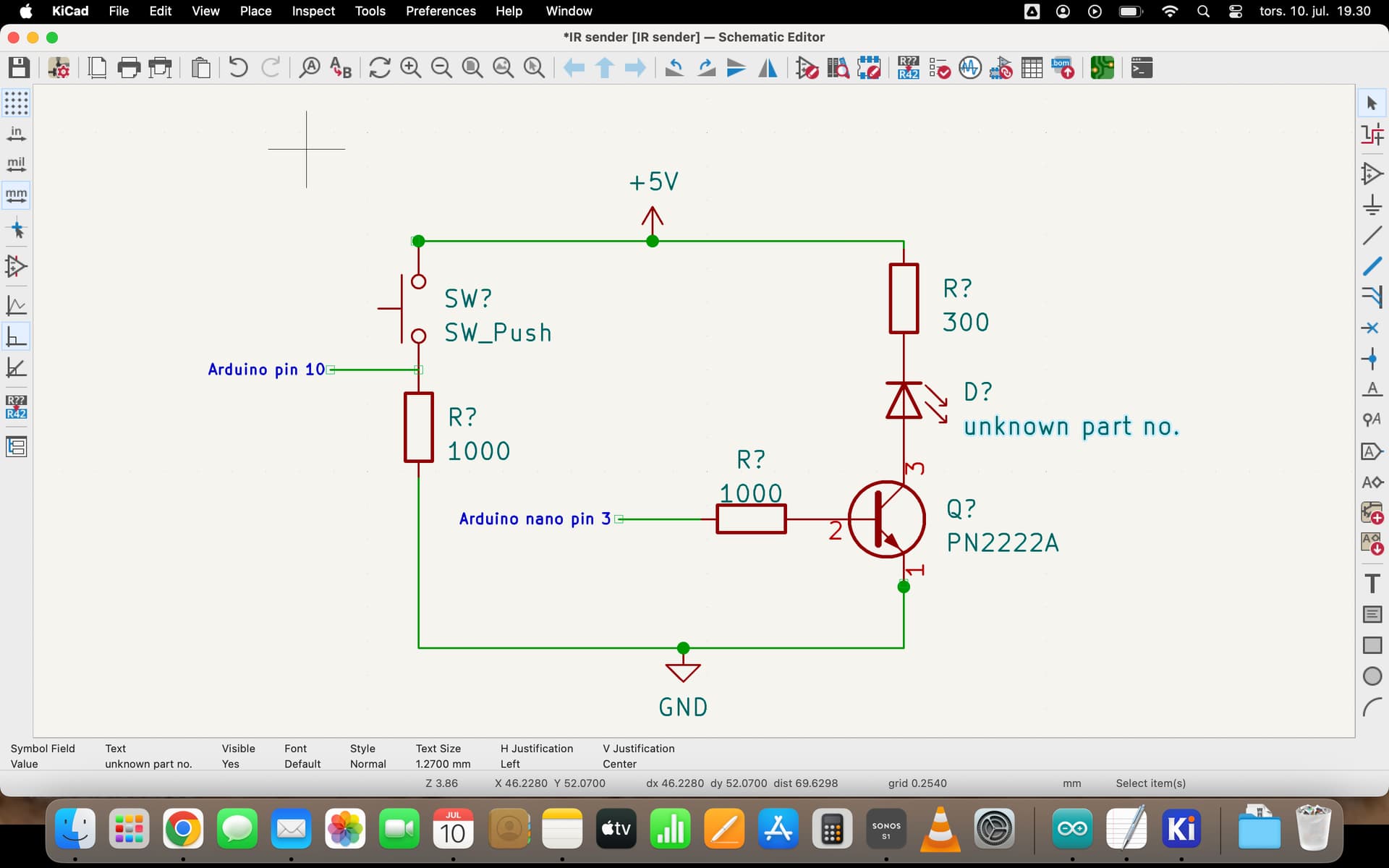
It should work. Maybe your transmitter is too weak, what kind of circuit you have? Did you test it at 30cm distance to TV receiver?
It depends on interferences from lights, filtering on receiver side and many other factors.
If you post the transmitter circuit, I can give suggestion for improvement.
No magic here. If you look at the raw code, you can easily see the caps and you can easily see that it's repeating the same code.
~ 4000, -4000 is the header for the code
~ 500, -1000 means binary 0
~ 500, -2000 means binary 1
so the actual code is 1111 0011 1001 0000 1100 1100
I'm not sure how to read your circuit. LED has wrong polarity and I don't understand the pin 10 approach there.
Anyway basic IR LED circuit for decent range could be something like this:
If you are powering the Nano from USB, and using the Nano's 5V pin as an output to power the LED, then there should be enough current. The 5V is coming from USB through a diode.
But when you switch over to battery power, as I assume you will at some point, then you will want to power the LED directly from the battery. You want to avoid running the LED power through the Nano's 5V regulator - it may not be able to provide enough current.
I was wondering since I actually dont have from the manufacturer which code/adress/command the tv remote uses, is there a way to get to know for sure or is there anyway to adjust/enhance the raw code to make the TV switch on more consistantly? does it make any sense...
It might be that measuring the raw transmission more accurately would help, or possibly sending one or two repeats.
Can you post how your LG TV is identified by the library? And can you get the library to do a raw capture of the LG? We could see how well it's measuring the times. The LG test should be done in a dimly lit room, with the remote several meters from the receiver.
Thank you for your advice. I just tried that and it immediately found out the TCL remote controller uses the protocol Matsushita. That was easy. So nice.
Then I wanted to send a command (power on) with IRMP->SimpleSender but it seems to me I can only choose between two protocols NEC or SAMSUNG. Although it says it supports MATSUSHITA.
So I tried figuring out how to enable the Matsushita but when I run the program the seriel monitor says:
START /private/var/folders/0x/yslh5wfx5zz5kks_6djf03cr0000gn/T/.arduinoIDE-unsaved2025613-79172-i579pz.31t7q/SimpleSender/SimpleSender.ino from Jul 13 2025
Using library version 3.6.4
Send IR signals at pin 3
Protocol not found
Protocol=  Address=0xAB0 Command=0x54F Repeats=2
The sketch code is:
/*
 *  SimpleSender.cpp
 *
 *  Sends NEC or Samsung protocol frames.
 *  Is able to send IR protocol data of 15 main protocols.
 *
 *      Sony SIRCS
 *      NEC + APPLE
 *      Samsung + Samsg32
 *      Kaseikyo
 *
 *      Plus 11 other main protocols
 *      JVC, NEC16, NEC42, Matsushita, DENON, Sharp, RC5, RC6 & RC6A, IR60 (SDA2008) Grundig, Siemens Gigaset, Nokia
 *
 *  To disable one of them or to enable other protocols, specify this before the "#include <irmp.hpp>" line.
 *  If you get warnings of redefining symbols, just ignore them or undefine them first (see Interrupt example).
 *  The exact names can be found in the library file irmpSelectAllProtocols.h (see Callback example).
 *
 *  Copyright (C) 2019-2020  Armin Joachimsmeyer
 *  armin.joachimsmeyer@gmail.com
 *
 *  This file is part of IRMP https://github.com/IRMP-org/IRMP.
 *
 *  IRMP is free software: you can redistribute it and/or modify
 *  it under the terms of the GNU General Public License as published by
 *  the Free Software Foundation, either version 3 of the License, or
 *  (at your option) any later version.
 *
 *  This program is distributed in the hope that it will be useful,
 *  but WITHOUT ANY WARRANTY; without even the implied warranty of
 *  MERCHANTABILITY or FITNESS FOR A PARTICULAR PURPOSE.
 *  See the GNU General Public License for more details.
 *
 *  You should have received a copy of the GNU General Public License
 *  along with this program. If not, see <http://www.gnu.org/licenses/gpl.html>.
 *
 */

#include <Arduino.h>

//#define SEND_SAMSUNG // else send NEC

#define IRMP_SUPPORT_MATSUSHITA_PROTOCOL 1
/*
 * Set library modifiers first to set output pin etc.
 */
#include "PinDefinitionsAndMore.h"
//#define IR_OUTPUT_IS_ACTIVE_LOW
#define IRSND_IR_FREQUENCY          38000

#define IRSND_PROTOCOL_NAMES        1 // Enable protocol number mapping to protocol strings - requires some FLASH.

//#include <irsndSelectMain15Protocols.h>
// or disable #include <irsndSelectMain15Protocols.h> and use only one protocol to save programming space
//#define IRSND_SUPPORT_NEC_PROTOCOL        1

/*
 * After setting the definitions we can include the code and compile it.
 */
#include <irsnd.hpp>

IRMP_DATA irsnd_data;

#if defined(SEND_SAMSUNG)
union WordUnion
{
    struct
    {
        uint8_t LowByte;
        uint8_t HighByte;
    } UByte;
    struct
    {
        int8_t LowByte;
        int8_t HighByte;
    } Byte;
    uint8_t UBytes[2];
    int8_t Bytes[2];
    uint16_t UWord;
    int16_t Word;
    uint8_t *BytePointer;
};
#endif

void setup() {
    Serial.begin(115200);
#if defined(__AVR_ATmega32U4__) || defined(SERIAL_PORT_USBVIRTUAL) || defined(SERIAL_USB) /*stm32duino*/|| defined(USBCON) /*STM32_stm32*/ \
    || defined(SERIALUSB_PID)  || defined(ARDUINO_ARCH_RP2040) || defined(ARDUINO_attiny3217)
    delay(4000); // To be able to connect Serial monitor after reset or power up and before first print out. Do not wait for an attached Serial Monitor!
#endif

    // Just to know which program is running on my Arduino
    Serial.println(F("START " __FILE__ " from " __DATE__ "\r\nUsing library version " VERSION_IRMP));

    irsnd_init();
    irmp_irsnd_LEDFeedback(true); // Enable send signal feedback at LED_BUILTIN

    Serial.println(F("Send IR signals at pin " STR(IRSND_OUTPUT_PIN)));

#if defined(SEND_SAMSUNG)
    /*
     * Send Samsung32
     */
    irsnd_data.protocol = IRMP_SAMSUNG32_PROTOCOL;
    irsnd_data.address = 0x0707;
    irsnd_data.command = 0xFB04; // For my Samsung, the high byte is the inverse of the low byte
    irsnd_data.flags = 0; // repeat frame 0 time
#else
    /*
     * Send NEC
     */
    irsnd_data.protocol = IRMP_SUPPORT_MATSUSHITA_PROTOCOL;
    irsnd_data.address = 0xAB0;
    irsnd_data.command = 0x54F; // The required inverse of the 8 bit command is added by the send routine.
    irsnd_data.flags = 2; // repeat frame 2 times
#endif

    // true = wait for frame and trailing space/gap to end. This stores timer state and restores it after sending.
    if (!irsnd_send_data(&irsnd_data, true)) {
        Serial.println(F("Protocol not found")); // name of protocol is printed by irsnd_data_print()
    }
    irsnd_data_print(&Serial, &irsnd_data);

}

void loop() {
    delay(5000);
    irsnd_data.command++;
#if defined(SEND_SAMSUNG)
    // For my Samsung remote, the high byte is the inverse of the low byte
    WordUnion tNextCommand; // using WordUnion saves 14 bytes program memory for the next 3 lines
    tNextCommand.UWord = irsnd_data.command;
    tNextCommand.UByte.HighByte = ~tNextCommand.UByte.LowByte;
    irsnd_data.command = tNextCommand.UWord;
#endif
    irsnd_send_data(&irsnd_data, true);
    irsnd_data_print(&Serial, &irsnd_data);
}