I'm planning to use a Meta VR Headset, probably the Quest Pro, together with an Arduino Uno. The Quest will run a VR application made in Unity and the Arduino will control custom hardware used for input / output.
Normally, I would just connect the Arduino to the PC running the Unity application via USB, but since the Quest Pro will run the application directly on the Headset, that won't be possible.
I was wondering if there was any way to establish a serial (or some other type of) connection between the Arduino and the Quest. Wireless connections (e.g. via Wi-Fi or Bluetooth) are pretty much off the table, because latency should be kept as low as possible (about ~10ms max). As far as I know, the Quest is running on Android.
Has anyone done anything like this before? Any help would be much appreciated!
If You read and use the sticky post "How to get the best out of this forum" and post links to datasheets etc You don't need to wait for someone having done exactly the same. That person mighr not exist.
There are exactly two apps. One is a Unity application (some sort of VR simulation). The other is an Arduino program that essentially reads inputs from a button, does some math and sends the result to the simulation.
If the simulation were to run on a PC, I could simply plug the Arduino into the PC, allowing the Arduino app to communicate with the Unity simulation. Unity / C# has APIs for that.
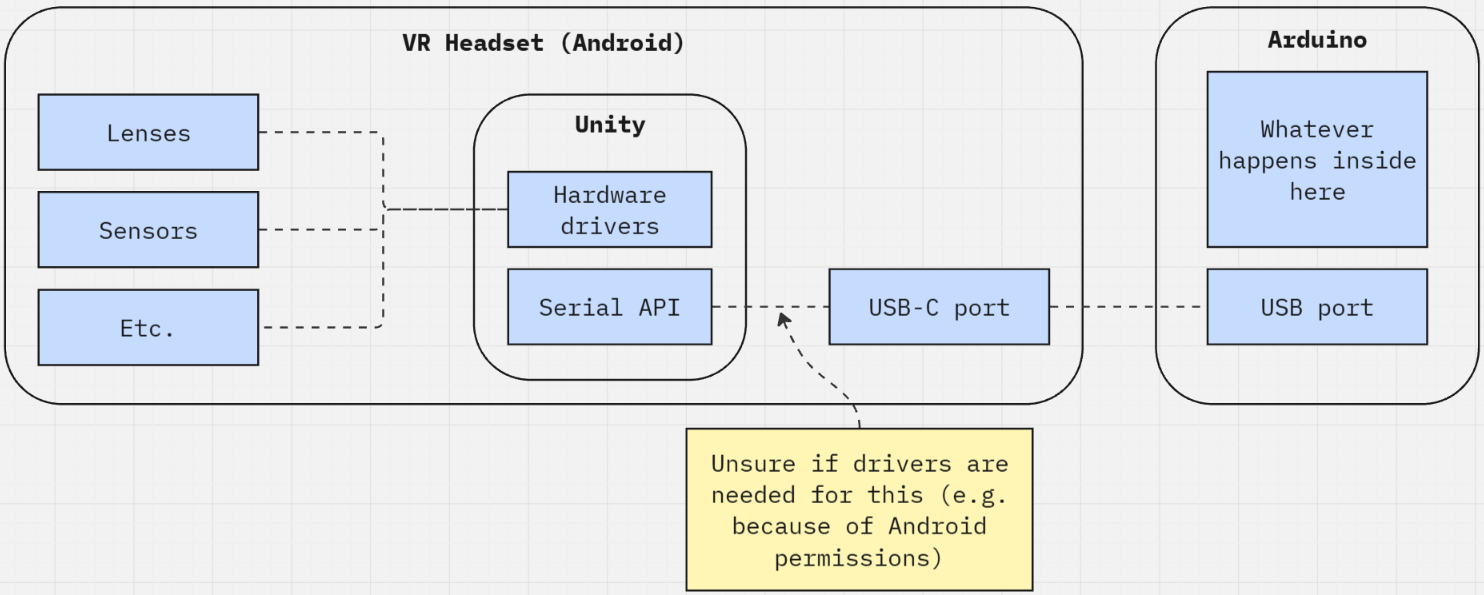
However, in this case, the simulation will run on the VR headset, which runs on a different operating system than my PC (some version of Android). Because of that, I'm not sure if I need, for example, custom drivers to establish a serial connection, or if it will work at all with the Quest Pro.
Seems more Quest/Meta than Arduino. Meta/Quest have a forum. You should also show your "idea" as a drawing so you do not need to patch as many holes... like these folks...
I plugged my 2.4GHz wireless mouse into my my phone and a desktop-style pointer appears on the screen which moves under mouse control and allows me to click buttons on screen and use the scroll wheel.
My point is that android seems to have drivers included for such devices, and if they can control the simulation, a suitable Arduino like a Pro Micro should also be able to do it.
Seems more Quest/Meta than Arduino. Meta/Quest have a forum.
Yes, this problem absolutely has more to do with the VR headset than with the Arduino. I've already tried asking on the Meta forums, but had no luck so far. My specialty is VR development and I'm not familiar with Arduinos in the slightest, so I figured I could at least try to get some useful leads on this forum.
You should also show your "idea" as a drawing
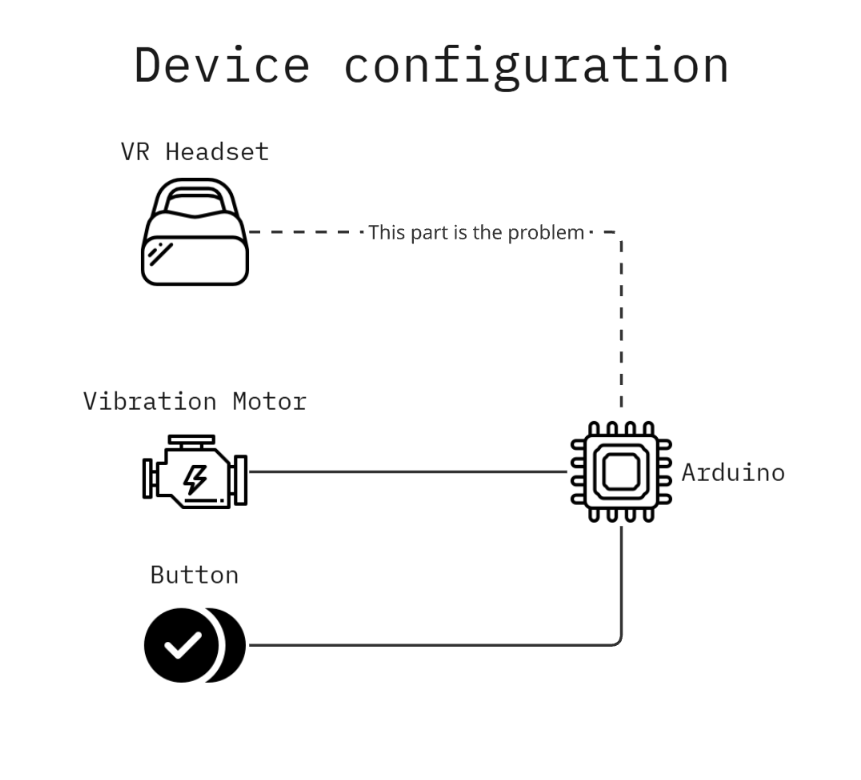
Fair point. I'm not familiar with the types of diagrams you showed, but I can try to visualize the problem in my own, crude way.
This shows all of the devices I want to use. The crux of the issue is connecting the Arduino to the VR headset and enabling communication between the Arduino app and Unity.
This (simplified) diagram shows my original idea of establishing a serial connection between the devices. However, I'm not sure if or how that's possible.
[quote] There is a USB port on the quest but it doesn't support USB host mode, so you can't just plug in an arduino. There are 2 main ways to run the Quest. In standalone mode, and in tethered mode (where you are generating the images on a gaming computer and shipping them over via the USB c or wifi). This commonly referred to as Oculus Link. In tethered mode, since the app, let's say a Unity app is actually running on the desktop, you can easily plug in an arduino to the desktop and control it with serial commands in Unity. In standalone more it's a bit more complex. You'd have to send messages over wifi to a computer hosting the Arduino. Getting into Frankenstein territory If you don't need to hear audio in the app, there's a potential to get "2 pins" of data out by repurposing the headphone jack. E.g. playing a dummy sound clip in the left channel or right channel. [end quote]
You could try communicating between the Arduino and the Meta Quest headset over Wi-Fi using UDP packets, with Unity receiving the data on a local port in a background thread for a somewhat low-latency transmission (assuming your wireless network is clean enough) .
It would also work with a WebSocket over Wi-Fi (just a bit slower) and be within your expected lag - might be easier to code for that.
Pick an ESP32 instead of a UNO to have a WiFi stack.
BLE could be an option too but your latency won’t be as good- I would say at least 30 to 50ms
In all cases, a background thread is needed to handle incoming messages asynchronously, with a thread-safe queue to pass data to Unity’s main thread (which would be the only one touching the UnityEngine API) without blocking the render loop.
Ah, I see. I was hoping we could avoid having the Quest tethered to a computer, but I guess it wouldn't necessarily be a dealbreaker. I don't think I'm crafty enough for that audio solution, lol.
Either way, thanks for your help. I really appreciate it.
I'm not really that familiar with network stuff, but I can look into that. Thanks for the suggestions!
Although, since I'm doing this project for a moderately large research institution, our network is always a bit crowded. I'll just have to try it out and see how bad the lag is.
I assume you won't be streaming video from your Arduino, more sending status update (button pressed and the likes) - so they are small messages and if you use a connection that is maintained (not just plain HTTP where you need to connect every time) then the latency could be OK. To be verified indeed based on how busy the airwaves are.
also check with the IT department of that "large research institution", they might have rules for new devices to join the wireless network.
What if you had a small board the size of a deck of cards with USB host ports, WiFi, Bluetooth, Ethernet, GPIO, I2C, SPI, HDMI? Take a look for Raspberry Pi 5 boards. This is the wrong forum for help on Raspberry Pi boards. See raspberrypi.com. I have no idea if a VR headset works when plugged into a Raspberry Pi board but many USB devices work. If you are limited to using Arduino boards then this will not help you.
Hi! We're interested in doing the exact same at our institute! How did you end up solving this? Did you go via the Quest-PC-tethered route, or did you manage to connect with the Serial device?
Hey there! I’m afraid we didn’t solve this problem at all. We ended up using another (non-standalone) HMD instead of the Quest Pro for different reasons, so the issue kind of solved itself. The only thing I found out is that you would need some kind of plugin to handle the connection between Android USB host APIs and Unity and you have to somehow handle the Android permissions. If you find a way to make it work, feel free to share! Although we won’t use it in our project anymore, this seems like a generally really useful thing that seemingly barely anyone has done yet.