Hi everyone,
I am using a neo-7m gps module to get the GPS position of my device. I have put the module outside for about 5 minutes, but it never seems to get a lock. Amazon reviews say that the module's in-built antenna is not good, so I got an external antenna. However, when I screw the antenna into the SMA connector, the GPS Module's PPS light, which shows if it is on, just turns off, and I am not able to detect it on my arduino uno. I have also removed the C2 capacitor as the product description said, but had no luck.
Wiring is VCC to 5v, Gnd to Gnd, TXD to 12, and RXD to 13.
Soldering the SMA connector onto the module was my very first time soldering, but I'm not sure if mis-soldering is a possible cause of this.
Is this an antenna issue, or did I do something wrong?
Thanks,
E13science
Can you provide clear close up photos of the area around the antenna connector?


From what I can see, the connector pins are touching the metal on the module, although slightly tilted.
Hi.
The module has a USB connector. If you connect it to your PC you should be able to view the GPS output in the Arduino IDE monitor without any programming effort. Do this without connecting your Arduino board to the GPS module.
The PC is not able to recognize the GPS Module, even without the antenna.
OK the PC is not able to recognize your module. My first guess is when connecting the module directly to the PC make sure the USB cable used does have the USB Data Lines and is not just a plain USB cable used for charging. A simple charging cable will power your module but not transfer data.
Next as to the PPS light. On one of my modules when powered on the PPS (Pulse Per Second) light will illuminate solid On. Once the module finds a minimum of 4 satellites the PPS LED should blink at a 1 second rate.
Assuming a good USB cable which includes the two data lines in addition to two power lines you can use any serial monitor to see the GPS data.
Arduino IDE Serial Monitor

Tera Term Serial Port Monitor

Old Ancient Microsoft Hyper Terminal

While your soldering leaves a little to be desired it's difficult to tell from an image if it's good. Soldering is a skill set and comes with time and practice.
Based on what I see it's hard to call. If you have used your USB cable to the GPS module before for data transfer it should work and if not it may be a charging cable only, no data transfer.
If the PPS module starts blinking shortly after power up the module is working.
Ron
Have you seen any NMEA sentences coming from the GPS module using any method at all? That's the first goal and that doesn't need an antenna.
I've tried using every USB-B cable in my household, but none work. Some of the cables I used were the ones that came with micro:bit, which I'm pretty sure have data lines. However, when I display the raw data that comes from the GPS Module to the Arduino, which comes to the serial monitor, I get
$GPVTG,,,,,,,,,N*30
$GPGGA,,,,,,0,00,99.99,,,,,,*48
$GPGSA,A,1,,,,,,,,,,,,,99.99,99.99,99.99*30
$GPGLL,,,,,,V,N*64
$GPRMC,,V,,,,,,,,,,N*53
$GPVTG,,,,,,,,,N*30
$GPGGA,,,,,,0,00,99.99,,,,,,*48
$GPGSA,A,1,,,,,,,,,,,,,99.99,99.99,99.99*30
$GPGLL,,,,,,V,N*64
$GPRMC,,V,,,,,,,,,,N*53
$GPVTG,,,,,,,,,N*30
$GPGGA,,,,,,0,00,99.99,,,,,,*48
$GPGSA,A,1,,,,,,,,,,,,,99.99,99.99,99.99*30
$GPGLL,,,,,,V,N*64
$GPRMC,,V,,,,,,,,,,N*53
$GPVTG,,,,,,,,,N*30
$GPGGA,,,,,,0,00,99.99,,,,,,*48
$GPGSA,A,1,,,,,,,,,,,,,99.99,99.99,99.99*30
$GPGSV,1,1,01,10,,,28*73
$GPGLL,,,,,,V,N*64
$GPRMC,,V,,,,,,,,,,N*53
$GPVTG,,,,,,,,,N*30
$GPGGA,,,,,,0,00,99.99,,,,,,*48
$GPGSA,A,1,,,,,,,,,,,,,99.99,99.99,99.99*30
$GPGLL,,,,,,V,N*64
$GPRMC,,V,,,,,,,,,,N*53
$GPVTG,,,,,,,,,N*30
$GPGGA,,,,,,0,00,99.99,,,,,,*48
$GPGSA,A,1,,,,,,,,,,,,,99.99,99.99,99.99*30
$GPGLL,,,,,,V,N*64
$GPRMC,,V,,,,,,,,,,N*53
$GPVTG,,,,,,,,,N*30
$GPGGA,,,,,,0,00,99.99,,,,,,*48
$GPGSA,A,1,,,,,,,,,,,,,99.99,99.99,99.99*30
$GPGLL,,,,,,V,N*64
$GPRMC,,V,,,,,,,,,,N*53
$GPVTG,,,,,,,,,N*30
$GPGGA,,,,,,0,00,99.99,,,,,,*48
$GPGSA,A,1,,,,,,,,,,,,,99.99,99.99,99.99*30
$GPGLL,,,,,,V,N*64
$GPRMC,,V,,,,,,,,,,N*53
$GPVTG,,,,,,,,,N*30
$GPGGA,,,,,,0,00,99.99,,,,,,*48
$GPGSA,A,1,,,,,,,,,,,,,99.99,99.99,99.99*30
$GPGLL,,,,,,V,N*64
$GPRMC,,V,,,,,,,,,,N*53
$GPVTG,,,,,,,,,N*30
$GPGGA,,,,,,0,00,99.99,,,,,,*48
$GPGSA,A,1,,,,,,,,,,,,,99.99,99.99,99.99*30
$GPGLL,,,,,,V,N*64
$GPRMC,,V,,,,,,,,,,N*53
$GPVTG,,,,,,,,,N*30
$GPGGA,,,,,,0,00,99.99,,,,,,*48
$GPGSA,A,1,,,,,,,,,,,,,99.99,99.99,99.99*30
$GPGLL,,,,,,V,N*64
$GPRMC,,V,,,,,,,,,,N*53
$GPVTG,,,,,,,,,N*30
$GPGGA,,,,,,0,00,99.99,,,,,,*48
$GPGSA,A,1,,,,,,,,,,,,,99.99,99.99,99.99*30
$GPGLL,,,,,,V,N*64
$GPRMC,,V,,,,,,,,,,N*53
$GPVTG,,,,,,,,,N*30
$GPGGA,,,,,,0,00,99.99,,,,,,*48
$GPGSA,A,1,,,,,,,,,,,,,99.99,99.99,99.99*30
$GPGLL,,,,,,V,N*64
and so on. I am pretty sure this means invalid location, because it doesn't seem like there are any valid latitude/longtitude, or time/date values in there.
I've done this already, and have formatted the received data with TinyGPS++
However, the issue I am having is getting an external antenna to connect to the module without it turning off.
You are plugging an active aerial into a powered SMA socket.
Maybe you should measure the voltage on the socket before and after plugging it in,
and/or measure if the active aerial has a short.
Leo..
After measuring with a multimeter, I got 3.3v without plugging in, and 0.9 volts after plugging in. There doesn't seem to be a short in the antenna or on the connector.
3.3volt could be right, but 0.9volt surely isn't.
The active aerial seems to draw 10mA.
Maybe a dumb question, but how do you power the module.
Leo..
Not a dumb question at all. We are in the dark about many relevant aspects of this project.
No location information at all. Only one reported satellite seen, and that had very weak signals.
Classic symptoms of;
The GPS is in a cave underground or indoors.
The GPS antenna is faulty or missing.
The GPS has a faulty\damadged antenna input, they are sensitive to static damage.
For those of us who understand how GPS modules work it would be matter of minutes to make yours deliver results or at least identify the problem area -- IF we were there with you and your gear.
This extended Q&A approach is slow and inefficient. We've been through it many times.
You need to be systematic and gain understanding of what's going on. Then you can be self reliant and tell us what the problems are.
Don't use TinyGPS++. Use the u-center software from u-blox. That will teach you so much. Learn how to feed the raw GPS output to u-center without using a custom sketch. There are several ways to do that.
I don't see that as good either. The active GPS antenna should not load down your 3.3 volt power that much. My module with external antenna powered with 5.0 volts my total current draw is only about 50 mA. My read is also that the external active antenna should draw about 10 ~ 20 mA.
Same question as to how is everything being powered?
Ron
I am powering my Arduino with my chromebook, and powering the GPS with the 5v pin on the Arduino.
When you say the antenna shouldn't draw that much power, does that mean I need to get a different external antenna?
I'm pretty sure the usb connector on my module doesn't work, because even with a usb-b cable with two power lines and two data lines, the module doesn't show up on my PC's device manager. Is there any other way to connect it to u-center?
With the Serial connections on the end of the PCB ?
This is the module you linked to in your first post:
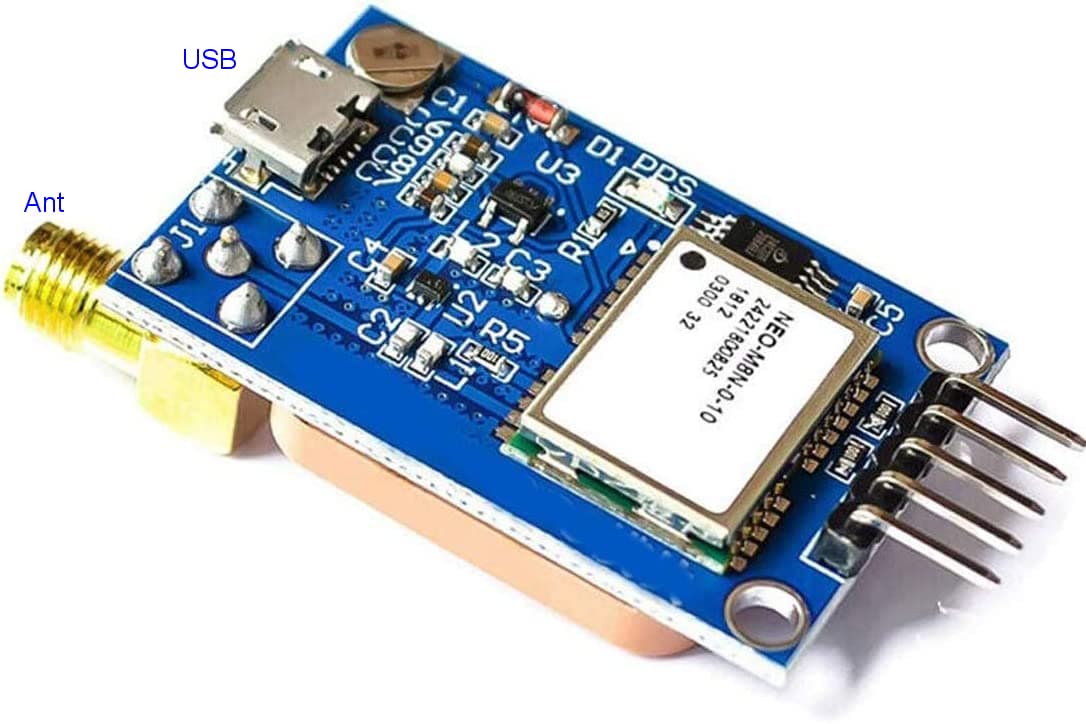
You should be able to just connect that module directly to your PC using a USB cable. Then use any software to look at your serial port as I covered several post back. This board, the board you linked to should have already had the external antenna connection point so what exactly do you have?
Ron