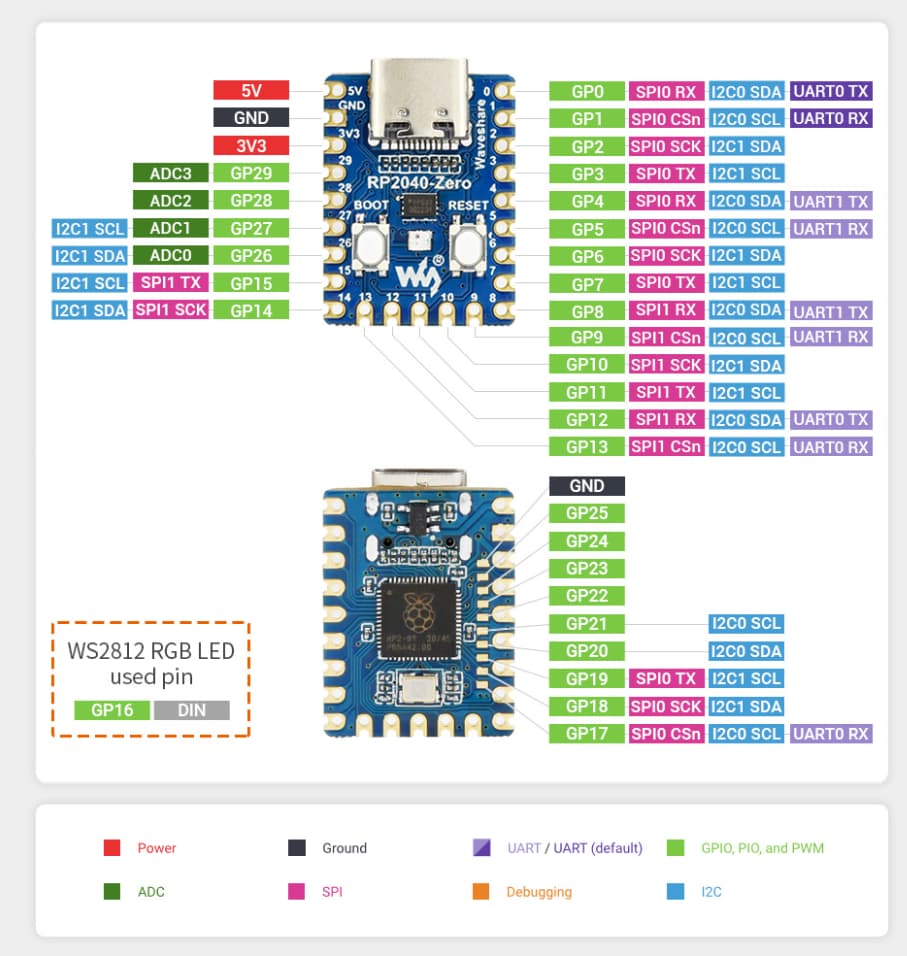
I'm working with a Waveshare RP2040-Zero module and attempting to establish I2C communication with an RTC module. Despite my efforts, I'm encountering issues with the I2C setup.
Specifically, I manually designated the SDA and SCL pins using Wire.setSDA(6) and Wire.setSCL(7). Following this, the USB port became unresponsive, leading to the module itself not responding. To resolve this, I had to reflash the original .uf2 file from the CircuitPython website, which revived the device.
Could anyone offer insights or guidance on establishing a successful I2C communication with the RTC module under these circumstances?
Can you buy a Raspberry Pi Pico that everyone uses and make your project with that board ?
Which board have you installed ?
If you followed the tutorial by Waveshare, then you have installed the "earlephilhower" board.Do you use Arduino C++ or MicroPython or CircuitPython ?
Does Waveshare give the schematic for that board ?
Where are the specific settings for this board ? For example to find the default SDA and SCL pin.
Hi I am using Arduino IDE 1.8.19 and I downloaded the board core to Arduino IDE and I selected Waveshare RP2040-Zero.
Also I figured out the problem. If you use Wire the module uses the pin 4 and 5. If you use Wire1 then module uses pin 26,27. There is no need to use setSDA() and setSCL() functions So my problem is over.