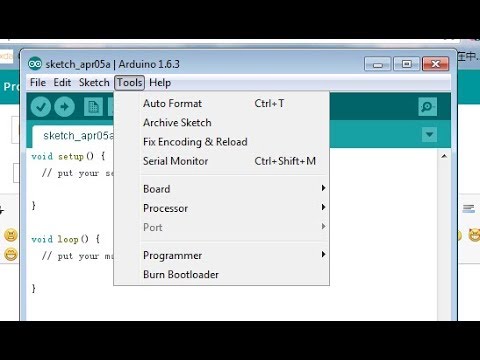
Hello, I down loaded the IDE software and one problem I'm running across is that If I plug in a new micro controller that I never havve had on my computer before the com port doesn't show in tools. But if I close out the IDE software then reopen it will show up.
My question is why does it to this and how can I fix this so it doesn't happen again and I have to keep closing out the IDE and reopening it all the time? I forgot one Thing. I'm running Windows 11 pro on my computer and The Arduino ide version is 2.0.3.
I gave it a try on my Windows 11 machine, with boards that have never been connected to that machine before and was not able to reproduce the problem. The port is shown in the Tools > Port menu even without having to restart Arduino IDE.
Please tell me more about the microcontroller you are using:
Which microcontroller is it?
Do you have any idea about what is specially significant about it being the first time it is plugged in? Does Windows install a driver for the microcontroller when you plug it in? Does the board get a unique COM port number?
I'm going to ask you to post some additional information that might help us to identify the problem.
Please do this:
Start Windows "File Explorer".
Open the Arduino IDE installation folder.
(usually C:\Program Files\Arduino IDE or C:\Users\<user name>\AppData\Local\Programs\Arduino IDE).
In the folder listing of the Arduino IDE installation folder, hold the Shift key while clicking the right hand button on the mouse.
From the context menu, click "Open PowerShell window here".
Windows PowerShell will now open with the current directory set to the Arduino IDE installation folder.
Type the following command:
& ".\Arduino IDE"
Press the Enter key.
Debug output should now be printed to the PowerShell window as Arduino IDE starts.
Wait for Arduino IDE to finish starting.
Connect a new microcontroller to your computer in whatever way is required to reproduce the problem of the port not being detected.
Switch back to the PowerShell window.
Right click on the title bar of the PowerShell window.
This will open a context menu.
Select Edit > Select All from the context menu.
This will select all the text in the PowerShell window.
Press Ctrl+C.
This will copy the contents of the PowerShell window to the clipboard.
Open a forum reply here by clicking the Reply button.
Click the </> icon on the post composer toolbar.
This will add the forum's code block markup (```) to your reply to make sure the error messages are correctly formatted.
Press Ctrl+V.
This will paste the output into the code block.
Move the cursor outside of the code block markup before you add any additional text to your reply.
Click the Reply button to post the output.
Please let me know if you have any questions or problems while following those instructions.
That fixed it. I totally forgot about the drivers. It just shows up as com port 3 but if I plug it in and the ide already open it doesn't see it. However if the ide is closed and I plug in the arduino clone with the ch340 in it then oepn the ide it does show up.
Thank you very much. I forgot this is a brand new computer build it doesn't have everything my other old computer has. Well this is a used pc but new for me.
Hello bidrohini videos he posted fix the problem. I didn't have driver installed. The arduino clones was showing up as com port 3 only and the ide wasn't showing it. But if i close out the ide software and reopen it then the com port shows up. I downloaded and installed the ch340 drivers and now the ide sees it without any problems.