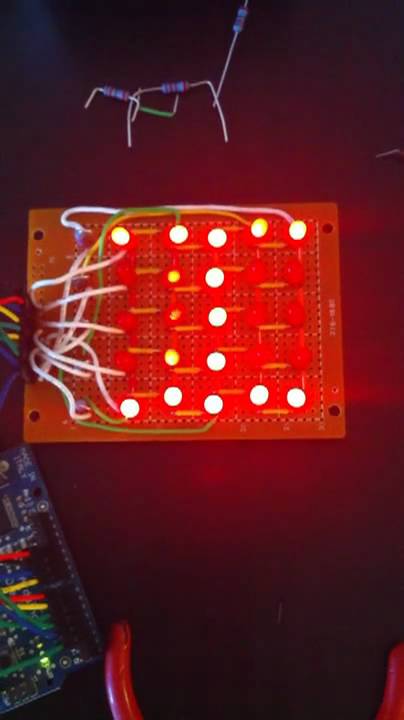
The reason I asked is because I built a 5x5 matrix as a prototype to a 8x8. Then I went to build the 8x8 and thought I ran out of OUTPUT pins. I didn't realize (until I just looked it up) that I can use Analog In as GPIO, as long as they are all GPIO.
For my rows, I go through a ULN2803. I didn't like the idea of my ATMega Sourcing and Sinking the current. My fear was if I messed up my code, I might take out a pin. And 8 LEDs at 20mA each starts getting close to the max current the chip can handle.
On my 5x5, I have an animation working.
I have an integer (matrixState) that represents the current display. In my state machine I have a loop that goes through the matrix and updates each LED based on matrixState. This loop has been designed to make the LEDs appear as bright as possible, but spend as little time as possible there.
Arrays are used to keep track of the characters. I generated a 3 character string based on my Matrix's output. In the main loop, I load one column at a time from my characters[] array into the matrixState.
There have to be better ways to do this. My goal was to get a 8x8 PCB done (my protoboards aren't big enough) so I could do an 8x8. I need to optimize the hardware and software more.
My code is badly commented and I switch between the concept of Rows/Cols and Source/Sink all over the place. To be honest, I put the project aside because I thought I'd have to add a multiplexer to make it work.
One of the major keys I will tell you is that you won't be able to use the delay() function. You really need to write your own. The matrix needs to keep updating, even while you wait for LEDs to stay on long enough. See myDelay() at the very end.
/*  LED Matrix, starting to play with matrixes for the first time.  */

#define numOfSources 5
#define numOfSinks 5
#define matrixSize 25
#define bigWait 500 // milliseconds
#define povWait 750  // microseconds
#define animationWait 50 // milliseconds
#define frames 10

int sourcePins[numOfSources] = {2,3,4,5, 6};
int sinkPins[numOfSinks]     = {7,8,9,10,11};

unsigned long characters[3] = {0x118FE31, 0x1F2109F, 0x0421004};
unsigned long checkeredPattern[10] = {0x0000000,0x0100401,0x0208822,0x0511445,0x0A2A8AA,0x1555555,0x0AA2A4A,0x1445114,0x0882208,0x1004010};

unsigned long matrixState = 0;

int characterPointer = 24;
int characterOffset = 4;
int whichCharacter = 0;


void setup()   {
  Serial.begin(9600);
  blankLEDs();
}

void loop()
{
// 24 23 22 21 20
// 19 18 17 16 15
// 14 13 12 11 10
// 09 08 07 06 05
// 04 03 02 01 00

// Start at far left row, moving right.
    for (int charRow = 24; charRow >= 21; charRow--) {
      for (int charColumn = charRow; charColumn >= 0; charColumn = charColumn - 5) {
        if bitRead(matrixState, (charColumn-1)) {  // load each bit from the right column into this column
          bitSet(matrixState, charColumn);
        } else {
          bitClear(matrixState, charColumn);
        }
      }
      myDelay(animationWait);  // myDelay waits for whatever amount of time I say, like delay.  Except I keep updating the matrix.
    }

 // load the farthest right row from character buffer
    for (int charColumn = characterPointer; charColumn >= 0; charColumn = charColumn - 5) {
      if bitRead(characters[whichCharacter], (charColumn)) {
          bitSet(matrixState, (charColumn-characterOffset));
        } else {
          bitClear(matrixState, (charColumn-characterOffset));
        }
    }


  characterPointer--;  // within the characters[] buffer, which row am I loading?
  characterOffset--;  // which column is getting loaded in matrixState
  if (characterPointer <= 19) {  // reached the end of the character, time to advance to the next element in character[]
    characterPointer = 24;
    characterOffset = 4;
    whichCharacter++;
    insertKern(1);
    if (whichCharacter > 2)
      whichCharacter = 0;
     // myDelay(1000);
  }
}

void insertKern(int kern) {   // Kludgy way of adding a space between the characters.
    for (int i = 0; i < kern; i++) {
     for (int charRow = 24; charRow >= 21; charRow--) {
      for (int charColumn = charRow; charColumn >= 0; charColumn = charColumn - 5) {
        if bitRead(matrixState, (charColumn-1)) {
          bitSet(matrixState, charColumn);
        } else {
          bitClear(matrixState, charColumn);
        }
      }
      myDelay(animationWait);
    }

     for (int charColumn = 20; charColumn >= 0; charColumn = charColumn - 5) {
          bitClear(matrixState, charColumn);
     }
  }
}

void lightMatrix() {
  int LEDCount = -1;       // which bit of matrixState are we checking
  int thisRowState = 0;    // state of each of the bits in this row

  for (int sinkCount = 0; sinkCount < numOfSinks; sinkCount++) {   // the DP sinks an entire row
    digitalWrite(sinkPins[sinkCount], HIGH); // HIGH turns off the DP's output, turning on the LED row.

    thisRowState = 0;   // clear on each interation

    for (int i=0; i < numOfSources; i++) {  // fill thisRowState with which LEDs need to be on.
      LEDCount++;
      if (bitRead(matrixState, LEDCount)) {
        bitSet(thisRowState, i);
      } else {
        bitClear(thisRowState, i);  // Really not necessary, but want to keep timing consistant.
      }
    }

    lightRow(thisRowState);
    delayMicroseconds(povWait);                // Constant delay to ensure higher on duty cycle
    digitalWrite(sinkPins[sinkCount], LOW);   // All done with the row, turn everything off before moving on
    blankSources();

  }  // sink  for

}  // end of lightMatrix

void lightRow(int j) {
  for (int source=0; source < numOfSources; source++) {
   if (bitRead(j,source)==1) {
      digitalWrite(sourcePins[source], HIGH); // HIGH sources 5V to the LED
   } else {
      digitalWrite(sourcePins[source], LOW); // Really not needed, but keep for consistant timing
   }
 }
}

void blankSources() {
  for (int i=0; i < numOfSources; i++) {
    pinMode(sourcePins[i], OUTPUT);
    digitalWrite(sourcePins[i], LOW);
  }
}

void blankLEDs() {

  for (int i=0; i < numOfSinks; i++) {
    pinMode(sinkPins[i], OUTPUT);
    digitalWrite(sinkPins[i], LOW); // low turns on the DP's output, providing path to gnd, turning off the LED.
  }
  blankSources();
}

unsigned long pow2(unsigned long j) {
  unsigned long result=1;
  for(int i=0; i < j; i++) {
    result = result * 2;
  }
  return result;
}

void myDelay(int waitTime) {
  long incomingMills = millis();
  long waitUntilMills = incomingMills + waitTime;

  while(millis() < waitUntilMills) {
    lightMatrix();
  }

}