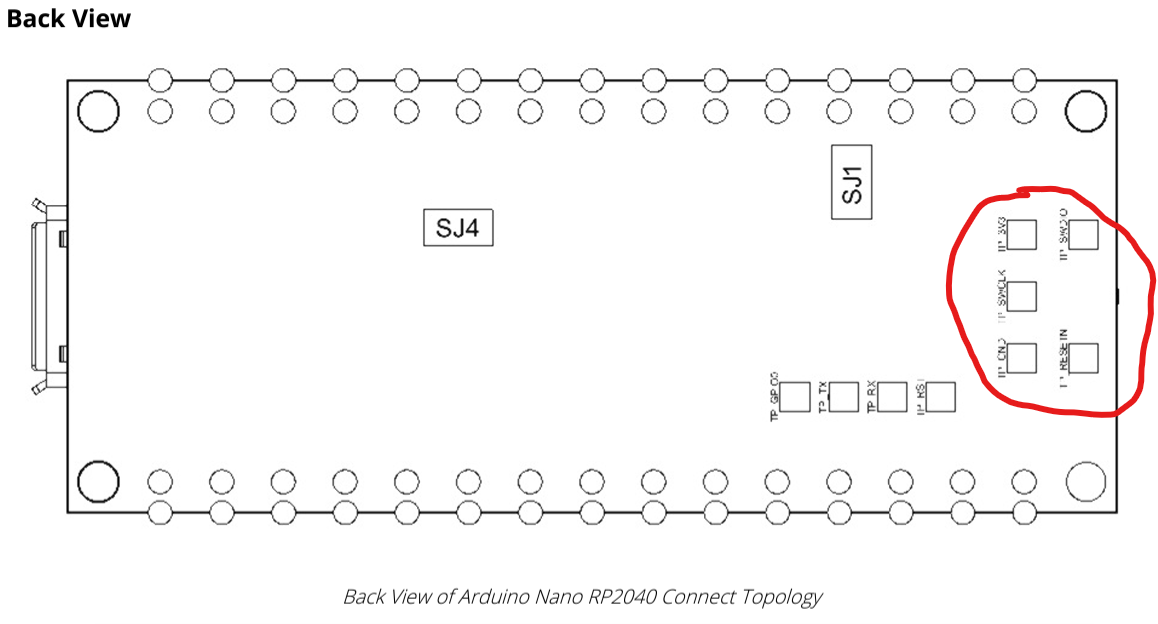
I noticed that on the back of the Nano 2040, there's five contact pads. They appear to be wired to all the necessary pins to run a debugger...has anyone had any success doing this? Specifically curious what sort of connector/interface you wound up going with to actually make the physical connection.
RPi has instructions for using a second pico as a debug probe.
I would suggest using something like this: 2 x 3 pogo pins, 0.1" spacing, built into a custom made jig with dowels/screws/standoffs to locate the PCB.

Adafruit have produced a tutorial: how to make a pogo pin test jig.
This looks like it would work nicely! I had considered pogo connectors, but never a full jig. I'm going to scoop up one of those 2x3's and see what I have lying around.
You can just put them on perfboard and wire the relevant pins into a group of three for connecting to a Raspberry Pi Debug Probe or dupont wires for connecting directly to Raspberry Pi GPIOs, which can also drive SWD debugging.
Here is some nice inspiration for a very simple approach to making a debug/programming jig:
https://www.instagram.com/p/B9eTOlcnSQP/
It just uses a standard female header as the way to mechanically hold the Nano to the jig.
That one uses the individual pogo pins instead of the 2x3 component like the one in your picture. I think using the single component would be super nice because it is a bit tricky to get the alignment of the individual pins right with this particular design. I'm not sure if the pins on the 2x3 component are tall enough for that approach though.
Other than the classic Nano, all Nano boards have the debug/programming pins broken out to test pads at the same locations, so the jig can be used for all of them. If you are interested in using the Nano Every, you should take note that the ATmega4809 uses a UPDI interface rather than SWD as the other boards, so the test pads are a little different on that board (though still at the same location).