Bonjour
je n'arrive pas à résoudre le problème de se programme es ce que quelqu'un pourrai m'aider ??
Merci pour votre gentillesse
//call the relevant library file
#include <Servo.h>
#include <Wire.h>
#include <LiquidCrystal_I2C.h>
//Set the communication address of I2C to 0x27, display 16 characters every line, two lines in total
LiquidCrystal_I2C mylcd(0x27, 16, 2);

//set ports of two servos to digital 9 and 10
Servo servo_10;
Servo servo_9;

volatile int btn1_num;//set variable btn1_num
volatile int btn2_num;//set variable btn2_num
volatile int button1;//set variable button1
volatile int button2;//set variable button2
String fans_char;//string type variable fans_char
volatile int fans_val;//set variable fans_char
volatile int flag;//set variable flag
volatile int flag2;//set variable flag2
volatile int flag3;//set variable flag3
volatile int gas;//set variable gas
volatile int infrar;//set variable infrar
String led2;//string type variable led2
volatile int light;//set variable light
String pass;//string type variable pass
String passwd;//string type variable passwd

String servo1;//string type variable servo1
volatile int servo1_angle;//set variable light
String servo2;//string type variable servo2
volatile int servo2_angle;//set variable servo2_angle

volatile int soil;//set variable soil
volatile int val;//set variable val
volatile int value_led2;//set variable value_led2
volatile int water;//set variable water

int length;
int tonepin = 3; //set the signal end of passive buzzer to digital 3
//define name of every sound frequency
#define D0 -1
#define D1 262
#define D2 293
#define D3 329
#define D4 349
#define D5 392
#define D6 440
#define D7 494
#define M1 523
#define M2 586
#define M3 658
#define M4 697
#define M5 783
#define M6 879
#define M7 987
#define H1 1045
#define H2 1171
#define H3 1316
#define H4 1393
#define H5 1563
#define H6 1755
#define H7 1971

#define WHOLE 1
#define HALF 0.5
#define QUARTER 0.25
#define EIGHTH 0.25
#define SIXTEENTH 0.625

//set sound play frequency
int tune[] =
{
  M3, M3, M4, M5,
  M5, M4, M3, M2,
  M1, M1, M2, M3,
  M3, M2, M2,
  M3, M3, M4, M5,
  M5, M4, M3, M2,
  M1, M1, M2, M3,
  M2, M1, M1,
  M2, M2, M3, M1,
  M2, M3, M4, M3, M1,
  M2, M3, M4, M3, M2,
  M1, M2, D5, D0,
  M3, M3, M4, M5,
  M5, M4, M3, M4, M2,
  M1, M1, M2, M3,
  M2, M1, M1
};

//set music beat
float durt[] =
{
  1, 1, 1, 1,
  1, 1, 1, 1,
  1, 1, 1, 1,
  1 + 0.5, 0.5, 1 + 1,
  1, 1, 1, 1,
  1, 1, 1, 1,
  1, 1, 1, 1,
  1 + 0.5, 0.5, 1 + 1,
  1, 1, 1, 1,
  1, 0.5, 0.5, 1, 1,
  1, 0.5, 0.5, 1, 1,
  1, 1, 1, 1,
  1, 1, 1, 1,
  1, 1, 1, 0.5, 0.5,
  1, 1, 1, 1,
  1 + 0.5, 0.5, 1 + 1,
};


void setup() {
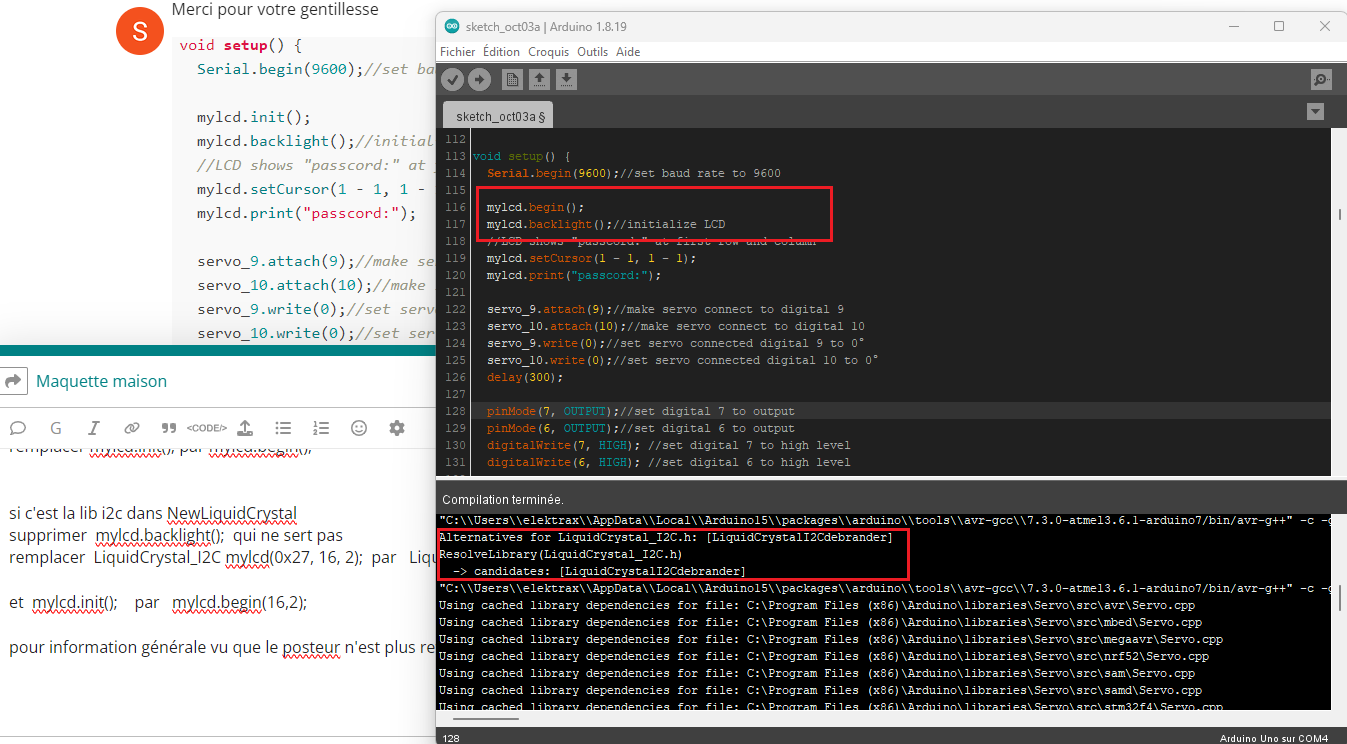
  Serial.begin(9600);//set baud rate to 9600

  mylcd.init();
  mylcd.backlight();//initialize LCD
  //LCD shows "passcord:" at first row and column
  mylcd.setCursor(1 - 1, 1 - 1);
  mylcd.print("passcord:");

  servo_9.attach(9);//make servo connect to digital 9
  servo_10.attach(10);//make servo connect to digital 10
  servo_9.write(0);//set servo connected digital 9 to 0°
  servo_10.write(0);//set servo connected digital 10 to 0°
  delay(300);

  pinMode(7, OUTPUT);//set digital 7 to output
  pinMode(6, OUTPUT);//set digital 6 to output
  digitalWrite(7, HIGH); //set digital 7 to high level
  digitalWrite(6, HIGH); //set digital 6 to high level

  pinMode(4, INPUT);//set digital 4 to input
  pinMode(8, INPUT);//set digital 8 to input
  pinMode(2, INPUT);//set digital 2 to input
  pinMode(3, OUTPUT);//set digital 3 to output
  pinMode(A0, INPUT);//set A0 to input
  pinMode(A1, INPUT);//set A1 to input
  pinMode(13, OUTPUT);//set digital 13 to input
  pinMode(A3, INPUT);//set A3 to input
  pinMode(A2, INPUT);//set A2 to input

  pinMode(12, OUTPUT);//set digital 12 to output
  pinMode(5, OUTPUT);//set digital 5 to output
  pinMode(3, OUTPUT);//set digital 3 to output
  length = sizeof(tune) / sizeof(tune[0]); //set the value of length
}

void loop() {
  auto_sensor();
  if (Serial.available() > 0) //serial reads the characters
  {
    val = Serial.read();//set val to character read by serial    Serial.println(val);//output val character in new lines
    pwm_control();
  }
  switch (val) {
    case 'a'://if val is character 'a',program will circulate
      digitalWrite(13, HIGH); //set digital 13 to high level,LED 	lights up
      break;//exit loop
    case 'b'://if val is character 'b',program will circulate
      digitalWrite(13, LOW); //Set digital 13 to low level, LED is off
      break;//exit loop
    case 'c'://if val is character 'c',program will circulate
      digitalWrite(12, HIGH); //set digital 12 to high level,NO of relay is connected to COM
      break;//exit loop
    case 'd'://if val is character 'd',program will circulate
      digitalWrite(12, LOW); //set digital 12 to low level,NO of relay is disconnected to COM

      break;//exit loop
    case 'e'://if val is character 'e',program will circulate
      music1();//play birthday song
      break;//exit loop
    case 'f'://if val is character 'f',program will circulate
      music2();//play ode to joy song
      break;//exit loop
    case 'g'://if val is character 'g',program will circulate
      noTone(3);//set digital 3 to stop playing music
      break;//exit loop
    case 'h'://if val is character 'h',program will circulate
      Serial.println(light);//output the value of variable light in new lines
      delay(100);
      break;//exit loop
    case 'i'://if val is character 'i',program will circulate
      Serial.println(gas);//output the value of variable gas in new lines
      delay(100);
      break;//exit loop
    case 'j'://if val is character 'j',program will circulate
      Serial.println(soil);//output the value of variable soil in new lines
      delay(100);
      break;//exit loop
    case 'k'://if val is character 'k',program will circulate
      Serial.println(water);//output the value of variable water in new lines
      delay(100);
      break;//exit loop
    case 'l'://if val is character 'l',program will circulate
      servo_9.write(180);//set servo connected to digital 9 to 180°
      delay(500);
      break;//exit loop
    case 'm'://if val is character 'm',program will circulate
      servo_9.write(0);;//set servo connected to digital 9 to 0°
      delay(500);
      break;//exit loop
    case 'n'://if val is character 'n',program will circulate
      servo_10.write(180);//set servo connected to digital 10 to 180°
      delay(500);
      break;//exit loop
    case 'o'://if val is character 'o',program will circulate
      servo_10.write(0);//set servo connected to digital 10 to 0°
      delay(500);
      break;//exit loop
    case 'p'://if val is character 'p',program will circulate
      digitalWrite(5, HIGH); //set digital 5 to high level, LED is on
      break;//exit loop
    case 'q'://if val is character 'q',program will circulate
      digitalWrite(5, LOW); // set digital 5 to low level, LED is off
      break;//exit loop
    case 'r'://if val is character 'r',program will circulate
      digitalWrite(7, LOW);
      digitalWrite(6, HIGH); //fan rotates anticlockwise at the fastest speed
      break;//exit loop
    case 's'://if val is character 's',program will circulate
      digitalWrite(7, LOW);
      digitalWrite(6, LOW); //fan stops rotating
      break;//exit loop
  }
}

////////////////////////set birthday song//////////////////////////////////
void birthday()
{
  tone(3, 294); //digital 3 outputs 294HZ sound
  delay(250);//delay in 250ms
  tone(3, 440);
  delay(250);
  tone(3, 392);
  delay(250);
  tone(3, 532);
  delay(250);
  tone(3, 494);
  delay(500);
  tone(3, 392);
  delay(250);
  tone(3, 440);
  delay(250);
  tone(3, 392);
  delay(250);
  tone(3, 587);
  delay(250);
  tone(3, 532);
  delay(500);
  tone(3, 392);
  delay(250);
  tone(3, 784);
  delay(250);
  tone(3, 659);
  delay(250);
  tone(3, 532);
  delay(250);
  tone(3, 494);
  delay(250);
  tone(3, 440);
  delay(250);
  tone(3, 698);
  delay(375);
  tone(3, 659);
  delay(250);
  tone(3, 532);
  delay(250);
  tone(3, 587);
  delay(250);
  tone(3, 532);
  delay(500);
}


//detect gas
void auto_sensor() {
  gas = analogRead(A0);//assign the analog value of A0 to gas
  if (gas > 700) {
//if variable gas>700
    flag = 1;//set variable flag to 1
    while (flag == 1)
      //if flag is 1, program will circulate
    {
      Serial.println("danger");//output "danger" in new lines
      tone(3, 440);
      delay(125);
      delay(100);
      noTone(3);
      delay(100);
      tone(3, 440);
      delay(125);
      delay(100);
      noTone(3);
      delay(300);
      gas = analogRead(A0);//gas analog the value of A0 to gas
      if (gas < 100)  //if variable gas is less than 100
      {
        flag = 0;//set variable flag to 0
        break;//exit loop exist to loop
      }
    }

  } else
    //otherwise
  {
    noTone(3);// digital 3 stops playing music
  }
  light = analogRead(A1);////Assign the analog value of A1 to light
  if (light < 300)//if variable light is less than 300
  {
    infrar = digitalRead(2);//assign the value of digital 2 to infrar
    Serial.println(infrar);//output the value of variable infrar in new lines
    if (infrar == 1)
      // if variable infra is 1
    {
      digitalWrite(13, HIGH); //set digital 13 to high level, LED is on
    } else//Otherwise
    {
      digitalWrite(13, LOW); //set digital 13 to low level, LED is off
    }

  }
  water = analogRead(A3);//assign the analog value of A3 to variable water
  if (water > 800)
    // if variable water is larger than 800
  {
    flag2 = 1;//if variable flag 2 to 1
    while (flag2 == 1)
      // if flag2 is 1, program will circulate
    {
      Serial.println("rain");//output "rain" in new lines
      servo_10.write(180);// set the servo connected to digital 10 to 180°
      delay(300);//delay in 300ms
      delay(100);
      water = analogRead(A3);;//assign the analog value of A3 to variable water
      if (water < 30)// if variable water is less than 30
      {
        flag2 = 0;// set flag2 to 0
        break;//exit loop
      }
    }

  } else//Otherwise
  {
    if (val != 'u' && val != 'n')
      //if val is not equivalent 'u' either 'n'
    {
      servo_10.write(0);//set servo connected to digital 10 to 0°
      delay(10);

    }

  }
  soil = analogRead(A2);//assign the analog value of A2 to variable soil
  if (soil > 50)
    // if variable soil is greater than 50
  {
    flag3 = 1;//set flag3 to 1
    while (flag3 == 1)
      //If set flag3 to 1, program will circulate
    {
      Serial.println("hydropenia ");//output "hydropenia " in new lines
      tone(3, 440);
      delay(125);
      delay(100);
      noTone(3);
      delay(100);
      tone(3, 440);
      delay(125);
      delay(100);
      noTone(3);//digital 3 stops playing sound
      delay(300);
      soil = analogRead(A2);//Assign the analog value of A2 to variable soil
      if (soil < 10)//If variable soil<10
      {
        flag3 = 0;//set flag3 to 0
        break;//exit loop
      }
    }

  } else//Otherwise
  {
    noTone(3);//set digital 3 to stop playing music
  }
  door();//run subroutine
}

void door() {
  button1 = digitalRead(4);// assign the value of digital 4 to button1
  button2 = digitalRead(8);//assign the value of digital 8 to button2


  if (button1 == 0)//if variablebutton1 is 0
  {
    delay(10);//delay in 10ms
    while (button1 == 0) //if variablebutton1 is 0,program will circulate
    {
      button1 = digitalRead(4);// assign the value of digital 4 to button1
      btn1_num = btn1_num + 1;//variable btn1_num plus 1
      delay(100);// delay in 100ms
    }

  }
  if (btn1_num >= 1 && btn1_num < 5) //1≤if variablebtn1_num<5
  {
    Serial.print(".");
    Serial.print("");
    passwd = String(passwd) + String(".");//set passwd
pass = String(pass) + String(".");//set pass
    //LCD shows pass at the first row and column
    mylcd.setCursor(1 - 1, 2 - 1);
    mylcd.print(pass);
  }
  if (btn1_num >= 5)
    //if variablebtn1_num ≥5
  {
    Serial.print("-");
    passwd = String(passwd) + String("-");//Set passwd
    pass = String(pass) + String("-");//set pass
    //LCD shows pass at the first row and column
    mylcd.setCursor(1 - 1, 2 - 1);
    mylcd.print(pass);

  }
  if (button2 == 0) //if variablebutton2 is 0
  {
    delay(10);
    if (button2 == 0)//if variablebutton2 is 0
    {
      if (passwd == ".--.-.")//if passwd is ".--.-."
      {
        mylcd.clear();//clear LCD screen
        //LCD shows "open!" at first character on second row
        mylcd.setCursor(1 - 1, 2 - 1);
        mylcd.print("open!");
        servo_9.write(100);//set servo connected to digital 9 to 100°
        delay(300);
        delay(5000);
        passwd = "";
        pass = "";
        mylcd.clear();//clear LCD screen
        //LCD shows "password:"at first character on first row
        mylcd.setCursor(1 - 1, 1 - 1);
        mylcd.print("password:");

      } else //Otherwise
      {
        mylcd.clear();//clear LCD screen
        //LCD shows "error!"at first character on first row
        mylcd.setCursor(1 - 1, 1 - 1);
        mylcd.print("error!");
        passwd = "";
        pass = "";
        delay(2000);
        //LCD shows "again" at first character on first row
        mylcd.setCursor(1 - 1, 1 - 1);
        mylcd.print("again");
      }
    }
  }
  infrar = digitalRead(2);//assign the value of digital 2 to infrar
  if (infrar == 0 && (val != 'l' && val != 't'))
    //if variable infrar is 0 and val is not 'l' either 't'
  {
    servo_9.write(0);//set servo connected to digital 9 to 0°
    delay(50);
  }
  if (button2 == 0)//if variablebutton2 is 0
  {
    delay(10);
    while (button2 == 0) //if variablebutton2 is 0,program will circulate
    {
      button2 = digitalRead(8);//assign the value of digital 8 to button2
      btn2_num = btn2_num + 1;//variable btn2_num plus 1
      delay(100);
      if (btn2_num >= 15)//if variablebtn2_num ≥15
      {
        tone(3, 532);
        delay(125);
        mylcd.clear();//clear LCD screen
        //LCD shows "password:" at the first character on first row
        mylcd.setCursor(1 - 1, 1 - 1);
        mylcd.print("password:");
        //LCD shows "wait" at the first character on first row
        mylcd.setCursor(1 - 1, 1 - 1);
        mylcd.print("wait");
      } else//Otherwise
      {
        noTone(3);//digital 3 stops playing music
      }
    }

  }
  btn1_num = 0;//set btn1_num to 0
  btn2_num = 0;//set btn2_num to 0
}

// Birthday song
void music1() {
  birthday();
}
//Ode to joy
void music2() {
  Ode_to_Joy();
}
void Ode_to_Joy()//play Ode to joy song
{
  for (int x = 0; x < length; x++)
  {
    tone(tonepin, tune[x]);
    delay(300 * durt[x]);
  }
}

//PWM control
void pwm_control() {
  switch (val)
  {
    case 't'://if val is 't',program will circulate
      servo1 = Serial.readStringUntil('#');
      servo1_angle = String(servo1).toInt();
      servo_9.write(servo1_angle);//set the angle of servo connected to digital 9 to servo1_angle
      delay(300);
      break;//exit loop
    case 'u'://if val is 'u',program will circulate
      servo2 = Serial.readStringUntil('#');
      servo2_angle = String(servo2).toInt();
      servo_10.write(servo2_angle);//set the angle of servo connected to digital 10 to servo2_angle
      delay(300);
      break;//exit loop
    case 'v'://if val is 'v',program will circulate
      led2 = Serial.readStringUntil('#');
      value_led2 = String(led2).toInt();
      analogWrite(5, value_led2); //PWM value of digital 5 is value_led2
      break;//exit loop
    case 'w'://if val is 'w',program will circulate
      fans_char = Serial.readStringUntil('#');
      fans_val = String(fans_char).toInt();
      digitalWrite(7, LOW);
      analogWrite(6, fans_val); //set PWM value of digital 6 to fans_val,the larger the value, the faster the fan
      break;//exit loop
  }
}