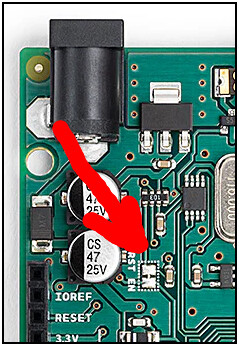
I came across a couple of Mega 2560 clones. One of them works perfectly fine. The other seems to have the blink sketch burned into it. But I'm not able to upload a new sketch in Arduino IDE. Here's the error message:
avrdude: Version 6.3-20190619
         Copyright (c) 2000-2005 Brian Dean, http://www.bdmicro.com/
         Copyright (c) 2007-2014 Joerg Wunsch

         System wide configuration file is "/Users/deling/Library/Arduino15/packages/arduino/tools/avrdude/6.3.0-arduino17/etc/avrdude.conf"
         User configuration file is "/Users/deling/.avrduderc"
         User configuration file does not exist or is not a regular file, skipping

         Using Port                    : /dev/cu.usbserial-21310
         Using Programmer              : wiring
         Overriding Baud Rate          : 115200
avrdude: stk500v2_ReceiveMessage(): timeout
avrdude: stk500v2_ReceiveMessage(): timeout
avrdude: stk500v2_ReceiveMessage(): timeout
avrdude: stk500v2_ReceiveMessage(): timeout
avrdude: stk500v2_ReceiveMessage(): timeout
It appears to be a bootloader issue. So... I followed the instructions here and burned the bootloader into the Mega 2560 using an Uno over ICSP. Then I unplugged the Uno (the programmer) and plugged in the Mega 2560 (the target board), and uploaded the blink sketch from Arduino IDE. And it worked this time.
However,
- It only works once. When I try to upload the same sketch again, I'm getting the same timeout error message again, until I repeat the process and burn the bootloader again.
- It only works if I keep the Uno (the programmer) connected with the Mega 2560 (the target).
Any idea what's going on? Since I have two supposedly identical boards and one works fine, I tend to believe this is not a hardware issue.
Thanks.
P.S. this is the verbose output when the upload succeeds:
Sketch uses 1544 bytes (0%) of program storage space. Maximum is 253952 bytes.
Global variables use 9 bytes (0%) of dynamic memory, leaving 8183 bytes for local variables. Maximum is 8192 bytes.
"/Users/deling/Library/Arduino15/packages/arduino/tools/avrdude/6.3.0-arduino17/bin/avrdude" "-C/Users/deling/Library/Arduino15/packages/arduino/tools/avrdude/6.3.0-arduino17/etc/avrdude.conf" -v -V -patmega2560 -cwiring "-P/dev/cu.usbserial-21320" -b115200 -D "-Uflash:w:/private/var/folders/f3/6ysp3l5j4zb5fz9r5zgjqgj400nmsy/T/arduino/sketches/11EBBBCDAE32B5881D6B4DDE9238999E/Blink.ino.hex:i"

avrdude: Version 6.3-20190619
         Copyright (c) 2000-2005 Brian Dean, http://www.bdmicro.com/
         Copyright (c) 2007-2014 Joerg Wunsch

         System wide configuration file is "/Users/deling/Library/Arduino15/packages/arduino/tools/avrdude/6.3.0-arduino17/etc/avrdude.conf"
         User configuration file is "/Users/deling/.avrduderc"
         User configuration file does not exist or is not a regular file, skipping

         Using Port                    : /dev/cu.usbserial-21320
         Using Programmer              : wiring
         Overriding Baud Rate          : 115200
         AVR Part                      : ATmega2560
         Chip Erase delay              : 9000 us
         PAGEL                         : PD7
         BS2                           : PA0
         RESET disposition             : dedicated
         RETRY pulse                   : SCK
         serial program mode           : yes
         parallel program mode         : yes
         Timeout                       : 200
         StabDelay                     : 100
         CmdexeDelay                   : 25
         SyncLoops                     : 32
         ByteDelay                     : 0
         PollIndex                     : 3
         PollValue                     : 0x53
         Memory Detail                 :

                                  Block Poll               Page                       Polled
           Memory Type Mode Delay Size  Indx Paged  Size   Size #Pages MinW  MaxW   ReadBack
           ----------- ---- ----- ----- ---- ------ ------ ---- ------ ----- ----- ---------
           eeprom        65    10     8    0 no       4096    8      0  9000  9000 0x00 0x00
           flash         65    10   256    0 yes    262144  256   1024  4500  4500 0x00 0x00
           lfuse          0     0     0    0 no          1    0      0  9000  9000 0x00 0x00
           hfuse          0     0     0    0 no          1    0      0  9000  9000 0x00 0x00
           efuse          0     0     0    0 no          1    0      0  9000  9000 0x00 0x00
           lock           0     0     0    0 no          1    0      0  9000  9000 0x00 0x00
           calibration    0     0     0    0 no          1    0      0     0     0 0x00 0x00
           signature      0     0     0    0 no          3    0      0     0     0 0x00 0x00

         Programmer Type : Wiring
         Description     : Wiring
         Programmer Model: AVRISP
         Hardware Version: 15
         Firmware Version Master : 2.10
         Vtarget         : 0.0 V
         SCK period      : 0.1 us

avrdude: AVR device initialized and ready to accept instructions

Reading | ################################################## | 100% 0.01s

avrdude: Device signature = 0x1e9801 (probably m2560)
avrdude: reading input file "/private/var/folders/f3/6ysp3l5j4zb5fz9r5zgjqgj400nmsy/T/arduino/sketches/11EBBBCDAE32B5881D6B4DDE9238999E/Blink.ino.hex"
avrdude: writing flash (1544 bytes):

Writing | ################################################## | 100% 0.29s

avrdude: 1544 bytes of flash written

avrdude done.  Thank you.