Your USB/Serial interface has no way to reset the controller. Try adding 100nF between U36 pin 2 (DTR) and the 2560's reset pin (30). You can also reset the controller manually during code upload, but timing is kind of critical and I would not recommend doing it this way.
If that doesn't help, then also try bridging R4 & R5 with a wire bridge (zero Ohms) and remove R3 and/or D34. R4 + R5 are not needed (but shouldn't hurt if they're a reasonably small value).
The led circuit around D34 is done the wrong way and will make the LED be active if there's NO data being sent on TX; you probably meant the opposite, which means you'd have to connect it differently: one leg of R3 to Vcc, the other leg to the anode of the LED and the cathode of the LED to the TX net.
Is U36 a CH340 of some kind?
The missing component values on your schematic are inconvenient; always include all component values and IC types.
Thank you very much, I am aware of these faults yes.. the thing is I was able once to upload a sketch successfully but not anymore, that's why I decided to troubleshoot what I already have..
The IC is FTR232RL.
I have tried the ISP programmer with the USBASP, but I am getting the error:
Sketch uses 1536 bytes (0%) of program storage space. Maximum is 253952 bytes.
Global variables use 9 bytes (0%) of dynamic memory, leaving 8183 bytes for local variables. Maximum is 8192 bytes.
"PATH\AppData\Local\Arduino15\packages\arduino\tools\avrdude\6.3.0-arduino17/bin/avrdude" "-CPATH\AppData\Local\Arduino15\packages\arduino\tools\avrdude\6.3.0-arduino17/etc/avrdude.conf" -v -V -patmega2560 -cusbasp -Pusb "-Uflash:w:PATH\AppData\Local\Temp\arduino\sketches\6EC41310911E197AE16A40FFABBFC950/Blink.ino.hex:i"

avrdude: Version 6.3-20190619
         Copyright (c) 2000-2005 Brian Dean, http://www.bdmicro.com/
         Copyright (c) 2007-2014 Joerg Wunsch

         System wide configuration file is "PATH\AppData\Local\Arduino15\packages\arduino\tools\avrdude\6.3.0-arduino17/etc/avrdude.conf"

         Using Port                    : usb
         Using Programmer              : usbasp
avrdude: Warning: cannot query manufacturer for device: No such file or directory
avrdude: Warning: cannot query product for device: No such file or directory
avrdude: error: could not find USB device with vid=0x16c0 pid=0x5dc vendor='www.fischl.de' product='USBasp'

avrdude done.  Thank you.

Failed programming: uploading error: exit status 1
Now I am able to upload from the IDE and through the USBASP after changing avrdude with the latest versions!
avrdude.exe in:
PATH\AppData\Local\Arduino15\packages\arduino\tools\avrdude\6.3.0-arduino17\bin
When you perform a "Burn Bootloader" operation, the sketch application is erased. This causes the bootloader to run constantly, meaning that no reset is necessary to activate the bootloader in order to perform the first upload via UART.
After that first upload, the flash memory contains the sketch application in addition to the bootloader so the bootloader no longer running constantly. This is why a reset is required in order to perform subsequent uploads to the board. That reset is normally produced by an auto-reset circuit, but if your custom board doesn't have one then you would need to manually reset the ATmega2560 at the right point in the upload operation.
That is great, but keep in mind that when you perform an "Upload Using Programmer" operation you erase the bootloader. The bootloader isn't required to upload via the ISP programmer, but if you later decide to try an upload via UART again, remember you will need to first perform another "Burn Bootloader" operation to replace the bootloader in the flash memory.
Thank you for the very valuable inputs. I did burn back the bootloader to the IC..
I still unable even when I press the RESET button manually to upload a sketch
avrdude: Version 7.3
         Copyright the AVRDUDE authors;
         see https://github.com/avrdudes/avrdude/blob/main/AUTHORS

         System wide configuration file is PATH\AppData\Local\Arduino15\packages\arduino\tools\avrdude\6.3.0-arduino17\etc\avrdude.conf

         Using port            : COM7
         Using programmer      : wiring
         Setting baud rate     : 115200
avrdude stk500v2_recv() error: timeout
avrdude stk500v2_recv() error: timeout
avrdude stk500v2_recv() error: timeout
avrdude stk500v2_recv() error: timeout
avrdude stk500v2_recv() error: timeout
avrdude stk500v2_recv() error: timeout
avrdude stk500v2_getsync() error: timeout communicating with programmer
avrdude wiring_open() error: stk500v2_getsync() failed; try -xdelay=n with some n in [-80, 100]
avrdude main() error: unable to open port COM7 for programmer wiring
avrdude list_available_serialports() error: avrdude built without libserialport support; please compile again with libserialport installed

avrdude done.  Thank you.

Failed uploading: uploading error: exit status 1
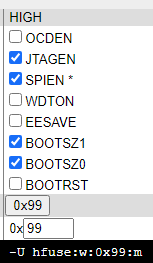
So you're setting up for an external crystal running at between 3.0 and 8.0 MHz. CKSEL0 = 0 is for a ceramic oscillator, not a crystal, with slowly rising power (SUT1:0 = 01). This does not seem to match with your schematic. What speed oscillator do you have on your board?
Maybe you should google a bit on how the fuses work for a Mega2560.
Good that you have fixed it now with the correct fuses but which board did you select in the IDE when you performed the "Burn Bootloader" option ? The boards.txt file for the Arduino Mega 2560 contains these entries for setting the fuses which you have now found to be correct:
mega.name=Arduino Mega or Mega 2560
. . .
mega.bootloader.low_fuses=0xFF
. . .
## Arduino Mega w/ ATmega2560
## -------------------------
mega.menu.cpu.atmega2560=ATmega2560 (Mega 2560)
. . .
. . .
mega.menu.cpu.atmega2560.bootloader.high_fuses=0xD8
mega.menu.cpu.atmega2560.bootloader.extended_fuses=0xFD
mega.menu.cpu.atmega2560.bootloader.file=stk500v2/stk500boot_v2_mega2560.hex
. . .
. . .
The "Burn Bootloader" option normally sets the fuses based on the current board selected.
yes I thought that was weird as well! I why wouldn't the bootloader do it?.
I couldn't burn the bootloader through the IDE for some reason, I went through cmd avrdude commands to burn, maybe it doesn't have these values by default.
I noticed that in posts #9 that the avrdude version was 7.3 but the avrdude.conf file was from a 6.3.0 folder.
Not sure if it would cause problems but it is probably worth fixing.
No, I don't think it does. avrdude is just the command line tool; it's the script that makes the particular settings. In this case it's the board definition within Arduino. If you run avrdude from command line, you bypass those settings.
why is it with this setup I can only upload sketches with avrdude version 7.3 ? why can't I upload with the 6.3.0 version that comes with the Arduino IDE 2.3.2 ?