MIDIUSB affecting software performance on Windows?

I have a simple sketch which uses the MIDIUSB library to send analog voltage readings as MIDI signals ... I have uploaded the sketch to both an Arduino Zero which is based on SAMD , and an Arduino Micro which is based on AVR , but the result is the same regardless of which Arduino I am using

I launch Resolume Arena, and open MIDI settings ... If I click on the checkbox for the MIDI input from the Arduino , Resolume Arena instantly becomes unresponsive until I disconnect the Arduino

My friend has a laptop running Ableton Live... Initially after connecting the Arduino to the computer, Ableton Live runs normally and receives MIDI input from the Arduino... But after a while, the user interface starts to lag and stutter, and it becomes very difficult to continue doing anything until the Arduino is unplugged

Is there an underlying cause for this? Me and my friend are both running Windows

You got this connected to that and this... Post an annotated schematic showing exactly how this is wired, this appears to be a windows problem.


I don't have any answers, just a few thoughts:

  • It could be helpful to test with MIDIOX.
    (Note: this software used to give me a false positive with antivirus)

  • Using CopperLan, you can create a virtual midi device, and remap a physical device to it. Maybe Resolume Arena and Abelton will accept this work around.

You shouldn't have to do this though, it should just work..

I have never experienced this, and i connect a Micro to Ableton and/or Guitar Rig without issue, mind you, you should show us the sketch you are using. If there is no limitation on the transmission of the midi commands that you send, you could be flooding the output and therefore possibly also the input buffer.

You can read the value of the pot meter more often than you can send the corresponding midi command.

So. The sketch please.

#include <Arduino.h>
#include "MIDIUSB.h"

void controlChange(byte channel, byte control, byte value)
{
  midiEventPacket_t event = {0x0B, 0xB0 | channel, control, value};
  MidiUSB.sendMIDI(event);
}

void setup()
{
}

void loop()
{

  uint8_t value = analogRead(A0) / 8;

  controlChange(1, 1, value);
  MidiUSB.flush();
}

I have made it limit its output to only send when there is a change in value, and only do it once every 50ms, but it is still hanging up Resolume Arena (I do not have access to my friend's computer running Ableton Live right now)

#include <Arduino.h>
#include "MIDIUSB.h"

unsigned long prevtime = 0;
unsigned long time = 0;
int prevvalue = 0;

void controlChange(byte channel, byte control, byte value)
{
  midiEventPacket_t event = {0x0B, 0xB0 | channel, control, value};
  MidiUSB.sendMIDI(event);
  // MidiUSB.flush();
}

void setup()
{
  prevvalue = analogRead(A0) / 8;
}

void loop()
{

  digitalWrite(LED_BUILTIN, LOW);
  time = millis() - prevtime;
  if (time > 50)
  {
    digitalWrite(LED_BUILTIN, HIGH);
    uint8_t value = analogRead(A0) / 8;
    if (abs(value - prevvalue) > 5)
    {
      prevvalue = value;
      controlChange(1, 1, value);
      MidiUSB.flush();
    }
    
    prevtime = millis();
  }
}

i.e. Resolume Arena is hanging even without any MIDI traffic, just trying to access the Arduino MIDI output is enough

Thanks for your reply, from searching online it seems MIDIOX has a similar functionality of remapping physical devices, although the virtual MIDI device to map to will have to be created separately such as with 'loopMIDI'


although I agree, [quote="toddnz, post:4, topic:1157483"]
You shouldn't have to do this though, it should just work..
[/quote]

I suggest you google exactly what an annotated schematic is, it is not composed of pictures but symbols showing how they are interconnected. Your fuzzy picture does not hele me help you. There are a lot of boards that look like your pictures. Links to technical information on the hardware devices helps. Rather then spend time looking at the pictures and finding something that looks like it I will spend that time helping somebody else.

1 Like

or I could just plainly say, I am connecting an Arduino Zero (via its native USB port) and an Arduino Micro (via its only USB port) to my computer?

because the electrical connections pheripheral to the Arduino boards are not really relevant

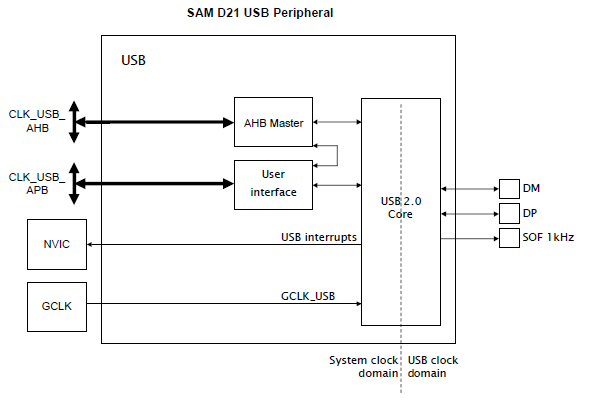
is this what you want?
image

Just as a test, do you get the same issues with the official Arduino MIDI example?

If the problem persists, even with the tutorial sketch, it helps eliminate anything code related once and for all.

That is a block diagram, not a schematic of your circuit as you wired it. Please spend some time with google, and do not forget links to technical information on each of the hardware parts. The details are in the schematic. Stating "Arduino Micro" is simple not enough because there are hundreds of different ones available. USB to USB is not MIDI.

Let me share my code, which i know doesn't hang Ableton or Guitar Rig

#include "MIDIUSB.h"

#define LED 3  // that pin is PWM capable and has no extra function
#define POT A2
#define CHANNEL (7 - 1)  // midi channel 6 equals 5 in this system.

// First parameter is the event type (0x09 = note on, 0x08 = note off).
// Second parameter is note-on/note-off, combined with the channel.
// Channel can be anything between 0-15. Typically reported to the user as 1-16.
// Third parameter is the note number (48 = middle C).
// Fourth parameter is the velocity (64 = normal, 127 = fastest).

void noteOn(byte channel, byte pitch, byte velocity) {
  midiEventPacket_t noteOn = {0x09, (uint8_t) (0x90 | channel), pitch, velocity};
  MidiUSB.sendMIDI(noteOn);
  MidiUSB.flush();
}

void noteOff(byte channel, byte pitch, byte velocity) {
  midiEventPacket_t noteOff = {0x08, (uint8_t) (0x80B | channel), pitch, velocity};
  MidiUSB.sendMIDI(noteOff);
  MidiUSB.flush();
}

void setup() {
  pinMode(LED, OUTPUT);
  analogWrite(LED, 120);
  delay(1000);
  analogWrite(LED, 0);
}

// First parameter is the event type (0x0B = control change).
// Second parameter is the event type, combined with the channel.
// Third parameter is the control number number (0-119).
// Fourth parameter is the control value (0-127).

void controlChange(byte channel, byte control, byte value) {
  midiEventPacket_t event = {0x0B, (uint8_t) (0xB0 | channel), control, value};
  MidiUSB.sendMIDI(event);
  MidiUSB.flush();
}


void loop() {
  static uint32_t moment = millis();
  //static bool noteon = true;
  static uint8_t volume = 0;
  uint8_t analog = analogRead(POT) >> 3;
  if ((volume != analog) && (millis() - moment > 20)) {
    moment = millis();
    volume = analog;
    controlChange(CHANNEL, 7, volume);
  }

  /*if (millis() - moment > 2000) {
    moment = millis();
    if (noteon) noteOn(0, 48, 100);  // pin C2
    else noteOff(0, 48, 64);
    noteon = !noteon;
    }*/

  midiEventPacket_t rx = MidiUSB.read();
  while (rx.header != 0) {    
    uint8_t type = rx.byte1 >> 4;
    uint8_t channel = rx.byte1 & 0xF;
    uint8_t value1 = rx.byte2;
    uint8_t value2 = rx.byte3;
    if (type == 0x9) analogWrite(LED, value2 * 2);
    if (type == 0x8) analogWrite(LED, 0);
    rx = MidiUSB.read();
  }

  //controlChange(0, 10, 65); // Set the value of controller 10 on channel 0 to 65
}

It is rather similar to yours, so i don't see any issue with your code.. really.

Other possibility is the OS of course, but i am also on Windows (10, i am never upgrading a device with a new OS again, it is just asking for trouble..) I am connecting it through a hub, but i don't think it makes much difference. So i can not re-create your issue, which to means it doesn't really exist. Have you tried several USB cables ? Removing other USB devices etc ? Do you have any other software running that can interfere with the COM ports , like the IDE ? Anyway, I hope it helps, this started out as a test sketch and i now use it as a simple volume button though i am intending to expand it a bit.

Two problems: 1. you're constantly sending MIDI messages, as mentioned already, 2. you're never reading any incoming data, causing the buffer on the PC to become full, which is probably not something the DAW is used to dealing with.

For a simple potentiometer, you could use something like Control Surface: Control-Change-Potentiometer.ino.
It filters the analog input, limiting the number of MIDI messages being sent, and it correctly reads any incoming USB packets to keep the buffer level low.

2 Likes

thanks for your replies, I have been busy implementing other features into my MIDI controller and have only just saw the replies

  1. I have implemented a rate limiter in the sketch,
unsigned long prevtime = 0;
int time = 0;
void loop()
{
    unsigned long instant = millis();
    time = instant - prevtime;
     if (time > 25)
     {
      //rest of sketch
     prevtime = instant;
      }
}

2.is there a way to solve the buffer becoming full? do i just call MidiUSB.read() every loop?
I would prefer not to redo my entire sketch to incorporate Control Surface if possible

Indeed

1 Like

This topic was automatically closed 180 days after the last reply. New replies are no longer allowed.