I have previously posted code for my Morse code translator project, and I wanted help adding functionality to it, specifically the capability to adjust its internal values for the space between letters and words based off the typing speed of the user (I have already gotten it to adjust its internal values for the length of a dash and dot based off user typing speed). I am new to Arduino and programming, so you may need to explain some concepts to me. Presently, the program keeps track of how long the space between button presses is, and each time the button is pressed down, it passes that value to the sort_space_buckets() function, as the input space_duration.
int button_space_buckets[80] = { 0, 0, 0, 0, 0, 0, 0, 0, 0, 0, 0, 0, 0, 0, 0, 0, 0, 0, 0, 0, 0, 0, 0, 0, 0, 0, 0, 0, 0, 0, 0, 0, 0, 0, 0, 0, 0, 0, 0, 0, 0, 0, 0, 0, 0, 0, 0, 0, 0, 0, 0, 0, 0, 0, 0, 0, 0, 0, 0, 0, 0, 0, 0, 0, 0, 0, 0, 0, 0, 0, 0, 0, 0, 0, 0, 0, 0, 0, 0, 0 };

void sort_space_buckets(unsigned long space_duration) {
  int bucket_index = space_duration / 100;
  if (bucket_index >= 80) {
    bucket_index = 79;
  }
button_space_buckets[bucket_index] += 1;
if (space_duration > 5000) {
  generate_histogram(80, button_space_buckets);
}
}
The sort_space_buckets() function adds one to the index in the button_space_buckets[] array that represents the duration of the space it has been fed. The first index in the array is 0-99 ms, the second is 100-199, etc. The program then calls on the generate_histogram function to print a histogram of the button_space_buckets list (for interpretation of the data) each time the duration the function has been fed is more than 5 seconds (I found that if it was run every time, the long Serial.print() task interfered with the detection of button presses during rapid typing). Would it be possible to add auto learning functionality to the translator using this infrastructure, and if so, what approach should I take? Or will I need to use a new approach if I want to add this functionality? General feedback on the code would also be appreciated.
Generate_histogram function is presented below.
void generate_histogram(int upper_boundary, int* reference_list) {
  Serial.println("---------");
  for (int i = 0; i < upper_boundary; ++i) {
    //Serial.println(button_press_buckets[i]);
    Serial.print((i + 1) * 100);
    Serial.print(" ");
    for (int x = 0; x < reference_list[i]; ++x) {
      Serial.print("X");
    }
    Serial.println("");
}
Serial.println("---------");
Serial.println(totalpress);
}
The hardware I am using is a Chinese Arduino clone (the Elegoo Uno R3), a LCD1602 Module Hitachi-compatible LCD display (Sorry I can't get more specific, no information other than that was included in the starter kit I am using), and two-pin pushbutton.
Schematic of device:
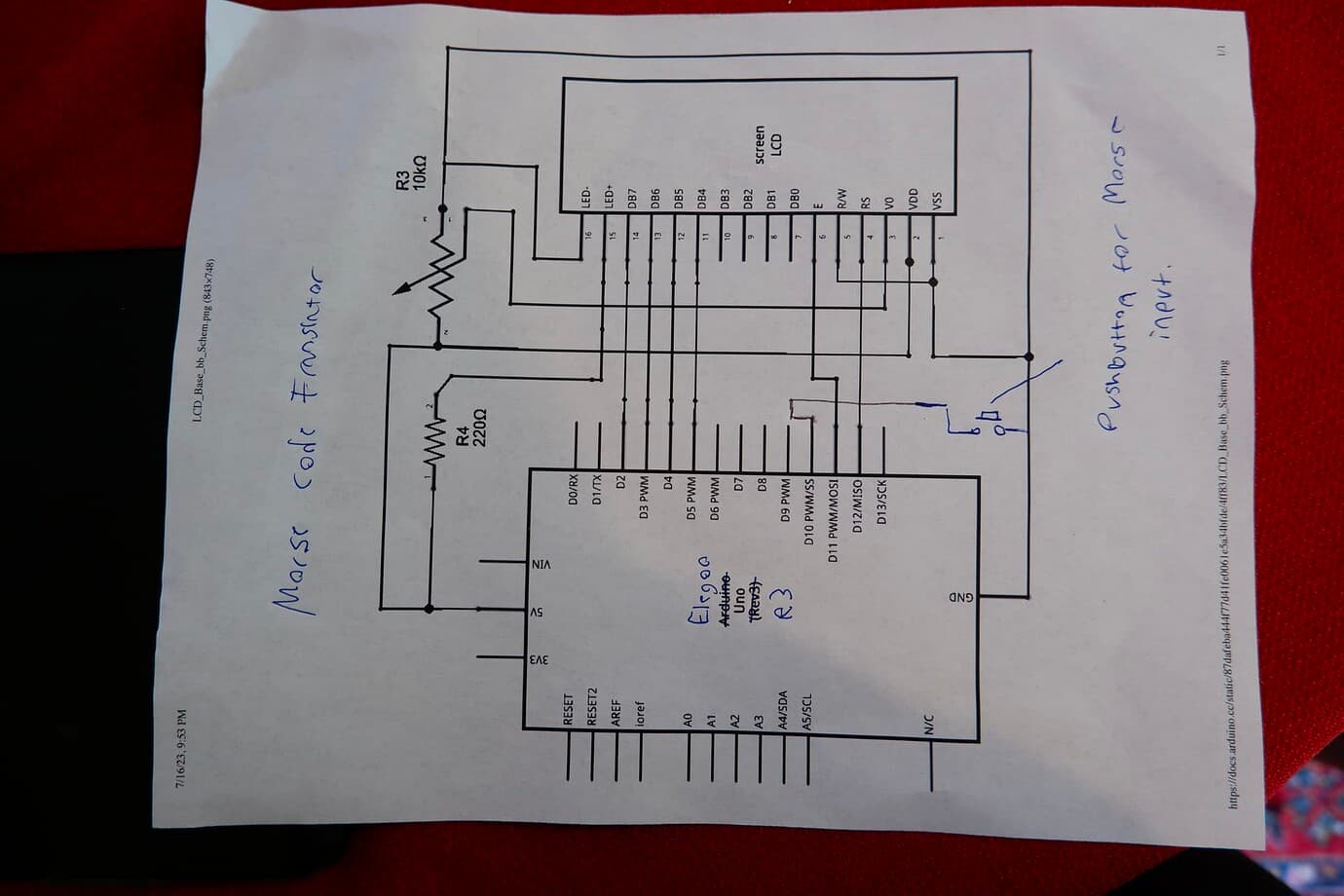
Full code is below, sorry if it isn't very concise.
// true if the button was down when we last checked
boolean last_button_state = false;
// include the library code:
int totalpress = 0;
int count = 0;
unsigned long starttime = 0;
unsigned long endtime = 0;
float totaltime = 0;
int unit = 1000;
int dot = unit;
int dash = dot * 3;
const int lspace = 1000 * 2;
const int wspace = 1000 * 6;
String letter = "";
//Keeping track of sequence of dots and dashes is being typed
const String morse_code_table[26] = {
  /* A */ ".-",
  /* B */ "-...",
  /* C */ "-.-.",
  /* D */ "-..",
  /* E */ ".",
  /* F */ "..-.",
  /* G */ "--.",
  /* H */ "....",
  /* I */ "..",
  /* J */ ".---",
  /* K */ "-.-",
  /* L */ ".-..",
  /* M */ "--",
  /* N */ "-.",
  /* O */ "---",
  /* P */ ".--.",
  /* Q */ "--.-",
  /* R */ ".-.",
  /* S */ "...",
  /* T */ "-",
  /* U */ "..-",
  /* V */ "...-",
  /* W */ ".--",
  /* X */ "-..-",
  /* Y */ "-.--",
  /* Z */ "--..",
};

#include <LiquidCrystal.h>

// initialize the library by associating any needed LCD interface pin
// with the arduino pin number it is connected to
const int rs = 12, en = 11, d4 = 5, d5 = 4, d6 = 3, d7 = 2;
LiquidCrystal lcd(rs, en, d4, d5, d6, d7);
// set up the LCD's number of columns and rows:

const int kButtonPin = 10;
// Pin that is being connected to the button for Morse imput.

const int CalibrateButtonPin = 9;
char decode_symbols(String symbols) {
  for (int i = 0; i < 26; ++i) {
    bool error = true;
    if (letter == morse_code_table[i]) {
      return 'A' + i;
    }
  }
  return '?';
}
bool is_letter_space(unsigned long duration_ms) {
  if (endtime != 0) {
    if ((duration_ms >= lspace) && (duration_ms < wspace)) {
      return true;
    } else {
      return false;
    }
  } else {
    return false;
  }
}

bool is_word_space(unsigned long duration_ms) {
  if (endtime != 0) {
    if (duration_ms >= wspace) {
      return true;
    } else {
      return false;
    }
  } else {
    return false;
  }
}

void generate_histogram(int upper_boundary, int* reference_list) {
  Serial.println("---------");
  for (int i = 0; i < upper_boundary; ++i) {
    //Serial.println(button_press_buckets[i]);
    Serial.print((i + 1) * 100);
    Serial.print(" ");
    for (int x = 0; x < reference_list[i]; ++x) {
      Serial.print("X");
    }
    Serial.println("");
  }
  Serial.println("---------");
  Serial.println(totalpress);
}

int button_press_buckets[40] = { 0, 0, 0, 0, 0, 0, 0, 0, 0, 0, 0, 0, 0, 0, 0, 0, 0, 0, 0, 0, 0, 0, 0, 0, 0, 0, 0, 0, 0, 0, 0, 0, 0, 0, 0, 0, 0, 0, 0, 0 };
void sort_press_buckets(unsigned long press_duration) {
  int bucket_index = press_duration / 100;
  if (bucket_index >= 40) {
    bucket_index = 39;
  }
  button_press_buckets[bucket_index] += 1;
  //generate_histogram(40, button_press_buckets);
}
int button_space_buckets[80] = { 0, 0, 0, 0, 0, 0, 0, 0, 0, 0, 0, 0, 0, 0, 0, 0, 0, 0, 0, 0, 0, 0, 0, 0, 0, 0, 0, 0, 0, 0, 0, 0, 0, 0, 0, 0, 0, 0, 0, 0, 0, 0, 0, 0, 0, 0, 0, 0, 0, 0, 0, 0, 0, 0, 0, 0, 0, 0, 0, 0, 0, 0, 0, 0, 0, 0, 0, 0, 0, 0, 0, 0, 0, 0, 0, 0, 0, 0, 0, 0 };
void sort_space_buckets(unsigned long space_duration) {
  int bucket_index = space_duration / 100;
  if (bucket_index >= 80) {
    bucket_index = 79;
  }
  button_space_buckets[bucket_index] += 1;
  if (space_duration > 5000) {
    generate_histogram(80, button_space_buckets);
    //I found the long Serialprint task was interfering with button press detection
  }
}
void print_letter_and_reset_memory() {
  lcd.print(decode_symbols(letter));
  letter = "";
  count = 0;
}

int find_fraction_of_button_pushes(float fraction) {
  float number_of_pushes = 0.0;
  float number_of_pushes_so_far = 0.0;

  for (int i = 0; i < 40; ++i) {
    number_of_pushes += button_press_buckets[i];
  }

  for (int i = 0; i < 40; ++i) {
    number_of_pushes_so_far += button_press_buckets[i];
    if (number_of_pushes_so_far > (fraction * number_of_pushes)) {
      return (i + 1) * 100;
    }
  }

  return 4000;  // Return the last index if the condition is not met
}
float find_dash_and_dot_threshold(float boundary) {
  int lower_range = find_fraction_of_button_pushes(boundary);
  int upper_range = find_fraction_of_button_pushes(1 - boundary);
  int dash_and_dot_threshold = ((lower_range + upper_range) / 2);
  return dash_and_dot_threshold;
}
void calibrate(float boundary) {
  unit = find_dash_and_dot_threshold(boundary);
}
void setup() {
  // put your setup code here, to run once:
  pinMode(kButtonPin, INPUT_PULLUP);
  Serial.begin(9600);
  lcd.begin(16, 2);
  lcd.setCursor(15, 0);
  //I'm not sure why the lcdprint needs to be there, but without it nothing prints when the button is pressed.
  lcd.print(" ");
  lcd.autoscroll();
}


void loop() {
  bool new_button_state = (digitalRead(kButtonPin) == LOW);
  unsigned long now = millis();
  unsigned long elapsed_time = (now - endtime);
  if ((last_button_state == false) && (new_button_state == true)) {
    // The button was not pressed the last time I iterated through this loop and it is now pressed.
    totalpress += 1;
    sort_space_buckets(elapsed_time);
    if (is_letter_space(elapsed_time) == true) {
      print_letter_and_reset_memory();
    } else if (is_word_space(elapsed_time) == true) {
      print_letter_and_reset_memory();
      lcd.print(" ");
      Serial.print(" ");
    }
    last_button_state = true;
    starttime = now;
  } else if ((last_button_state == true) && (new_button_state == false)) {
    // The button was just released.
    last_button_state = false;
    endtime = now;
    totaltime = (endtime - starttime);
    sort_press_buckets(totaltime);
    if (totalpress >= 30) {
      Serial.println("");
      Serial.print(find_dash_and_dot_threshold(0.35));
      Serial.println("");
      calibrate(0.35);
    }
    if (totaltime <= (dot)) {
      letter += ".";
      count += 1;
      if (count >= 5) {
        print_letter_and_reset_memory();
      }
    } else {
      letter += "-";
      count += 1;
      if (count >= 5) {
        print_letter_and_reset_memory();
      }
    }
  }
  delay(15);
}