I have a lidar unit for an old Neato BotVac 85. It is working and uses UART comms (115200 baud) for controlling the sensors (though the motor runs off another 5V connection).
When you start rotating it, it starts to automatically output raw bytes of data. This has proven a little tricky to decipher.
It has a terminal with some basic commands and when I type "help" I get the following:
#
Help?
#
Help...3 ESCs or BREAK to abort...
  GetVersion
  Help
  Log
  SaveCal
  SetSerial
  Upload
  Wanderer
  Calibrate  b16 b8 SunBlind loop2AA loop155
  GetCal  A B C LPT LFL LFT LFH IMX IB LPI LCH LPD NRX SCR
  SetCal  A B C LPT LFL LFT LFH IMX IB LPI LCH LPD NRX SCR
  Spin  Fake DotX DotI Text Hash79 Timing Foto RPS Pac
  TestEncoder
OK
#
TestEncoder command appears to output raw encoder readings (it has 2) and azimuth in ASCII every 24 degrees (15 measurements per rotation).
So back to when I rotate it, either by hand or by powering the motor. It outputs unreadable data, at least in ASCII. In hex it looks like a stream of this:
... ef 67 fa d2 35 1d 52 80 0f 00 52 80 0f 00 52 80 0f 00 52 80 0f 00 9f 68 fa a5 35 1d 52 80 0f 00 52 80 0f 00 52 80 0f 00 52 80 0f 00 eb 67 fa d2 35 1d ...
52 80 0f 00 is repeated a lot, but after 4 repeats of that it outputs 6 bytes. This appears to be the sensor readings. Here is an example:
70 7F FA C4 4E 99
B8 7E FA F0 4E 99
68 7F FA C2 58 99
B1 08 FA EE 58 99
61 09 FA C0 58 99
A9 08 FA EC 4E 99
58 7F FA BE 4E 99
A0 7E FA EA 4E 99
50 7F FA BC 4E 99
98 7E FA E8 22 99
48 53 FA BA 22 99
90 52 FA E5 22 99
3C 53 FA B7 07 99
84 37 FA E3 07 99
20 3E FA B0 0D 99
68 3D FA DC 02 99
Byte 3 never changes. Byte 6 appears to be how fast the lidar is spinning, with 99 being full motor speed and drops closer you get to stopped. But bytes 1/2/4/5 are tricky.
After plotting these in Excel and converting to decimals, I see that bytes 1 and 4 are related to azimuth, as they are constantly falling in value and wrapping after a certain point (lidar spins counter-clockwise). But it's not continuous, it looks like every other row is from previous reading, as if it is alternating measurements. But it is not perfectly every other value, there are a few instances where it skips that. See chart for byte 1 (byte 4 is similar):

Bytes 2 and 5 are all over the place, but I assume related to distance. They seem batched into similar measurements 1-4 readings in a row. They are not correlated to each other. See plots:
Byte 2:
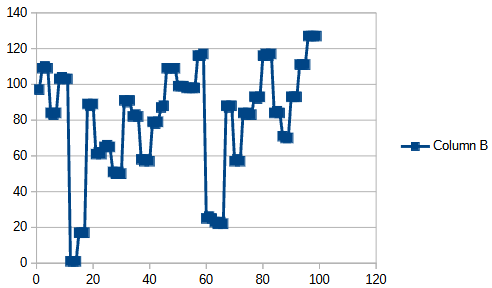
Byte 5:

The plots are all over the same 100 samples.
Any thoughts of how to decipher this data to make use of this lidar?
Thanks!