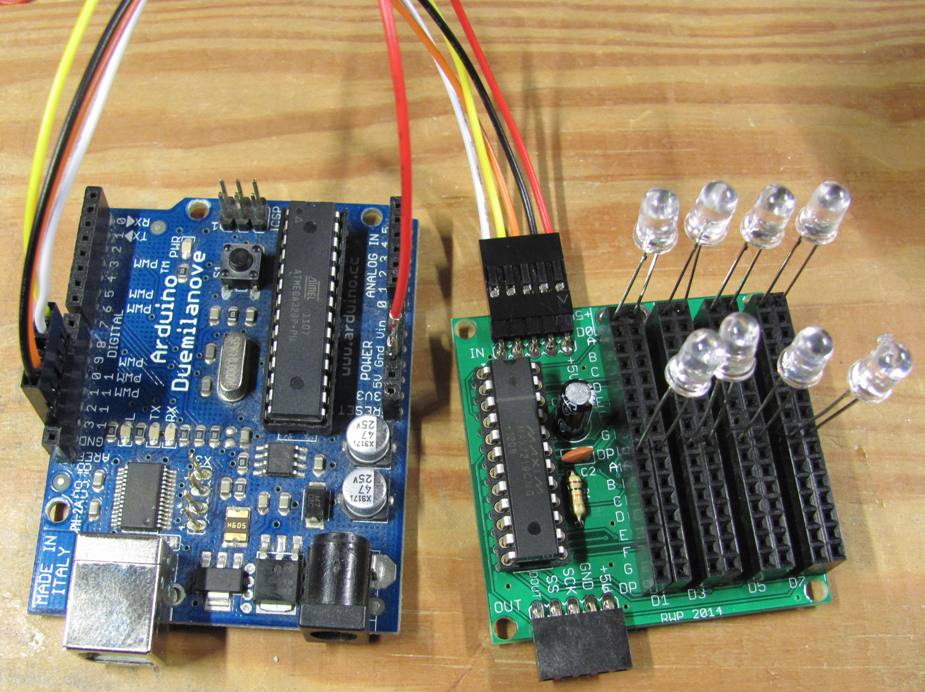
They are all standard 0.100 inch pitch devices. The larger 36 pin/2 row connector are easy, DigiKey, Mouser, RS, Farnell, wherever will have flat cable and connectors for that one.
Then you have five 8 pin single row and one 10 pin. These will most likely be more difficult to source. Aries Electronics has some 10 pin cables but I cannot find any 8's.
I suspect you'll find the single row jumps to be rather expensive since they are not a common, high demand part. DigiKey might do some customs here but again, expect big $.
I would have connection reliability concerns over plugging into the single row headers. The single row connectors on the Arduino board only make contact with two sides of the inserted pin and since they have low retention forces, the plug (even when it's a single row, not individual wires, which is far worse), has no side to side movement restrictions which could cause intermittent connections if the wires are allowed to flex.
If this is one-off kind of projects, I'd make my own single rows. You can buy the connector plastic bodies in any width, the 8's and 10's included. Then, using the common and inexpensive 10/20/30cm ribbon cable jumpers, peel off a group of 8 or 10 wires, leaving the wire ribbon connected together, remove the single bodies from the ends and replace with the multi-pin bodies. It's very easy and takes no time at all.
If this is a permanent installation and subject to any vibration, I'd consider soldering the single rows. If your soldering skills up to it, remove the single row headers and solder the pins directly into the board. If you don't have a vacuum desoldering station, there is an easy, safe way do do this without fear of damaging the vias in the double sided board.
With a pair of strong slip jaw pliers with serrated jaws, grab onto one end of a female header body. Holding the board with the other hand, lift the black plastic body up and away from the board making a 1/16" (~1.5mm) gap between the body and the board. Now, move to the other end of the connector body and repeat the pull. Repeat this process and you'll see that the body comes cleanly off, leaving behind the 8 or 10 "tuning fork" connector pins.
Place the board in a fixture or a helpers hands to hold and heat the solder side of each pin, hold the fork end with small needle nose pliers and when the solder melts, simply remove the pin from the hole. This requires zero force and so long as the solder molten, there is no chance for via damage. Repeat until no pins remain and use some liquid flux and solder wick to clean out the holes. If you have no flux, you can apply fresh solder, which will deposit some flux, making the solder wick more active. Seems counterintuitive but it works well.